
1. Introduction
Thank you for purchasing the Reina RF-3511R Pedestal Fan. This fan combines powerful airflow with convenient features such as remote control and foot-touch operation, designed to provide a comfortable environment in your home. Please read this manual thoroughly before use to ensure proper operation and maintenance.

The Reina RF-3511R fan, designed for home use.
2. Safety Instructions
- Always ensure the fan is placed on a stable, flat surface to prevent tipping.
- Do not insert fingers or any objects into the fan grille when the fan is operating.
- Keep the fan away from water or other liquids to avoid electric shock.
- Unplug the fan from the power outlet before cleaning or when not in use for extended periods.
- Do not operate the fan with a damaged cord or plug.
- Ensure proper ventilation around the fan.
- This appliance is not intended for use by persons (including children) with reduced physical, sensory or mental capabilities, or lack of experience and knowledge, unless they have been given supervision or instruction concerning use of the appliance by a person responsible for their safety.
3. Package Contents
Please check that all items are present in the package:
- Reina RF-3511R Pedestal Fan Unit
- Remote Control
- User Manual (this document)
4. Product Overview
The Reina RF-3511R features a 14-inch circulator-type fan head with 5 blades, designed for efficient air circulation. It includes both a convenient foot-touch control panel on the base and a full-function remote control.

Circulator-type fan head with Reina logo.

Slim side profile of the fan.
Key features include:
- 14-inch, 5-blade design for powerful and soft airflow.
- Foot-touch control panel for easy operation without bending down.
- Remote control for convenient operation from a distance.
- 4 wind modes: Ultra-low, Low, Medium, Strong, plus Natural and Sleep modes.
- Timer function up to 7.5 hours (450 minutes).
- Automatic left/right oscillation.
5. Setup
The Reina RF-3511R fan typically comes pre-assembled. Follow these steps for initial setup:
- Unpacking: Carefully remove the fan and all accessories from the packaging.
- Placement: Place the fan on a firm, level surface. Ensure there is adequate space around the fan for optimal airflow and oscillation.
- Power Connection: Plug the power cord into a standard AC power outlet.
- Remote Control Battery: Insert batteries into the remote control (batteries not included, typically AAA).

The fan's height can be adjusted for optimal air delivery.
6. Operating Instructions
6.1 Control Panel Operation (Foot Touch)
The fan can be operated directly using the large, easy-to-press buttons on the base, designed for foot-touch convenience.

Operating the fan with a foot touch on the base control panel.
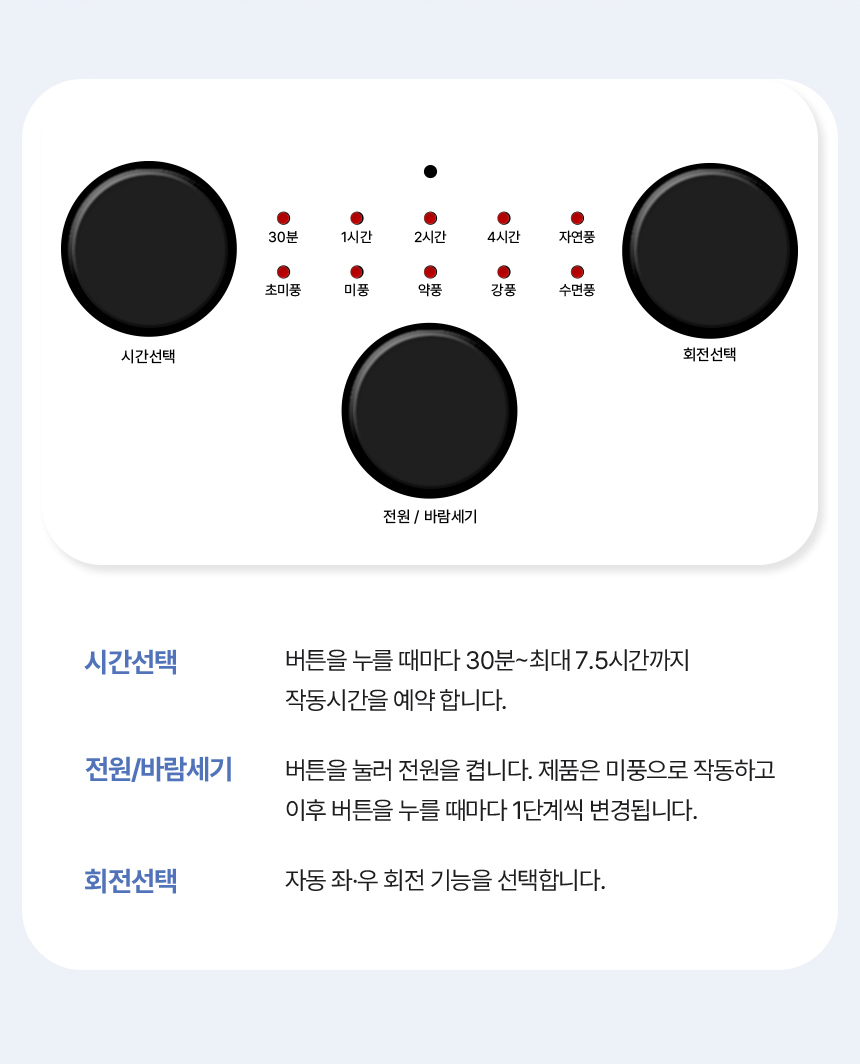
Detailed view of the control panel buttons and their functions.
- Power / Wind Strength Button (Center):
- Press once to turn on the fan. It will start in 'Low' (미풍) mode.
- Subsequent presses cycle through wind strengths: Ultra-low (초미풍) → Low (미풍) → Medium (약풍) → Strong (강풍).
- Press and hold to turn off the fan.
- Time Selection Button (Left):
- Press repeatedly to set the timer. Each press adds 30 minutes, up to a maximum of 7.5 hours (450 minutes).
- Available settings: 30 min, 1 hr, 2 hr, 4 hr. The LED indicators will light up accordingly.
- Oscillation Selection Button (Right):
- Press to activate or deactivate automatic left/right oscillation.
LED indicators above the buttons show the current timer setting and wind mode (Natural/Sleep).
6.2 Remote Control Operation
The remote control provides full functionality for convenient operation from a distance.

The remote control allows for convenient operation.
- Power Button: Turns the fan on or off.
- Wind Strength Button: Cycles through Ultra-low, Low, Medium, Strong wind modes.
- Oscillation Button: Activates or deactivates automatic left/right oscillation.
- Timer Button: Sets the fan's operating time (30 min to 7.5 hours).
- Mode Button: Cycles through special modes like Natural Wind (자연풍) and Sleep Wind (수면풍).
6.3 Wind Modes
The fan offers various wind modes to suit your preference:
- Ultra-low (초미풍): A very gentle breeze.
- Low (미풍): A soft, continuous airflow.
- Medium (약풍): A moderate, steady breeze.
- Strong (강풍): A powerful, invigorating airflow.
- Natural Wind (자연풍): Simulates natural outdoor breezes by varying wind strength.
- Sleep Wind (수면풍): Provides a quiet, gentle airflow suitable for sleeping, often gradually decreasing in intensity.
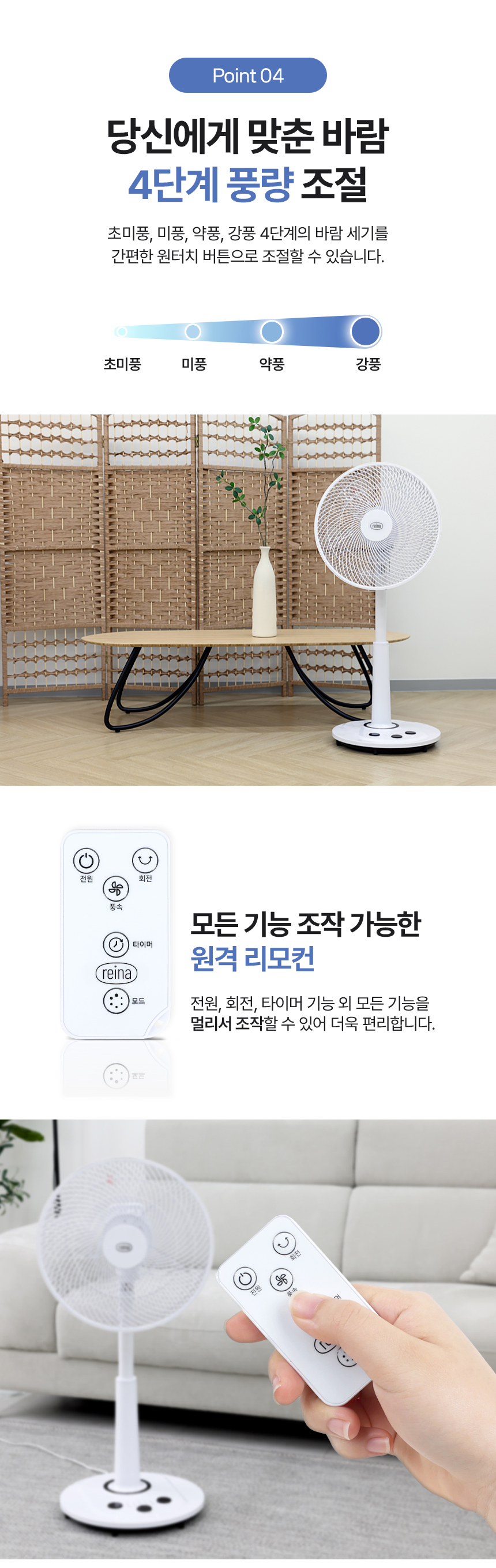
The 14-inch, 5-blade design ensures rich and cool airflow.
6.4 Timer Function
The fan features a convenient timer function, allowing you to set it to turn off automatically after a specified period. The timer can be set from 30 minutes up to 7.5 hours (450 minutes) in increments. This is particularly useful for nighttime use.

The 450-minute timer function provides peace of mind, especially during sleep.
7. Maintenance
Regular cleaning will help maintain the fan's performance and extend its lifespan.
- Cleaning the Exterior: Wipe the fan's exterior with a soft, damp cloth. Do not use abrasive cleaners or solvents.
- Cleaning the Grille and Blades:
- Ensure the fan is unplugged before cleaning.
- Carefully remove the front grille (if detachable) according to the product design.
- Wipe the fan blades and the inside of the grilles with a soft, dry or slightly damp cloth to remove dust.
- Reattach the front grille securely before plugging the fan back in.
- Storage: When not in use for an extended period, unplug the fan, clean it, and store it in a cool, dry place, preferably in its original packaging.
8. Troubleshooting
| Problem | Possible Cause | Solution |
|---|---|---|
| Fan does not turn on. | No power supply. Power button not pressed. | Check if the power cord is securely plugged into a working outlet. Press the Power button on the control panel or remote. |
| Remote control not working. | Batteries are dead or incorrectly inserted. Obstruction between remote and fan. | Replace batteries, ensuring correct polarity. Remove any objects blocking the signal path. Ensure remote is pointed at the fan. |
| Weak airflow. | Fan blades or grille are dirty. Fan is set to a low wind mode. | Clean the fan blades and grilles as described in the Maintenance section. Increase the wind strength setting. |
| Fan is noisy. | Loose parts or debris. Fan not on a stable surface. | Unplug and check for any loose parts or foreign objects. Clean thoroughly. Ensure the fan is on a flat, stable surface. |
9. Specifications
| Feature | Detail |
|---|---|
| Model | RF-3511R |
| Brand | Reina |
| Power Source | AC |
| Blade Size | 14-inch (approx. 35cm) |
| Number of Blades | 5 |
| Wind Modes | 4 levels (Ultra-low, Low, Medium, Strong) + Natural Wind, Sleep Wind |
| Timer Function | 30 minutes to 7.5 hours (450 minutes) |
| Control Type | Foot-touch control panel, Remote control |
| Oscillation | Automatic Left/Right |
| Origin | Mainland China |
| Package Dimensions (approx.) | Length: 57 cm, Width: 41 cm, Height: 19 cm |
| Package Weight (approx.) | 3.0 kg |
10. User Tips
- Optimal Air Circulation: For best results, position the fan to create a cross-breeze or to circulate air towards an open window.
- Energy Saving: Utilize the timer function to automatically turn off the fan when you no longer need it, especially overnight.
- Quiet Operation: For a quieter environment, especially during sleep, use the 'Sleep Wind' mode.
- Remote Control Care: Keep the remote control in a safe place to avoid misplacing it. Replace batteries promptly when performance degrades.
11. Warranty and Support
For warranty information and customer support, please refer to the seller's policy or contact the point of purchase. Keep your purchase receipt as proof of purchase.