
1. Introduction
Thank you for choosing the F9 5C Wireless Bluetooth Headphones. These earbuds are designed to provide a high-quality audio experience with convenient features such as a digital display charging case, touch controls, and waterproof design. This manual will guide you through the setup, operation, and maintenance of your new headphones.
2. Package Contents
Please check the box for the following items:
- F9 5C Wireless Bluetooth Earbuds (Left and Right)
- Charging Case with Digital Display
- USB Charging Cable
- Multiple Sizes of Ear Tips
- User Manual
Product unboxing and initial overview.
3. Product Overview
The F9 5C headphones feature a compact design with a multi-functional charging case.
3.1 Charging Case
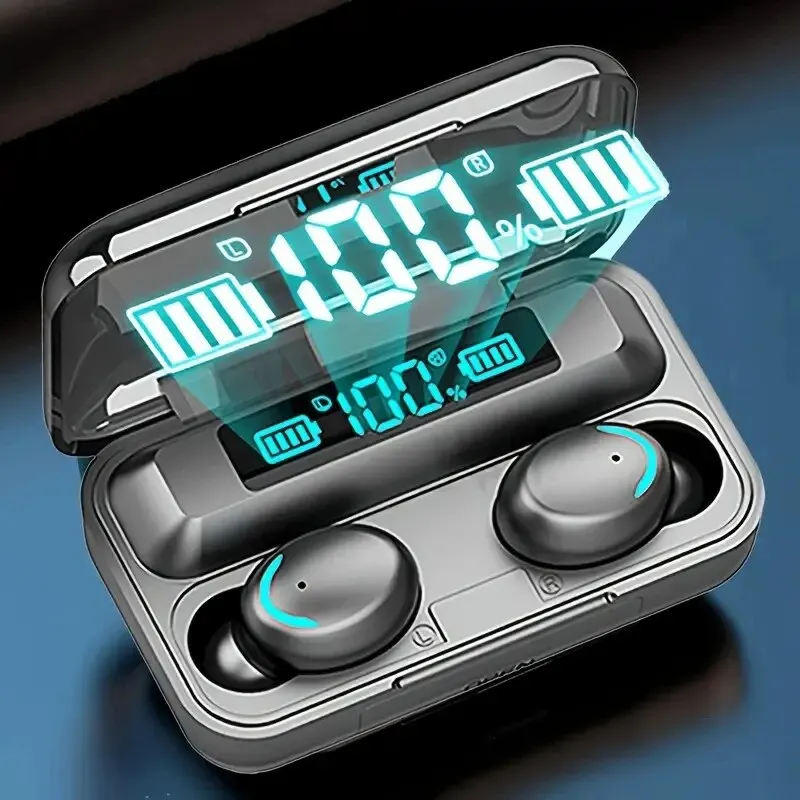
The charging case is equipped with a digital LED display that shows the battery percentage of the case and the individual charge progress of the left and right earbuds.

Digital display on the charging case showing battery status.
3.2 Earbuds
The earbuds are designed for comfortable in-ear wear and feature touch controls for various functions. They are also IPX7 waterproof, making them suitable for sports and outdoor activities.

F9 5C Earbuds in their charging case.
4. Specifications
| Feature | Description |
|---|---|
| Material | Plastic |
| Category | Earphones & Headphones |
| Wireless Type | Bluetooth 5.0 |
| Communication | Wireless |
| Style | In-ear |
| Vocalism Principle | Hybrid Technology |
| Active Noise-Cancellation | No (Features CVC8.0 Intelligent Noise Reduction for calls) |
| Control Button | Yes (Touch Control) |
| Volume Control | Yes |
| Waterproof Rating | IPX7 (Can be washed directly, no fear of sweating and washing) |
| Sound Features | 9D Surround Sound, HIFI High-Frequency Technology, 10MM Dynamic Speaker Unit, Quad-core Sound |
| Battery Life (Cumulative) | Approx. 120 hours endurance, 150 hours call time (with charging case) |
| Charging Case Functionality | Digital LED display, can be used as an emergency power bank for phones. |
| Origin | Mainland China |

Battery endurance details.

IPX7 Waterproof feature.
5. Setup Guide
5.1 Initial Charging
Before first use, ensure both the charging case and earbuds are fully charged. Connect the USB charging cable to the charging case and a power source. The digital display will show the charging progress.

The charging case can also serve as an emergency power bank for your phone.
5.2 Pairing with Your Device
- Take both earbuds out of the charging case. They will automatically power on and pair with each other.
- On your smartphone or Bluetooth-enabled device, go to Bluetooth settings.
- Search for available devices and select "TWS" or the specific "F9 5C" model name to connect.
- Once connected, you will hear a confirmation tone, and the earbuds are ready for use.

Instructions for single or binaural earbud use.
6. Operating Instructions
The F9 5C earbuds feature intuitive touch controls:
| Function | Action |
|---|---|
| Power On | Long press L/R earbud for 3-5 seconds (or automatically when removed from case) |
| Power Off | Long press L/R earbud for 3-5 seconds (or place back in charging case) |
| Play/Pause | Click L/R earbud once |
| Answer/Hang Up Call | Click L/R earbud once |
| Previous Song | Touch left earbud twice |
| Next Song | Touch right earbud twice |
| Volume Down | Touch left earbud three times |
| Volume Up | Touch right earbud three times |
| Summon Voice Assistant (Siri/Android) | Long press L/R earbud for 1 second |

Detailed touch control functions.

Activating voice assistant.
7. Maintenance
7.1 Cleaning
Regularly clean the earbuds and charging case with a soft, dry cloth. Avoid using harsh chemicals or abrasive materials. For the ear tips, you can gently wash them with water and mild soap, ensuring they are completely dry before reattaching.
7.2 Waterproofing
The earbuds are IPX7 waterproof, meaning they can withstand immersion in water up to 1 meter for 30 minutes. They are resistant to sweat and rain. However, the charging case is not waterproof. Do not submerge the charging case in water.
7.3 Dust Protection
The charging case is designed with a high-quality dust plug to protect the charging port from dust and debris, extending the product's lifespan.

Dust plug for charging port protection.
8. Troubleshooting
8.1 Earbuds Not Powering On/Pairing
- Ensure the earbuds are charged. Place them in the charging case and check the digital display.
- Make sure both earbuds are removed from the case simultaneously for automatic pairing.
- If they don't pair automatically, try manually powering them on by long-pressing for 3-5 seconds.
8.2 Cannot Connect to Phone Bluetooth
- Ensure Bluetooth is enabled on your phone.
- Forget the device ("TWS" or "F9 5C") from your phone's Bluetooth list and try pairing again.
- Make sure the earbuds are not connected to another device.
8.3 No Sound or Poor Sound Quality
- Check the volume levels on both your phone and the earbuds.
- Ensure the earbuds are properly seated in your ears.
- Try resetting the earbuds by placing them back in the charging case and then taking them out again.
8.4 Earbuds Not Responding to Touch Controls
- Ensure your fingers are clean and dry when using touch controls.
- Try restarting the earbuds.
9. User Tips
- For optimal call quality, ensure both earbuds are properly paired and worn. If you experience issues with calls, re-pair the earbuds with your device.
- The digital display is very useful for monitoring battery levels; keep an eye on it to avoid unexpected power loss.
- Experiment with the different ear tip sizes to find the best fit for comfort and sound isolation.
10. Warranty and Support
For detailed warranty information and further support, please refer to the official product documentation or contact the seller directly. A comprehensive user manual in PDF format is available for download at User Manual (PDF).