
1. Introduction
The LEEDOAR Smart Audio Sunglasses are designed to provide a seamless audio experience while offering essential eye protection. Featuring Bluetooth 5.3 connectivity, directional sound, and HD anti-ultraviolet lenses, these glasses are perfect for outdoor activities, sports, and daily use. Enjoy hands-free calls and music with comfort and style.

Figure 1: Dual speaker directional sound and Wireless 5.3 integration.
2. Key Features
- Wireless 5.3 Stereo: Stable performance and high-definition call quality.
- HD Anti-Ultraviolet Lenses: Clear vision and effective UV protection.
- Integrated Nose Support Design: Reduces indentation for comfortable wear.
- Ultra-light Frame Material: Glasses weigh only 30g for extended comfort.
- Touch Connection: Zero physical key operation with multi-functional touch controls.
- IPX4 Waterproof: Resistant to sweat and splashes, suitable for various situations.
- Highly Elastic Mirror Legs: ±30° elastic space for a versatile fit on different face shapes.
- Dual Speaker Design: Directional sound for privacy and clear audio.
- Active Noise-Cancellation: Enhances audio experience by reducing ambient noise.

Figure 2: Overview of product features.
3. Package Contents
Please check the box for the following items:
- LEEDOAR Smart Audio Sunglasses (Model F06, F07, or F08)
- Charging Cable (USB)
- User Manual

F06 Package

F07 Package

F08 Package
4. Specifications
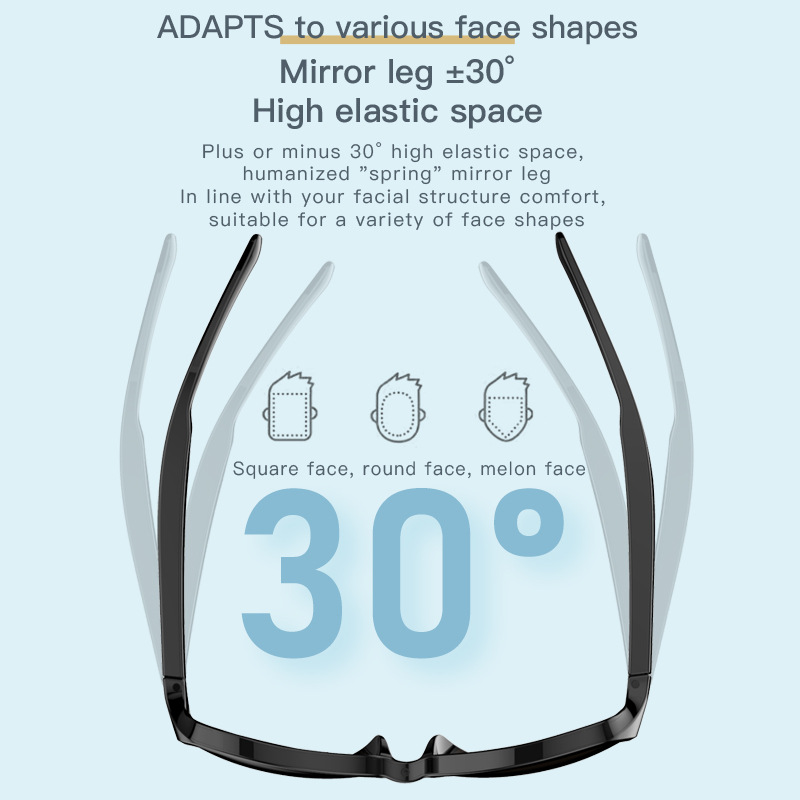
Figure 3: Product dimensions and technical parameters.
| Feature | Specification |
|---|---|
| Brand Name | LEEDOAR |
| Model | F06, F07, F08 |
| Material | Metal |
| Weight | 140g |
| Bluetooth Version | 5.3 |
| Wireless Type | Bluetooth |
| Communication | Wireless |
| Effective Distance | >10m |
| Speaker Power | 1.2W |
| Speaker Unit | 8 ohm electric 0916 horn |
| Microphone | Electret condenser microphone |
| Charging Method | Cable |
| Charging Duration | ~2 hours |
| Play Time | ~2.4 hours |
| Shutdown Standby Time | ~6 months |
| Style | Ear Hook |
| Plug Type | L Bending |
| Sound Isolating | Yes |
| Active Noise-Cancellation | Yes |
| With Microphone | Yes |
| Volume Control | Yes |
| Control Button | Yes |
| Support APP | Yes |
| Waterproof | Yes (IPX4) |
| Voice Assistant Built-in | No |
| NFC Technology | No |
| Maximum Wireless Range | <10m |
| Impedance Range | up to 32 Ω |
| Number Of Drivers | 2 |
| Headphone Pads Material | Other |
| Magnet Type | Other |
| Function | Common Headphone, Sport, For Outdoor |
| Certification | CE, FCC, RoHS, UL |
| Origin | Mainland China |
5. Setup
5.1 Charging the Sunglasses
- Locate the charging port on the temple of the sunglasses.
- Connect the provided USB charging cable to the charging port and a suitable USB power source (e.g., computer, wall adapter).
- The indicator light will show charging status (e.g., red for charging, blue/green for fully charged).
- Charge for approximately 2 hours for a full charge.

Figure 4: Charging port location.
5.2 Bluetooth Pairing
- Ensure the sunglasses are fully charged.
- Press and hold the power button (usually located on one of the temples) until the indicator light flashes, indicating pairing mode.
- On your smartphone or Bluetooth-enabled device, go to Bluetooth settings and search for new devices.
- Select "LEEDOAR Smart Glasses" (or similar name) from the list of available devices.
- Once connected, the indicator light will change to a steady color (e.g., blue) or turn off, and you will hear an audio confirmation.
5.3 Wearing the Sunglasses
Place the sunglasses on your face as you would with regular sunglasses. The integrated nose support and elastic mirror legs are designed for a comfortable and secure fit. Adjust as needed for optimal comfort and sound delivery.

Figure 5: Integrated nose support for comfort.
6. Operating Instructions
6.1 Power On/Off
- Power On: Press and hold the power button for approximately 3 seconds until the indicator light turns on.
- Power Off: Press and hold the power button for approximately 5 seconds until the indicator light turns off.
6.2 Touch Controls
The sunglasses feature multi-functional touch controls on the temples. Specific gestures may vary slightly by model, but common functions include:
- Play/Pause Music: Single tap on the touch area.
- Answer/End Call: Single tap on the touch area during an incoming call.
- Reject Call: Press and hold the touch area for 2 seconds during an incoming call.
- Next Track: Double tap on the right temple.
- Previous Track: Double tap on the left temple.
- Volume Up/Down: Swipe forward/backward on the touch area (or specific tap patterns, refer to quick start guide if included).
- Activate Voice Assistant: Triple tap on the touch area.

Figure 6: Touch control area.
6.3 Video Overview
Watch this video for a visual guide on the features and operation of the F06 Smart Sunglasses.
Video 1: F06 Smart Sunglasses Product Overview.
7. Maintenance
- Cleaning: Use a soft, clean cloth to wipe the lenses and frame. Avoid abrasive materials or harsh chemicals that could damage the lenses or electronic components.
- Storage: When not in use, store the sunglasses in their protective case to prevent scratches and damage. Keep them away from direct sunlight and extreme temperatures.
- Water Resistance: The sunglasses are IPX4 waterproof, meaning they are resistant to splashes and sweat. Do not submerge them in water or expose them to heavy rain. Dry thoroughly if they get wet.
- Hinge Care: The fine hinges are designed for durability. Avoid excessive force when opening or closing the temples.

Figure 7: IPX4 waterproof feature.
8. Troubleshooting
- Cannot Power On: Ensure the sunglasses are fully charged. If the battery is completely drained, it may take a few minutes of charging before the device responds.
- Cannot Pair with Device:
- Make sure Bluetooth is enabled on your device.
- Ensure the sunglasses are in pairing mode (indicator light flashing).
- Move the sunglasses closer to your device (within 1 meter).
- Turn off and on both the sunglasses and your device, then try pairing again.
- Clear previous Bluetooth connections on your device if you have too many saved.
- No Sound/Low Sound:
- Check the volume level on both the sunglasses and your connected device.
- Ensure the sunglasses are properly connected via Bluetooth.
- Verify that the audio output on your device is set to the sunglasses.
- Intermittent Connection:
- Ensure there are no obstructions between the sunglasses and your device.
- Avoid environments with strong Wi-Fi or other wireless interference.
- Keep the connected device within the effective range (<10m).
9. User Tips
- Initial Charge: For optimal battery life, fully charge your sunglasses before the first use.
- Comfort Fit: Take advantage of the ±30° elastic mirror legs to adjust for the most comfortable fit on your face.
- Outdoor Use: The HD anti-ultraviolet lenses are designed for outdoor use, providing clear vision and protection from harmful UV rays.
- Hands-Free Calls: Utilize the built-in microphone and directional speakers for convenient hands-free calls while on the go.
10. Warranty and Support
LEEDOAR products are manufactured to the highest quality standards. For warranty information and customer support, please refer to the documentation provided with your purchase or contact your retailer. Keep your proof of purchase for any warranty claims.