
Introduction
Thank you for choosing the FGHGF YS-528L Digital Stopwatch Timer. This versatile and durable stopwatch is designed for precise timing in various activities, including sports, training, and daily use. Featuring a clear LED backlight, multiple timing modes, and a robust metal construction, it is an essential tool for coaches, athletes, and anyone needing accurate timekeeping.
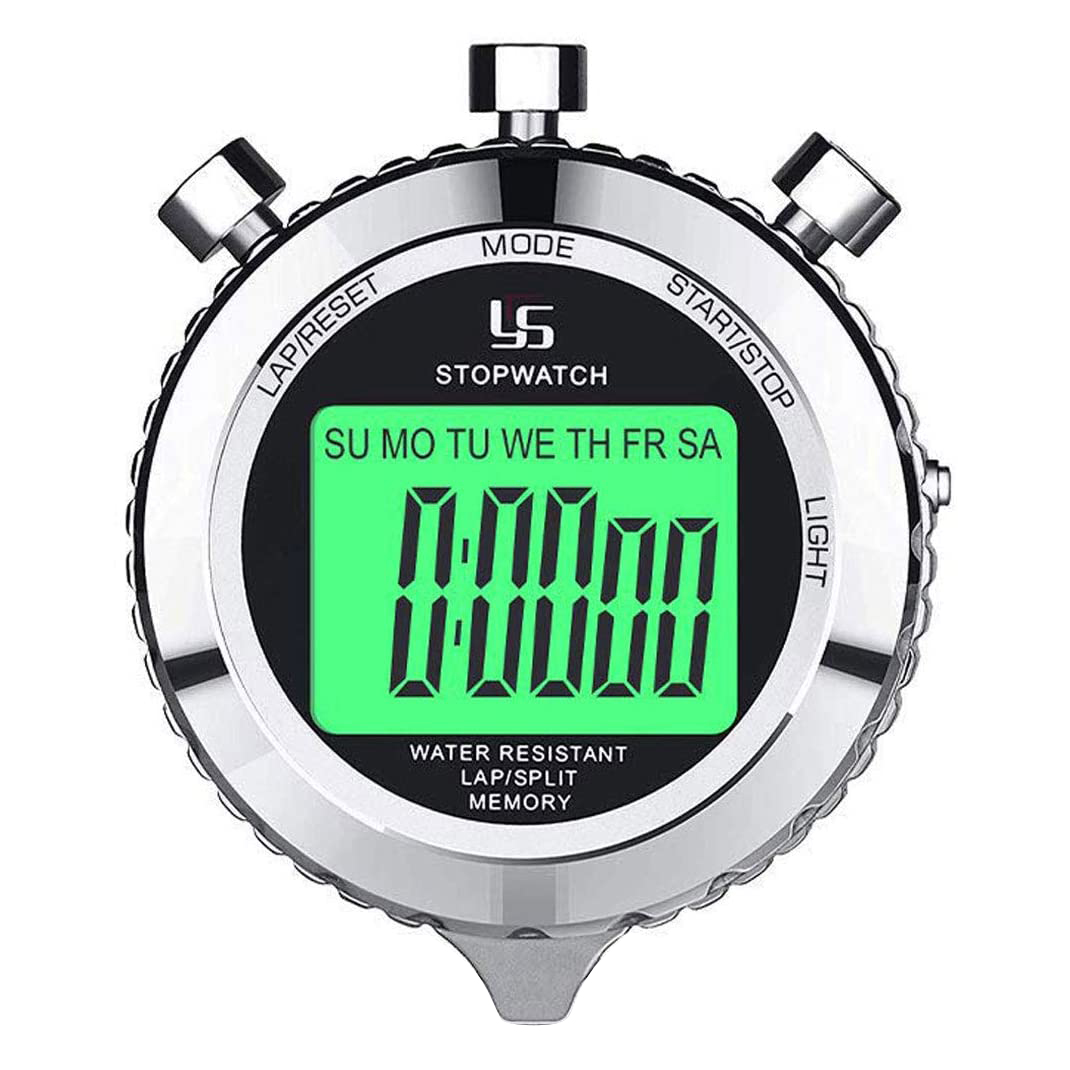
Figure 1: YS-528L Digital Stopwatch Timer
Key Features
- LED Backlight: Ensures clear display visibility in low-light conditions.
- Multi-functionality: Includes Stopwatch mode, Time mode, Countdown mode, and Alarm.
- Split Recall Memory: Stores up to 2 lap times and can recall them for review, with a maximum timing capacity of 39 hours.
- Alarm & Silent Mode: Features an alarm function and the ability to turn off volume for silent operation.
- Water Resistant: Designed to withstand splashes and light exposure to water.
- Durable Construction: Made with a metal casing for enhanced durability.
Package Contents
- 1 x YS-528L Digital Stopwatch Timer
- 1 x Battery (pre-installed or included)
Setup
- Initial Inspection: Carefully unbox the stopwatch and inspect it for any visible damage.
- Protective Film: A plastic protective film may be present on the screen. You may remove it for optimal clarity or leave it on if it does not interfere with visibility.
- Battery: The stopwatch comes with a battery. If the display is not active, ensure the battery is correctly installed or replace it if necessary.
Operating Instructions
The YS-528L stopwatch features four primary buttons for navigation and control:
- MODE: Cycles through different operating modes (Clock, Stopwatch, Countdown, Alarm).
- START/STOP: Initiates and pauses timing functions, or confirms settings.
- LAP/RESET: Records lap times during stopwatch mode or resets values.
- LIGHT: Activates the LED backlight for improved visibility.

Figure 2: Display modes of the stopwatch
Mode Selection
Press the MODE button repeatedly to cycle through the available modes: Clock, Stopwatch, Countdown, and Alarm.
Clock Mode
In Clock mode, the stopwatch displays the current time and day of the week.
- To adjust the time, press and hold the LAP/RESET button until the digits flash.
- Use the START/STOP button to adjust the flashing digit and the MODE button to move to the next digit/setting.
- Press LAP/RESET again to save and exit setting mode.
Stopwatch Mode
This mode is used for timing events.
- Press START/STOP to begin timing.
- Press START/STOP again to pause the timer.
- Press LAP/RESET while the timer is running to record a lap time. The lap time will display briefly, and the main timer will continue running.
- Press LAP/RESET while the timer is paused to reset it to zero.
- To recall lap times, ensure the stopwatch is in Stopwatch mode and paused. Press LAP/RESET to cycle through recorded lap times.
Countdown Mode
Set a specific time for the stopwatch to count down from.
- In Countdown mode, press and hold LAP/RESET to enter setting mode.
- Use START/STOP to adjust the flashing digit and MODE to move to the next digit.
- Press LAP/RESET to save the countdown time.
- Press START/STOP to begin the countdown.
- Press START/STOP again to pause/resume.
- When the countdown reaches zero, an alarm will sound (if not silenced).
Alarm Mode
Set an alarm to sound at a specific time.
- In Alarm mode, press and hold LAP/RESET to enter setting mode.
- Use START/STOP to adjust the flashing digit and MODE to move to the next digit.
- Press LAP/RESET to save the alarm time.
- To turn the alarm ON or OFF: While in Alarm mode, press the START/STOP button once. An alarm icon will appear/disappear on the display to indicate its status.
Backlight Function
Press the LIGHT button to activate the LED backlight for a few seconds, illuminating the display.
Maintenance
- Cleaning: Wipe the stopwatch with a soft, dry cloth. Do not use abrasive cleaners or solvents.
- Water Exposure: While water resistant, avoid submerging the stopwatch in water or exposing it to heavy rain.
- Storage: Store the stopwatch in a cool, dry place away from direct sunlight and extreme temperatures.
- Battery Replacement: If the display dims or becomes unresponsive, replace the battery. Refer to a professional if unsure how to replace it.
Troubleshooting
| Problem | Possible Cause | Solution |
|---|---|---|
| Display is blank or dim. | Low or dead battery. | Replace the battery. |
| Buttons are unresponsive. | Temporary software glitch or low battery. | Try removing and reinserting the battery (if accessible) or pressing all buttons simultaneously for a few seconds to reset. Replace battery if issue persists. |
| Alarm does not sound. | Alarm is turned off or volume is muted. | Ensure the alarm is activated in Alarm mode (check for alarm icon). Verify silent mode is not active. |
Specifications
| Feature | Detail |
|---|---|
| Model | YS-528L |
| Brand | FGHGF |
| Material | Metal |
| Display | Digital with LED Backlight |
| Functions | Stopwatch, Time, Countdown, Alarm, Lap/Split Memory |
| Lap Memory | 2 laps, up to 39 hours |
| Water Resistance | Yes (Water Resistant) |
| Dimensions (W x H x T) | 2.17 in x 2.57 in x 0.51 in (approx. 5.5 cm x 6.5 cm x 1.3 cm) |
| Weight | 0.187 kg (approx. 0.41 lbs) |
| Origin | Mainland China |

Figure 3: Stopwatch Dimensions
User Tips
- For optimal battery life, avoid prolonged use of the backlight when not necessary.
- Familiarize yourself with the button functions in each mode to quickly switch between tasks.
- The water-resistant feature protects against splashes, but it is not designed for swimming or submersion.
Warranty and Support
This product is manufactured to high-quality standards. For any questions, technical support, or warranty inquiries, please contact the retailer or manufacturer directly. Keep your purchase receipt as proof of purchase.