
1. Introduction
The VJOYCAR G60 GPS Digital Speedometer is an innovative and versatile head-up display (HUD) designed to provide essential driving information directly in your line of sight. Utilizing GPS+Beidou dual chipsets, it offers accurate speed readings, time display, compass direction, and an over-speed alarm. Its plug-and-play design and universal compatibility make it suitable for a wide range of vehicles.

Figure 1: VJOYCAR G60 GPS Digital Speedometer in use, displaying speed and compass.
2. Product Features
- Innovative Design: Displays real-time speed when moving and switches to time clock when stationary.
- Speed Unit Switch: Easily switch between Kilometers per Hour (KM/H) and Miles per Hour (MPH).
- Over-speed Alarm: Customizable alarm setting from 10 to 120 KM/H, with the option to disable.
- Multi-Color Display: Choose from 7 different display colors to suit your preference.
- Wide Application: Compatible with all cars, trucks, buses, E-scooters, and E-bikes that have a USB port.
- Plug & Play: Simple installation, works directly after connecting to a power supply.
- Smooth Display: Features no skip speed for a coherent and fluid data presentation.
- GPS+Beidou Dual Chipsets: Ensures highly accurate and quickly refreshed speed readings without delay.
- Compact Size & Large Font: Small product size ensures it doesn't obstruct your view, while large fonts provide clear visibility day and night.
- Automatic On/Off: Automatically powers on and off with the car's ignition.

Figure 2: The VJOYCAR G60 is compatible with a wide range of vehicles.
3. Package Contents
The standard package includes the following items:
- 1 x Main Host (VJOYCAR G60 GPS Digital Speedometer)
- 1 x 2m USB Cable
- 1 x Non-slip Mat
- 1 x User Manual
- 1 x Gift Box
An optional cigarette lighter charger may also be included depending on your purchase.

Figure 3: Contents of the standard package.
4. Specifications
| Attribute | Value |
|---|---|
| Brand Name | VJOYCAR |
| Model Name | G60 Car HUD Head Up Display |
| Size Name | 118*36*18mm / 4.64''*1.42''*0.71'' |
| Wire or Wireless | Wired |
| Output Frequency | GPS Speedometer for All Cars |
| Special Feature | Large Font & Small Size |
| Ready to Work | Plug & Play |
| Speed Unit | KMH & MPH switch freely |
| Display Color | 7 different colors to switch freely |
| Over-speed Alarm | Off or 10~120km/h |
| Warranty | 1 year |
| Origin | Mainland China |

Figure 4: Product dimensions and component overview.
5. Setup
5.1 Installation
- Place the non-slip mat on a flat surface of your car dashboard, ensuring it does not obstruct your view or interfere with driving.
- Place the VJOYCAR G60 GPS Digital Speedometer on the non-slip mat.
- Connect the provided USB cable to the Type-C power connector on the device.
- Plug the other end of the USB cable into a USB port in your car (e.g., a car charger, cigarette lighter adapter with USB output, or a car's built-in USB port).
The installation is non-destructive and straightforward.
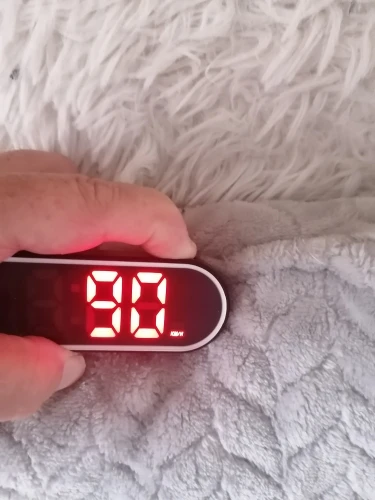
Figure 5: Non-destructive installation using a USB power source.
5.2 Initial GPS Signal Acquisition
Upon first use or after a long period of inactivity, the device may take a few minutes to acquire a GPS signal. Ensure the device has a clear view of the sky (e.g., placed on the dashboard) for optimal signal reception. Once a signal is acquired, the GPS indicator will stabilize, and the device will begin displaying accurate speed and time.

Figure 6: Display showing GPS signal acquisition (satellite icon).
6. Operating Instructions
The VJOYCAR G60 features two setting buttons (Button ① and Button ②) for easy control.
Figure 7: Location of Setting Button ① and Setting Button ②.
6.1 Automatic On/Off
The device will automatically power on when your car starts and power off when your car stops, provided it is connected to a power source that is controlled by the car's ignition.

Figure 8: Automatic power on/off functionality.
6.2 Display Modes (Speed / Time)
When the vehicle is moving, the device will display the current speed. When the vehicle is stationary, it will display the current time.
Video 1: Demonstration of speed and time display modes.
6.3 Changing Speed Unit (KM/H / MPH)
Short press Setting Button ② to toggle between KM/H and MPH speed units.

Figure 9: Switching between KM/H and MPH display.
6.4 Changing Display Color
Short press Setting Button ① to cycle through the 7 available display colors.
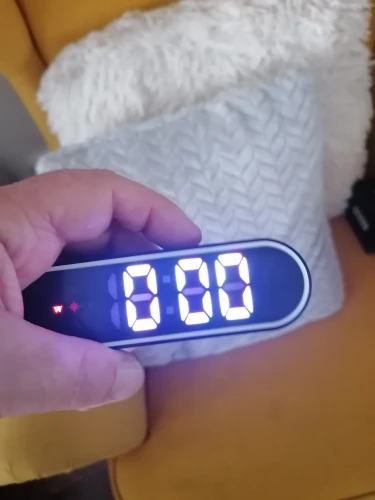
Figure 10: Various color options for the display.
6.5 Setting Over-speed Alarm
- Long press Setting Button ①. The red over-speed icon and the current alarm value will start flashing.
- While flashing, short press Setting Button ① repeatedly to increase the over-speed value from 10 to 120 KM/H.
- Release the button to save the setting. The display will stop flashing after a few seconds.
- To turn off the over-speed alarm, set the value to 'Off' (usually by cycling past 120 KM/H or 0 KM/H).

Figure 11: Over-speed alarm notification.
6.6 Adjusting Timezone
- Long press Setting Button ②. The time display will start flashing.
- While flashing, short press Setting Button ① to adjust the hour by 1-hour increments.
- Release the button to save the setting. The display will stop flashing after a few seconds.
6.7 GPS Compass Functionality
The device accurately displays the driving direction (N-North, S-South, W-West, E-East) using GPS data.

Figure 12: GPS Compass displaying driving direction.
7. Maintenance
- Keep the device clean by wiping it with a soft, dry cloth. Avoid using harsh chemicals or abrasive cleaners.
- Ensure the USB cable is securely connected to prevent accidental disconnection.
- Avoid exposing the device to extreme temperatures or direct sunlight for prolonged periods, as this may affect its performance and lifespan.
8. Troubleshooting
- No Display / Device Not Turning On:
- Check if the USB cable is securely connected to both the device and the power source.
- Ensure the car's USB port or cigarette lighter adapter is providing power.
- Verify that the car's ignition is on (if connected to an ignition-controlled power source).
- Inaccurate Speed Display / No Speed Reading:
- Ensure the device has a clear, unobstructed view of the sky to receive GPS signals. Test the device outdoors, not in a garage or parking lot.
- Allow a few minutes for the device to acquire a stable GPS signal, especially during the first use or after relocation.
- Over-speed Alarm Setting Limit:
- Some users have reported that the over-speed alarm setting may cycle back to 0 or 10 KM/H after reaching 90 KM/H, preventing settings above this value. If you encounter this, please contact customer support for assistance.
- Inaccurate Compass Display:
- The compass relies on GPS data. Ensure good GPS signal reception.
- If the compass consistently displays incorrect directions (e.g., North/South when facing East/West), this may indicate a calibration issue or a defect. Contact customer support if the problem persists.
- Loose USB Cable Connection:
- If the USB cable feels loose or frequently disconnects from the device, try using a different Type-C USB cable to rule out a cable issue. If the problem persists with multiple cables, the device's port may be faulty.
9. User Tips
- Optimal Placement: Due to its small size and large font display, the G60 can be placed discreetly on your dashboard without blocking your view, while still providing clear information.
- Outdoor Testing: Always test the GPS speedometer in an open area with a clear view of the sky to ensure proper GPS signal acquisition and accurate readings. Indoor testing or testing in areas with poor satellite reception may result in inaccurate or no readings.
- Wired Connection: The wired connection ensures stable performance and reliable data transmission, which is crucial for accurate speed and time display.
10. Warranty & Support
The VJOYCAR G60 GPS Digital Speedometer comes with a 1-year warranty from the date of purchase.
If the item cannot work properly, please contact us directly. We will exchange a new unit or provide a refund, without requiring a return.
For any inquiries or support, please contact us via email: letitia@vjoycar.com