

Introduction
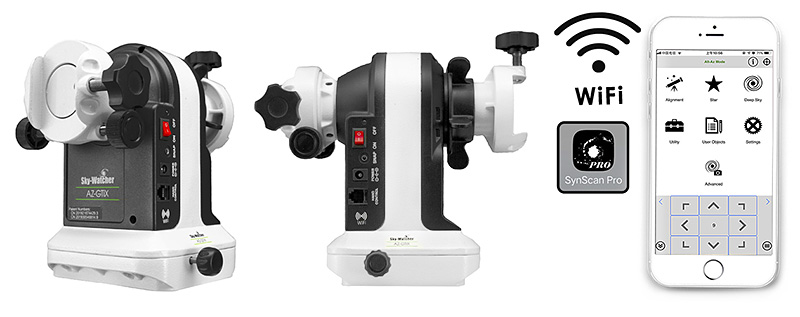
The Sky-Watcher AZ-GTiX is a highly portable Alt-Azimuth astronomy mount designed for dual telescope setups. It features integrated Wi-Fi for wireless control via a smartphone or tablet using the free SynScan App. This manual provides essential information for setting up, operating, and maintaining your AZ-GTiX mount.
Package Contents
- AZ-GTiX Mount Head
- L-Bracket
- Additional Saddle Plate
- 61mm Extension Pillar
- Instruction Manual (this document)
- (Optional: Sky-Watcher stainless steel tripod with accessory tray, if purchased separately)
Note: Telescopes, cameras, and external power supplies are not included unless specified in your purchase.

Setup
1. Powering the Mount
- The mount requires 8 AA-size batteries (not supplied) or an external power supply (DC 7.5~14V, 1A, tip-positive, not supplied).
- Ensure the power source is correctly connected before operation.
2. Mounting the AZ-GTiX Head
- The mount head can be connected to a regular photo tripod via its standard 3/8" tripod bush.
- If using the optional Sky-Watcher stainless steel tripod, attach the mount head securely.
3. Attaching Telescopes/Equipment
- The AZ-GTiX features dual 45mm Sky-Watcher/Vixen-type dovetail saddles.
- For a single telescope setup, attach your telescope to one saddle. The mount supports up to 6 kg on a single saddle.
- For a dual telescope setup, use the provided L-bracket and additional saddle plate. The mount supports a total payload of up to 10 kg across both saddles.
- Ensure all equipment is securely fastened to prevent accidental drops.

Operating Instructions
1. Wi-Fi Connection and SynScan App
- The AZ-GTiX creates its own Wi-Fi network. Ensure the mount is powered on.
- Download the free SynScan App for iOS or Android on your smartphone or tablet.
- Connect your mobile device to the AZ-GTiX Wi-Fi network.
- Open the SynScan App. Enter your current coordinates and follow the simple alignment procedure within the app.
- The app provides an intuitive touchscreen menu for exploring celestial objects.

2. GO-TO Control and Database
- The SynScan App offers full computerized GO-TO control, allowing the mount to automatically slew to objects.
- The app's database contains over 10,000 celestial objects, including Messier, NGC, IC, Caldwell catalogues, named DSOs, stars, and solar system objects.
- Additional objects can be accessed when working with third-party planetarium software.
3. Freedom-Find™ Dual-Encoder Technology
- This patented technology allows you to move the mount manually in either axis without losing its positional information.
- This provides flexibility during observational sessions, as you can manually adjust the telescope's position without needing to re-align the system.
4. Tracking and Slewing
- Tracking Rates: Sidereal, Lunar, Solar, Alignment-Free Solar Tracking.
- Slewing Speeds: 0.5X, 1.0x, 8.0x, 16x, 32x, 64x, 128x, 400x, 800x.
- Tracking Mode: Dual Axis Tracking.
5. Additional Controls
- SynScan Hand Control Port: An optional Synscan Hand Controller (available separately) can be connected for alternative control.
- DSLR Shutter Release Port: Use this port with optional cables (available separately) to control a DSLR camera for astrophotography.
Maintenance
- Keep the mount clean and free from dust and moisture. Use a soft, dry cloth for cleaning.
- Avoid exposing the mount to extreme temperatures or direct sunlight for prolonged periods.
- Store the mount in a dry, protected environment when not in use.
- Regularly check all screws and fasteners to ensure they are secure. Do not overtighten.
Troubleshooting
- Mount not powering on: Check battery installation or external power supply connection. Ensure the power switch is in the "ON" position.
- Wi-Fi connection issues: Ensure the mount's Wi-Fi is active. Try restarting both the mount and your mobile device. Verify you are connecting to the correct Wi-Fi network generated by the mount.
- Inaccurate tracking/pointing: Perform the alignment procedure in the SynScan App carefully. Ensure the mount is level and stable. Check for any obstructions to movement.
- Motor noise: A quiet operation is expected. Excessive noise might indicate an issue; ensure no cables or objects are interfering with moving parts.
Specifications
| Feature | Specification |
|---|---|
| Model Number | AZ-GTiX |
| Single Side Payload | 6 kg |
| Total Payload (Dual Saddle) | 10 kg |
| Mount Head Weight | 2 kg |
| Tripod + Extension Pier Weight (Optional) | 2.4 kg + 0.12 kg |
| Power Requirement | 8 AA-size batteries or external DC 7.5~14V, 1A (tip-positive) |
| Motor | DC Servo Motor, Gear Ratio 6480 |
| Saddle Type | 45mm Sky-Watcher/Vixen-type dovetail |
| Wi-Fi Module | Built-in |
| SynScan App Database | 10,000+ objects (Messier, NGC, IC, Caldwell, named DSOs, Stars, Solar System) |
| Pointing Accuracy | Up to 10 arc-minute (RMS) |
| Resolution | 2073600 Counts/Rev., 0.625 arc-second |
| Aux. R.A./Dec. Axis Encoders Resolution | 1068 Counts/Rev., approx. 20 arc-minutes |
| Dual-Encoder Technology | Freedom-Find™ |
| Tracking Rates | Sidereal, Lunar, Solar, Alignment-Free Solar Tracking |
| Slewing Speeds | 0.5X, 1.0x, 8.0x, 16x, 32x, 64x, 128x, 400x, 800x |
| Tracking Mode | Dual Axis Tracking |
| Interface | SynScan Hand Control Port, DSLR Shutter Release Port, Built-in Wi-Fi Module |
| Connectivity | ASCOM platform (Windows PC), Mobile planetarium App (iOS/Android) |
| Network Protocol | UDP, Port 11880 |
| Tripod Bush | 3/8" |
| Height of Tripod/Mount (excl. OTA) | 100cm - 139cm (with optional tripod) |
| Total Weight with Optional Tripod | 5.2 kg |
User Tips
- For extended observation sessions, consider using an external power supply to avoid frequent battery changes.
- Always balance your telescopes carefully on the mount to ensure smooth operation and prevent strain on the motors.
- Familiarize yourself with the SynScan App's "Tonight's Best Sky Tour" feature to quickly find interesting objects.
Warranty and Support
For warranty information, technical support, or service inquiries, please refer to the official Sky-Watcher website or contact your authorized dealer. Keep your proof of purchase for warranty claims.