
1. Introduction
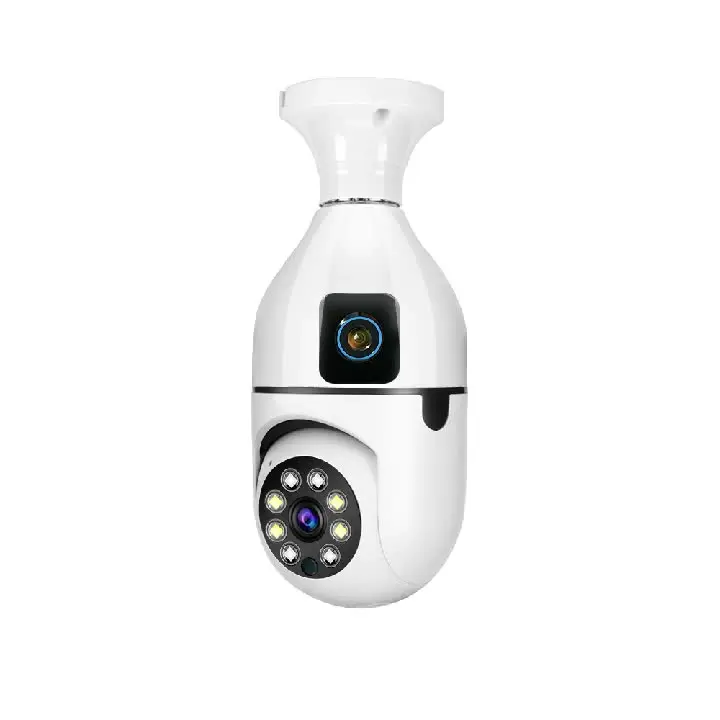
This manual provides detailed instructions for the installation, operation, and maintenance of your Yoosee 4MP Dual Lens E27 Bulb Security Camera. This innovative camera offers dual-lens monitoring, pan-tilt-zoom (PTZ) capabilities, two-way audio, and smart features for comprehensive indoor surveillance. Please read this manual thoroughly before using the product to ensure proper functionality and safety.
Product Overview Video: Demonstrates key features and functionality.
2. Features
- 4MP Resolution: Dual 2MP lenses provide a combined 4-megapixel resolution for clear imaging.
- Dual Lens & Dual Screen Preview: Monitor two areas simultaneously without blind spots.
- PTZ Control: Horizontal rotation of 355 degrees and vertical rotation of 90 degrees via APP remote control.
- Two-Way Audio: Built-in anti-noise microphone and speaker for real-time communication.
- Color Night Vision: Enhanced night vision capabilities using IR and white light LEDs for clear monitoring in low-light conditions up to 10 meters.
- Motion Detection & Alarm: Supports motion detection with alarm bell and mobile phone client push notifications.
- Flexible Storage: Supports local storage via TF card (up to 128GB, not included) and cloud storage options.
- Mobile Phone Remote Access: View and control the camera remotely via the Yoosee APP on Android and iOS devices.
- Easy Installation: Designed for E27 bulb socket installation, making setup simple and convenient.
- H.265 Video Compression: Efficient video compression for optimized storage and bandwidth usage.
- Multi-User Access: Share camera access with multiple users across different devices.

Key Features: One for Two, Dual Cam, Dual Screen, Mobile Remote, Motion Detection, Cloud Storage, Audio, H.265.

Dual-lens dual-screen preview for comprehensive monitoring.

Dual camera system eliminates blind spots compared to single lens cameras.

Fluent Two-Way Audio: Anti-noise microphone and speaker for communication.
3. Specifications
| Parameter | Detail |
|---|---|
| Processor | GM8135S+CS1145 |
| Platform | Yoosee |
| Image Sensor | Dual 2 MP CMOS Sensor (1080P per lens) |
| Built-in Lens | 2 Pieces 3.6 mm Lens |
| PTZ Control | Horizontal rotation 355 degrees, Vertical rotation 90 degrees |
| Video Format | 1920*1080P (2MP) |
| Video Compression Standard | H.265 |
| Video Frame Rate | 1-30 frame |
| Video Mode | Manual video recording, alarm recording |
| Video Playback Mode | Mobile client + PC client |
| Audio Input and Output | Input: Built-in microphone; Output: Built-in speaker |
| Infrared Night Vision | IR night vision distance 10 meters (optional IR-CUT switch) |
| Focus Mode | Manual |
| Local Storage | TF card, maximum support 128G (not included) |
| Supported Protocols | TCP/UDP, IP, HTTP, SMTP, DHCP, DDNS, UPNP, NTP |
| WiFi Protocol | IEEE 802.11b/g/n (2.4GHz only, does not support 5G WiFi) |
| Video Control | Support |
| Motion Detection | Support |
| Alarm Action | Alarm bell / Mobile phone client push notifications |
| Firmware Upgrade | Remote upgrade through the network |
| System Interface | 1 USB interface, 1 TF Interface |
| Supply Voltage | E27 AC220V |
| Working Temperature | -10°C to 60°C |
| Image Rotation | Mirror / upside down |
| Application | Indoor |
| Product Dimensions | Approx. 150mm (Height) x 68mm (Width) |
| Net Weight | 273g |
| Shell Material | Plastic |
| Certification | CE |
| ONVIF Support | Yes |

Product Dimensions.
4. Package Contents
Please check the package for the following items:
- 1 x Yoosee 4MP Dual Lens E27 Bulb Security Camera
- 1 x E27 Base
- 1 x User Manual
Note: The TF Card is NOT included in the packing list and must be purchased separately if local storage is desired.
5. Setup Guide
Follow these steps to set up your Yoosee E27 Bulb Security Camera:
- Install the Camera: Screw the camera into a standard E27 bulb socket. Ensure the power is off before installation.
- Power On: Turn on the power to the E27 socket. The camera will power on and initiate its self-check.
- Download Yoosee APP: Scan the QR code provided in the manual or search for "Yoosee" in your mobile app store (Android/iOS) to download and install the application.
- Open APP & Add Device: Open the Yoosee APP, click the "+" icon, and choose "Add new device".
- Select Connection Mode: Choose "Smartlink" for recommended indoor setup. Other options like "Wired connection" or "AP connection" may be available.
- Connect to WiFi: Enter your 2.4GHz WiFi network name and password. Ensure your phone is connected to the same 2.4GHz WiFi network. Note: This camera does not support 5G WiFi.
- Device Ready & Waiting to Connect: The app will indicate when the device is ready. Increase the volume on your phone and keep it within 30 cm of the camera for successful connection.
- Connecting to WiFi: The device will connect to WiFi. This process may take 1-2 minutes. Please wait patiently.
- Improve Setting Information: Once connected, you will be prompted to set a password for the camera. This is crucial for security.
- Complete: The setup is complete. You can now view your camera feed and adjust settings.

Yoosee APP Setup: Steps 1-3.

Yoosee APP Setup: Steps 4-6.

Yoosee APP Setup: Steps 7-9.
6. Operating Instructions
Once your camera is set up and connected to the Yoosee APP, you can utilize its various functions:
- Live View: Access the live feed from both lenses on your mobile device. The dual-screen preview allows you to monitor different areas simultaneously.
- PTZ Control: Use the directional controls within the app to pan the camera horizontally up to 355° and tilt vertically up to 90°.
- Two-Way Audio: Tap the microphone icon in the app to speak through the camera's speaker, and listen to audio from the camera's microphone.
- Recording: Manually start video recording or configure alarm-triggered recording. Recordings can be stored on a TF card or in the cloud.
- Playback: Access recorded footage from your TF card or cloud storage through the app.
- Motion Detection: Enable motion detection in the app settings to receive alerts and trigger recordings when movement is detected.
- Night Vision: The camera automatically switches to IR night vision in low light. White light LEDs can be activated for color night vision.
- Multi-User Sharing: Share access to your camera with family members or trusted individuals through the Yoosee APP.

APP Remote Control: Pan and Tilt functionality.

Multi-user access across Android, iOS, and Windows platforms.
7. Maintenance
To ensure the longevity and optimal performance of your camera, follow these maintenance guidelines:
- Indoor Use Only: This camera is designed for indoor use and is not waterproof. Avoid exposure to moisture or extreme weather conditions.
- Temperature Range: Operate the camera within the specified temperature range of -10°C to 60°C.
- Cleaning: Gently wipe the camera lenses and body with a soft, dry cloth. Do not use harsh chemicals or abrasive cleaners.
- Firmware Updates: Regularly check for and install firmware updates through the Yoosee APP to ensure your camera has the latest features and security enhancements.
- Power Cycle: If the camera experiences issues, try power cycling it by turning off the E27 socket power for a few seconds and then turning it back on.
8. Troubleshooting
If you encounter problems with your camera, refer to the following common issues and solutions:
- Camera not connecting to WiFi:
- Ensure your WiFi router is operating on the 2.4GHz band. This camera does not support 5G WiFi.
- Verify that your mobile phone is connected to the same 2.4GHz WiFi network during setup.
- Check your WiFi password for accuracy.
- Keep your phone close to the camera (within 30 cm) during the connection process.
- Ensure your router's signal is strong enough in the camera's location.
- No video feed or poor quality:
- Check your internet connection speed. A stable connection is required for live streaming.
- Ensure the camera lenses are clean and free from obstructions.
- Verify the camera is powered on and connected to WiFi.
- Two-way audio not working:
- Check the volume settings on your mobile device and within the Yoosee APP.
- Ensure there are no obstructions blocking the camera's microphone or speaker.
- Motion detection alerts not received:
- Verify that motion detection is enabled in the Yoosee APP settings.
- Check your phone's notification settings to ensure the Yoosee APP is allowed to send notifications.
- Adjust the motion detection sensitivity if necessary.
- TF card not recording:
- Ensure the TF card is correctly inserted into the camera.
- Check if the TF card is full. Format the card via the app if needed (this will erase all data).
- Verify the TF card is supported (up to 128GB).
9. User Tips
- Optimal Placement: For best coverage, consider the camera's 355° horizontal and 90° vertical rotation capabilities when choosing an E27 socket location.
- Secure Your Account: Always set a strong, unique password for your Yoosee account and camera to prevent unauthorized access.
- Regular Monitoring: Utilize the dual-screen preview feature to keep an eye on different areas of your room simultaneously, enhancing your surveillance.
- Cloud Storage Consideration: While a TF card offers local storage, consider cloud storage for off-site backup and enhanced security against physical damage or theft of the camera.
- Yoosee Compatibility: The camera is fully compatible with the Yoosee app, ensuring a seamless user experience.

Versatile use cases for monitoring family, pets, or business premises.
10. Warranty and Support
For warranty information and technical support, please contact the seller or refer to the official Yoosee support channels. Keep your purchase receipt as proof of purchase.