
1. Introduction
Thank you for choosing the Reobrix 22025 MOC-75257 High-Tech Dump Truck Excavator Model. This advanced building block set allows you to construct a detailed and functional dump truck, complete with remote control and APP control capabilities. This manual provides essential information for assembly, operation, and maintenance to ensure a rewarding building and play experience.
2. Safety Information
- WARNING: This product contains small parts and is not suitable for children under 3 years old due to choking hazards.
- WARNING: DON'T EAT. Keep away from fire and high temperatures.
- Recommended Age: 14+ years. Adult supervision is recommended during assembly and play for younger users.
- Ensure all electrical components (battery box, motors) are handled carefully and installed correctly to prevent damage.
- Do not modify the product or its components, as this may lead to malfunction or injury.
3. Package Contents
Your Reobrix 22025 Dump Truck Model package includes the following:
- 1622 building block pieces (Yellow color)
- Paper Instruction Manual for assembly
- Power Equipment:
- 1 x Battery Box
- 1 x L Motor
- 1 x XL Motor
- 1 x Servo Motor
Note: The product is shipped in a carton box without the original retail packaging to reduce shipping volume and cost. All toys and the manual are included.
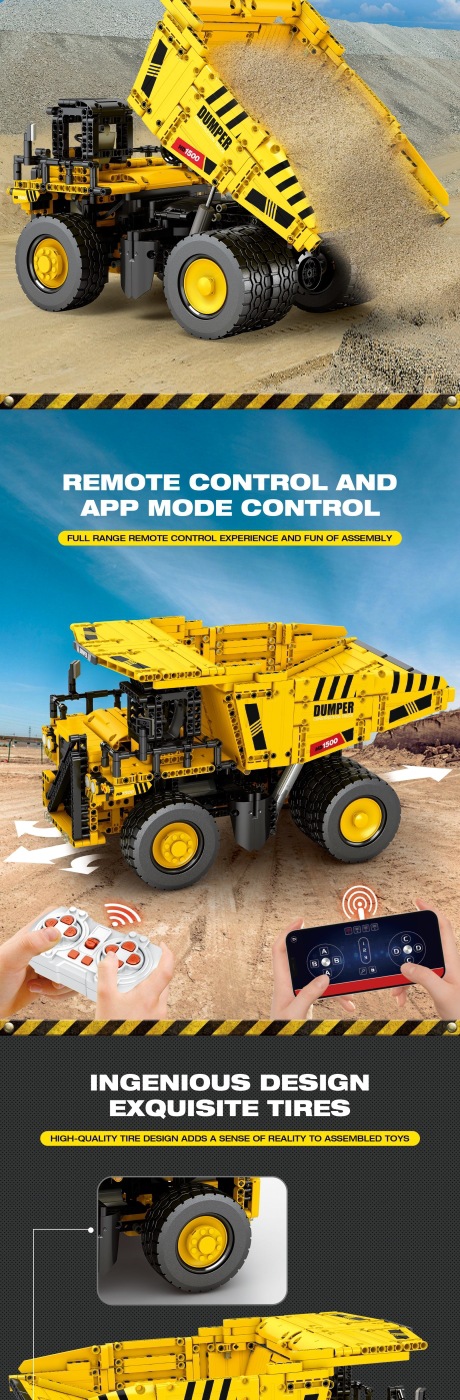
Image: Included Power Equipment (Battery Box, L Motor, XL Motor, Servo Motor)
4. Specifications
| Attribute | Detail |
|---|---|
| Brand | Reobrix |
| Model Number | 22025 |
| Bricks Number | 1622 PCS |
| Material | Plastic (Environment Friendly) |
| Color | Yellow |
| Functions | Remote Control, APP Control, Bucket Lifting/Tilting |
| Certification | CE |
| Recommended Age | 14+ |
| Assembled Dimensions (Approx.) | 40 cm (Length) x 21.5 cm (Height) |

Image: Product Parameters and Dimensions
5. Assembly Instructions
The Reobrix 22025 model comes with a detailed paper instruction manual. Please follow the step-by-step diagrams and instructions provided in the included manual for proper assembly.
- Unpack: Carefully open the carton box and lay out all the pieces. It is recommended to sort the pieces by type or color to facilitate assembly.
- Follow the Manual: Refer to the included paper manual for precise, illustrated assembly steps. Each step will guide you through connecting the blocks and integrating the power components.
- Install Power Components: During assembly, ensure the Battery Box, L Motor, XL Motor, and Servo Motor are installed in their designated positions as shown in the manual. Pay attention to wiring connections if applicable.
- Test Functionality: Periodically test movable parts and connections as you build, especially after installing motors, to ensure smooth operation.
- Final Check: Once assembly is complete, double-check all connections and ensure no parts are loose.

Image: Fully Assembled Reobrix Dump Truck Model
6. Operating Instructions
The Reobrix 22025 Dump Truck can be controlled via a dedicated remote control or a smartphone application.
6.1 Powering On
- Ensure batteries are correctly installed in the Battery Box (and remote control, if using).
- Turn on the power switch on the Battery Box.
6.2 Remote Control Operation
If a physical remote control is included, refer to its specific instructions for pairing and control functions. Generally, controls will include:
- Forward/Backward movement
- Left/Right steering
- Bucket Up/Down (lifting and tilting)
6.3 APP Control Operation
- Download the App: Search for the official Reobrix control app on your smartphone's app store (iOS or Android).
- Pairing: Open the app and follow the on-screen instructions to connect to your Reobrix 22025 model via Bluetooth.
- Control Interface: The app will provide a virtual control interface for driving the dump truck and operating its functions.

Image: Demonstrating both Remote Control and APP Control

Image: Simulation of real loading and unloading with remote-controlled bucket
7. Maintenance
- Cleaning: Wipe the model with a soft, dry cloth. Do not use water or chemical cleaners, as this may damage the blocks or electronic components.
- Storage: Store the model in a cool, dry place away from direct sunlight and extreme temperatures to prevent deformation or discoloration of the plastic.
- Battery Care: Remove batteries from the Battery Box and remote control if the model will not be used for an extended period to prevent leakage.
- Component Check: Periodically check for any loose connections or damaged parts.
8. Troubleshooting
- Model not moving/responding:
- Check if the Battery Box is switched on.
- Ensure batteries are correctly inserted and have sufficient charge.
- Verify all motor connections are secure.
- If using APP control, ensure Bluetooth is enabled and the device is properly paired.
- Bucket not lifting/tilting:
- Check the Servo Motor connection.
- Ensure there are no obstructions preventing the bucket's movement.
- Missing parts during assembly:
- Carefully re-check the packaging and sorting area.
- If parts are genuinely missing, circle the missing parts on the paper manual and contact customer support for free replacement parts.
9. User Tips
- Organize Pieces: Before starting assembly, sort the blocks by color, size, or type. This will significantly speed up the building process.
- Follow Steps Carefully: Building complex models requires attention to detail. Do not rush through steps to avoid errors that might require disassembling later.
- Battery Quality: Use high-quality batteries for the best performance and longer play time for the remote control functions.
- Explore App Features: The control app may offer additional features or customization options beyond basic movement. Take time to explore its interface.
10. Warranty and Support
For any issues, missing parts, or technical support, please contact the seller or manufacturer directly. Free replacement parts are available if there are any missing components; simply circle the missing parts on your paper manual and reach out to the support team for assistance.