1. Introduction
This manual provides detailed instructions for the Yongnuo YN685EX-RF TTL Flash Light and the YN32-TX Wireless Flash Transmitter, designed for Sony Mirrorless Cameras. The YN685EX-RF is a powerful speedlite with a Guide Number (GN) of 60, supporting TTL, Manual (M), Multi, and Group (Gr) modes, along with High-Speed Synchronization (HSS) up to 1/8000s. It features an integrated transceiver and receiver, making it compatible with the YONGNUO RF radio trigger system (RF602/603). The YN32-TX is a compact wireless flash transmitter specifically designed for Sony cameras, offering 2.4G wireless control, 5-group independent grouping, and a built-in lithium battery.
Both devices are compatible with a wide range of Sony Mirrorless Cameras, including α1, α7 series (α7, α7II, α7III, α7IV, α7C, α7R, α7RII, α7RIII, α7RIV, α7S, α7SII, α7SIII), α9, and α6000 series (α3000, α3500, α5000, α5100, α6000, α6300, α6400, α6500, α6600, α6700).
2. Package Contents
Please check the contents of your package upon unboxing. If any items are missing or damaged, contact your retailer.
2.1 YN685EX-RF Flash Light Package
- 1 x YN685EX-RF Flash Speedlite
- 1 x Mini Stand
- 1 x Black Case
- 1 x User Manual (English and Chinese)

Image: Contents of the YN685EX-RF flash package: flash unit, mini stand, black case, and user manual.
2.2 YN32-TX Wireless Flash Transmitter Package
- 1 x YN32-TX Flash Transmitter
- 1 x User Manual (English and Chinese)

Image: Contents of the YN32-TX transmitter package: transmitter unit and user manual.
3. Product Overview
3.1 YN685EX-RF Flash Light

Image: Front view of the YN685EX-RF flash unit with its LCD screen displaying settings.

Image: Close-up views of the YN685EX-RF flash unit, showing the hot shoe mount, external charging port, USB port, built-in reflector, and battery compartment.
3.2 YN32-TX Wireless Flash Transmitter
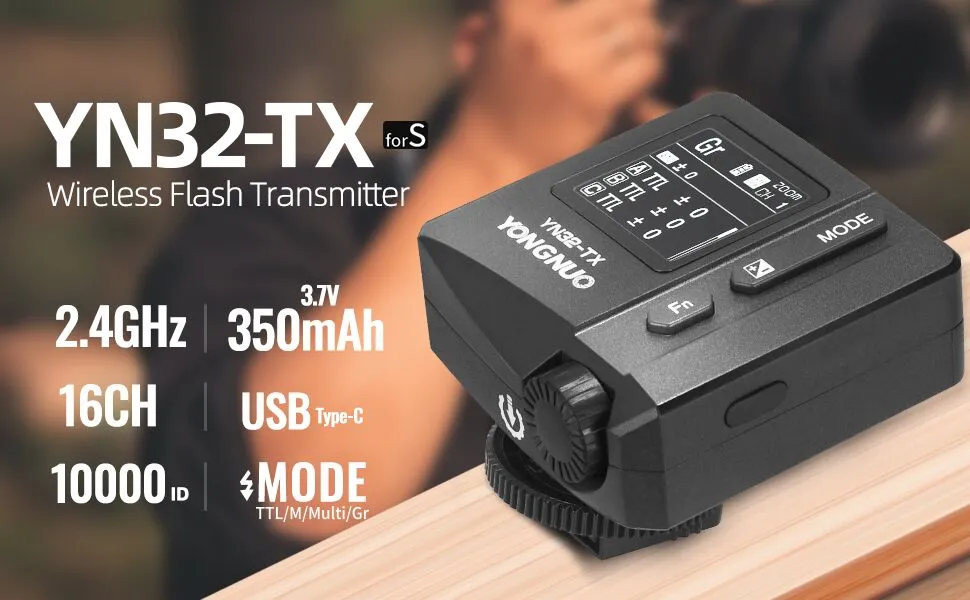
Image: Front view of the YN32-TX Wireless Flash Transmitter with its TFT-LCD screen.
4. Setup
4.1 YN685EX-RF Battery Installation
- Open the battery compartment cover on the side of the YN685EX-RF flash unit.
- Insert four (4) AA alkaline batteries or AA nickel-metal hydride batteries, ensuring correct polarity (+/-).
- Close the battery compartment cover securely.
4.2 YN32-TX Charging
The YN32-TX has a built-in 350mAh lithium battery. To charge:
- Connect a USB Type-C cable to the YN32-TX's USB port.
- Connect the other end to a USB power source (e.g., wall adapter, power bank).
- The device supports Type-C PD and QC fast charging. For fast charging, ensure the voltage is over 9V and current is over 2A.
- The device can be used while charging.
4.3 Mounting to Camera Hot Shoe
- Ensure your Sony mirrorless camera is powered off.
- Slide the YN685EX-RF flash or YN32-TX transmitter onto the camera's hot shoe until it clicks into place.
- Tighten the locking mechanism (if present) to secure the unit.
4.4 Power On/Off
- YN685EX-RF: Press and hold the power button until the LCD screen illuminates. To power off, press and hold the power button again.
- YN32-TX: Press and hold the power button until the TFT-LCD screen illuminates. To power off, press and hold the power button again.
5. Operating Modes
5.1 Flash Modes (YN685EX-RF)
The YN685EX-RF supports TTL, Manual (M), Multi, and Group (Gr) flash modes.
- TTL (Through-The-Lens): Automatic flash exposure control. The flash output is automatically adjusted based on the camera's metering.
- M (Manual): Allows you to manually set the flash output from 1/128 to 1/1, with 22 levels of fine-tuning.
- Multi (Stroboscopic Flash): Fires a series of rapid flashes during a single exposure, useful for capturing multiple movements of a subject.
- Gr (Group): Used in wireless multi-flash setups to control individual groups of flashes.
5.2 High-Speed Synchronization (HSS)
The YN685EX-RF supports High-Speed Synchronization (HSS) up to 1/8000s, allowing you to use flash with fast shutter speeds, which is ideal for shooting in bright conditions or with wide apertures.
5.3 Zoom Range Adjustment (YN685EX-RF)
The YN685EX-RF features both auto zoom and manual zoom functions. The flash coverage can be adjusted from 20mm to 200mm to match your lens's focal length, ensuring uniform and effective fill light.
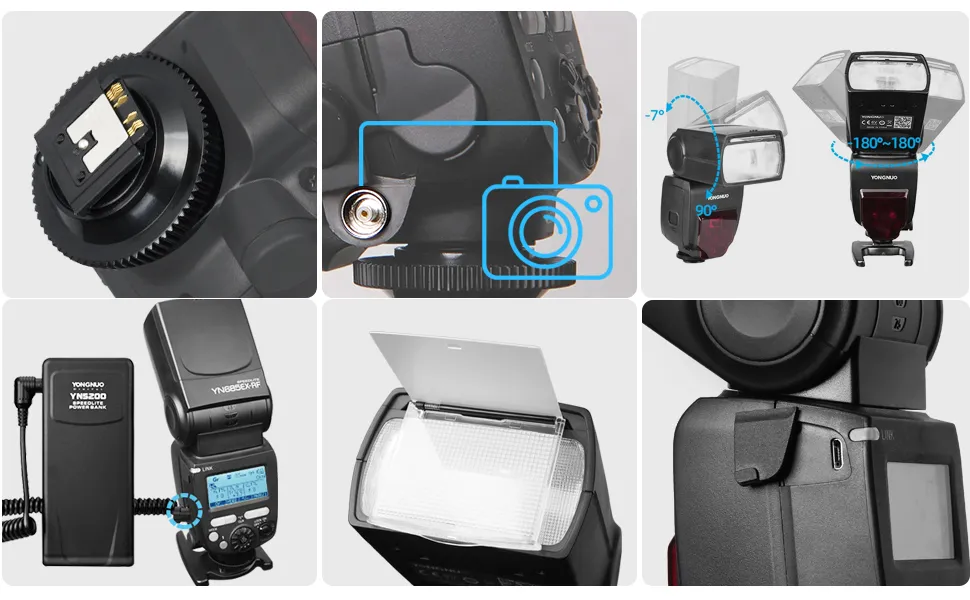
Image: Diagram showing the manual zoom range of the YN685EX-RF flash from 20mm to 200mm, with a Guide Number (GN) of 60.
5.4 Flash Head Rotation (YN685EX-RF)
The flash head can be rotated for bounce flash photography:
- Vertical Rotation: -7° to 90°
- Horizontal Rotation: 180° to each side
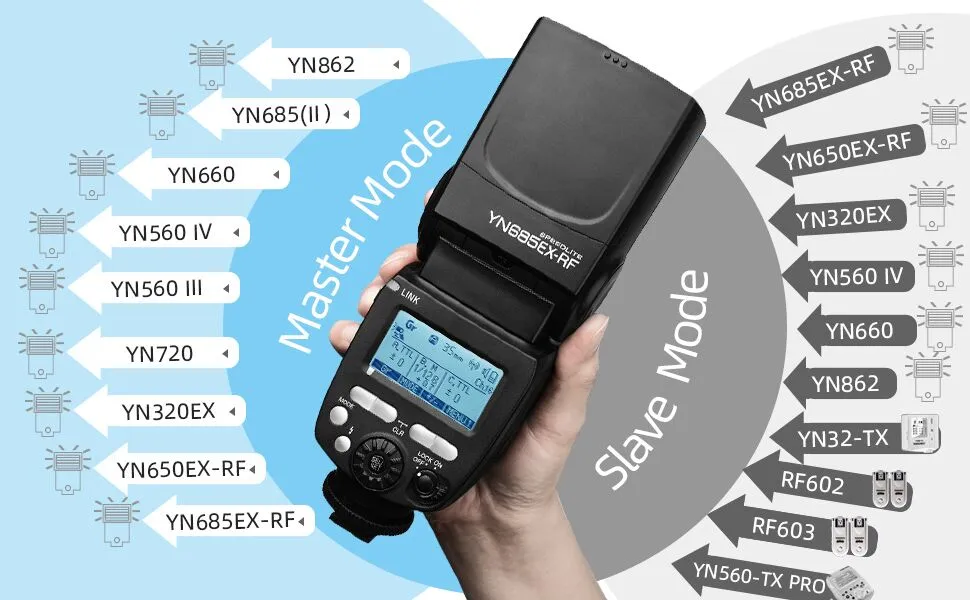
Image: Diagram illustrating the vertical (-7 to 90 degrees) and horizontal (180 degrees each side) rotation angles of the YN685EX-RF flash head.
5.5 Wireless Triggering Modes
Both the YN685EX-RF and YN32-TX support various wireless triggering modes.
5.5.1 YN685EX-RF as Master Unit (Radio Transmission)
When used as a radio master unit, the YN685EX-RF can control up to 5 independent groups of slave flashes. It can remotely control flash mode, flash output, and focal length for compatible YONGNUO speedlites such as YN650EX-RF, YN685EX-RF, YN320EX, YN685(II), YN720, YN560 IV, YN660, and YN560 III.

Image: Diagram illustrating the YN685EX-RF in Master Mode, showing compatible slave units.
5.5.2 YN685EX-RF as Slave Unit (Radio Transmission)
The YN685EX-RF can function as a slave unit, receiving RF radio triggering signals from YONGNUO master units like YN650EX-RF, YN685EX-RF, YN320EX, YN685(II), YN720, YN560 IV, YN660, YN560 III, YN560-TX (pro), RF603, RF602, and YN32-TX. It supports 16 transmission channels and 10000 wireless radio IDs for multi-flash lighting.

Image: Diagram illustrating the YN685EX-RF in Slave Mode, showing compatible master units.
5.5.3 YN685EX-RF as Slave Unit (Optical Transmission)
For optical transmission wireless flashing, the YN685EX-RF can be set as a slave unit to receive optical triggering signals from YN320EX and Sony flashes such as HVL-F32M, HVL-F60RM, HVL-F60M, enabling off-camera TTL mode flashing.
5.5.4 YN32-TX as Transmitter
The YN32-TX is a dedicated wireless flash transmitter compatible with the YONGNUO RF602/603 Radio Triggering System. It supports 5-group independent grouping control, allowing remote adjustment of flash mode, output, focal length, stroboscopic number, and frequency for compatible YONGNUO speedlites. The transmission range is approximately 60 meters.
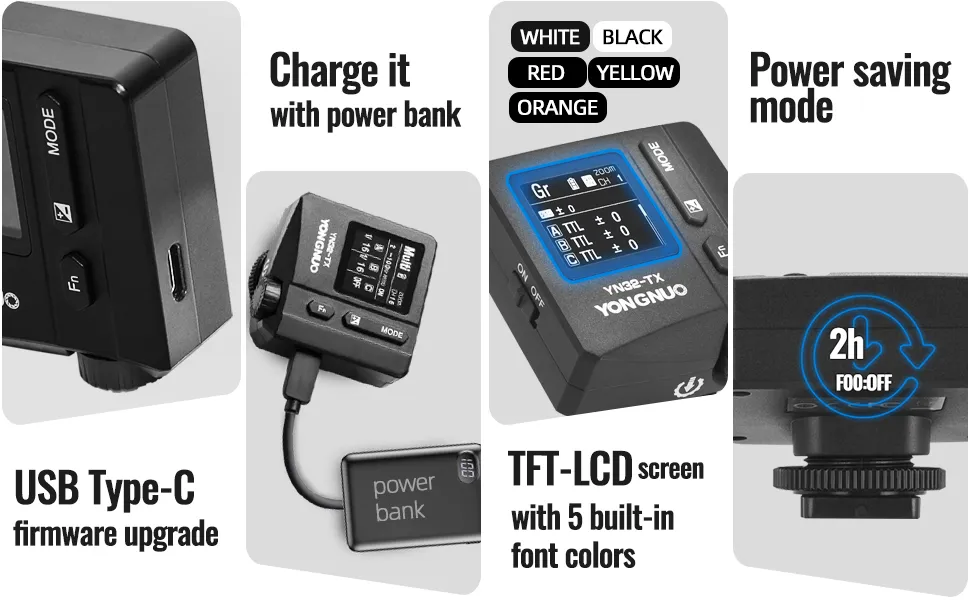
Image: Diagram illustrating the 60m transmission range of the YN32-TX transmitter, showing it controlling various Yongnuo flash units.
6. Key Features
6.1 YN685EX-RF Specific Features
- High Guide Number: GN60 (ISO 100, 200mm).
- Super-speed Recycle System: Approximately 2 seconds for full output flash. Even with older batteries, it achieves fast recycle times of 3-4 seconds.
- External Battery Pack Support: Compatible with external battery packs for extended use and faster recycling.
- Real-time Power Consumption Display: Easily monitor battery levels on the LCD screen.
- Sound Prompt: Audible alerts for various operations.
- Custom Functions (C.Fn): Personalize settings to suit your workflow.
- Autosave Function: Retains your last settings when powered off.
- LCD Display Screen: Clear display for settings and information.
- Standard PC Synchronous Interface: For wired synchronization with cameras or studio strobes.

Image: Infographic highlighting key features of the YN685EX-RF flash, including GN60, HSS 1/8000s, 2s recycle, TTL/M/Multi modes, PC sync, Fn settings, power saving, LCD, sound, and reflector.
6.2 YN32-TX Specific Features
- Lightweight Design: Compact dimensions of approximately 55x58x39mm and a weight of 68g.
- Built-in Lithium Battery: 350mAh high-capacity battery for long-lasting performance.
- TFT-LCD Screen: High-resolution display with 5 selectable font colors.
- Power Saving Function: Optimizes battery life during idle periods.
- Autosave Settings: Automatically saves your custom settings.

Image: Infographic highlighting YN32-TX features: USB Type-C firmware upgrade, power bank charging, TFT-LCD screen with 5 font colors, and power saving mode.
7. Specifications
7.1 YN685EX-RF Flash Light
| Feature | Description |
|---|---|
| Product Model | YN685EX-RF |
| Circuit Design | Insulated Gate Bipolar Transistor (IGBT) |
| Guide No. | 60 (ISO 100, 200mm) |
| Flash Mode | TTL, M, Multi, Gr |
| Triggering Mode | Set-top, Radio Master, Radio Slave, Wireless |
| Zoom Range | 20, 24, 28, 35, 50, 70, 105, 135, 200mm |
| Vertical Rotation Angle | -7~90 ° |
| Horizontal Rotation Angle | 180° each side |
| Power Supply | 4 x AA alkaline batteries or AA nickel-metal hydride batteries |
| Light-emitting Times | 100~1500 times (using AA alkaline batteries) |
| Recycle Time | Approx. 2s |
| Color Temperature | 5600k |
| Flash Time | 1/350s~1/20000s |
| Flash Control | 8 levels of output control (1/128~1/1), 22 levels of fine tuning |
| External Interface | Hot shoe, PC interface, external charging interface, USB interface |
| Radio Transmission Distance | Up to 100 meters |
| Additional Functions | Master flash, off-camera flash, high-speed sync, rear curtain sync, exposure compensation, exposure lock, lamp head, electric zoom, sound prompts, automatic save settings, power saving mode, overheat protection, custom functions, firmware upgrade |
| Dimensions | 65 × 78 × 210mm |
| Net Weight | 427g |
7.2 YN32-TX Wireless Flash Transmitter
| Feature | Description |
|---|---|
| Product Model | YN32-TX |
| Compatible Camera | Sony's mirrorless camera with MI hot-shoe |
| Radio Transmission | 2.4GHz |
| Compatible Trigger System | YONGNUO RF Radio Trigger System |
| Power Supply Mode | Built-in lithium battery (3.7V/350mAh) |
| Flash Mode | TTL / M / Multi / Gr |
| Flash Sync Mode | Front-curtain sync / Rear-curtain sync / High-speed sync |
| Slave Unit Controllable Group | Up to 5 groups (A/B/C/D/E) |
| Transmission Range | Approx. 60m |
| Channel | CH 1~16 |
| ID Setting | 10000 (0000~9999) |
| Remote Parameter Control | Flash mode, flash output, focal length |
| LCD Display Screen | TFT-LCD |
| USB Interface | Type-C |
| Dimensions | Approx. 55*58*39mm |
| Weight | Approx. 68g |
8. Compatibility
8.1 Compatible Sony Cameras
The YN685EX-RF and YN32-TX are compatible with Sony mirrorless cameras featuring an MI hot-shoe, including but not limited to:
- Sony α1, α7, α7II, α7III, α7IV, α7C, α7R, α7RII, α7RIII, α7RIV, α7S, α7SII, α7SIII, α9
- Sony α3000, α3500, α5000, α5100, α6000, α6300, α6400, α6500, α6600, α6700
8.2 Wireless System Compatibility

Image: Diagram showing the YN685EX-RF in Master Mode controlling various slave units and in Slave Mode being controlled by various master units, including the YN32-TX.

Image: Compatibility table for YN685EX-RF and YN32-TX, listing various slave units and their support for TTL/M/Multi, remote control of flash output, focal section, and HSS.

Image: Compatibility table for YN32-TX, listing various slave units and their support for flash mode, remote control of flash output, focal section, and HSS.
9. User Tips
- Battery Management: Always carry spare AA batteries for the YN685EX-RF, especially during long shoots. For the YN32-TX, keep it charged via its USB-C port or use a power bank for on-the-go charging.
- Firmware Updates: Regularly check the YONGNUO official website for the latest firmware updates for both the YN685EX-RF and YN32-TX. Firmware updates can improve performance, add new features, and fix bugs.
- Wireless ID Settings: When using multiple flash units in a complex setup, utilize the 10000 wireless radio IDs to avoid interference and ensure reliable triggering.
- Bounce Flash: Experiment with the flash head's rotation capabilities to bounce light off ceilings or walls for softer, more natural-looking illumination.
- High-Speed Sync (HSS): Leverage HSS when shooting outdoors in bright sunlight to overpower the sun or achieve shallow depth of field with wide apertures.
10. Troubleshooting
- Flash Not Firing:
- Check if the flash unit is securely mounted on the camera's hot shoe.
- Ensure batteries are correctly inserted and have sufficient charge.
- Verify that the flash is powered on.
- Check camera flash settings and ensure external flash is enabled.
- In wireless mode, confirm the master and slave units are on the same channel and ID, and within range.
- Incorrect Exposure:
- In TTL mode, ensure camera metering is appropriate for the scene.
- In Manual mode, adjust flash output (1/128 to 1/1) as needed.
- Check for obstructions between the flash and subject.
- Ensure the flash head zoom matches the lens focal length.
- Wireless Connection Issues:
- Confirm both transmitter and receiver are set to the correct group, channel, and ID.
- Ensure units are within the specified transmission range (approx. 60m for YN32-TX, 100m for YN685EX-RF).
- Check for potential radio interference from other devices.
- Ensure line of sight for optical slave mode.
- Slow Recycle Time:
- Replace old or low-power AA batteries in the YN685EX-RF.
- Consider using an external battery pack for faster recycle times.
- For YN32-TX, ensure the built-in battery is fully charged.
- Flash Overheating:
- If the flash unit becomes hot, it may enter overheat protection mode. Allow it to cool down before continued use. Avoid rapid, consecutive full-power flashes.
11. Maintenance
- Cleaning: Use a soft, dry cloth to clean the exterior of the flash and transmitter. For stubborn dirt, a slightly damp cloth can be used, followed by immediate drying. Do not use solvents or abrasive cleaners.
- Battery Care (YN685EX-RF): Remove AA batteries if the flash will not be used for an extended period to prevent leakage.
- Battery Care (YN32-TX): For optimal battery life, avoid fully discharging the built-in lithium battery frequently. Store the unit with a partial charge if not used for long periods.
- Storage: Store the units in a cool, dry place, away from direct sunlight and extreme temperatures. Use the provided black case for the YN685EX-RF for protection.
- Firmware Updates: As mentioned in User Tips, regularly check the YONGNUO official website for firmware updates. Use the USB port (Type-C for YN32-TX) to perform updates according to the instructions provided by YONGNUO.
12. Warranty and Support
YONGNUO products typically come with a manufacturer's warranty. Please refer to the warranty card included in your product packaging for specific terms and conditions, including warranty period and coverage details. For technical support, service, or warranty claims, please contact your original retailer or visit the official YONGNUO website for customer service contact information.


