
1. Introduction and Overview
Welcome to the advanced driving experience with your new Srnubi Car Radio featuring the 2023 New Driving OS UI 6.0. This system, developed over a year, offers a fully upgraded Android player with enhanced features and a smooth user interface. It boasts a 1.2GB system memory and is designed for powerful 8-core or above radios to ensure optimal performance.
Key features include a cool desktop display, seamless switching between day and night modes, dynamic weather display with rain and snow effects, accurate vehicle speed display, and a customizable desktop layout. The system also allows for easy switching between driving mode and a free mode, providing flexibility for your journey.
Video: Overview of Srnubi UI 6.0 features and functionality.
2. Setup and Firmware Activation
To unlock the full potential of your Srnubi Car Radio, the UI 6.0 firmware requires activation. Please note that this firmware is only compatible with Srnubi 8-core or above radios (T10 configured radios). Attempting to upgrade other versions may result in performance issues or lag.
Firmware Upgrade Process:
- Purchase Firmware: The UI 6.0 firmware is a separate purchase. Please ensure you have acquired it.
- Contact Customer Service: After purchasing, contact Srnubi customer service to obtain the download address for the firmware files.
- Download to USB: Download the two firmware files to a USB flash drive.
- Upgrade and Reset: Insert the USB drive into your car radio and follow the on-screen prompts to perform the firmware upgrade and system reset.
- Activation Code: After a successful reset, an activation code prompt will appear on the screen.
- Send Activation Code: Take a clear photo of the activation code and send it to Srnubi customer service.
- Activation Confirmation: Customer service will activate the firmware for you. Once confirmed, your UI 6.0 system will be ready for use.

Image: Srnubi New Driving OS UI 6.0 promotional banner.

Image: Software activation screen with QR code.
3. Operating Instructions
3.1 User Interface (UI) Navigation
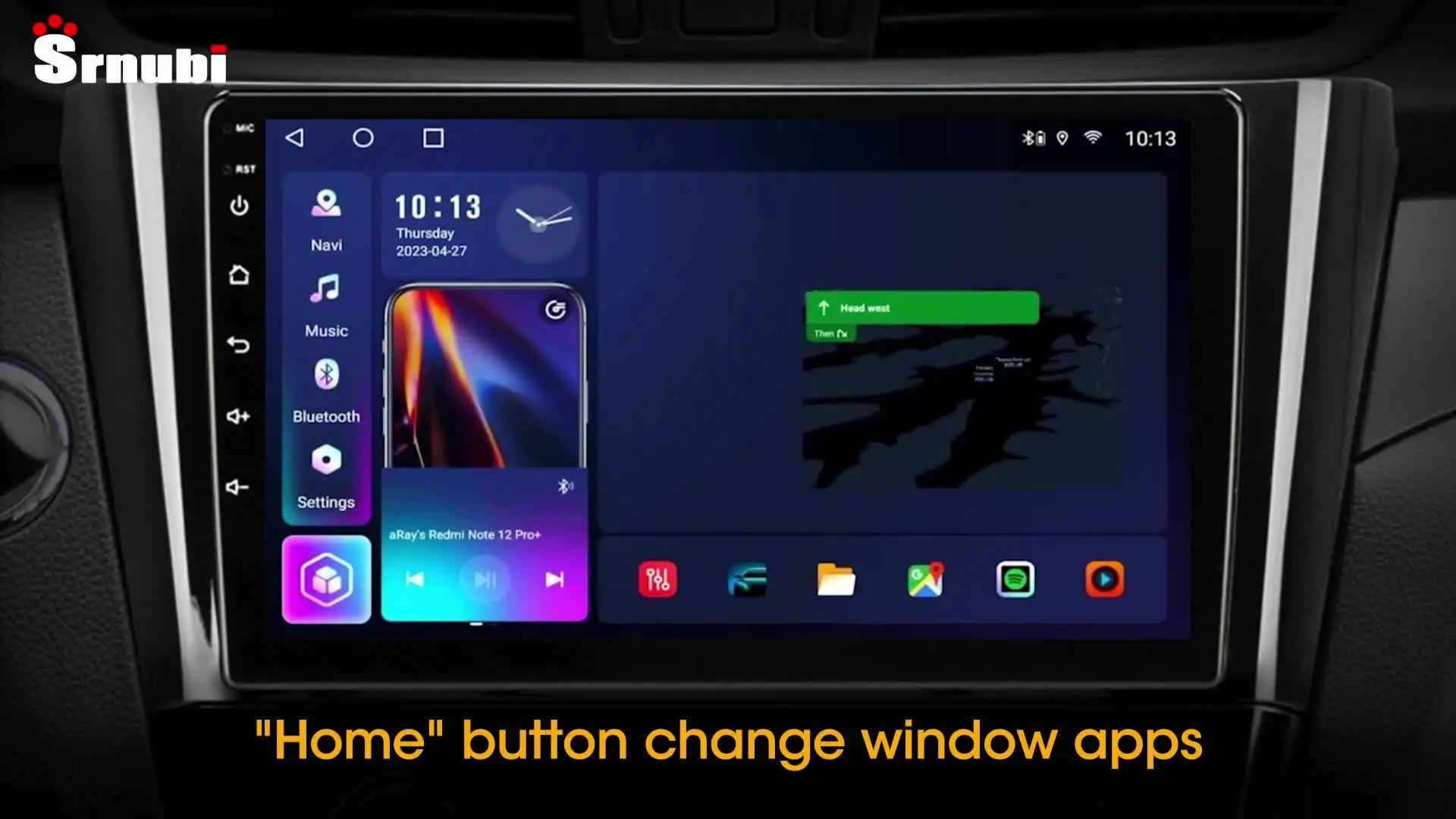
The UI 6.0 features an intuitive interface with a side menu for quick access to core functions: Navigation (Navi), Music, Bluetooth, and Settings. The main screen displays customizable widgets and real-time information.
3.2 Driving Dynamics Display
The integrated Driving APK provides real-time driving dynamics, including speed, RPM, and other vehicle data, enhancing your awareness on the road.

Image: Real-time driving dynamics displayed on the car radio screen.
3.3 Day and Night Mode Switching
The system supports automatic day and night mode switching, which can be linked to your vehicle's headlights for optimal screen visibility in varying light conditions.

Image: User interface for selecting day or night display mode.
3.4 Window Applications and Layouts
Use the "Home" button to easily switch between different window applications. The desktop layout is highly customizable, allowing you to arrange widgets and apps according to your preference.

Image: Demonstrating the ability to switch between multiple applications on the screen.
3.5 Multimedia Features
- Multimedia Widget: A convenient shortcut allows for one-key switching of multimedia content.
- FM Radio: Access and tune into your favorite FM radio stations with a unique secondary frame display.
- Bluetooth 5.0: Connect your smartphone via Bluetooth 5.0 for hands-free calling and high-quality audio streaming.
- Surround Sound & Equalizer: Customize your audio experience with advanced surround sound settings and a detailed equalizer.

Image: Detailed audio equalizer and sound field adjustment interface.
3.6 Navigation
The system supports map navigation, providing clear directions and real-time traffic information to guide you to your destination.
3.7 Streaming Media & Video Playback
Enjoy various streaming media and video playback options, including TikTok and YouTube. The system also supports real-time viewing of road conditions to improve safety.

Image: Real-time view of road conditions, enhancing safety during driving.
3.8 Split-screen Display
Utilize the split-screen feature to run two applications simultaneously, such as navigation and music playback, for enhanced multitasking.
3.9 Wireless Carplay
Seamlessly integrate your iPhone with the car radio using Wireless Carplay for access to navigation, music, calls, and more.
3.10 Colorful Buttons
Personalize the look of your car radio with customizable colorful buttons, allowing you to match the interface to your vehicle's interior or your personal style.
4. Maintenance
To ensure the longevity and optimal performance of your Srnubi Car Radio, follow these general maintenance guidelines:
- Software Updates: Regularly check for and install any available software updates to benefit from new features and performance improvements.
- Screen Cleaning: Use a soft, lint-free cloth specifically designed for electronics to clean the screen. Avoid harsh chemicals or abrasive materials.
- Temperature Control: Avoid exposing the device to extreme temperatures, both hot and cold, as this can affect its electronic components.
- Proper Shutdown: Always allow the system to shut down properly before turning off your vehicle's ignition to prevent data corruption.
5. Troubleshooting
If you encounter any issues with your Srnubi Car Radio, please refer to the following common troubleshooting steps:
5.1 Firmware Activation Issues
If you experience problems during firmware activation, such as the activation code not appearing or activation failing, ensure you have followed all steps correctly. Double-check that your radio is an 8-core or T10 configured model. If the issue persists, immediately contact Srnubi customer service with a photo of your activation code for assistance.
5.2 Compatibility and Installation
The UI 6.0 firmware is specifically designed for 8-core or above Srnubi radios. If you are attempting to install it on a different configuration, it may not function correctly or could lead to system lag. For physical installation, this unit is designed for standard car radio form factors. Installation on a 'vertical version' or non-standard setup may not be officially supported and could require specific adapters or custom firmware, which is not covered by standard instructions. Please consult with a professional installer if you have a non-standard vehicle setup.
5.3 Performance Issues / Lag
If your radio experiences lag or slow performance after a firmware upgrade, verify that your device meets the minimum requirements of an 8-core processor and 1.2GB system memory for UI 6.0. Insufficient hardware can lead to performance degradation. Consider performing a factory reset if software glitches are suspected, but back up any important data first.
6. Specifications
| Feature | Specification |
|---|---|
| Operating System | Android 12 with Srnubi UI 6.0 |
| Processor Requirement | 8-core or above |
| System Memory Requirement | 1.2GB (for UI 6.0) |
| Bluetooth Version | 5.0 |
| Wireless Connectivity | Wireless Carplay |
| Origin | Mainland China |
7. Warranty and Support
Srnubi offers a commitment to quality and customer satisfaction. Your product is eligible for free returns within 90 days. We also prioritize your security and privacy, ensuring that your personal details are protected and not shared without your consent.
For any technical support, firmware-related inquiries, or assistance with activation, please contact Srnubi customer service. They are available to help you with any questions or issues you may encounter.
8. User Tips
- Verify Compatibility: Before attempting any firmware upgrades, always confirm that your car radio is an 8-core model with sufficient memory (1.2GB) to support the UI 6.0 system. This prevents potential performance issues.
- Firmware Activation: After downloading the firmware, remember to contact customer service with a photo of your activation code to complete the activation process.
- Personalize Your Experience: Take advantage of the customizable desktop layouts and window applications to tailor the interface to your driving needs and preferences.
- Optimal Visibility: Utilize the automatic day and night mode switching feature, especially when driving in varying light conditions, to maintain clear screen visibility.