
1. Introduction
The CJMCU-204 is a compact, high-speed USB 2.0 hub module designed to expand a single USB port into four downstream USB 2.0 ports. It features a DC controller for stable power delivery and is suitable for various embedded systems, DIY projects, and applications requiring multiple USB connections. This manual provides essential information for the safe and effective use of your CJMCU-204 module.
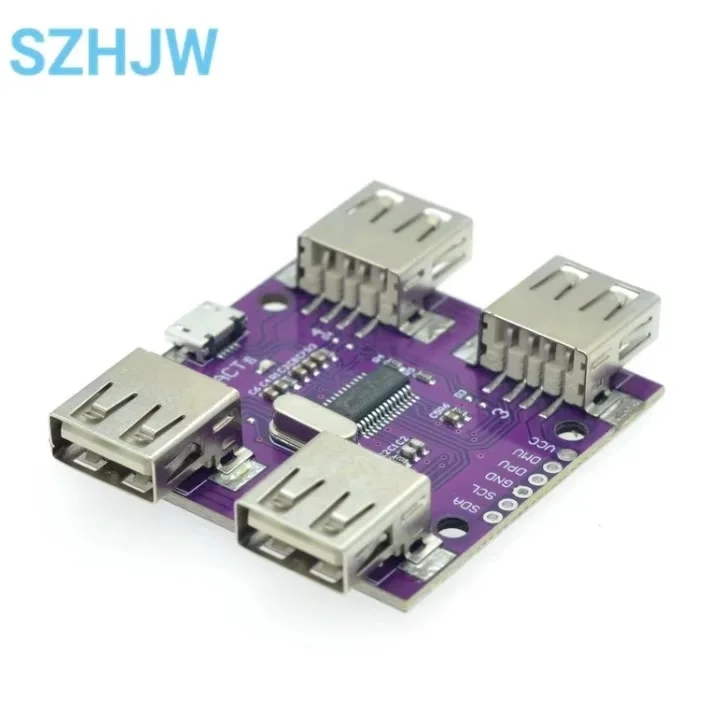
Video: Overview of the CJMCU-204 USB Hub Module.
2. Safety Information
Please read and understand the following safety precautions before using the module:
- Ensure proper voltage (5V) and current (up to 500mA total) are supplied to the module. Incorrect power can damage the module and connected devices.
- Avoid short circuits on the USB ports or power pins.
- Do not expose the module to moisture, extreme temperatures, or static electricity.
- Handle the module with care to prevent physical damage to components or solder joints.
- If soldering is required for pin headers, ensure proper soldering techniques are used to avoid damage.
3. Package Contents
- 1 x CJMCU-204 Hi-Speed USB 2.0 HUB DC Controller 4 Port USB Hub Module
4. Product Overview
The CJMCU-204 module features a central USB 2.0 hub controller, a micro USB input port for upstream connection and power, and four standard USB Type-A female ports for connecting downstream devices. It also includes pin headers for direct power input and data lines, offering flexibility for integration into custom projects.

Figure 4.1: Top view of the CJMCU-204 module with pin labels.
Key components and connections:
- Micro USB Port: Used for connecting to the host device (upstream) and for primary power input.
- USB Type-A Ports (x4): For connecting peripheral devices (downstream).
- Pin Headers:
- VCC: Power input (5V).
- DMU, DPU: USB data lines for upstream connection.
- GND: Ground connection.
- SCL, SDA: I2C communication lines (if applicable for advanced control, consult datasheet for specific chip).

Figure 4.2: CJMCU-204 module dimensions.
5. Setup Instructions
-
Power Connection:
- Via Micro USB: Connect a standard micro USB cable from your host device (e.g., computer, Raspberry Pi) to the micro USB port on the CJMCU-204 module. This will provide both data and power to the module.
- Via Pin Headers (Optional): For standalone applications or when additional power is needed, connect a stable 5V DC power supply to the 'VCC' pin and connect the ground of your power supply to the 'GND' pin. Ensure the power supply can deliver sufficient current for the module and all connected devices (up to 500mA total).
-
Data Connection:
- If using the micro USB for power, the data connection will be established automatically with the host device.
- If using external power via pin headers, ensure the micro USB port is still connected to the host device for data transfer.
-
Connecting Downstream Devices: Once the module is powered and connected to a host, you can plug up to four USB 2.0 devices into the standard USB Type-A ports.
6. Operating Instructions
- Power On: Connect the module to a power source as described in the Setup section.
- Host Recognition: Your host device (e.g., computer) should automatically detect the USB hub. No special drivers are typically required for standard USB hub functionality.
- Connect Devices: Plug your USB 2.0 peripheral devices (e.g., keyboard, mouse, flash drive) into the available USB Type-A ports on the module.
- Device Recognition: The host device should recognize the newly connected peripherals.
- Power Consumption: Be mindful of the total power consumption of all connected devices. The module is designed to provide up to 500mA total. Exceeding this limit may lead to unstable operation or damage.
7. Maintenance
- Keep the module clean and free from dust and debris. Use a soft, dry cloth for cleaning.
- Store the module in a dry, cool environment when not in use.
- Avoid touching the electronic components directly, especially when powered, to prevent static discharge.
- Regularly inspect connections for any signs of wear or damage.
8. Troubleshooting
| Problem | Possible Cause | Solution |
|---|---|---|
| Module not recognized by host. | Loose connection, insufficient power, faulty cable. |
|
| Connected devices are not working or disconnect randomly. | Insufficient power, faulty device, exceeding current limits. |
|
| Slow data transfer speeds. | Device limitation, cable quality, host port limitation. |
|
9. Specifications
| Feature | Specification |
|---|---|
| Product Type | Module |
| Brand Name | SZYTF |
| Model | CJMCU-204 |
| USB Standard | USB 2.0 Hi-Speed |
| Number of Ports | 4 x USB Type-A Downstream Ports |
| Upstream Port | 1 x Micro USB |
| Input Voltage | 5V DC |
| Max Total Current Output | 500mA (for all downstream ports combined) |
| Dimensions (L x W) | 44.1mm x 44.1mm |
| Package Dimensions (L x W x H) | 10cm x 10cm x 10cm |
| Package Weight | 0.03 kg |
| Condition | New |
| Origin | Mainland China |
10. User Tips
- For optimal performance, especially with power-hungry devices, consider using a dedicated 5V power supply connected to the VCC/GND pins, in addition to the micro USB data connection.
- When integrating into custom enclosures, ensure adequate ventilation to prevent overheating.
- Always connect the hub to the host before connecting multiple devices to the hub.
11. Warranty and Support
For any issues or questions regarding the CJMCU-204 module, please contact your retailer or the manufacturer for support. Keep your purchase receipt as proof of purchase for any warranty claims.