
1. Product Overview
The CrowPanel ESP32 5.0-inch module is a powerful Human-Machine Interface (HMI) capacitive touch screen featuring an 800x480 resolution LCD. It integrates the ESP32-S3-WROOM-1-N4R8 module as its main control processor, offering a dual-core 32-bit LX6 microprocessor, built-in WiFi, and Bluetooth-compatible wireless functions. With a main frequency of up to 240MHz, it delivers robust performance for a wide range of IoT and embedded applications.
The module includes the 5.0-inch LCD display and a driver board. It supports various development environments such as Arduino IDE, Espressif IDF, Lua RTOS, and Micro Python, and is compatible with the LVGL graphics library and openHASP. This allows for easy customization of UI interfaces and rapid project development.


2. Package Contents
The package typically includes the following items:
- 1x CrowPanel ESP32 Display-5.0 Inch Display
- 1x USB-A to Type-C Cable
- 1x Crowtail/Grove to 4pin DuPont Cable

3. Setup and Connections
Follow these steps to set up your CrowPanel ESP32 Display module:
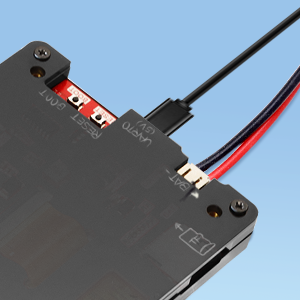
- Connect to Power: Connect the module to a power source using the provided USB-A to Type-C cable. The USB-C port can also be used to connect external UART devices. Alternatively, an external lithium battery (3.7-4.2V) can be connected to the BAT port for power.
- Attach to Device: Securely attach the screen to your intended device or project.
- Power On: Power on your device. The screen should light up automatically.
- Adjust Display: Adjust the screen angle or brightness for optimal viewing experience.

4. Operating Instructions
4.1. Basic Operation
- Touch Control: The 5.0-inch display features a capacitive touch screen for intuitive interaction with user interfaces.
- Interface Navigation: Navigate through menus and applications by tapping and swiping on the screen.
4.2. Development and UI Design
The CrowPanel ESP32 Display supports multiple development environments and UI design tools:
- Supported Environments: Arduino IDE, Espressif IDF, PlatformIO, and Micro Python.
- LVGL Graphics Library: Compatible with the open-source LVGL graphics library for creating rich and dynamic user interfaces.
- SquareLine Studio: Use SquareLine Studio to easily design and implement LVGL UIs and export ready-to-use projects.


5. Maintenance and Safety
5.1. Safety Information
- Electrical Safety: Do not use in damp environments to prevent electric shock.
- Impact Protection: Avoid strong impacts to prevent screen damage.
- Screen Handling: Do not touch the screen surface directly with bare hands to avoid scratches.
- Environmental Conditions: Avoid direct sunlight exposure or high-temperature environments.
- Unauthorized Modification: Do not disassemble or repair the unit yourself.
5.2. Precautions
- Voltage Compatibility: Verify voltage compatibility before use.
- Power Cycling: Avoid frequently turning the monitor on and off.
- Static Images: Avoid displaying static images for extended periods to prevent screen burn-in.
- Cleaning: Do not clean the screen with corrosive cleaning agents. Use a soft, dry cloth for cleaning.
- Physical Handling: Avoid pressing or shaking the screen hard during use to prevent loosening of internal connections and components.
- Repair: Before repairing or replacing any equipment components, make sure to turn off the power and disconnect from the device.
6. Troubleshooting (FAQs)
- Q: No signal displayed?
- A: Check whether the connection cable is loose or improperly connected.
- Q: Screen flickering?
- A: Try replacing the cable or adjusting the resolution settings.
- Q: Unable to power on?
- A: Confirm that the power plug is securely inserted and the power source is active.

7. Specifications
| Attribute | Value |
|---|---|
| Model | 5.0 inch CrowPanel ESP32 display |
| Main Processor | ESP32-S3-WROOM-1-N4R8 |
| Resolution | 800*480 |
| Touch Type | Capacitive Touch Screen |
| Display Type | TN Panel |
| Screen | TFT-LCD Screen |
| Display Driver | ILI6122 & ILI5960 |
| External Power Supply | DC5V-2A |
| Battery Voltage | 3.7-4.2V |
| Interface | 2*UART0, 2*GPIO, 2*I2C, 1*Battery |
| Button | BOOT Button and Reset Button |
| Active Area | 108*64.8mm(W*H) |
| Working Temperature | -20℃~70℃ |
| Storage Temperature | -30℃~80℃ |
| HS CODE | 8524919090 |
7.1. Pin Specifications

7.2. Hardware Overview and Dimensions

7.3. Comparison with Other Models
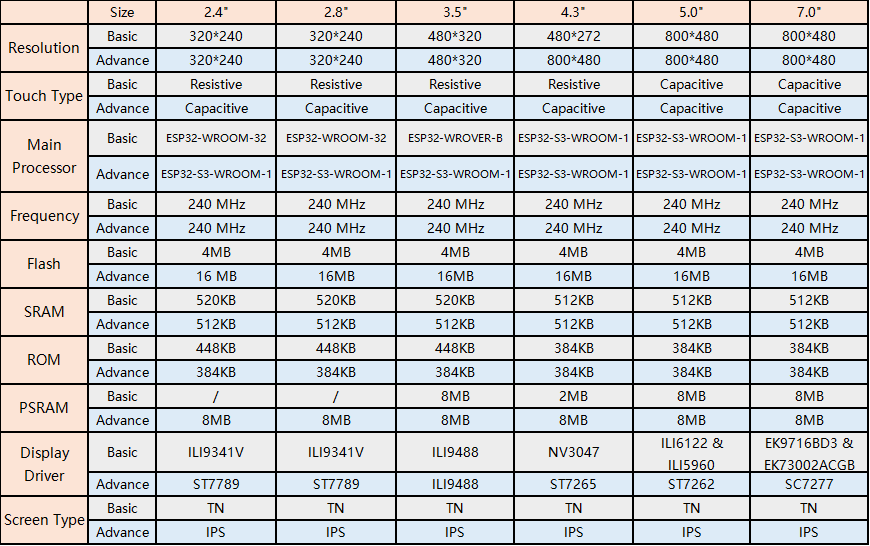
For a detailed comparison between the CrowPanel Basic and Advanced series, refer to the following diagrams:

8. User Tips
- When developing with LVGL, consider using SquareLine Studio for faster UI design and project export.
- Utilize the Crowtail/Grove compatibility for easier integration with other modules in your projects.
- For portable applications, leverage the external lithium battery power supply option.
- Explore the official Wiki and forum for community support and advanced tutorials.
9. Warranty and Support
Manufacturer: Elecrow Technology Development Co., Ltd.
Address: No.4832 Ba'an Avenue, Bao'an District, Shenzhen City
Website: https://www.elecrow.com
Made in: China
For detailed information, technical support, and documentation, please refer to the following resources:
- Official Wiki: CrowPanel 5inch HMI Display Wiki
- User Manual (PDF): Download User Manual
- Schematic Diagram: Download Schematic
- ESP32-S3-WROOM-1N4R8 Datasheet: Download Datasheet
- LCD Specification: Download LCD Spec
- Outline Dimensions: Download Outline Dimensions
- LVGL Reference: Download LVGL Reference
- CE Certificate: Download CE Certificate
- Community Forum: Post your tech questions in the forum