
1. Introduction
Thank you for choosing the Transparent Mecha Bluetooth Speaker. This mini wireless loudspeaker combines a unique transparent design with powerful audio features, including Bluetooth 5.3 connectivity, TWS (True Wireless Stereo) pairing, and a dynamic breathing light that reacts to sound. Its compact and waterproof design makes it ideal for various uses, including camping and everyday listening.

2. Key Features
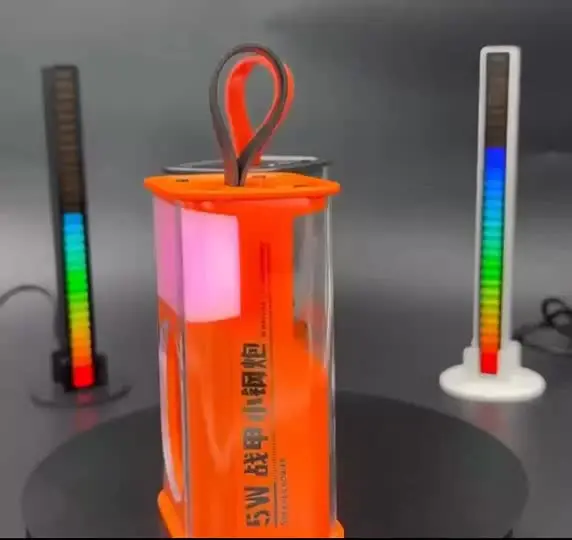
- Transparent Mecha Design: Creative transparent appearance with a fully transparent PC shell, allowing internal precision components to be visible.
- Bluetooth 5.3: Advanced Bluetooth version for stable and efficient wireless connection.
- Dynamic Breathing Light: Light follows sound, offering a lamp control function for an enhanced audio-visual experience.
- Original Sound Shock: Delivers powerful and clear audio.
- TWS Connection: Supports True Wireless Stereo for pairing two speakers to form a surround sound system.
- Waterproof: Designed to withstand water exposure.
- Built-in Microphone: For hands-free calling.
- Portable: Compact design with a lanyard for easy carrying.
- Multiple Sound Modes: Stereo Sound Mode, Live Sound Mode, Extra Bass Mode, Transparency Mode, Standard Mode.

3. Setup
3.1. Charging the Speaker
Before first use, fully charge the speaker. Use a Type-C cable (not included) to connect the speaker to a compatible USB power source (5-20V DC). The LED indicator will show charging status and turn off when fully charged. The built-in 500mAh high-quality battery provides approximately 3-4 hours of playback time.
3.2. Power On/Off
To power on the speaker, press and hold the power button located on the top panel until you hear an audible prompt and the breathing light activates. To power off, press and hold the power button again until the light turns off.
4. Operating Instructions
4.1. Bluetooth Pairing
- Ensure the speaker is powered on and in pairing mode (the breathing light may flash).
- On your device (smartphone, tablet, etc.), enable Bluetooth and search for available devices.
- Select "LIUTIANFEI A36" (or similar name) from the list.
- Once connected, you will hear a confirmation sound, and the breathing light will indicate a successful connection.
4.2. TWS (True Wireless Stereo) Connection
For an immersive stereo experience, you can pair two Transparent Mecha Bluetooth Speakers together:
- Ensure both speakers are powered on and not connected to any other Bluetooth device.
- On one speaker, double-press the TWS button (if available, otherwise refer to the PDF manual for specific TWS pairing instructions).
- The speakers will automatically search and pair with each other. Once connected, you will hear a confirmation sound.
- Connect your device to one of the paired speakers via Bluetooth as described in Section 4.1. Both speakers will now play audio in stereo.

4.3. Music Playback and Controls
- Play/Pause: Press the Play/Pause button (if available) or control from your connected device.
- Volume Control: Use the volume buttons on the speaker or your connected device to adjust the volume.
- Sound Modes: The speaker supports various sound modes including Stereo, Live, Extra Bass, Transparency, and Standard. Refer to the PDF manual for instructions on how to switch between these modes.
- Supported Formats: The speaker supports MP3 and WAV playback functions.
4.4. Breathing Light Function
The speaker features a dynamic breathing light that follows the rhythm of the sound. This lamp control function can be managed via dedicated buttons on the speaker or through your connected device, if supported. Refer to the PDF manual for detailed light control options.
5. Maintenance
5.1. Cleaning
Wipe the speaker with a soft, dry cloth. Do not use abrasive cleaners or solvents. For the transparent casing, a slightly damp cloth can be used, followed by a dry one.
5.2. Storage
Store the speaker in a cool, dry place away from direct sunlight and extreme temperatures. If storing for an extended period, ensure the battery is partially charged (around 50%) to prolong its lifespan.
5.3. Waterproof Feature
The speaker is waterproof. However, avoid submerging it in water for prolonged periods or exposing it to high-pressure water jets. Ensure all ports are securely closed before exposing to water.
6. Troubleshooting
- Speaker does not power on: Ensure the battery is charged. Connect to a power source and try again.
- Cannot pair via Bluetooth: Make sure the speaker is in pairing mode and within range of your device. Turn off and on Bluetooth on your device, or restart both the speaker and your device.
- No sound: Check the volume levels on both the speaker and your connected device. Ensure the speaker is correctly paired.
- TWS pairing issues: Ensure both speakers are fully charged and not connected to any other device before attempting TWS pairing. Try restarting both speakers.
7. Specifications
| Attribute | Value |
|---|---|
| Model | A36 |
| Brand Name | LIUTIANFEI |
| Speaker Type | Portable |
| Communication | AUX, USB, Bluetooth |
| Bluetooth Version | 5.3 |
| Maximum Wireless Range | 10m-20m |
| Power Source | Battery |
| Battery Capacity | 500mAh |
| Battery Life | 3-4 hours (approx.) |
| Input/Output | USB (Type-C) |
| Voltage Range | USB (5-20V DC) |
| Output Voltage | 5 W |
| PMPO | 10 W |
| Input Power | <25 W |
| Frequency Range | 60Hz-23KHz |
| Audio Crossover | Full-Range |
| Channels | 2 (2.0) |
| Number of Loudspeaker Enclosure | 1 |
| Sound Modes | Stereo Sound Mode, Live Sound Mode, Extra Bass Mode, Transparency Mode, Standard Mode |
| Control | Volume control |
| Waterproof | Yes |
| Built-in Microphone | Yes |
| Support Apt-x | Yes |
| Codecs | Apt-X HD |
| Playback Function | MP3, WAV |
| Support Memory Card | Yes |
| Material | Plastic |
| Cabinet Material | Plastic |
| Weight | 200g |
| Dimensions (approx.) | 101mm (H) x 60mm (W) x 47mm (D) |
| Certification | CE |

8. User Tips
- Battery Life: For optimal battery performance, charge the speaker fully before each use. Expect approximately 3-4 hours of playback on average volume.
- TWS Placement: When using TWS, place the two speakers equidistant from your listening position for the best stereo separation.
- Light Customization: Experiment with the breathing light function to match your music or mood.
9. Warranty and Support
For detailed warranty information and further support, please refer to the official user manual available in PDF format. You can access the PDF manual here. If you encounter any issues not covered in this manual or the PDF, please contact the seller for assistance.