
1. Product Overview
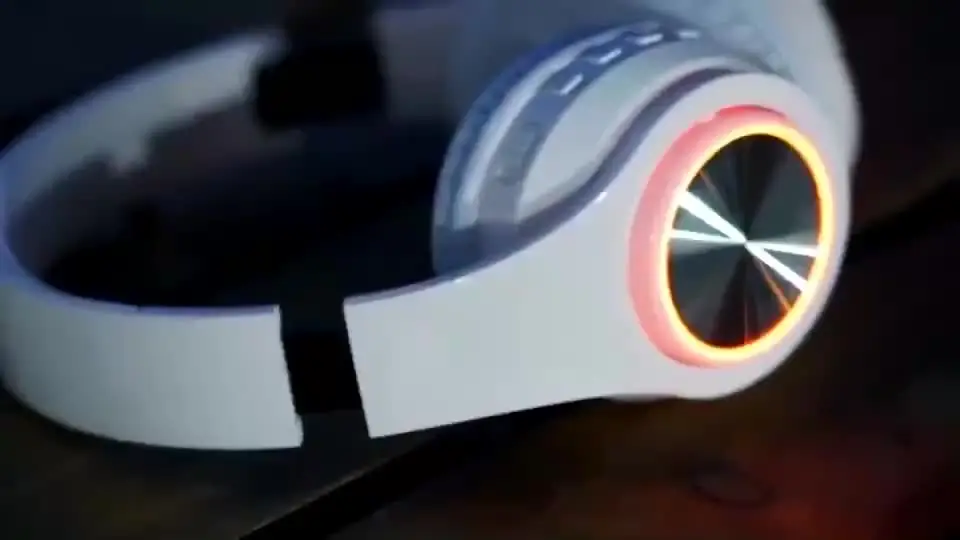
The B39 Bluetooth Headphone is a versatile over-ear headset designed for a rich audio experience. It features colorful LED lights, multiple connectivity options (Bluetooth, TF card, 3.5mm Aux), 8D stereo surround sound, and a built-in microphone for clear communication. Its foldable design ensures portability and comfortable wear.

2. Package Contents
- 1 x B39 Over Ear Bluetooth Headphone
- 1 x USB Charging Cable
- 1 x 3.5mm AUX Cable
- 1 x User Manual
3. Setup and Charging
3.1 Initial Charging
Before first use, fully charge your headphones. Connect the supplied USB charging cable to the headphone's USB charging port and the other end to a compatible USB power source (e.g., computer USB port, USB wall adapter). The LED indicator will show charging status and turn off or change color when fully charged.
- Charging Interface: USB charging port
- Charging Time: Approximately 2 hours

3.2 Power On/Off
- Power On: Press and hold the Power button/Mode switch until the LED indicator lights up.
- Power Off: Press and hold the Power button/Mode switch until the LED indicator turns off.
3.3 Bluetooth Pairing
- Ensure the headphones are powered off.
- Press and hold the Power button/Mode switch for approximately 3-5 seconds until the LED indicator flashes blue and red alternately, indicating pairing mode.
- On your Bluetooth-enabled device (mobile phone, tablet, laptop), go to Bluetooth settings and search for available devices.
- Select "B39" from the list of devices.
- Once connected, the LED indicator will typically show a solid blue light or flash slowly.
3.4 TF Card Mode
Insert a TF (MicroSD) card (up to 32GB) into the designated TF card slot on the headphone. The headphone will automatically switch to MP3 playback mode, allowing you to listen to music directly from the card without needing a connected device.
3.5 3.5mm AUX Wired Mode
Connect one end of the included 3.5mm AUX cable to the 3.5mm audio port on the headphone and the other end to your audio source (e.g., computer, MP3 player). This mode allows you to use the headphones even when the battery is depleted or with non-Bluetooth devices.

4. Operating Instructions
4.1 Button Controls

- (1) Previous song/Volume+: Short press for previous song, long press for Volume Up.
- (2) Next song/Volume-: Short press for next song, long press for Volume Down.
- (3) 3.5mm audio port: For wired connection using the AUX cable.
- (4) USB charging port: For charging the headphones.
- (5) Pause/Play & answer/hang up: Short press to Play/Pause music. Short press to Answer/End a call. Long press to reject a call.
- (6) Power button/Mode switch: Long press to Power On/Off. Short press to switch between Bluetooth, TF Card, and AUX modes.
4.2 Colorful LED Light Flashing
The B39 headphones feature colorful LED lights that flash during operation, adding a dynamic visual element to your listening experience. The LED lights can be controlled via the headphone's buttons (specific control not detailed, typically tied to power/mode button or a dedicated light button if present).

4.3 Audio Quality and Microphone
Experience 8D Stereo Surround Sound with HiFi bass. The headphones are equipped with an internal, noise-canceling microphone, ensuring clear voice pickup and reduced environmental noise during calls.

5. Maintenance
- Cleaning: Use a soft, dry cloth to clean the headphones. Avoid using harsh chemicals or abrasive materials.
- Storage: When not in use, fold the headphones to save space and protect them from damage. Store them in a cool, dry place away from direct sunlight and extreme temperatures.
- Water Resistance: The headphones are waterproof, but avoid prolonged exposure to water or submersion.

6. Troubleshooting
- Cannot Power On: Ensure the headphones are fully charged. If not, connect them to a power source using the USB charging cable.
- Cannot Pair via Bluetooth: Make sure the headphones are in pairing mode (LED flashing blue and red). Ensure Bluetooth is enabled on your device and it's within 10 meters of the headphones. Try restarting both devices.
- No Sound: Check the volume levels on both the headphones and your connected device. Ensure the correct audio source (Bluetooth, TF card, AUX) is selected. If using AUX, ensure the cable is fully inserted.
- Poor Sound Quality: Move closer to your Bluetooth device to reduce interference. Ensure the headphones are fully charged.
- Microphone Not Working: Check if the microphone is enabled on your connected device. Ensure the headphones are properly connected via Bluetooth.
7. Specifications
| Feature | Specification |
|---|---|
| Brand Name | HKFZ |
| Model | B39 |
| Material | Plastic |
| Style | Over the Ear |
| Communication | Wireless+Wired (Bluetooth, TF Card, 3.5mm Aux) |
| Bluetooth Version | V5.0+EDR |
| Working Distance | 10m |
| Maximum Wireless Range | <10m |
| Battery Capacity | 400mAh (with battery protective board) |
| Playing Time | 5~6 hours (up to 8-12 hours as per illustration) |
| Charging Time | About 2 hours |
| Standby Time | 200 hours (up to 60 days as per illustration) |
| Charging Method | Cable (USB) |
| Connectors | Type C (for charging), 3.5mm (for audio) |
| Driver Diameter | 10mm |
| Frequency Response Range | 20 - 20000Hz |
| Resistance | 32Ω |
| Impedance Range | up to 32 Ω |
| Vocalism Principle | Dynamic |
| Headphone Pads Material | Silicone |
| With Microphone | Yes |
| Active Noise-Cancellation | Yes |
| Sound Isolating | Yes |
| Volume Control | Yes |
| Control Button | No (Functionality integrated into other buttons) |
| Waterproof | Yes |
| Voice Assistant Built-in | No |
| Support Memory Card | Yes (TF Card) |
| Colorful RGB Light Flashing | Support |
| Support Profile | A2DP 1.2, AVRCP 1.0, HSP, HSF 1.5 |
| Function | Listen music, Make call |
| Origin | Mainland China |
8. User Tips
- Portability: The headphones are designed to be foldable, making them very convenient for storage and easy to carry when traveling. Simply fold the ear-pads inwards and adjust the head beam for a compact form factor.
- Comfort for Long Wear: The lightweight design and soft memory foam ear pads ensure comfortable wearing for extended periods, ideal for long listening sessions or travel.
- Versatile Playback: Don't forget you can use a TF card to turn your headphones into a standalone MP3 player, perfect for running or exercising without needing your phone.
9. Product Demonstration Video
10. Warranty and Support
For any questions, technical support, or warranty inquiries regarding your B39 Bluetooth Headphone, please contact the seller or retailer from whom you purchased the product. Please refer to your purchase documentation for specific contact details and warranty terms.