
1. Product Overview
The Topvico Tuya Emergency Panic Button WIFI System is designed to provide peace of mind for caregivers and ensure the safety of the elderly, patients, or disabled individuals. It features a Wi-Fi enabled host unit and RF433mhz SOS buttons (bracelet and pendant) that trigger local alarms and send instant notifications to your smartphone via the Tuya Smart Life or Smart Life APP.

Figure 1: System Components - WIFI Host, SOS Bracelet, and SOS Pendant

Figure 2: System Applications
2. Setup Guide
2.1 Unboxing and Initial Power-On
- Carefully unpack all components: the WIFI host, SOS bracelet, and SOS pendant.
- Plug the WIFI host into a standard AC 220V (or 110V depending on region) power outlet. The host will power on automatically.
2.2 Pairing RF433mhz Buttons (SOS Bracelet/Pendant)
The SOS buttons communicate with the WIFI host using RF433mhz frequency. Follow these steps to pair them:
- On the WIFI host, long press the 'Pairing/Reset' button (usually the first button from the left, indicated by a lock icon). The LED light ring on the host will start flashing, indicating it's in pairing mode.
- While the host's LED is flashing, press the red SOS button on the SOS pendant or bracelet.
- The WIFI host will emit a sound or its light will change to confirm successful pairing.
- Repeat for any additional SOS buttons.
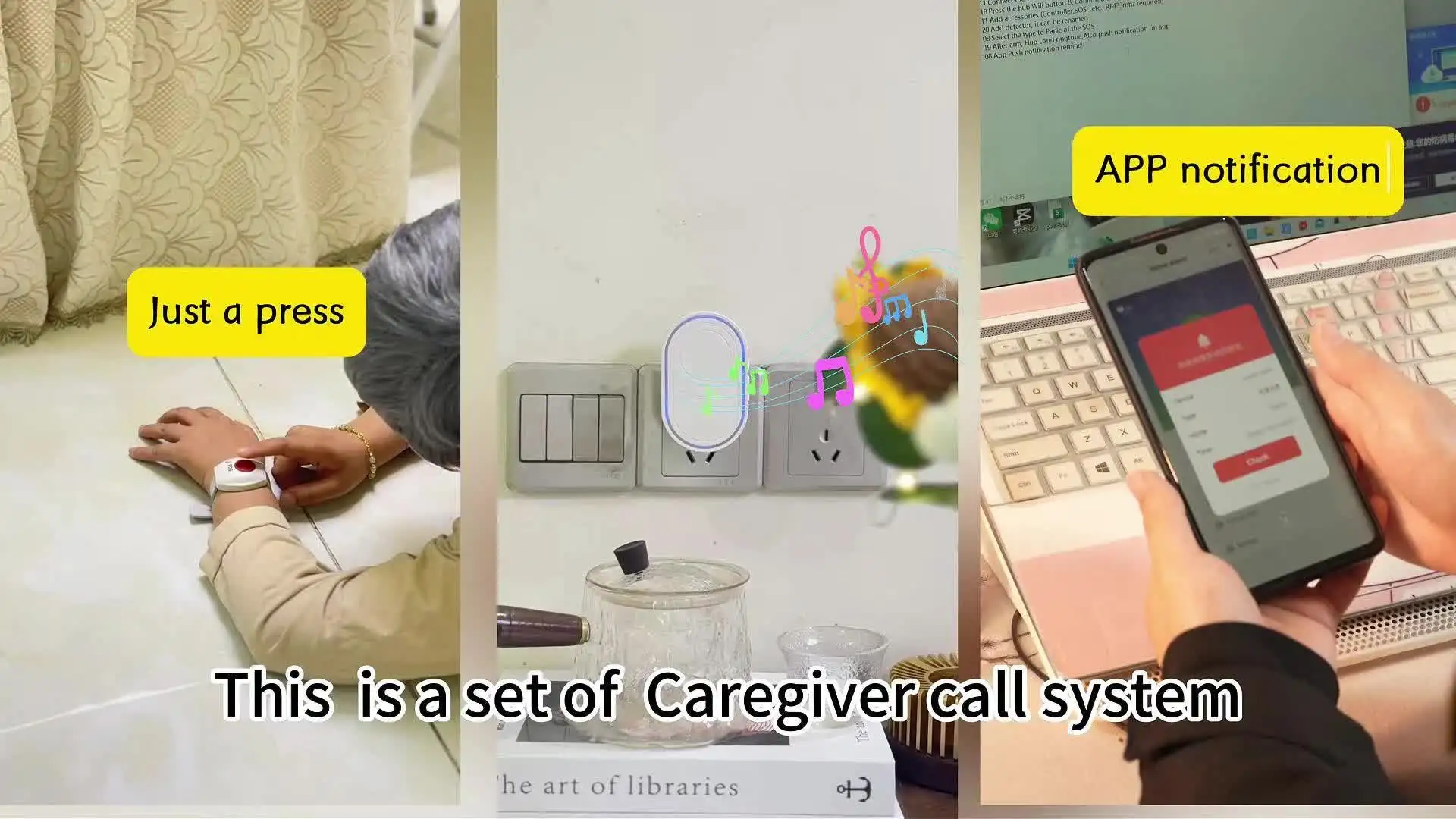
Video 1: Step-by-step guide for powering on, pairing SOS buttons, and connecting to Wi-Fi.
2.3 Connecting to Tuya Smart Life / Smart Life APP (Wi-Fi)
The WIFI host connects to your smartphone via the Tuya Smart Life or Smart Life APP. Ensure your Wi-Fi network is 2.4Ghz, as 5Ghz is not supported.
- Download and install the 'Tuya Smart' or 'Smart Life' app from your smartphone's app store (available for iOS and Android).
- Register or log in to your account.
- Ensure Bluetooth and Wi-Fi are enabled on your phone. Connect your phone to your 2.4Ghz Wi-Fi network.
- On the WIFI host, long press the 'Wi-Fi Setting' button (usually the middle button, indicated by a Wi-Fi icon). The LED light ring will flash quickly.
- In the app, tap '+' to add a device. The app should automatically detect the 'Multifunction alarm' (Gateway/Gateway).
- Select your 2.4G Wi-Fi network and enter the password.
- Once successfully added, you will receive an 'Alarm From Your Hub' notification.
- You can rename the device in the app for easier identification (e.g., "Home Alarm").

Figure 3: System Connection Diagram
2.4 Accessory Settings in APP
- In the app, navigate to the device settings and select 'Accessories setting'.
- Choose the type for your paired SOS button (e.g., 'Panic').
- Name your accessory (e.g., 'SOS 01').
- Save the settings.
2.5 Sharing Device Access
You can share access to the device with up to 20 family members or caregivers. This allows them to receive APP notifications and manage the system.
- In the app, go to the device settings.
- Select 'Share Device'.
- Add family members by entering their account details or sharing a link.
3. Operating Instructions
3.1 Triggering an Alarm
When an emergency occurs, the user presses the red SOS button on the bracelet or pendant. This action will:
- Trigger a local alarm sound and LED flicker on the WIFI host.
- Send an instant notification to all linked smartphones via the Tuya Smart Life / Smart Life APP.
Note: For a stronger alarm signal, hold the SOS button for approximately 0.5 seconds or slightly longer.

Figure 4: Alarm Trigger and Notification Flow
3.2 Muting the Alarm
The local alarm on the WIFI host can be muted in two ways:
- Via WIFI Host: Press any button on the WIFI host unit.
- Via APP: Use the 'Disarm' or 'Mute alarm sound' option within the Tuya Smart Life / Smart Life APP.
3.3 Customizing Alarm Sounds and Volume
The WIFI host offers various customization options for its local alarm:
- Ringtones: Choose from 58 optional ringtones. You can also set different ringtones for buttons installed in different locations.
- Volume: Adjust the volume across 5 levels, including a mute mode (0-120dB).

Figure 5: Ringtone and Volume Adjustment
3.4 Power Failure Notifications
The WIFI host has a built-in rechargeable battery that provides up to 5 hours of operation during a power outage. In case of AC power failure or restoration, the system will send instant APP notifications to your smartphone.

Figure 6: Built-in Rechargeable Battery and Power Notifications
3.5 Arm/Disarm Modes
The system offers various modes for convenience:
- Arm: Activates all sensors for monitoring.
- Disarm: Disables the alarm system.
- Away Arm: For when no one is home, all sensors are monitored.
- Home Arm: For when people are home, typically only perimeter sensors are monitored.
- Timer: Schedule arm/disarm times.

Figure 7: Remote Control and App Interface for Arm/Disarm Modes
4. Maintenance
4.1 SOS Button Battery Replacement
The SOS bracelet and pendant are powered by a CR2032 button battery, which can last for more than 6 months. When the battery is low, replace it with a new CR2032 battery. These are readily available in the market.
4.2 Waterproof Status
- SOS Bracelet: The SOS bracelet is waterproof, allowing it to be worn during activities like showering or washing hands.
- SOS Pendant: The SOS pendant is NOT waterproof. Avoid exposing it to water.

Figure 8: SOS Bracelet Details

Figure 9: SOS Bracelet Waterproof Feature

Figure 10: SOS Pendant (Not Waterproof)
5. Troubleshooting
- Difficulty Connecting to Wi-Fi: Ensure your Wi-Fi router is broadcasting a 2.4Ghz network. The system does not support 5Ghz Wi-Fi. Also, confirm Bluetooth is enabled on your phone during the initial setup.
- SOS Button Signal Strength: When pressing the SOS button, hold it for about 0.5 seconds or a little longer to ensure a stronger and more reliable alarm signal is sent.
- Limited Indoor Range: The indoor range for SOS buttons to the WIFI host is typically 15 to 30 meters. For very large houses, consider ordering multiple WIFI hosts. One SOS button can connect to many WIFI hosts, ensuring coverage throughout the home.
- Unclear App/Manual Translations: If you encounter difficulties due to unclear English translations in the app or manual, refer to the official Tuya Smart Life or Smart Life app guides, or consult community forums for assistance.
- SMS/Phone Call Alerts: While APP notifications are free, SMS and phone call alert services may require additional fees depending on the Tuya platform services and regional availability. Check the app for details on these premium features.
6. Specifications
| Feature | Description |
|---|---|
| Brand Name | TOPVICO |
| Model Number | TP-542DS-T |
| FCC ID | 2AURI-ZX-DB10 |
| Smart Home Platform | Tuya (Smart Life / Tuyasmart APP) |
| Function | Emergency Panic Button, Elderly Alarm, SOS Bracelet, Caregiver Pager, Watch Call, Senior Fall Alert |
| Alarm Style | Alarm voice + LED flicker + APP Notification |
| SOS Wristband | 433mhz, EV1527, 330K. Cannot work alone. Waterproof. |
| SOS Pendant | 433mhz, EV1527, 330K. Cannot work alone. NOT waterproof. |
| WIFI Alarm Host | Connects 433mhz sensors and 2.4G WIFI router, sends notices to APP. |
| Work Distance (SOS to WIFI Host) | 15 to 30m indoor, 80m (open area) |
| Work Mode | SOS sends signal to WIFI host, WIFI host sends notice via APP. |
| APP Name | Smart Life / Tuyasmart (supports English, Russian, Spanish, Portuguese, French, German, Italian, etc.) |
| Voice Assistant Support | Alexa, Google Home |
| Power Supply for SOS Buttons | 1 unit CR2032 button battery (included), >6 months working life. |
| Power Supply for WIFI Host | AC 220V (or 110V) with power plug, includes 300mAh backup lithium battery (works >5 hours during outage). Original European plug (AU adapter provided if needed). |
| DIY Alarm System Support | Max 100pcs 433mhz sensors and 10pcs remote controllers (not included). |
| Working Temperature | -20℃ to 55℃ |
| WIFI Host Dimensions | 90.6mm (L) x 56.6mm (W) x 21.5mm (H) |
| SOS Pendant Dimensions | 68.1mm (L) x 42.2mm (W) x 16mm (H) |
| SOS Bracelet Dimensions | 244mm (L) x 16mm (W) x 43mm (Button Diameter) |

Figure 11: WIFI Host and SOS Pendant Dimensions

Figure 12: WIFI Host Button Functions

Figure 13: Available Plug Types (UK, US, EU) and AU Adapter
7. User Tips
- App Selection: Always use the 'Tuya Smart' or 'Smart Life' app for optimal functionality and compatibility with other Tuya devices.
- Wi-Fi Compatibility: Remember that the device only works with 2.4Ghz Wi-Fi networks. Ensure your router is configured correctly or select the 2.4Ghz band during setup.
- SOS Button Press Duration: For reliable alarm activation, press and hold the SOS button for at least half a second. A quick tap might not always register.
- Coverage in Large Homes: If you live in a large home, consider purchasing additional WIFI host units. A single SOS button can be paired with multiple hosts to extend the effective range and ensure the alarm is heard or notifications are sent from the nearest host.
- Water Safety: The SOS bracelet is waterproof and safe for use in showers or while washing hands. However, the SOS pendant is NOT waterproof and should be kept away from moisture.
- Notification Costs: While APP push notifications are free, be aware that SMS and phone call alert services may incur additional charges from the Tuya platform, depending on your region and chosen services.
8. Frequently Asked Questions (FAQ)
- Q: Does this device automatically detect falls?
- A: No. The SOS alert must be activated manually by pressing the SOS button.
- Q: Are APP notifications free?
- A: Yes. APP push notifications are free.
- Q: Do SMS and phone call alerts require payment?
- A: Yes. SMS and phone call services require additional fees depending on Tuya platform services and regional availability.
- Q: Does it work with Apple iOS?
- A: Yes, the Tuya Smart / Smart Life app is available for iOS devices.
- Q: Does this device warn my mobile if I'm away from home?
- A: Yes, via APP notifications, as long as your smartphone has an internet connection.
- Q: Does the button trigger the app?
- A: Yes, pressing the SOS button sends a signal to the WIFI host, which then triggers a notification in the app.
- Q: How many panic buttons come with the system?
- A: The standard system typically includes one SOS bracelet and one SOS pendant. Additional buttons can be purchased separately and paired with the WIFI host.
9. Warranty and Support
9.1 Product Guarantee
This product comes with a 12-month guarantee from the date of purchase.
9.2 After-Sale Service
For any product or service issues, please contact the seller directly. When reporting a problem, it is helpful to provide images or videos of the defective goods to assist in troubleshooting.
- Technical Support: Professional technicians are available to help identify and resolve issues.
- Product Problems: If a genuine product problem is confirmed, a new package will be sent, or a full refund will be issued.
- Repairs: If repairs are needed within the guarantee period, please contact the seller. Outside the guarantee period, the buyer is responsible for the cost of returning the item or the shipping cost of parts.
TOPVICO Electronic Technology Co., Ltd. was established in 2011 and is committed to providing competitive home security and automation products.