
1. Product Overview
The K&F Concept T255A4 is a versatile aluminum alloy camera travel tripod designed for photographers and videographers. It features a 360° rotatable ball head, a transverse center column for unique shooting angles, and can be converted into a monopod. Its compact and flexible design makes it ideal for various photography needs, supporting a wide range of cameras including DSLRs, mirrorless systems, action cameras, and smartphones.

2. Specifications
| Feature | Specification |
|---|---|
| Material | Aluminum Alloy |
| Max Extended Length | 1700mm (67 inches) |
| Folded Length | 430mm (16.9 inches) |
| Weight (with ball head) | 1.69kg (3.72 lbs) |
| Load Capacity | Up to 10kg (22.04 lbs) |
| Leg Sections | 5 sections |
| Max Tube Diameter | 25mm |
| Locking System | Metal spiral locking |
| Ball Head | 360° Rotatable, 28mm diameter sphere |
| Quick Release Plate | Exclusive Design, Aluminum Magnesium Alloy |
| Center Column | Transverse (0-180°), 360° Horizontal Rotation |
| Monopod Function | Detachable, can be used as walking stick |
| Compatibility | Video Camera, Action Cameras, 360° Video Camera, Point & Shoot Cameras, Special Camera, Smartphones, Mirrorless System Camera |
3. Package Contents
- 1 x K&F Concept T255A4 Tripod
- 1 x Storage Bag
- 1 x Quick Release Plate (Note: Two types of quick release plates may be shipped randomly)
- 2 x Hex Wrenches
- 1 x User Manual (this document)


4. Setup Instructions
- Unfolding the Tripod: Release the leg angle adjustment buttons and extend the tripod legs to your desired angle. Secure the leg sections by twisting the metal spiral locks clockwise until firm.
- Adjusting Height: Loosen the leg locks on each section, extend the legs to the desired height, and then tighten the locks. For additional height, extend the center column by loosening its lock and pulling it upwards.
- Attaching the Camera:
- Ensure the quick release plate is securely attached to your camera's tripod mount.
- Open the quick release clamp on the ball head.
- Slide the camera with the quick release plate into the clamp until it clicks into place. Tighten the clamp securely.

Figure 4: Close-up of the ball head and quick release plate, showing how to attach a camera. - Adjusting Ball Head: Loosen the main locking knob on the ball head to adjust the camera's angle. Use the panning knob for horizontal rotation. Tighten the knobs once the desired position is achieved. The integrated bubble level helps ensure a perfectly level shot.
- Transverse Center Column Setup: To use the transverse center column, loosen the center column lock, pull the column up, and then rotate it 90 degrees horizontally. Secure it in place by tightening the center column lock. This allows for macro photography or shooting from unique low angles.
- Monopod Conversion: One of the tripod legs can be detached and combined with the center column to form a monopod. Unscrew the designated leg from the tripod body, then unscrew the center column from the main chassis. Attach the detached leg to the bottom of the center column.

5. Operating Instructions
- Standard Shooting: Adjust the tripod legs and center column to achieve the desired height and stability. Ensure all locks are tightened before mounting your camera.
- Panoramic Shooting: The ball head allows for 360° horizontal rotation. Loosen the panning lock knob on the ball head, rotate the camera to capture your panorama, and then tighten the lock.
- Macro Photography / Low Angle Shooting: Utilize the transverse center column by inverting it or positioning it horizontally for extreme low-angle shots or macro photography.
- Monopod Use: Once converted, the monopod can be used for quick setup and mobility, especially in crowded areas or when a full tripod is not feasible. It can also serve as a walking stick.


6. Maintenance
- Cleaning: Regularly wipe down the tripod with a soft, dry cloth to remove dust and dirt. For stubborn grime, use a slightly damp cloth and mild soap, then dry thoroughly. Avoid harsh chemicals.
- Lubrication: The metal spiral locking mechanisms are designed for durability. If they become stiff, a small amount of silicone-based lubricant can be applied, but generally, they require minimal maintenance.
- Storage: Store the tripod in its carrying bag in a cool, dry place away from extreme temperatures and humidity. Ensure it is clean and dry before storage to prevent corrosion.
- Inspection: Periodically check all screws, knobs, and leg locks for tightness. Tighten any loose components to ensure safe operation.
7. Troubleshooting
- Tripod feels unstable: Ensure all leg locks and the center column lock are fully tightened. Check that the leg angles are evenly spread and the tripod is on a flat, stable surface.
- Camera wobbles on ball head: Verify that the quick release plate is securely attached to your camera and that the quick release clamp on the ball head is fully tightened. Also, ensure the main ball head locking knob is firm.
- Leg sections are difficult to extend/retract: Check for any debris or dirt in the locking mechanisms. Clean as per maintenance instructions. If the issue persists, a small amount of lubricant might be needed.
- Ball head movement is not smooth: Ensure the ball head locking knob is sufficiently loosened. If there's resistance, check for any foreign particles.
8. User Tips
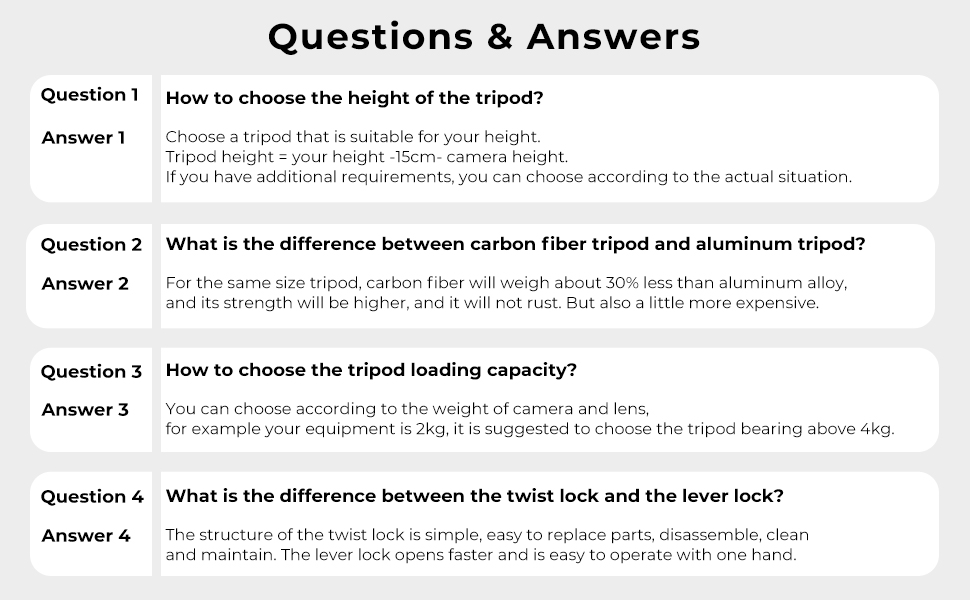
- Choosing Tripod Height: A general guideline for comfortable shooting height is: your height - 15cm - camera height. Adjust based on your specific needs and shooting conditions.
- Selecting Load Capacity: Always choose a tripod with a load capacity significantly higher than the combined weight of your camera and heaviest lens. For example, if your equipment weighs 2kg, it is recommended to choose a tripod with a bearing capacity above 4kg to ensure stability.
- Telephoto Lens Balance: For cameras with heavy telephoto zoom lenses, consider using a tripod mount ring or a telephoto lens bracket. This helps distribute the weight more evenly and prevents strain on the camera's lens mount and the tripod's ball head.
- Twist Lock vs. Lever Lock: The T255A4 uses metal spiral (twist) locks. Twist locks are generally simple in structure, easy to disassemble, clean, and maintain, offering a secure hold.
9. Warranty & Support
This K&F Concept T255A4 Tripod comes with a 1-year warranty from the date of purchase, covering manufacturing defects. For technical support, warranty claims, or any product-related inquiries, please contact K&F CONCEPT customer service through their official channels.