
1. Package Contents
Please check the package carefully to ensure all accessories are present and in good condition.
- SNGUSCAM H2 4G LTE Trail Camera
- Antenna
- Mounting Strap
- Wall Mount Bracket and Screws
- USB Cable
- User Guide (PDF available online)
- SIM Card Ejector Tool (for Nano SIM)

Image: Trail Camera and various accessories including mounting hardware and cables.

Image: H10 Trail Camera variant (Light Grey).
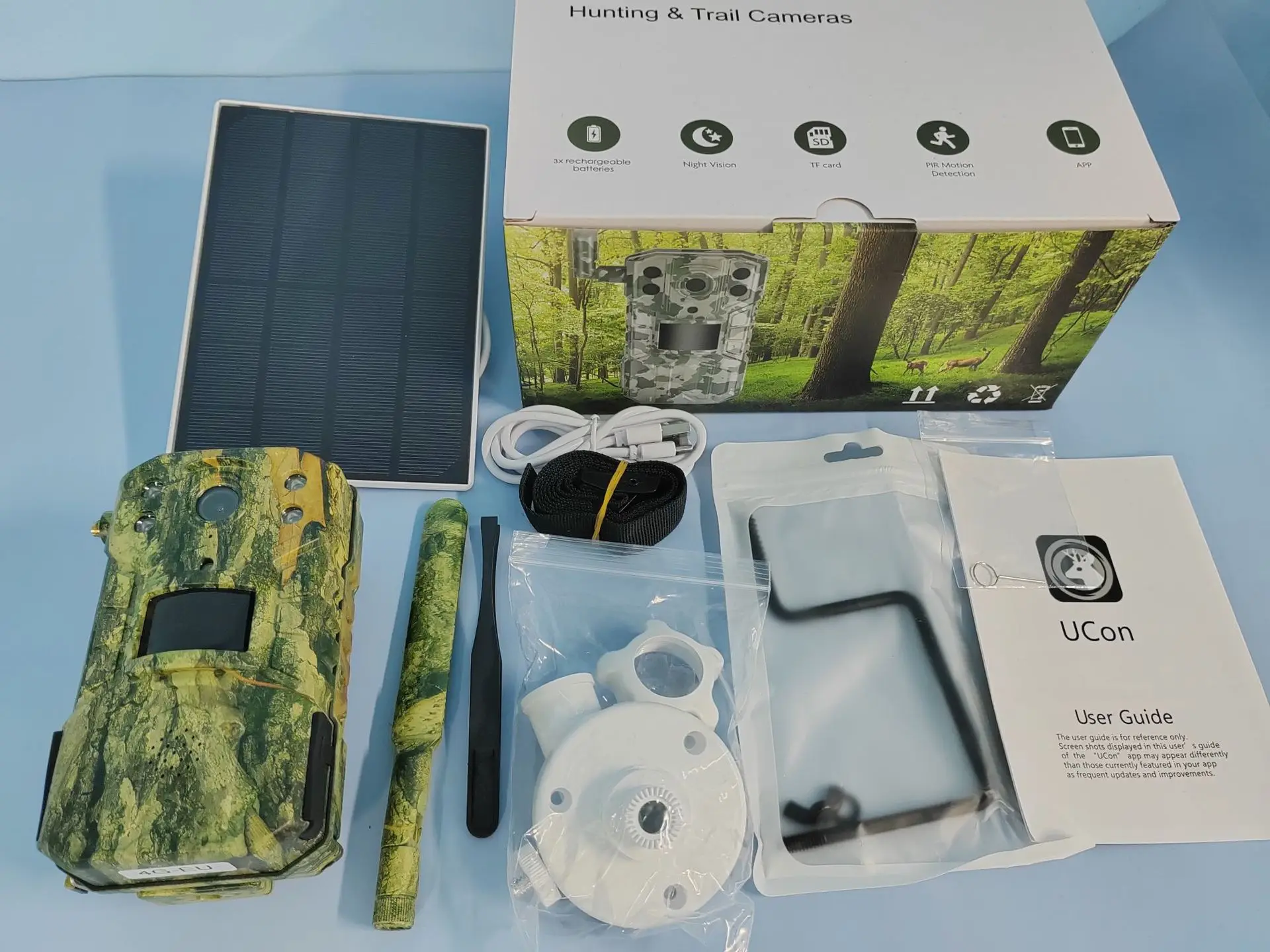
Image: H10 Trail Camera with Solar Panel variant (Light Green).
2. Parts Identification

Image: Detailed diagram showing front, back, right, and left views of the camera with labeled components.
Front View:
- Antenna
- Infrared lights
- Lens
- Microphone
- Light sensor
- PIR sensor
- Speaker
Back View:
- Lock hole
- Tie hole
- QR Code
Right View:
- Charge indicate light
- Power input port
- Function switch
- Working status indicator
Left View:
- Antenna seat
- 4G Signal light
- TF Card slot
- SIM Card slot
- Reset key
- Battery cover latch
3. Setup Guide
3.1. Unboxing and Initial Check
Open the package box and verify that all accessories are present. Ensure the camera is free from any visible damage.
3.2. Battery Installation
The H2 Trail Camera requires 3PCS 18650 batteries (not included in the package). Open the battery cover latch on the left side of the camera, insert the batteries with correct polarity, and close the cover securely.
3.3. Powering On and Antenna Installation
Attach the antenna to the antenna seat on the left side of the camera. Power on the camera using the function switch.
Video: Demonstrates unboxing, powering on the camera, and installing the antenna (0:00 - 0:48).
3.4. SIM Card Insertion and Device Reset
Insert a 4G SIM card into the SIM Card slot. Press and hold the reset button for 5-8 seconds. After hearing the prompt (reset), observe the signal light of the camera.
Video: Demonstrates inserting the SIM card and performing a device reset (0:49 - 1:59).
3.5. App Download and Device Pairing
Download the UCon app from your mobile app store. In the app, select "Add 4G device" and scan the QR code on the camera to complete the pairing process.
Video: Demonstrates adding the 4G device via the UCon app by scanning the QR code (2:00 - 2:42).
3.6. Mounting the Camera
Use the provided mounting strap or wall mount bracket to secure the camera in your desired location. Ensure it is stable and has a clear field of view.

Image: Trail camera securely mounted on a tree, demonstrating outdoor placement.
4. Operation
4.1. Mobile App Features (UCon App)
- View & Delete Images/Videos: Access and manage captured media directly from your phone.
- 2-Way Audio: Listen to sounds from the camera's location and speak through the camera's speaker.
- Manage Camera Settings: Adjust various camera parameters remotely.
- Monitor Battery & Cell Signal: Keep track of the camera's power and network connectivity.
- Share to any phone: Easily share access to the camera with others.
4.2. Motion Detection
The camera features an advanced PIR sensor that detects mammals (body temperature around 37°C/98.6°F) and sends instant alerts to your phone. The PIR trigger time is 0.5 seconds, ensuring quick capture of events.

Image: Examples of wildlife (deer, rabbit, wild boars, meerkats) captured by the camera, highlighting its fast trigger speed.
4.3. Night Vision
The camera supports auto-switching to night vision mode with a visible range of up to 32 feet (10 meters), allowing clear observation even in complete darkness.
4.4. Live View
Enjoy 2.7K live view directly through the UCon app, providing real-time monitoring of the camera's surroundings.
4.5. Storage
The camera offers 1 month of free cloud storage. For local storage, it supports an SD card up to 128GB.
5. Maintenance
5.1. Waterproof Rating
The H2 Trail Camera has an IP66 waterproof design, allowing it to operate reliably in severe weather conditions, including rain and splashing. It is not designed for underwater diving or prolonged submersion.

Image: Camera shown with water splashing on it, illustrating its IP66 waterproof capability.
5.2. Cleaning
Only use a provided microfiber cloth or a professional lens pen to clean the camera lens. Avoid using fingers or rough paper towels, as this can scratch the lens coating.
5.3. Storage
Store the camera in a cool, dry place when not in use. Avoid leaving it in hot environments, such as a car, for extended periods, as this can damage internal components.
6. Troubleshooting
6.1. Signal Indicator Color Changes
The 4G Signal light on the camera indicates network status:
- Red - Blue Blinking: The camera is currently looking for the network.
- Red Blue Fast Blinking: The network has been found.
- Blue Light Long On: The camera has successfully received a 4G signal.
6.2. General Connectivity Issues
- Ensure the 4G SIM card is correctly inserted and activated.
- Perform a device reset (as described in Section 3.4) if the camera fails to connect to the network.
- Check that the UCon app has all necessary permissions enabled on your smartphone.
- Verify that there is sufficient 4G network coverage in the camera's installation area.
7. Specifications

Image: Detailed table outlining the technical specifications of the camera.
| Attribute | Value |
|---|---|
| Sensor | CMOS sensor, Max 14.0MP (interpolation) |
| Storage medium | Support SD card (Max. 128G), Cloud storage |
| Lens | F=1.6 f=6.0 |
| PIR trigger time | 0.5s |
| IR Leds | High power LED with ICR, strong 4pcs 940nm |
| PIR sensitivity | Adjustable (High/Middle/Low) |
| PIR angle | 50° |
| PIR delay | 10s-5min (Optional) |
| Working Mode | Photo mode/Video mode |
| Photo resolution | Format : JPEG Resolution : 14.0MP |
| Video resolution | Format : MP4, support H.265, Resolution : 2.7K |
| Video Length | 5s |
| Microphone | Yes, Built-in |
| Speaker | Yes, Built-in |
| Remote operation | Support, mobile phone remote operation, Two-way awakening |
| Mobile APP | Yes, APP Name: UCON |
| Live broadcast | Yes |
| Cloud storage | Yes |
| Working voltage | DC 5V |
| Battery | 3pcs 18650 batteries (not included in package) |
| Power Charger | DC 5V/1A |
| SIM card | Nano SIM card |
| System language | Automatic, switching with mobile phone system |
| Stand-by time | 150 days (3pcs 18650 Batteries) |
| Working temperature | -20°C- 70°C |
| Waterproof level | IP66 |
| Dimensions | 118(L)*71(W)*140(H)mm (without antenna). Antenna is 180mm. |
| Weight | Approx 297±5g (battery excluded) |
8. Safety Warnings
8.1. Solar Hazard (Extreme Danger)
NEVER look directly at the Sun with this camera. Doing so will cause instant and irreversible eye damage or permanent blindness. Do not leave the camera unattended in direct sunlight. The lenses can act as a magnifying glass and start a fire.
8.2. Usage Safety
- Movement Hazard: Do not walk, run, or operate machinery while looking through the camera's live view. This can disrupt depth perception and may cause falls, collisions, or traffic accidents.
- Pinch Hazard: Be careful when handling the camera, especially when opening or closing compartments, to avoid pinching fingers.
8.3. Child Safety
- Adult Supervision: Children should only use this device under adult supervision.
- Choking Hazard: Keep small detachable parts (like SIM card ejector tool, screws) away from children and pets.
- Strangulation Hazard: If the product includes a neck strap, keep it away from small children to prevent entanglement or strangulation.
9. User Tips
- Battery Life: For optimal performance and to achieve the advertised 150 days standby time, use high-quality 18650 batteries. Battery life can vary based on usage frequency and environmental conditions.
- SIM Card Compatibility: The camera is designed to work with 4G SIM cards. Ensure your SIM card is activated and has an active data plan for remote functionality.
- App Usage: Familiarize yourself with the UCon app's features to fully utilize remote viewing, settings management, and two-way audio.
- Signal Strength: For reliable 4G connectivity, place the camera in an area with good cellular signal strength.
10. Warranty and Support
10.1. Manufacturer Information
Manufacturer: SUNGUS International Trade (ShenZhen) Limited.
Address: 605, building 14, Lane9, Hekan Village, bantian Street, Shenzhen, Guangdong, China
Phone: 86-18598039583
Email: hosheahongcamera@gmail.com
10.2. EU Authorized Representative
Representative: SUNBURST INNOVATIONS SP. Z O.O.
Address: ul. FRANCISZKA KLIMCZAKA 5, lok 95, 02-797 Warszawa
Contact: 732099593
10.3. Regulatory Compliance
This optical product is manufactured in accordance with general consumer safety regulations. It is designed for outdoor observation and is safe for normal consumer use when instructions are followed.
The materials used in this product (including the rubber armor, optical glass, and ABS plastics) are compliant with RoHS directives. They are free from hazardous levels of lead, mercury, cadmium, and other restricted substances, making them safe for skin contact.
10.4. Additional Resources
A detailed user manual in PDF format is available for download. Please refer to this document for further information and advanced settings: Download User Manual (PDF)