
1. Introduction
The Godox iT32 & X5 iFlash Camera Flash system offers a versatile and modular lighting solution for photographers. This kit combines the iT32 TTL Mini Flash with an X5 Wireless Trigger, providing full TTL and HSS support across various camera brands (Canon, Nikon, Sony, Fujifilm, Olympus/Panasonic, Leica) by simply interchanging the X5 hotshoe version. The X5 functions as both an on-camera hotshoe mount and a wireless transmitter, enabling seamless transitions between on-camera and off-camera use, as well as complex multi-light setups. With magnetic modularity, cross-brand compatibility, and Godox's 2.4GHz wireless integration, this system empowers photographers to control light effortlessly.

2. What's in the Box
The standard package for the iT32 + X5 N (Nikon version shown) includes the following items:
- iT32 Flash Unit x1
- Diffuser x1
- Magnetic Base x1
- V2 CTO Color Filter x1
- 1/1 CTO Color Filter x1
- Storage Bag x1
- USB Type-C Charging Cord x1
- X5 Wireless Trigger (specific version, e.g., X5 N for Nikon) x1

3. Setup Guide
3.1 Attaching the X5 Trigger to the iT32 Flash
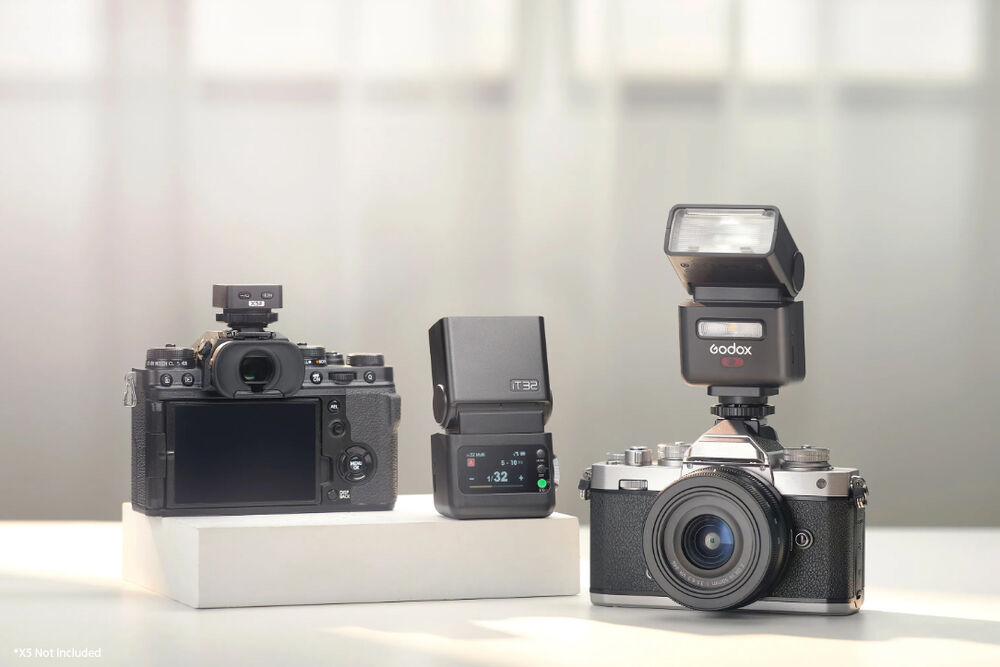
- Align the X5 trigger with the bottom of the iT32 flash unit. The magnetic interface will automatically absorb the X5 for easy attachment.
- Ensure the connection is firm and secure.
3.2 Mounting the X5 Trigger to Your Camera
- With the X5 attached to the iT32, rotate the locking ring of the X5 trigger.
- Carefully insert the X5 into the hot shoe mount of your camera.
- Rotate the locking ring until it is fully locked to ensure a secure connection.

3.3 Charging the Units
Both the iT32 flash and the X5 trigger have built-in rechargeable batteries. Use the provided USB Type-C charging cord to charge them.
- iT32 Flash: A full charge takes approximately 1 hour and 10 minutes.
- X5 Trigger: A full charge takes approximately 3 hours when connected to the iT32.
4. Operating Instructions
4.1 Power On/Off
Locate the power button on the iT32 unit to turn the flash on or off. The X5 trigger does not have a separate power button; it powers on when attached to the iT32 or a camera hotshoe.
4.2 Flash Modes
The iT32 supports the following flash modes:
- TTL (Through-The-Lens) Auto Flash: Automatically adjusts flash output for optimal exposure.
- Manual Flash: Allows precise control over flash power from 1/128 to 1/1, with 1/3 stop increments.
- Multi (Stroboscopic) Flash: Fires a series of rapid flashes (up to 100 times) with an output range from 1/128 to 1/4.
4.3 Wireless Operation (Godox 2.4GHz X System)
The iT32 and X5 are integral parts of the Godox 2.4GHz X wireless system, offering flexible control:
- On-Camera Use: When the iT32 is attached to the X5, and the X5 is mounted on your camera's hotshoe, the system functions as an on-camera flash.
- Off-Camera Triggering: Detach the X5 from the iT32 and mount it on your camera's hotshoe. The X5 automatically switches to trigger mode, allowing wireless control of the iT32 and other compatible Godox flashes within a range of up to 20 meters (separated triggering).
- Multi-Light Sync: When the iT32 and X5 are used together (iT32+X5 setting), they act as a master unit to trigger multiple Godox flashes simultaneously. In this configuration, the maximum control distance is approximately 80 meters.

4.4 Controls and Display
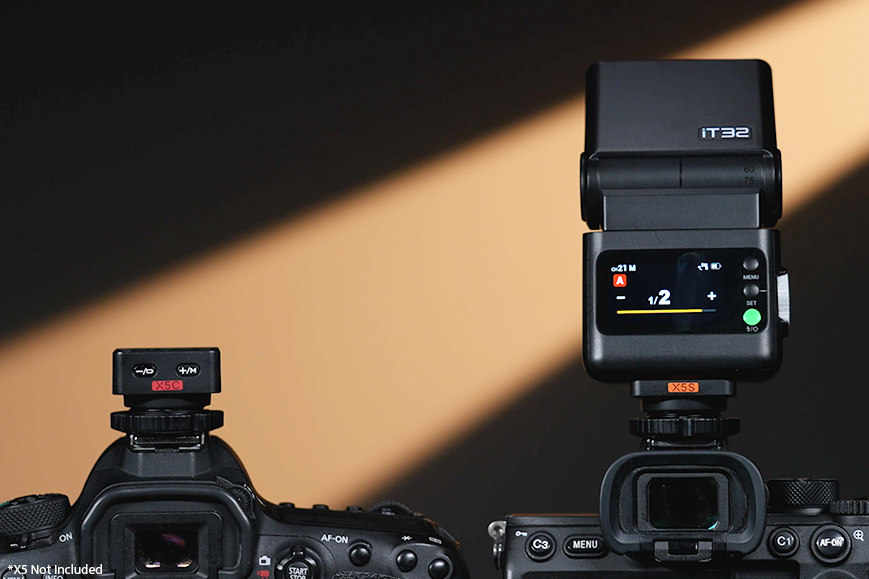
- Color Touchscreen: The iT32 features an intuitive color touchscreen for easy navigation and setting adjustments.
- LED Modeling Lamp: A convenient LED modeling light is integrated, with adjustable brightness levels from 1 to 10.
- Flash Exposure Compensation (FEC): Adjust flash output from -3.0 to +3.0 in 1/3 stop increments.
- S1/S2 Settings: Optical slave modes for triggering the flash by another flash.
- TCM Conversion: Available in Wi-Off mode for converting TTL values to manual power settings.
- Rotating Flash Head: The flash head can be rotated for bounce flash and creative lighting angles.
- Built-in Reflector and Diffuser: For light shaping and softening.


4.5 Advanced Sync Features
- High-Speed Sync (HSS): Allows flash synchronization at shutter speeds faster than the camera's native sync speed (up to 1/8000 seconds, or 1/80000 seconds with Sony cameras equipped with global shutter).
- First-Curtain Sync: Flash fires at the beginning of the exposure.
- Second-Curtain Sync: Flash fires at the end of the exposure, useful for capturing motion trails.
- Global Shutter Sync Shooting and Radio Wireless Global Shutter Sync: These settings are only available when using the iT32 with the optional X5S model (for Sony cameras).
5. Maintenance
- Charging: Regularly charge the iT32 and X5 batteries using the provided USB-C cable to ensure optimal performance.
- Firmware Updates: Connect the iT32 to a computer via its USB-C port to perform firmware updates, ensuring compatibility and access to new features.
- Over-Temperature Protection: The iT32 is equipped with over-temperature protection to prevent damage during extended use. Allow the unit to cool down if this feature activates.
- Cleaning: Use a soft, dry cloth to clean the flash unit and trigger. Avoid using harsh chemicals or abrasive materials. Keep the hotshoe contacts clean and free of debris.
- Storage: Store the unit in the provided storage bag in a cool, dry place when not in use.
6. Troubleshooting
- Flash Not Firing:
- Check battery levels on both iT32 and X5.
- Ensure the X5 is securely mounted on the camera hotshoe and the locking ring is tightened.
- Verify flash mode settings (TTL, Manual, Multi) and wireless group/channel settings.
- Confirm camera compatibility with the specific X5 version.
- Wireless Connection Issues:
- Ensure both iT32 and X5 are within the specified transmission range (20m for separated triggering, 80m for iT32+X5 as master).
- Check for obstructions between the units.
- Verify that the wireless groups and channels are correctly set and match.
- Battery Level Indicator: The iT32's screen displays the battery level for both the flash and the attached X5 trigger, allowing you to monitor power status in real-time.
- System Status: The iT32 automatically identifies the attached X5 version and displays key information, minimizing errors and ensuring smooth shooting sessions.
- Limited Features: Certain features like HSS support and second-curtain sync may be limited depending on your specific camera model. Refer to your camera's manual for full compatibility details.
7. Specifications
| Feature | Specification |
|---|---|
| Model Number | ML100R (iT32) |
| Photography Accessories Type | Photography Kits |
| Voltage Range | USB (5-20V DC) |
| Power Supply (iT32) | 7.4V/900mAh Lithium Battery |
| Power Supply (X5) | 3.8V/100mAh Lithium Battery |
| Recycle Time (1/1 step) | Approx. 1.5s |
| Number of Flashes (1/1 step) | Approx. 510 |
| Power Saving | Standby and auto off functions |
| Sync Triggering Mode | Hot shoe, 2.5mm sync cord |
| Dimension (iT32) | 56*39*101mm |
| Dimension (X5) | 1.26*1.26*1.06mm |
| Net Weight (iT32) | 169g |
| Net Weight (X5) | 23g |
| Wireless Function | Sender, Receiver |
| Sender Groups | M, A, B, C (iT32+X5 S/N/F/O); A, B, C, D (iT32+X5 C) |
| Receiver Groups | A, B, C, D |
| Transmission Range (approx) | Max. 80m (Max. 20m in separated triggering) |
| Channels | 32:1-32 |
| ID | OFF/1-99 |
| Guide Number | Approx. GN18 (ISO 100, in meters) / 59' at ISO 100 |
| Flash Duration (t0.1) | 1/1000s-1/30000s |
| Exposure Control System | TTL auto flash and manual flash |
| Flash Exposure Compensation | ±3 steps with 1/3 increment each step |
| Sync Mode | High-speed sync (up to 1/8000s or 1/80000s with Sony global shutter), first-curtain sync, second-curtain sync |
| Multi Flash | Provided (up to 100 times, 100Hz) |

8. User Tips
- Magnetic Attachment: The iT32 and X5 utilize a magnetic interface for quick and secure attachment. This makes switching between on-camera and off-camera setups very efficient.
- Cross-Brand Compatibility: Remember that the iT32 flash body is universal, but you need the specific X5 version (e.g., X5C for Canon, X5N for Nikon, X5S for Sony, X5F for Fujifilm, X5O for Olympus/Panasonic, X5L for Leica) to match your camera's hotshoe and TTL system.
- Sony Camera Compatibility: For Sony users, the X5S trigger is compatible with models such as a77 II, a99, a77, DSC-RX10, a6000, a7R, a350, a7R II (4.0), a7R III, a7M3, a9, a7R IV, a7R5, a7M IV, ZV-E10, a9 III, a7C, a7C II, a6400, and a6500.
- Triggering Other Godox Flashes: The X5S, when paired with the iT32, can act as a sender unit to control other Godox flashes within the wireless X system, including AD100Pro II, AD200Pro II, AD600Pro II, AD600BM II, iT30Pro, V100, V480, and Lux Master models.
- X5 Battery Monitoring: Although the X5 trigger doesn't have a power on/off button, you can check its internal 3.8V, 100mAh lithium battery level via the iT32's menu when the X5 is attached.
9. Warranty and Support
For warranty information, technical support, or service inquiries, please contact your retailer or the official Godox customer service. Keep your proof of purchase for any warranty claims.