
1. Introduction
The Flipsky FSESC75100 is a high-performance Electronic Speed Controller (ESC) based on VESC firmware, designed for a variety of electric vehicles including electric skateboards, scooters, and e-bikes. It features an aluminum PCB for enhanced heat dissipation and supports a wide voltage range with regenerative braking capabilities. This manual provides essential information for the safe and effective use of your FSESC75100.
Video: Product overview, VESC Tool demonstration, application examples, and performance comparison.
2. Safety Information
⚠ Warning: Protective equipment should be worn. Not to be used in traffic.
- Always ensure proper insulation for all electrical connections to prevent short circuits.
- Operate the ESC within its specified voltage and current limits.
- Avoid contact with water or moisture unless the unit is specifically designed with a waterproof enclosure.
- Disconnect the battery before performing any maintenance or wiring changes.
- Keep out of reach of children.
3. Specifications
| Feature | Description |
|---|---|
| Model Number | 75100 Aluminum PCB |
| Material | Aluminum |
| Size | L85mm*W50.7mm*H33.8mm*H18.5mm+5.9mm USB TYPE |
| Voltage | 14-84V (4-20S) |
| Current | 100A Continuous, burst 120A |
| BEC | 5V@1.5A |
| Control Modes | BLDC square wave mode, FOC sine wave mode |
| Firmware | Latest (firmware update supported) |
| ERPM | 150000 |
| Control Interface Ports | USB, CAN, UART |
| Supported Sensors | ABI, HALL, AS5047, AS5048A |
| Input Set Support | PPM, ADC, NRF, UART |
| Wire Size | 12AWG |
| Programmable | Yes |
| Regenerative Capacity | Yes |
4. Setup Instructions
4.1. Unboxing and Inspection
Carefully unbox your FSESC75100. Inspect the unit for any visible damage. Ensure all components are present.
4.2. Wiring Connections
Connect the FSESC75100 to your motor and battery according to the following diagrams. Pay close attention to polarity and ensure all connections are secure.


4.3. Software Configuration (VESC Tool)
The FSESC75100 is configured using the VESC Tool software. It is recommended to keep the factory-shipped firmware version 5.2. Upgrading to newer firmware versions may potentially damage the ESC if not done correctly.
Important Firmware Note: Phase filtering is not available for Flipsky ESC75100 and 75200. Please turn off the phase filter function and choose "false" in VESC_TOOL when using firmware version on or above 5.3 (VESC_TOOL 3.01). Failure to turn off the phase filter will result in ESC damage. Do not restore the default parameters when using the wizard interface.
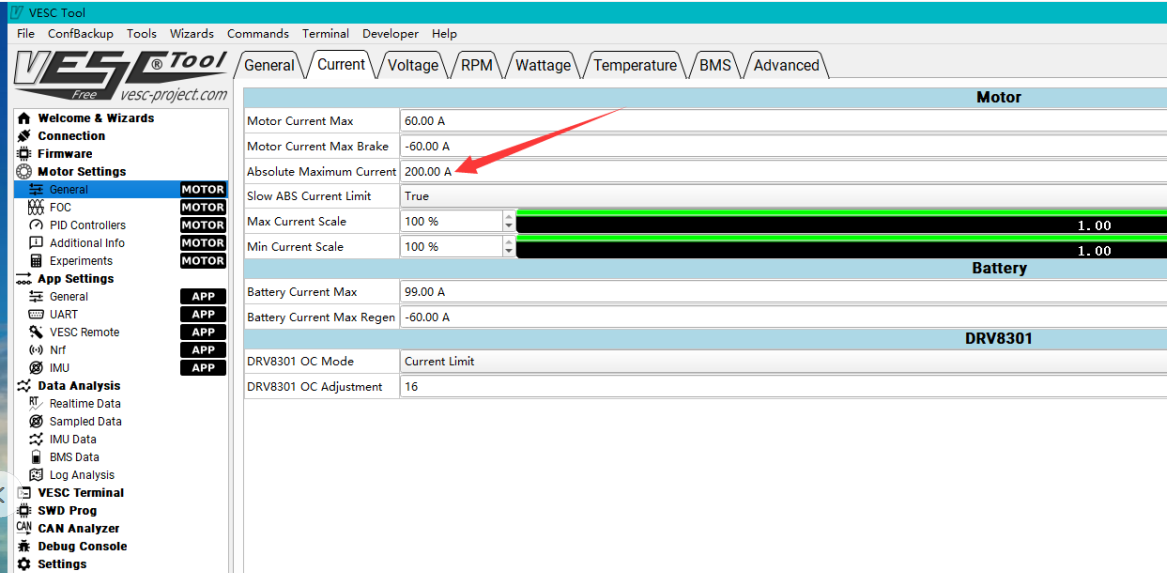
Current Limit Setting: Be careful to limit the Absolute Maximum Current below 250A in the VESC Tool settings.
5. Operating Instructions
Once properly configured with the VESC Tool, the FSESC75100 is ready for operation. Ensure your motor and battery are correctly connected and the VESC Tool settings match your application (electric skateboard, scooter, or e-bike).
- Power on your device. The ESC will initialize.
- Use your remote control (PPM, NRF) or other input methods (ADC, UART) to control the motor speed.
- The ESC supports regenerative braking, which recharges the battery during deceleration.
6. Maintenance
- Keep the ESC clean and free from dust and debris.
- Regularly check all electrical connections for tightness and signs of wear.
- Ensure the ESC is mounted in a location that allows for adequate airflow, especially if not using a water-cooling enclosure.
- Avoid exposing the ESC to extreme temperatures or direct sunlight for prolonged periods.
7. Troubleshooting
- ESC Damage after Firmware Update: Ensure phase filtering is turned off in VESC Tool for firmware versions 5.3 and above. Verify that default parameters were not restored after updating.
- Overcurrent/Overheat Protection: Check your VESC Tool settings to ensure the Absolute Maximum Current is set below 250A. Monitor the ESC temperature during operation.
- No Motor Response: Verify all wiring connections (motor, battery, control input). Check VESC Tool for any fault codes or incorrect motor detection settings.
- Intermittent Operation: Inspect for loose connections or damaged wires. Ensure your battery is adequately charged and providing stable voltage.
8. User Tips
- The FSESC75100 is known to be a good driver for various applications.
- It works effectively with 60V batteries.
- Ensure all connections are secure before operation to prevent unexpected issues.
- Regularly check VESC Tool settings, especially after firmware updates, to prevent potential damage from incorrect configurations.
9. Warranty and Support
9.1. Warranty Policy
- Consumable Electronic Products (e.g., VESC/Motor/Battery): 2 months warranty from the 7th day after shipment (checked by logistic record).
- Non-Electronic Products: 2 months warranty from the 7th day after shipment (checked by logistic record).
- If a product is returned for repair and found to be a manufacturing failure, the seller will bear the return shipping cost. If the repair is not feasible, a discount may be provided for a new replacement (excluding shipping cost). Wear and tear caused by normal use is not considered a defect.
9.2. Conditions Voiding Warranty
- Mechanical damage to electronic components or PCB.
- PCB board has repair soldering iron traces (excluding soldering the cable bullet connectors).
- Water damage or external impact damage.
- Abnormal applications beyond the product specifications.
- Products purchased from channels other than the official seller.
- Products transferred via personal second transaction without original order number or warranty card.
- Warranty is only valid for the original ordered product.
9.3. Support
For any questions regarding VESC/Motor settings or other technical inquiries, please contact Flipsky Official Store customer support. Provide your after-sales warranty card number or original order number for assistance.