
1. Introduction
Thank you for choosing the TILTA Khronos Classic Mobile Video Cage for your iPhone 17 Pro or iPhone 17 Pro Max. This comprehensive system is designed to enhance your mobile filmmaking experience, offering unparalleled functionality, protection, and versatility. This manual provides detailed instructions for the proper setup, operation, and maintenance of your Khronos system and its optional accessories.
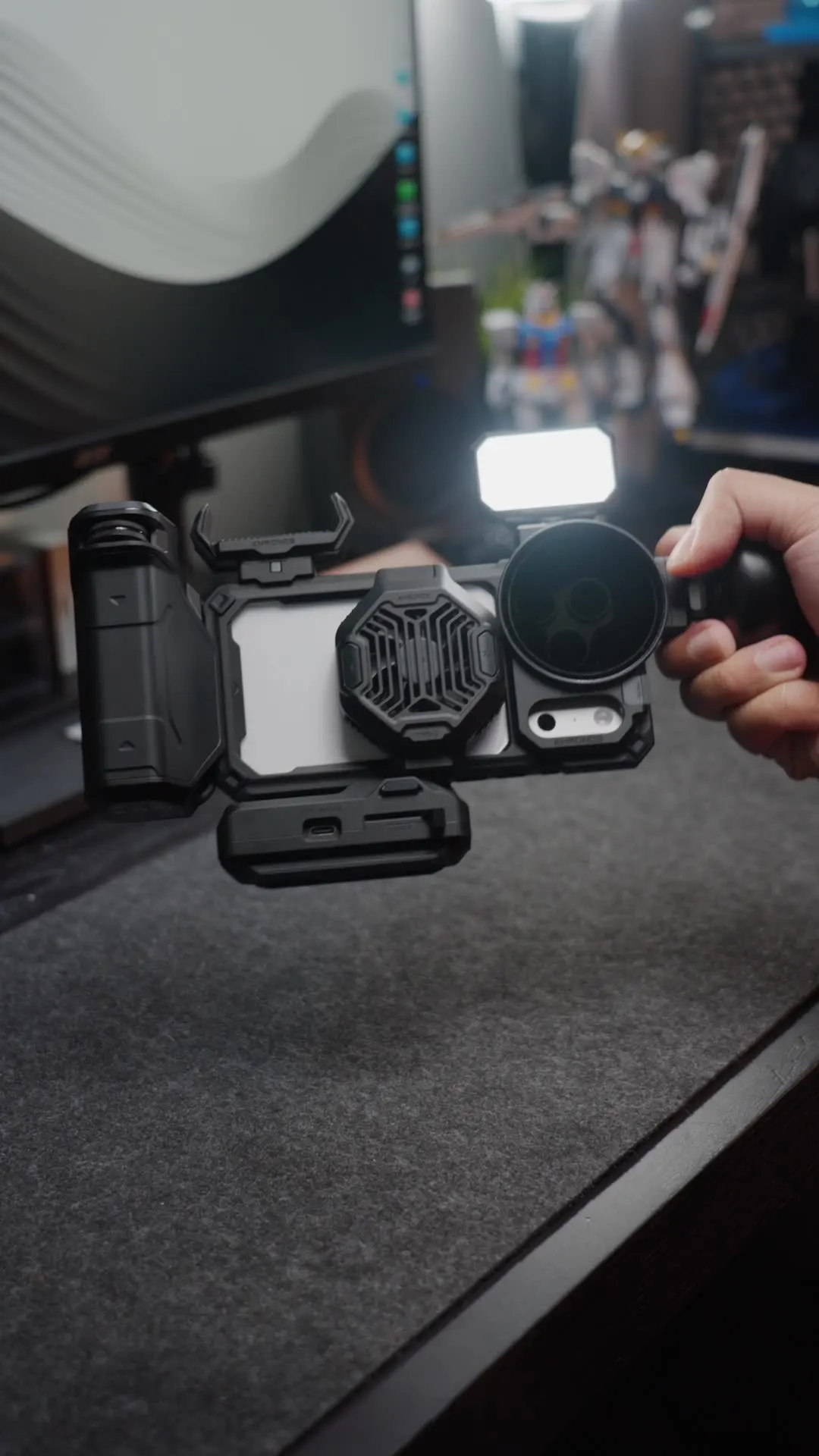
The Khronos Ultimate Kit for iPhone 17 Pro / Pro Max represents the next generation of mobile filmmaking. Designed meticulously for both models of iPhone 17, this camera cage-inspired smartphone case offers an unparalleled blend of functionality and elegance. Built to shield your phone from daily wear and tear, the Khronos case offers reliable protection without compromising on style or functionality.
Installation is easier than ever as this updated case features a quick release snap-in design, allowing users to install or remove the case quickly while ensuring any connected accessories remain securely attached. The Khronos case features integrated electronic contact points throughout, allowing you to pass power through the cage to power your accessories.
2. Safety & Warnings
General Cautions
- Keep the device away from sharp objects to avoid scratches or surface damage.
- Avoid contact with water and chemicals (such as perfume or cleaning agents). Wipe dry immediately if exposed.
- Store in a dry environment with humidity below 40% RH.
- In high-temperature environments, monitor the device to avoid overheating during extended use.
- Do not expose the device or its accessories to strong impact or vibration to prevent damage or malfunction.
Battery Safety (for Lite Control Handle)
WARNINGS:
- The lightweight control handle contains a non-removable built-in 3.7V 2.59Wh 700mAh lithium battery. Do not attempt to replace the battery yourself, as this may damage the battery or device.
- Do not expose the battery to high temperatures or place it near heat sources such as direct sunlight, heaters, microwaves, ovens, or water heaters. Overheating may cause explosion.
- Do not disassemble, modify, insert foreign objects into, or immerse the battery in water or other liquids, as this may cause leakage, overheating, fire, or explosion.
- The battery electrolyte is highly corrosive. If it comes into contact with skin or eyes, rinse immediately with clean water for at least 15 minutes and seek medical attention.
- Do not throw the battery into fire, as this may cause fire or explosion.
- Do not drop, crush, or puncture the battery. Avoid subjecting the battery to excessive external pressure, which may cause an internal short-circuit and overheating.
- Do not use damaged batteries.
- Do not store the battery in a fully discharged state for extended periods, as this may cause deep discharge and irreversible cell damage.
- Do not charge the device near flammable materials (such as carpets or wooden surfaces). Always supervise charging to ensure safety.
3. Product Overview
The Khronos system is a modular mobile video cage designed for the iPhone 17 Pro and Pro Max, offering extensive customization and accessory integration.
Khronos Lite iPhone 17 Pro / 17 Pro Max Phone Case
The core of the system, providing protection and mounting points for accessories.


Parts Overview (Phone Case)
- Filter/Lens Adapter Slot: For attaching lens adapters and filter trays.
- Magnetic Panel: For magnetic accessories.
- Foldable Stand: Integrated kickstand for vertical or horizontal viewing.
Khronos Lite Control Handle with Magnetic Mount Kit (Optional)
This handle provides additional power, focus/zoom control, and stability.
Parts Overview (Control Handle)
- Power/Record Button: Hold for 1 second to power on/off. Bluetooth activates automatically.
- Shutter Button: For photo/video capture.
- Zoom Lever: Push left/right to zoom in/out.
- Focus Wheel: Rotate to adjust focus (App Mode).
- Function Button (FNC): Triple press to switch modes, hold with zoom lever for quick zoom.
- Power Indicator Light: Shows power status.
- USB-C Port: Input Power: 5V / 0.5A (2.5W).
- 1/4"-20 Thread with Locating Points: For mounting to other gear.
- Quick-Release Pins: For attaching to the phone case.
- Clamp: Secures the handle to the case.
- Safety Lock: Reinforces the connection.
Other Key Accessories
- Khronos Cooling System V2: 22W variable frequency heat dissipator with MagSafe wireless magnetic connection.
- Khronos Quick Release USB-C Hub: Provides additional USB ports for SSDs and an HDMI port for external monitors, with an integrated ARCA plate.
- Khronos Mini LED Panel: Daylight Mini LED Light with CRI ≥95RA, 3 brightness levels, and adjustable mount.
- Khronos Circular Wooden Handle: Alternative operating handle with integrated NATO Rail.
- 58mm Filter Tray: Mounts to the Khronos Case for 58mm filters.
- Magnetic 58mm Variable ND Filter (2-5 Stops): Provides greater exposure control.
- Magnetic 58mm Polarizer with Black Mist 1/2 Filter: Reduces reflections and softens images.
- 17mm Thread Lens Adapter: For attaching 17mm threaded lenses.
- T Series Mount Lens Adapter: For attaching T-mount mobile lenses.


4. Setup & Installation
4.1 Installing the Lite Control Handle
- Align the handle's quick-release pins with the mounting points on the phone case.
- Slide the handle in the direction indicated by the arrow to secure it.
- Push up the safety lock to reinforce the connection. To unlock, push in the opposite direction.
4.2 Installing the Lite Control Handle with Magnetic Adapter Backplate (Optional)
- Align the Lite Control Handle's quick-release pins with the mounting points on the Magnetic Adapter Backplate.
- Slide the handle in the direction indicated by the arrow to secure it. Push up the safety lock to lock. Push in the opposite direction to unlock.
- Magnetically attach the Adapter Backplate to the back of the phone to complete installation.
4.3 Bluetooth Connection Instructions
- Ensure the control handle is installed on the phone case or magnetic adapter backplate.
- Hold the [Power/Record Button] for 1 second to power on and enter Bluetooth pairing mode. The handle will automatically power off if Bluetooth is not connected within 5 minutes after startup.
4.3.1 Bluetooth Control for Native Camera (HID Mode)
- Turn on Bluetooth on your iPhone: Go to [Settings] > [Bluetooth] > Enable [Use Bluetooth].
- Search for devices, then choose KB-lite-XXXXXX from the [Device Name] list to enter Bluetooth pairing.
- Once successfully paired, the handle will automatically reconnect when Bluetooth is enabled on both devices.
4.3.2 Bluetooth Control for Blackmagic Cam App (App Mode)
- Turn on Bluetooth on your iPhone: Go to [Settings] > [Bluetooth] > Enable [Use Bluetooth].
- Open the Blackmagic Cam app: Go to [Settings] > Enable [Use Bluetooth] > Select NUCLEUS Wireless Lens Control.
- Search for devices, then choose KA-lite-XXXXXX from the [Device Name] list to enter Bluetooth pairing.
- Once successfully paired, use the handle to record video with the Blackmagic Cam app.
4.4 Thread Lens Adapter Installation (Optional)
- Align the latch of the lens mount adapter with the slot on the phone case and snap it into place.
- Align both sides of the lens mount adapter with the phone's camera frame.
- Slide the lens mount adapter in the locking direction until you hear a “click.”
Unlocking Thread Lens Adapter
Press the bayonet release button and slide in the unlock direction to release.
4.5 Filter Tray Installation (Optional)
- Align the filter adapter latch with the slot on the phone case and snap it into place.
- Align both sides of the filter adapter with the phone's camera frame.
- Push the filter adapter in the locking direction until it clicks into place.
Unlocking Filter Tray
Press the release button and push in the unlocking direction to release.
4.6 Magnetic Filter Installation (Optional)
- Align the filter buckle with the slot on the filter mount and snap it into place.
- Once aligned, snap the filter onto the mount magnetically to complete installation.

5. Operating Instructions
5.1 Using the Foldable Stand
The integrated foldable stand allows for convenient viewing in both vertical and horizontal orientations. Simply pull out the stand from the back of the case and adjust it to your desired angle (up to 60° folding range).
5.2 Bluetooth Control Functions (Lite Control Handle)
- Function Button (FNC):
- Triple Press: Switch between HID mode (Native Camera) and App mode (Blackmagic Cam App).
- Hold: While holding, move the zoom lever to quickly zoom.
- Shutter Button:
- HID Mode: Half-Press for Focus, Full Press for Photo/Video.
- App Mode: Full Press for Video.
- Zoom Lever: Push fully left or right to zoom in or out. Note: In HID mode, zoom control in the native Camera app requires enabling [Settings] > [Accessibility] > [Zoom] on your iPhone.
- Focus Wheel: In App Mode, rotate the wheel to adjust focus.
5.3 Disconnecting Bluetooth
Press the FNC button five times to disconnect Bluetooth.
5.4 Adjusting Magnetic 58mm Variable ND Filter (2-5 Stops)
After installing the Magnetic 58mm Variable ND Filter, rotate the outer frame left or right to adjust the light reduction level.

6. Maintenance
- Regularly clean the product with a soft, dry cloth.
- Avoid using harsh chemicals or abrasive materials that could damage the finish.
- Keep the product in a cool, dry place away from direct sunlight and extreme temperatures.
- Ensure all connections and mounting points are free from dust and debris to maintain secure attachments.
- For the Lite Control Handle, ensure proper battery charging and storage as per the safety guidelines.
7. Troubleshooting
Bluetooth Connection Issues
- Check Bluetooth Status: Ensure your phone's Bluetooth is turned on.
- Check Battery Level: Make sure the device has sufficient power.
- Verify Connection Status: Confirm the handle is not already paired with another device. If so, disconnect it before pairing with the current phone.
- Restart & Reset: Restart both the phone and the handle, then re-enter Bluetooth pairing mode.
- Clear Pairing Records: In the phone's Bluetooth settings, delete the existing pairing record for the handle, then search and pair again.
- Confirm Pairing Steps: Ensure pairing is performed correctly and according to the instructions in this manual.
8. Specifications
| Component | Attribute | Value |
|---|---|---|
| Khronos Lite iPhone 17 Pro Case | Materials | PC/TPU/Aluminum Alloy/Microsuede |
| Dimensions | 6.11 x 3.07 x 0.62 in / 155.3 x 78 x 15.8 mm | |
| Weight | 0.14 lbs / 64 g | |
| Colors | Black/Light Gray/Champagne/Navy Blue | |
| Khronos Lite iPhone 17 Pro Max Case | Materials | PC/TPU/Aluminum Alloy/Microsuede |
| Dimensions | 6.64 x 3.31 x 0.65 in / 168.7 x 84 x 16.4 mm | |
| Weight | 0.16 lbs / 74 g | |
| Colors | Black/Light Gray/Champagne/Navy Blue | |
| Khronos Lite Control Handle for iPhone | Materials | Aluminum Alloy/Plastic/Stainless Steel |
| Dimensions | 3.15 x 1.62 x 1.50 in / 80.1 x 41.2 x 38.2 mm | |
| Weight | 0.16 lbs / 72 g | |
| Colors | Black/Light Gray | |
| Khronos Universal Magnetic Adapter Backplate (Optional) | Materials | Aluminum Alloy/Plastic/Stainless Steel |
| Dimensions | 4.39 x 2.28 x 0.17 in / 111.4 x 58 x 4.3 mm | |
| Weight | 0.09 lbs / 42.5 g | |
| Colors | Black/Light Gray | |
| Khronos 17mm Thread Lens Adapter for iPhone 17 Pro (Optional) | Materials | Aluminum Alloy/Velvet Pad |
| Dimensions | 2.72 x 1.98 x 0.19 in / 69.1 x 50.4 x 4.7 mm | |
| Weight | 0.01 lbs / 6.5 g | |
| Colors | Black/Light Gray | |
| Khronos 17mm Thread Lens Adapter for iPhone 17 Pro Max (Optional) | Materials | Aluminum Alloy/Velvet Pad |
| Dimensions | 2.97 x 2.04 x 0.15 in / 75.4 x 51.8 x 3.8 mm | |
| Weight | 0.02 lbs / 10.5 g | |
| Colors | Black/Light Gray | |
| Khronos T Series Mount Lens Adapter for iPhone 17 Pro (Optional) | Materials | Aluminum Alloy/Velvet Pad |
| Dimensions | 2.72 x 1.98 x 0.15 in / 69.1 x 50.4 x 3.7 mm | |
| Weight | 0.01 lbs / 6 g | |
| Colors | Black/Space Gray | |
| Khronos T Series Mount Lens Adapter for iPhone 17 Pro Max (Optional) | Materials | Aluminum Alloy/Velvet Pad |
| Dimensions | 2.97 x 2.04 x 0.15 in / 75.4 x 51.8 x 3.8 mm | |
| Weight | 0.02 lbs / 7 g | |
| Colors | Black/Space Gray | |
| Khronos 58mm Filter Tray for iPhone 17 Pro (Optional) | Materials | Aluminum Alloy/Velvet Pad/PC |
| Dimensions | 3.29 x 2.39 x 0.21 in / 83.5 x 60.8 x 5.4 mm | |
| Weight | 0.03 lbs / 12.5 g | |
| Colors | Black/Space Gray | |
| Khronos 58mm Filter Tray for iPhone 17 Pro Max (Optional) | Materials | Aluminum Alloy/Velvet Pad/PC |
| Dimensions | 3.54 x 2.42 x 0.22 in / 90 x 61.5 x 5.5 mm | |
| Weight | 0.05 lbs / 21.5 g | |
| Colors | Black/Space Gray | |
| Khronos Magnetic 58mm Variable ND Filter (2-5 Stops) (Optional) | Materials | Aluminum Alloy/Optical Lens |
| Dimensions | 2.40 x 0.20 in / 61.1 x 5.2 mm | |
| Weight | 0.04 lbs / 17 g | |
| Colors | Black/Space Gray | |
| Khronos Magnetic 58mm Polarizer with Black Mist 1/2 Filter (Optional) | Materials | Aluminum Alloy/Optical Lens |
| Dimensions | 2.40 x 0.20 in / 61.1 x 5.2 mm | |
| Weight | 0.04 lbs / 17 g | |
| Colors | Black/Space Gray |
9. User Tips
- Explore the full range of Khronos accessories to unlock the complete potential of your mobile filmmaking setup.
- Always ensure accessories are securely attached before use to prevent accidental detachment during shooting.
- When using external audio sources with the Focus Handle or USB-C Hub, a 3.5mm TRS to 3.5mm TRRS Cable is required.
10. Warranty & Support
Warranty Information
Dear Valued Customer: Thank you for choosing TILTA products. Please keep your warranty card safe for future repairs or service requests.
- The warranty covers electronic accessories for 1 year and mechanical parts for 2 years (excluding damage caused by human error).
- Damage caused by human error, self-disassembly, removal of seals, improper use, any external damage, or repairs and modifications conducted at unauthorized service centers are not covered under warranty.
Manufacturer & Support
Manufacturer: Shenzhen Tilta Technology Co. Ltd.
Address (China): 1st and 2nd Floor, Building B, Qiaode High Technology Park, No.7 Road, Guangming New Dist, Shenzhen, 518125
Address (United States): 1901 W Magnolia Blvd, Burbank, CA 91506
Address (Germany): Lise-Meitner-Allee 13. Bochum, North Rhine-Westphalia 44801
Address (United Kingdom): Room 3, Unit 11, Woodland Business Park, Ystradgynlais, Swansea SA9 1JW
Official Website: https://tilta.com/, https://eu.tilta.com/, https://tilta.uk/
For more operational instructions, you can access the electronic version of this user manual by scanning the QR code on the product packaging or visiting the official website. The full PDF manual is available at: User Manual (PDF)