
1. Introduction
This manual provides essential information for the safe and effective operation and maintenance of your VEVOR TS-03, TS-06, or TS-08 Automatic Tennis Ball Machine. Designed to enhance your tennis skills through consistent practice, this machine serves as a reliable training partner. Please read this manual thoroughly before initial use and keep it for future reference.

Note: This machine is designed for use with standard tennis balls only. Do not operate the machine in rainy conditions or use wet balls to prevent damage.
2. Safety Information
- Always ensure the machine is placed on a stable, level surface before operation.
- Keep hands, hair, and loose clothing away from moving parts, especially the ball dispenser and driving wheels.
- Do not allow children to operate the machine without adult supervision.
- Use only dry, standard tennis balls. Wet balls can damage the machine and reduce ball life.
- Avoid operating the machine in adverse weather conditions, such as rain or heavy wind.
- Ensure the charging port is dry before plugging in the charger.
- Turn off the machine and unplug it before performing any maintenance or cleaning.
3. Package Contents
Each VEVOR Tennis Ball Machine package includes the following:
- 1 x Portable Tennis Ball Machine (Supports Android and iOS system)
4. Product Features
- Durable Construction: Made from robust ABS material, ensuring longevity and sturdiness. The internal driving wheels are crafted from polymer composites to minimize wear on tennis balls.
- Long-Lasting Battery: Equipped with a 16AH large-capacity lithium battery, providing 6-8 hours of continuous operation on a single charge.
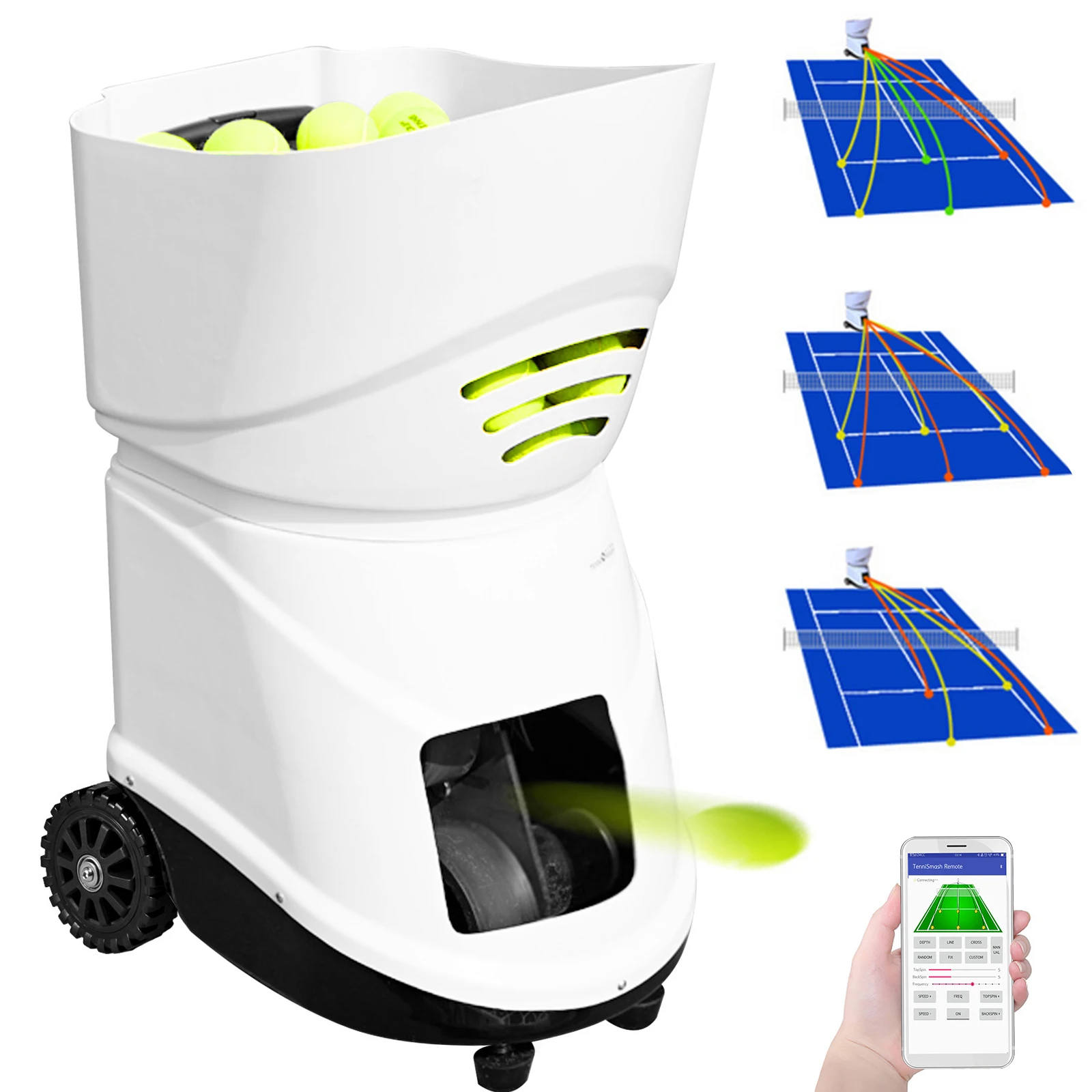
- Intelligent APP Control: Control the machine via the 'TenniSmash Remote' app (available for Android and iOS). Adjust serve speed, topspin, backspin, and select from five modes offering 27 types of ball routes. Customize up to 20 drop points and track your ball hitting count daily, weekly, and monthly.
- Portability: Weighing approximately 40 lbs (18 kg), the machine features two 6-inch wheels and an extendable handle for easy transport across various terrains, including grass and curbs.
- Space-Saving Design: The ball hopper is detachable and can hold up to 150 tennis balls, allowing for compact storage when not in use. Sturdy rubber feet ensure stability during operation.


5. Setup Instructions
- Unpacking: Carefully remove all components from the packaging. Inspect for any damage.
- Assemble Hopper: Attach the detachable ball funnel (hopper) to the main body of the machine. Ensure it is securely in place. The hopper can hold up to 150 balls.
- Positioning: Place the machine on a flat, stable surface on the tennis court. Ensure the rubber feet are making full contact with the ground for stability.
- Power On: Locate the power button on the control panel (typically near the extended handle). Press the button to turn on the machine.
- Initial Charge: Before first use, fully charge the machine's 16AH lithium battery. Connect the charger to the charging port and plug it into a power outlet. The charging process is indicated by a light on the charger or machine.
- App Installation: Download the 'TenniSmash Remote' app from your device's app store (supports Android and iOS).
- App Connection: Open the 'TenniSmash Remote' app on your smartphone. Follow the in-app instructions to connect to your VEVOR Tennis Ball Machine via Bluetooth.

6. Operating Instructions
- Load Balls: Place up to 150 standard tennis balls into the detachable hopper.
- Power On: Ensure the machine is powered on and connected to the 'TenniSmash Remote' app on your smartphone.
- Select Mode: Within the app, choose from five different serving modes: Depth, Line, Cross, Random, Fix, or Custom. These modes offer 27 kinds of ball routes.
- Adjust Settings: Use the app to adjust the following parameters:
- Serve Speed: Adjust the ball speed (20-140 km/h).
- Topspin/Backspin: Control the spin of the ball.
- Feed Rate: Set the interval between ball serves (2-10 seconds).
- Drop Points: For custom modes, you can set up to 20 specific drop points on the court.
- Start Serving: Once settings are configured, press the 'ON' or 'Start' button in the app to begin serving balls.
- Stop Serving: To stop the machine, press the 'OFF' or 'Stop' button in the app.
- Track Progress: The app allows you to track your ball hitting count daily, weekly, and monthly to monitor your training progress.
7. Maintenance
- Cleaning: Regularly wipe down the exterior of the machine with a soft, dry cloth. Ensure no dust or debris accumulates in the ball dispenser area.
- Driving Wheels: Periodically inspect the polymer composite driving wheels for any signs of wear or damage. Clean any accumulated fuzz or debris from the wheels to maintain optimal performance and prolong their service life.
- Battery Care: To maximize battery life, fully charge the machine after each use. If storing for an extended period, charge the battery to about 50-70% and recharge every 3-6 months. Avoid completely draining the battery.
- Storage: When not in use, detach the ball hopper and store the machine in a dry, cool place, away from direct sunlight and moisture. The compact design allows for storage in a car trunk or closet.
8. Troubleshooting
- Machine Not Turning On: Check if the battery is charged. Ensure the power button is pressed firmly.
- Balls Not Dispensing: Verify that the hopper is correctly attached and contains enough balls. Check for any obstructions in the ball dispenser mechanism.
- App Connection Issues: Ensure Bluetooth is enabled on your smartphone and the machine. Try restarting both the machine and the app. Make sure the app is updated to the latest version.
- Inconsistent Ball Speed/Spin: Check the driving wheels for debris or wear. Ensure the balls are dry and of standard quality. Adjust settings in the app.
- Machine Stops Unexpectedly: The battery might be low. Recharge the machine. If the issue persists, contact customer support.
9. Specifications
TS-08 Specifications
| Feature | Specification |
|---|---|
| Voltage | DC 12V |
| Load | 150 Balls |
| Ball Speed | 20-140 km/h |
| Feed Rate | 2-10 Seconds |
| Battery Life | 6-8 hours |
| Net Weight | 18 kg / 40 lbs |
| Packing Size | 578x448x528 mm / 22.7x17.6x21 in |
TS-06 Specifications
| Feature | Specification |
|---|---|
| Voltage | DC 12V |
| Load | 150 Balls |
| Ball Speed | 20-140 km/h |
| Feed Rate | 2-10 Seconds |
| Battery Life | 6-8 hours |
| Net Weight | 19 kg / 42 lbs |
| Packing Size | 578x448x528 mm / 22.7x17.6x21 in |
TS-03 Specifications
| Feature | Specification |
|---|---|
| Voltage | DC 12V |
| Load | 150 Balls |
| Ball Speed | 20-140 km/h |
| Feed Rate | 2-10 Seconds |
| Battery Life | 6-8 hours |
| Net Weight | 18 kg / 40 lbs |
| Packing Size | 578x448x528 mm / 22.7x17.6x21 in |

10. User Tips
- For optimal performance, use new or lightly used tennis balls. Old or heavily worn balls may affect the machine's accuracy and lifespan.
- Experiment with different ball speeds, spins, and modes via the app to find the training routine that best suits your skill level and goals.
- Regularly check the ball hopper for any foreign objects before loading balls to prevent damage to the internal mechanism.
- When transporting the machine, ensure the handle is fully extended and the wheels are clear of obstructions for smooth movement.
11. Warranty and Support
For warranty information, technical support, or service inquiries, please refer to the contact information provided with your purchase or visit the official VEVOR website. Keep your purchase receipt as proof of purchase.