
1. Introduction
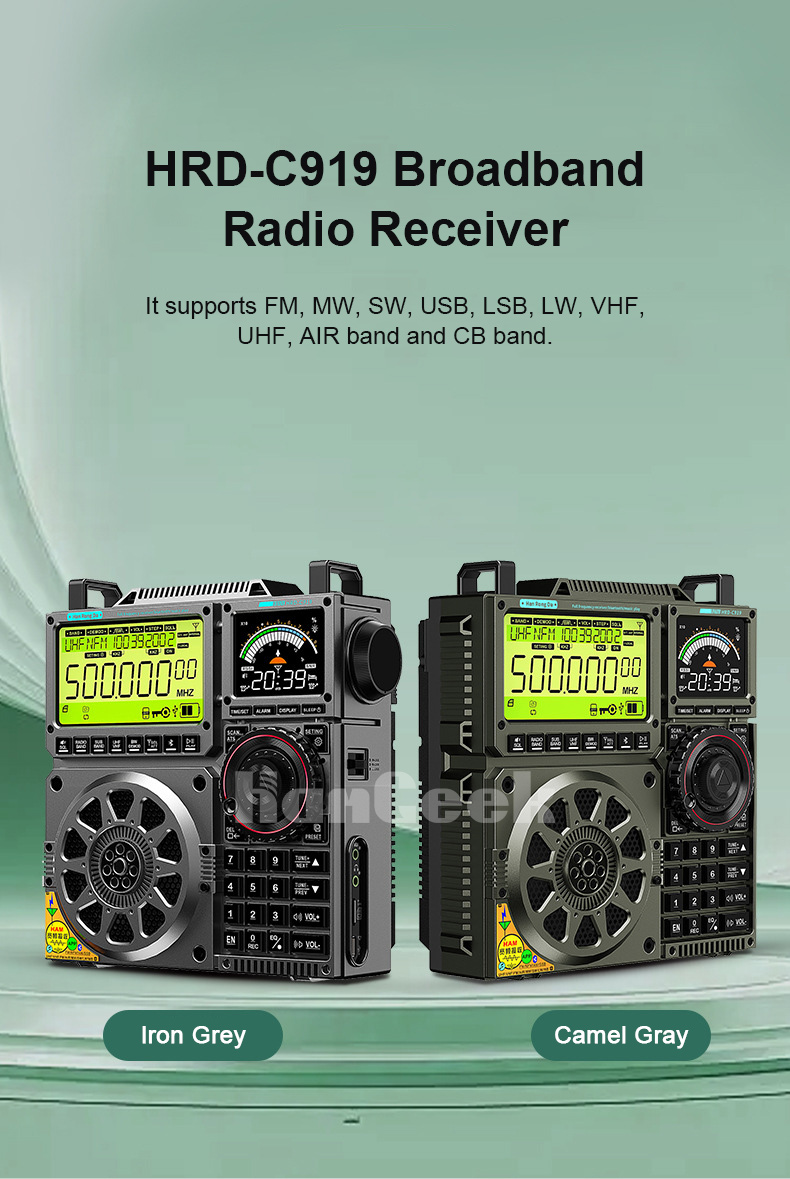
The TZT HRD-C919 is a versatile broadband radio receiver designed for enthusiasts and general users alike. It supports a wide range of frequencies including FM, MW (Medium Wave), SW (Shortwave), USB, LSB, LW (Long Wave), VHF, UHF, AIR band, and CB band. Beyond its extensive radio capabilities, the HRD-C919 functions as a multifunctional device, offering Bluetooth connectivity, TF card playback, and recording features. It can also be connected to a computer for audio input or card reading. Equipped with a 3-inch 20W full-range speaker and BASS sound effect, it delivers a rich audio experience.
2. Setup Guide
2.1 Unpacking and Package Contents
Before proceeding, please ensure all items are present in the package:
- 1 x HRD-C919 Radio Unit
- 1 x User Manual
- 1 x Charging Cable
- 1 x Lanyard
- 2 x 18650 Lithium Batteries
Note: A TF card is NOT included and must be purchased separately for recording and music playback features.
2.2 Battery Installation
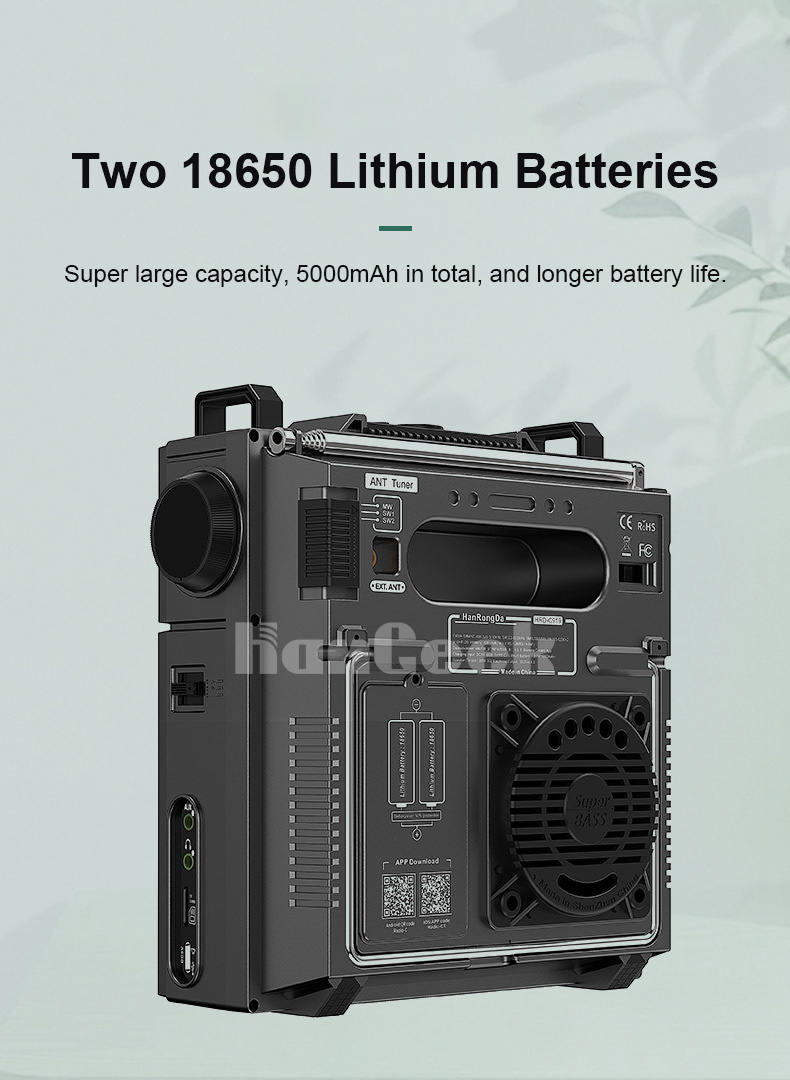
The HRD-C919 is powered by two 18650 lithium batteries, providing a total capacity of 5000mAh for extended use.
- Locate the battery compartment on the rear of the radio.
- Open the battery compartment cover.
- Insert the two 18650 batteries, ensuring correct polarity (+/-) as indicated inside the compartment.
- Close the battery compartment cover securely.
2.3 Antenna Connection
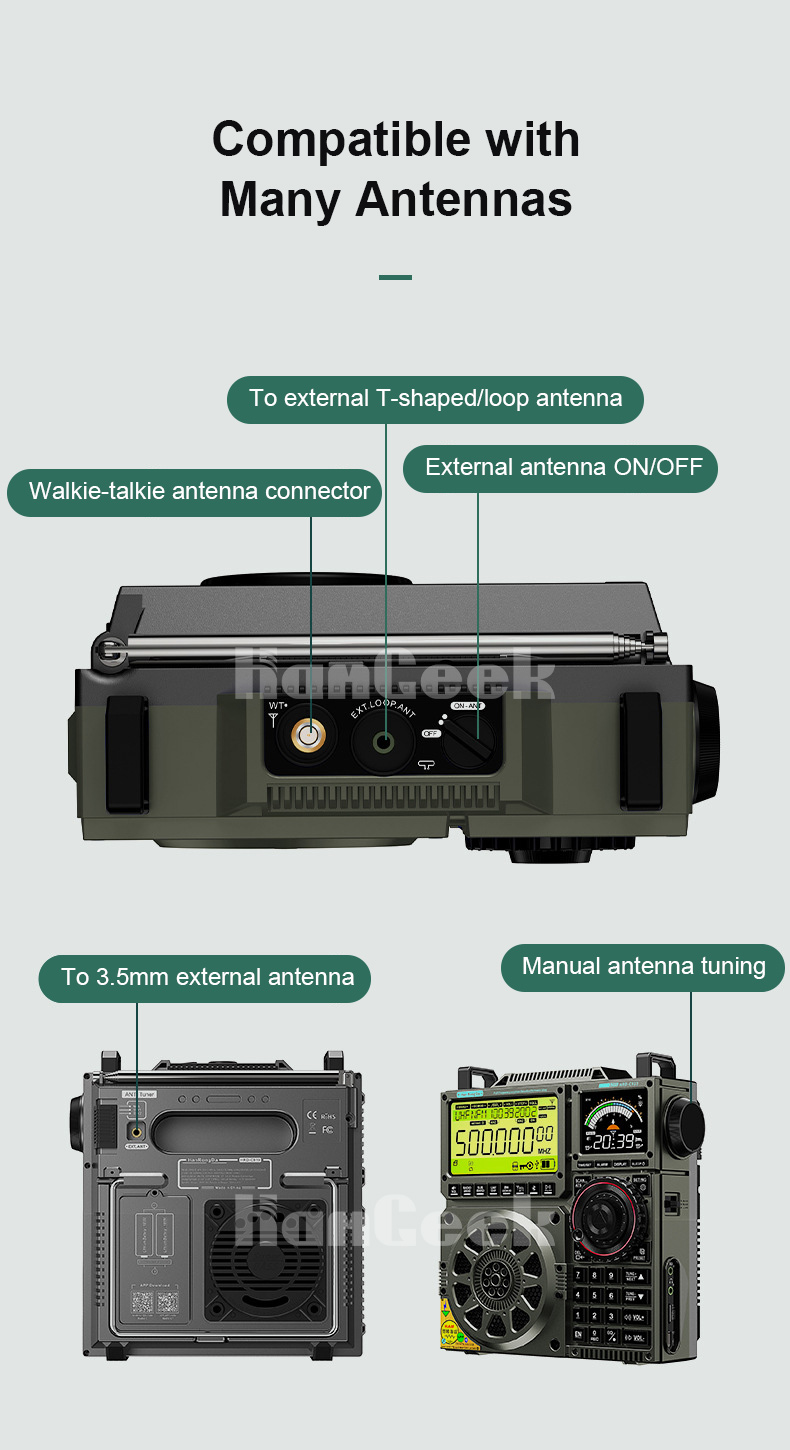
The radio is compatible with various antenna types to optimize reception across different bands.
- Telescopic Antenna: Extend the built-in telescopic antenna for FM, VHF, and UHF reception.
- External T-shaped/Loop Antenna: Connect a compatible external T-shaped or loop antenna to the designated port on the top of the unit for enhanced reception, especially for SW and MW.
- Walkie-talkie Antenna Connector: Use this port for specific walkie-talkie antennas.
- 3.5mm External Antenna: Connect a 3.5mm external antenna for general reception improvement.
- External Antenna ON/OFF Switch: Ensure the external antenna switch is in the 'ON' position when using an external antenna.
2.4 Initial Power On
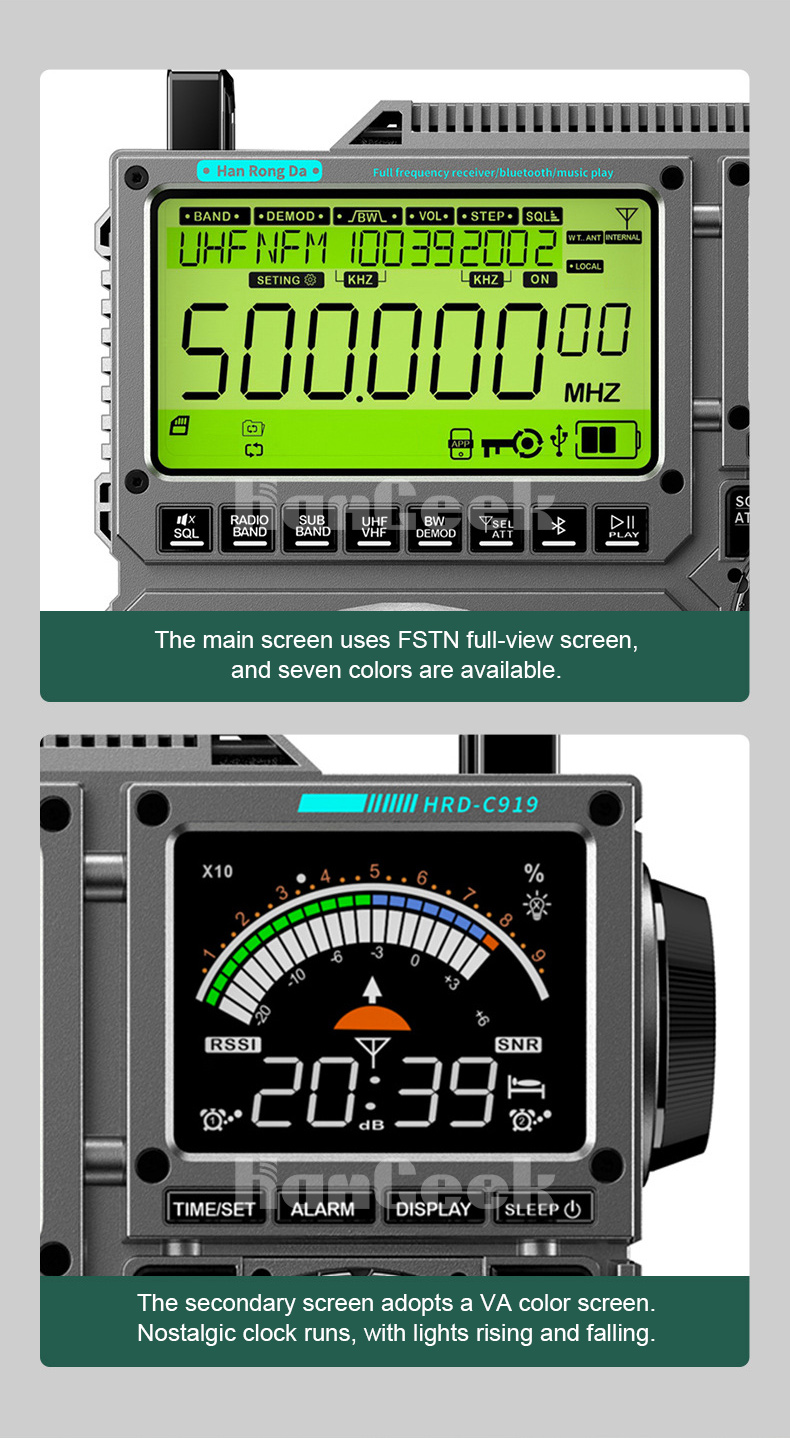
Press and hold the power button (usually located on the top or side) to turn on the radio. The main FSTN full-view screen and the secondary VA color screen will illuminate.
3. Operating Instructions
3.1 Display Screens
The HRD-C919 features two distinct display screens:
- Main Screen: A FSTN full-view screen that displays primary information such as frequency, time, and mode. It offers seven selectable colors.
- Secondary Screen: A VA color screen that shows additional details like signal strength (RSSI), signal-to-noise ratio (SNR), and a nostalgic clock display with dynamic lighting effects.
3.2 Tuning Methods
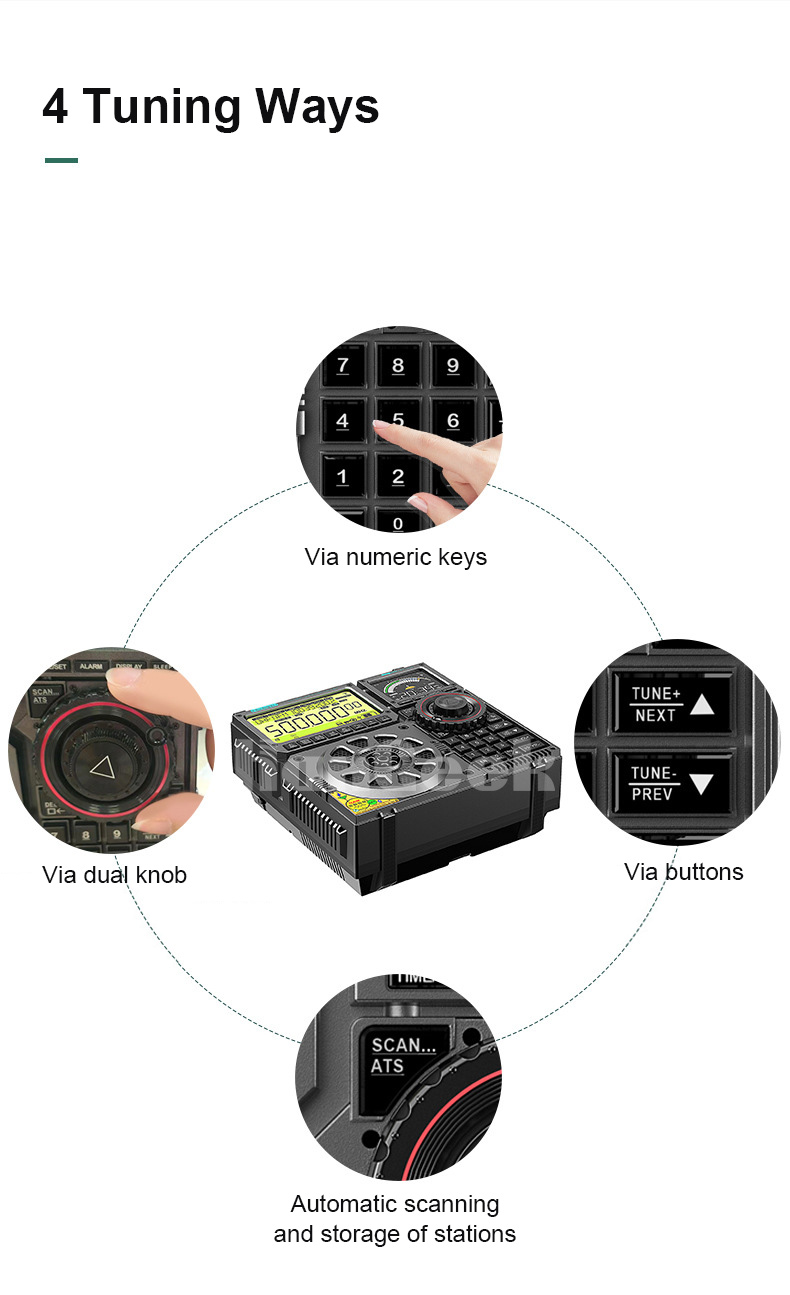
The radio offers four convenient ways to tune into stations:
- Numeric Keys: Directly enter the desired frequency using the numeric keypad.
- Dual Knob: Use the large rotary knob for precise frequency adjustment.
- TUNE+ / TUNE- Buttons: Incrementally adjust the frequency using the dedicated TUNE+ and TUNE- buttons.
- Automatic Scanning (ATS): Press the 'SCAN... ATS' button to automatically scan and store available stations.
3.3 Radio Modes and Bands
The HRD-C919 supports a comprehensive range of bands and modes:
- Bands: FM, MW, SW, LW, VHF, UHF, AIR, CB
- Modes: USB, LSB (for single-sideband reception)
Use the 'RADIO BAND' button to cycle through the available frequency bands. Further mode selection (e.g., USB/LSB) can be done via dedicated buttons or menu options.
3.4 Bluetooth and Music Playback
The radio supports Bluetooth connectivity for streaming audio and can play music directly from a TF card.
- Bluetooth Mode: Activate Bluetooth on the radio and pair it with your smartphone or other Bluetooth-enabled device to stream audio.
- TF Card Playback: Insert a TF card (not included) loaded with MP3, WMA, WAV, APE, or FLAC audio files into the TF card slot. The radio will automatically detect and play the music.
- Recording Function: The radio includes a recording function. Refer to the on-screen menu or user manual for specific instructions on how to initiate and manage recordings.
- Computer Connection: Connect the radio to a computer via USB for audio input or to access files on the inserted TF card.
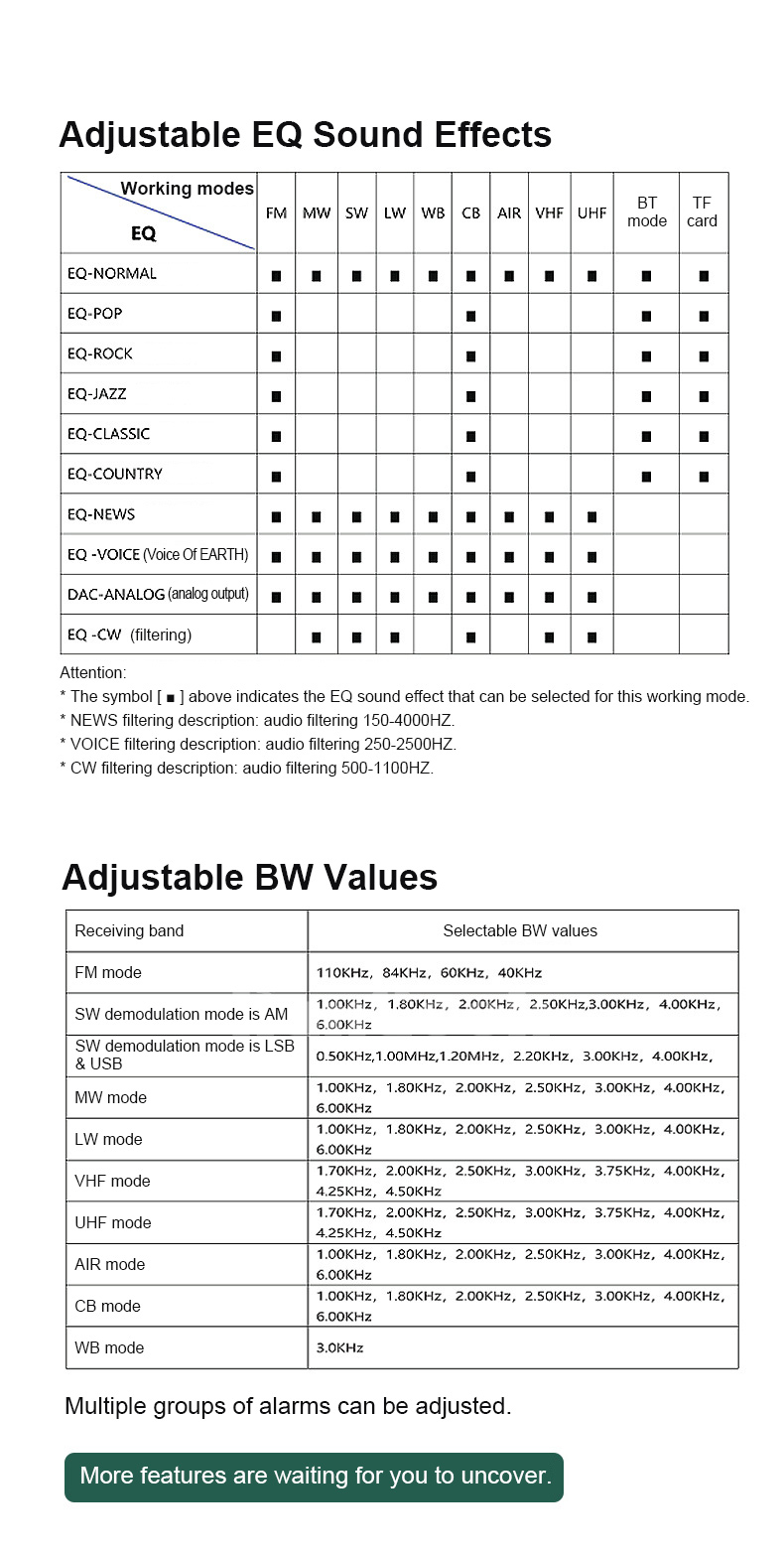
3.5 Adjustable EQ Sound Effects
Customize your audio experience with various Equalizer (EQ) sound effects. The availability of EQ effects may vary depending on the working mode (FM, MW, SW, LW, CB, AIR, VHF, UHF, BT mode, TF card).
| Working Mode | FM | MW | SW | LW | CB | AIR | VHF | UHF | BT mode | TF card |
|---|---|---|---|---|---|---|---|---|---|---|
| EQ-NORMAL | ■ | ■ | ■ | ■ | ■ | ■ | ■ | ■ | ■ | ■ |
| EQ-POP | ■ | ■ | ■ | ■ | ||||||
| EQ-ROCK | ■ | ■ | ■ | ■ | ||||||
| EQ-JAZZ | ■ | ■ | ■ | ■ | ||||||
| EQ-CLASSIC | ■ | ■ | ■ | ■ | ||||||
| EQ-COUNTRY | ■ | ■ | ■ | ■ | ||||||
| EQ-NEWS | ■ | ■ | ■ | ■ | ■ | ■ | ■ | ■ | ■ | ■ |
| EQ-VOICE (Voice of EARTH) | ■ | ■ | ■ | ■ | ■ | ■ | ■ | ■ | ■ | ■ |
| DAC-ANALOG (analog output) | ■ | ■ | ■ | ■ | ■ | ■ | ■ | ■ | ■ | ■ |
| EQ-CW (filtering) | ■ | ■ | ■ | ■ | ■ | ■ | ■ | ■ | ■ | ■ |
The symbol [■] indicates the EQ sound effect that can be selected for this working mode.
- NEWS filtering description: audio filtering 160-4000Hz
- Voice filtering description: audio filtering 250-3500Hz
- CW filtering description: audio filtering 500-1000Hz
3.6 Adjustable BW Values
The HRD-C919 allows for adjustment of bandwidth (BW) values, which can help in filtering out interference and improving signal clarity, especially in crowded bands.
| Receiving Band | Selectable BW Values |
|---|---|
| FM | 110KHz, 84KHz, 60KHz, 40KHz |
| SW demodulation mode is AM | 1.00KHz, 1.80KHz, 2.00KHz, 2.50KHz, 3.00KHz, 4.00KHz, 6.00KHz |
| SW demodulation mode is LSB & USB | 0.50KHz, 1.00KHz, 1.20KHz, 2.20KHz, 3.00KHz, 4.00KHz, 6.00KHz |
| MW mode | 1.00KHz, 1.80KHz, 2.00KHz, 2.50KHz, 3.00KHz, 4.00KHz, 6.00KHz |
| LW mode | 1.00KHz, 1.80KHz, 2.00KHz, 2.50KHz, 3.00KHz, 4.00KHz, 6.00KHz |
| VHF mode | 1.70KHz, 2.00KHz, 2.50KHz, 3.00KHz, 3.75KHz, 4.00KHz, 4.50KHz, 6.50KHz |
| UHF mode | 1.70KHz, 2.00KHz, 2.50KHz, 3.00KHz, 3.75KHz, 4.00KHz, 4.50KHz, 6.50KHz |
| AIR mode | 1.00KHz, 1.80KHz, 2.00KHz, 2.50KHz, 3.00KHz, 4.00KHz, 6.00KHz |
| CB mode | 1.00KHz, 1.80KHz, 2.00KHz, 2.50KHz, 3.00KHz, 4.00KHz, 6.00KHz |
| WB mode | 3.0KHz |
3.7 Mobile App Control
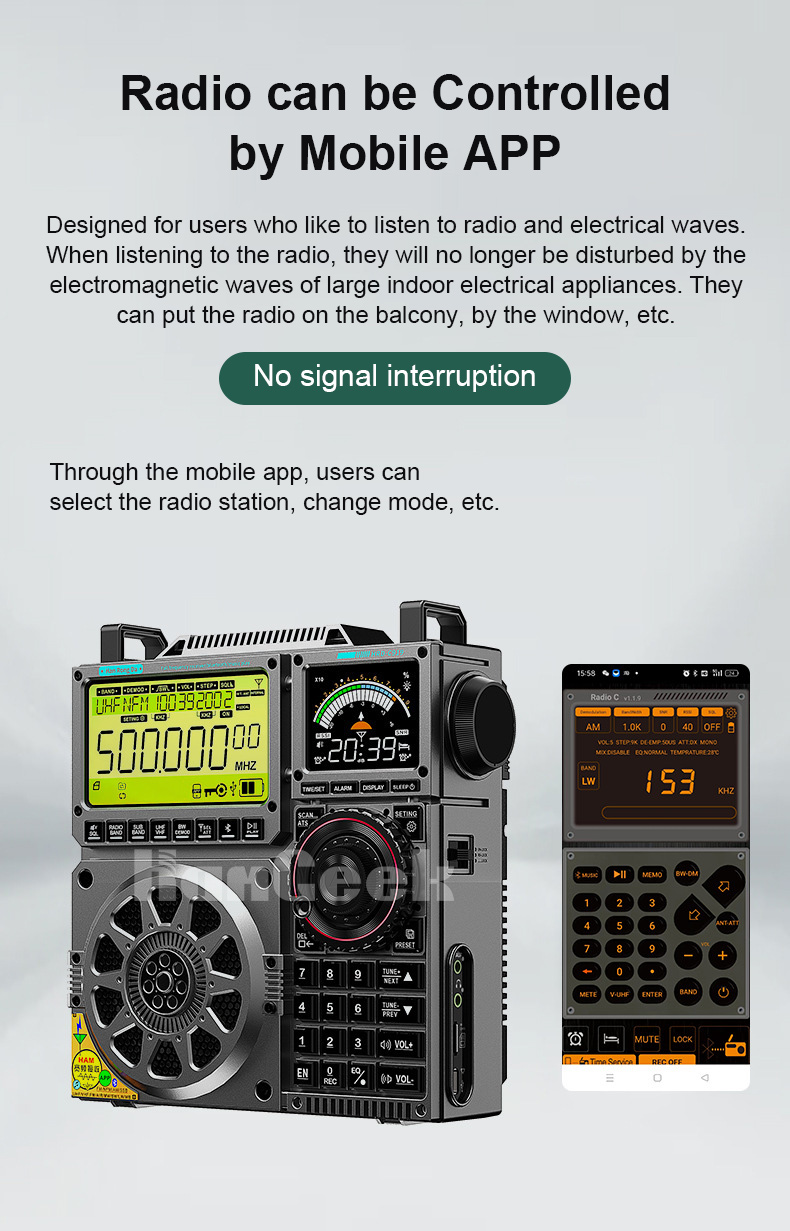
The HRD-C919 can be controlled via a dedicated mobile application, offering a convenient way to select radio stations, change modes, and manage settings without physical interaction with the unit. This feature is particularly useful for minimizing interference from household electrical appliances, allowing for flexible placement of the radio.
4. Maintenance
- Cleaning: Use a soft, dry cloth to clean the radio's exterior. Avoid using abrasive cleaners or solvents.
- Battery Care: To prolong battery life, avoid fully discharging the 18650 batteries frequently. Recharge them when the battery indicator is low. If storing the radio for an extended period, remove the batteries or ensure they are charged to about 50-70%.
- Storage: Store the radio in a cool, dry place away from direct sunlight, extreme temperatures, and high humidity.
- Antenna Care: Handle the telescopic antenna gently to prevent bending or breakage. When not in use, retract it fully.
5. Troubleshooting
- Radio does not power on:
- Ensure the 18650 batteries are correctly installed and charged.
- Check if the power button is pressed and held sufficiently. - Poor reception or static:
- Extend the telescopic antenna fully.
- Try connecting an external antenna (T-shaped/loop, 3.5mm, or walkie-talkie antenna) and ensure the external antenna switch is ON.
- Adjust the radio's position or location, moving away from potential sources of interference (e.g., computers, large appliances).
- Experiment with different BW (bandwidth) settings for the current band. - No sound:
- Check the volume level.
- Ensure headphones are not connected if you intend to use the speaker.
- Verify that the selected EQ setting is appropriate and not muting the audio. - Bluetooth connectivity issues:
- Ensure Bluetooth is enabled on both the radio and your pairing device.
- Make sure the radio is in Bluetooth mode.
- Try unpairing and re-pairing the devices.
- Ensure no other devices are actively connected to the radio via Bluetooth. - Mobile App control not working:
- Ensure the radio's Bluetooth is on and paired with your smartphone.
- Check that the mobile app is updated to the latest version.
- Restart both the radio and the mobile app.
6. Specifications
| Feature | Detail |
|---|---|
| Model | HRD-C919 |
| Brand | TZT |
| Sound Quality Selection | Stereo |
| SNR (MW) | ≥18dB |
| SNR (FM) | ≥40dB |
| SNR (SW) | ≥40dB |
| Radio Tuning Method | Digital Display |
| Band Type | Broadband reception (FM, MW, SW, USB, LSB, LW, VHF, UHF, AIR, CB) |
| Impedance | 3 inches, 3 ohms and 20W |
| Encoding Chip Type | DSP |
| Recording Function | Yes |
| Channels | Two-channel |
| Main Screen Size | 82.9mm x 45.2mm (3.3" x 1.8") |
| Secondary Screen Size | 47.5mm x 35.56mm (1.9" x 1.4") |
| Number of Stored Radio Stations | 1600 |
| Material | ABS |
| Battery Capacity | 5000mAh total (2 x 2500mAh 18650 batteries) |
| Supported Audio Formats | MP3, WMA, WAV, APE, FLAC |
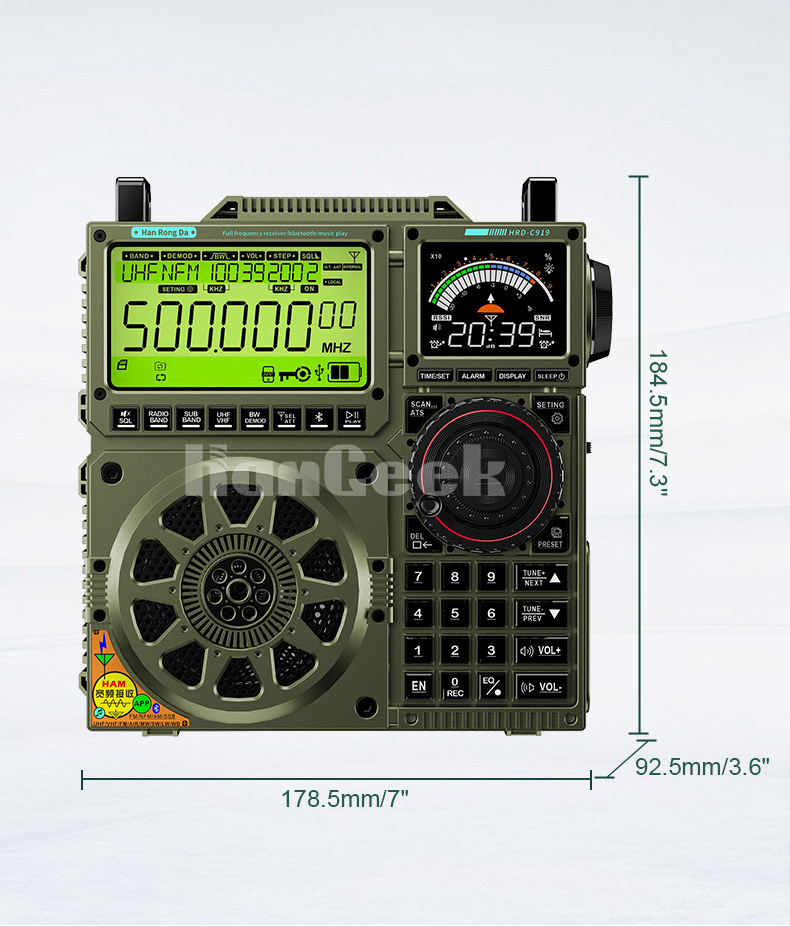
| Radio Dimensions (WxDxH) | 178.5mm x 92.5mm x 184.5mm (7" x 3.6" x 7.3") |
| Weight | 1090g (2.4lb) |
7. User Tips
- Optimize Reception: For best reception, especially on shortwave and medium wave, try using an external antenna. The radio is designed to be compatible with various external antennas.
- Mobile App Convenience: Utilize the mobile app for remote control. This can help reduce potential interference from nearby electronic devices and allows for flexible placement of the radio.
- Explore EQ Settings: Experiment with the adjustable EQ sound effects to find the best audio profile for different types of content (music, news, voice) and listening preferences.
- Bandwidth Adjustment: Learn to use the adjustable BW (bandwidth) values to fine-tune reception and minimize interference, particularly when listening to weak signals or in crowded frequency environments.
- Alarm Functionality: The radio supports multiple adjustable alarms, which can be configured for various purposes.
8. Warranty and Support
For detailed warranty information, specific terms and conditions, and further technical support, please refer to the comprehensive user manual provided in PDF format. You can access the PDF manual at: TZT HRD-C919 User Manual (PDF).
If you encounter any issues not covered in this manual or the PDF document, please contact the seller or manufacturer's customer support for assistance.


