
Introduction
The SKYRC GSM020 GNSS Performance Analyzer is a compact and professional-grade instrument designed for enthusiasts of RC cars, helicopters, and FPV drones. It utilizes GNSS (GPS+GLONASS) technology to accurately measure and analyze various performance metrics such as speed, distance, and altitude. With its built-in rechargeable LiPo battery and Bluetooth connectivity, it provides a convenient way to track and improve the performance of your RC models through a dedicated mobile application.

Key Features
- Multiple Modes: Offers 3 distinct modes for various applications: Drag Race, Track Race, and Flying Mode.
- Data Storage: Equipped with 1MB of flash memory, capable of storing up to 50 data records.
- Integrated Battery: Features a built-in 200mAh rechargeable LiPo battery, providing over 5 hours of operation.
- App Integration: Recorded data can be analyzed through a dedicated mobile application, compatible with iOS 9.0+ and Android 5.0+ devices.
- GPS Coordinator: Utilizes GPS for precise positioning and data collection.
- Measurement Units: Supports both Metric and Imperial systems of measurement.
Setup Guide
- Unboxing: Carefully remove the GSM020 device, USB charging cable, and instruction manual from the packaging.
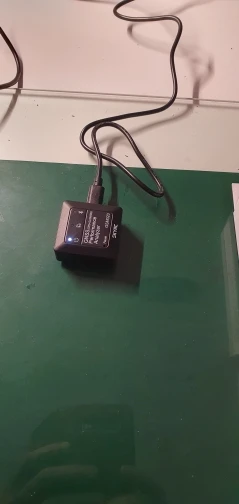
- Initial Charge: Connect the device to a USB power source using the provided cable. The charging indicator LED will show the charging status. Ensure the device is fully charged before first use.
- App Installation: Download the official SKYRC GNSS Performance Analyzer app from your device's app store (compatible with iOS 9.0+ and Android 5.0+).
- Power On: Press and hold the power button (marked with a circle and vertical line) on the device until the LEDs illuminate.
- Bluetooth Pairing: Open the installed app on your smartphone. The app will automatically search for and connect to the GSM020 via Bluetooth. Ensure Bluetooth is enabled on your smartphone. The Bluetooth LED on the device will indicate connection status.


Operating Instructions
- Power On/Off: Press and hold the power button to turn the device on or off.
- GPS Signal Acquisition: Place the GSM020 in an open area with a clear view of the sky to acquire a strong GPS signal. The GPS LED will indicate signal status.
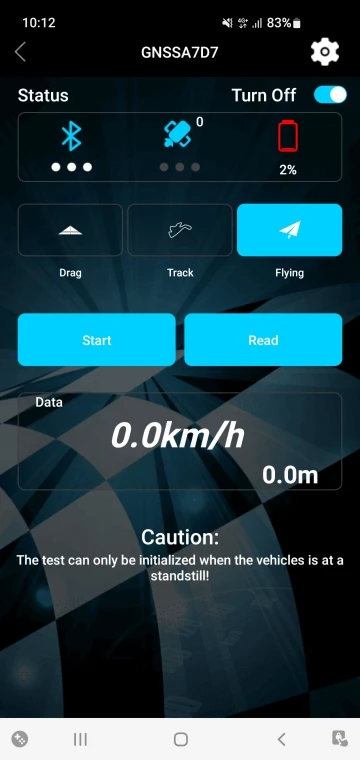
- Select Mode: In the mobile app, select one of the three performance analysis modes: 'Drag Race', 'Track Race', or 'Flying Mode', depending on your activity.
- Start Recording: Once the device has a stable GPS signal and your vehicle is at a complete standstill, tap the 'Start' button in the app to begin recording performance data.
- Stop Recording: After completing your run or flight, tap the 'Stop' button in the app. The data will be saved to the device's internal memory.
- View and Analyze Data: Use the 'Read' function in the app to retrieve saved data from the device. The app provides useful analysis tools to review your performance metrics.
Caution: The test can only be initialized when the vehicle is at a standstill!
Maintenance
- Charging: Recharge the built-in LiPo battery regularly to ensure optimal performance. Avoid completely draining the battery.
- Cleaning: Use a soft, dry cloth to clean the device. Do not use harsh chemicals or solvents.
- Storage: Store the device in a cool, dry place. The recommended storage temperature is between -10°C and +70°C (14°F to 158°F).
- Humidity: Avoid operating or storing the device in environments with humidity outside the range of 5% to 90%.
Troubleshooting
- Device Not Powering On: Ensure the battery is charged. Connect to a USB power source and check if the charging LED illuminates.
- No GPS Signal: Move the device to an open outdoor area with an unobstructed view of the sky. Signal acquisition may take a few minutes.
- Bluetooth Connection Issues: Ensure Bluetooth is enabled on your smartphone and the device is powered on. Try restarting both the device and the app.
- Data Not Recording: Verify that the GPS signal is stable and that you have pressed 'Start' in the app. Remember, recording can only be initialized when the vehicle is stationary.
- Device Unresponsive: If the device becomes unresponsive, locate the 'Reset' button (a small pinhole) and gently press it with a thin object (e.g., a paperclip) to restart the device.
Specifications
| Attribute | Value |
|---|---|
| Brand | SkyRC |
| Model Number | GSM020 |
| Name | GNSS Performance Analyzer |
| Modes | Drag Race, Track Race, Flying Mode |
| Receiver | L1, 1575.42 MHz |
| Update Frequency | 10 Hz |
| Antenna | Built-in |
| Satellite Signal Reception Sensitivity | -167dBm |
| Operating Temperature | 0°C to +40°C (32°F to 104°F) |
| Rest Temperature | -10°C to +70°C (14°F to 158°F) |
| Operating Humidity | 5% to 90% |
| Case Size | 40 x 39 x 16mm |
| Weight | 38g |
| Material | Plastic (ABS) |
| Is Electric | No Battery (refers to external power, has internal battery) |
| Is Batteries Included | No (refers to removable batteries, has internal battery) |
| Certification | CE |

User Tips
- The GSM020 is highly effective for analyzing the performance of both RC cars and RC aircraft like helicopters and jets.
- Users have found the device to be very easy to use, making it accessible for quickly gauging real performance metrics.
- For accurate results, ensure the device has a clear view of the sky to acquire a strong GPS signal before starting any test.
Warranty and Support
For warranty information, technical support, or service inquiries, please refer to the official SKYRC website or contact your authorized dealer. Keep your purchase receipt as proof of purchase for any warranty claims.