1. Introduction
Thank you for choosing the Pro'skit MA-1225CF Flexible Magnifier. This device is designed to provide clear, magnified viewing for various tasks, including intricate hobby work, electronics repair, reading, and other detailed applications. Featuring a flexible arm, a sturdy clamp, and an illuminated lens, it offers convenience and precision for your workspace.

2. Product Overview
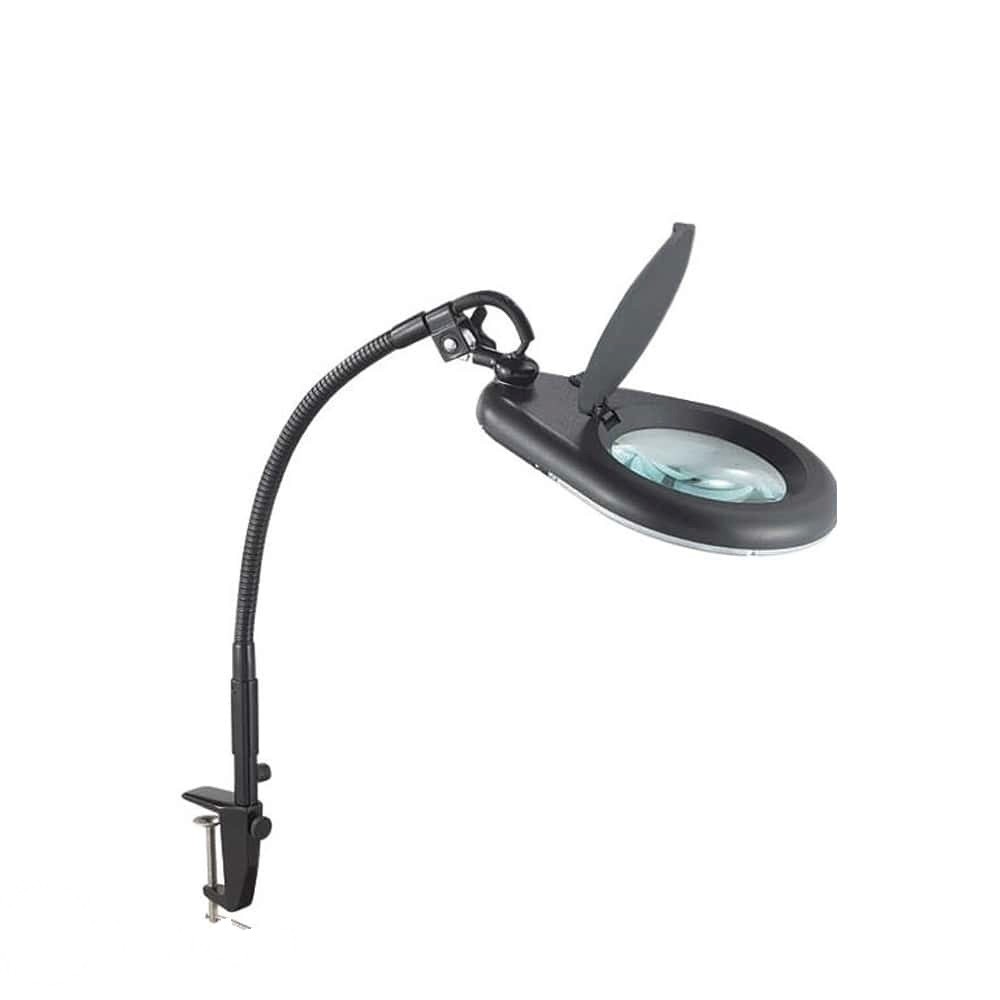
The Pro'skit MA-1225CF consists of the following main components:
- Magnifier Head: Contains the main lens and integrated illumination. It also features a protective cover.
- Flexible Arm: A durable, adjustable arm that allows for precise positioning of the magnifier head.
- Desk Clamp (Underwire): A robust clamp designed to securely attach the magnifier to a workbench, desk, or other suitable surface.
- Power Cable: For connecting the illumination to a power source (details not specified, assume standard AC adapter or USB).
3. Setup Instructions
- Unpack: Carefully remove all components from the packaging.
- Attach Clamp: Select a stable surface (desk, workbench edge) with a thickness suitable for the clamp. Loosen the clamp screw, position the clamp firmly, and tighten the screw until the clamp is secure.
- Insert Flexible Arm: Insert the base of the flexible arm into the designated slot on the clamp. Ensure it is seated firmly.
- Connect Power: Connect the power cable from the magnifier head to an appropriate power source. (Specific power requirements are not detailed, please refer to product labeling for voltage and current if available).
4. Operating Instructions
- Positioning the Magnifier: Gently bend and adjust the flexible arm to bring the magnifier head to your desired viewing position over your work area.
- Using the Lens: Open the protective cover on the magnifier head. Place the object you wish to magnify directly under the lens. Adjust the distance between the lens and the object for optimal focus and clarity.
- Activating Illumination: Locate the power switch for the integrated light (typically on the magnifier head or power cable). Flip the switch to turn the light ON. Turn it OFF when not in use to conserve energy.
- Closing the Cover: When finished, close the protective cover over the lens to prevent dust accumulation and scratches.
5. Maintenance
- Cleaning the Lens: Use a soft, lint-free cloth specifically designed for optical lenses. For stubborn smudges, a small amount of lens cleaning solution can be applied to the cloth (not directly to the lens).
- Cleaning the Body: Wipe the flexible arm, clamp, and magnifier head with a soft, damp cloth. Avoid abrasive cleaners or solvents.
- Storage: When not in use, ensure the protective lens cover is closed. Store the magnifier in a clean, dry environment away from direct sunlight and extreme temperatures.
- Cable Care: Regularly inspect the power cable for any signs of damage. If damaged, discontinue use and replace it immediately.
6. Troubleshooting
| Problem | Possible Cause | Solution |
|---|---|---|
| Illumination not working | No power, loose connection, faulty switch/LED. | Check power connection. Ensure the power switch is ON. If issues persist, contact support. |
| Magnifier is unstable/wobbly | Clamp not securely fastened, arm not fully inserted. | Ensure the desk clamp is tightened securely to a stable surface. Verify the flexible arm is fully inserted into the clamp base. |
| Blurred vision through lens | Lens is dirty, incorrect focal distance. | Clean the lens as per maintenance instructions. Adjust the distance between the lens and the object until clear. |
7. Specifications
- Model: MA-1225CF
- Magnification: 2.25X
- Lens Diameter: 127mm
- Color: Black
- Mounting Type: Desk Clamp (Underwire)
- Arm Type: Flexible Gooseneck
- Illumination: Integrated Light Source (Type not specified, typically LED)
- Package Dimensions (Approx.): 30 cm (L) x 20 cm (W) x 10 cm (H)
- Package Weight (Approx.): 0.2 kg
8. User Tips
- For optimal viewing, ensure your work area is well-lit, even when using the magnifier's integrated light.
- Experiment with different distances between the lens and your object to find the clearest focal point for your specific task.
- Always close the lens cover when the magnifier is not in use to protect the lens from dust and accidental damage.
- Position the clamp on a sturdy, flat surface to prevent tipping or instability during use.
9. Warranty & Support
For warranty information, technical support, or service inquiries, please contact your retailer or the manufacturer directly. Keep your purchase receipt as proof of purchase.


