
1. Product Overview
The Vjoycar V70 is an advanced OBD2 Head-Up Display (HUD) and on-board computer designed to provide real-time vehicle data and diagnostic information. It features a 5.8-inch HD LCD screen and supports multiple languages, making it a versatile tool for enhancing driving safety and monitoring car performance.

Figure 1: Vjoycar V70 OBD2 HUD Gauge
1.1 Key Features
- Display Information: Vehicle speed, water temperature, voltage, fuel consumption, RPM, single mileage, total cumulative mileage, travel time, system time, intake pressure, oil temperature, air-fuel ratio, turbo boost pressure, absolute throttle position, acceleration test, brake test, and more.
- Alarms: Overspeed alarm, speed alarm, high water temperature alarm, low voltage alarm, engine fault alarm.
- Diagnostic Capabilities: Read and clear OBDII system error codes, display OBDII data stream (text format), and print faulty codes.
- Multi-language Support: English, Russian, and Spanish.
- Broad Compatibility: Supports most OBD2 protocols, including J1850, CAN, and EOBD, for cars manufactured from 1996 onwards (USA), 2003 onwards (Europe), 2008 onwards (Asia), and 2010 onwards (China).
- Customizable Display: Choose from various display interfaces and adjust screen rotation.
- Software Updates: Supports lifetime free software updates and upgrades via USB.
2. Package Contents
Ensure all items are present and in good condition upon unboxing:

Figure 2: V70 Package Contents
- Vjoycar V70 Smart HUD Gauge
- 16-pin OBD Cable
- USB Cable (for product upgrades)
- Velcro Sticker
- Operating Instructions Manual
- Original Box
3. Setup Guide
3.1 Physical Installation
- Placement: The V70 can be placed on your car's dashboard or mounted upside-down on the windshield. Use the provided anti-slip mat or Velcro sticker to secure the device.
- Connection: Locate your vehicle's OBD2 port (usually under the dashboard near the steering wheel). Connect the 16-pin OBD cable to the V70 device and then to your car's OBD2 port.

Figure 3: Device standing on dashboard

Figure 4: Device mounted upside-down on windshield
3.2 Initial Power-On and Basic Settings
- Power On: When your car's ACC (Accessory) is on, the V70 device will power on automatically. It will display the VJOYCAR logo and then proceed to scan for protocols.
- Language Selection:
a. Long press the 'ESC' button to enter the Main Menu.
b. Navigate to 'Language' using the Up/Down buttons and press 'OK'.
c. Select your preferred language (English, Español, or Русский) and press 'OK'. - Unit Selection (KM/H or MPH):
a. From the Main Menu, navigate to 'System Para Set' and press 'OK'.
b. Select 'Unit' and press 'OK'.
c. Choose 'Metric' for KM/H or 'English' for MPH and press 'OK'.
Video 1: V70 Unboxing and Initial Setup Demonstration

Figure 5: Language Selection Menu
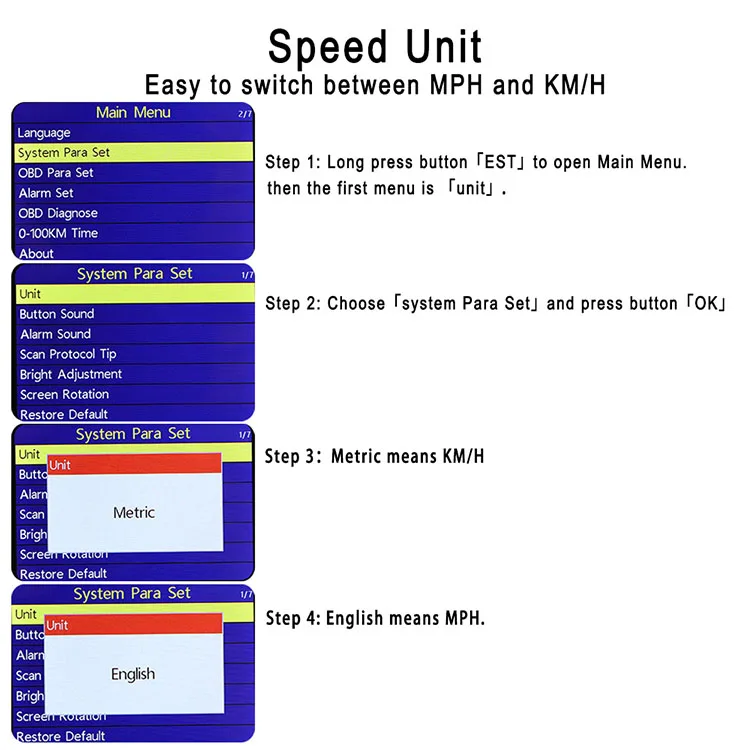
Figure 6: Speed Unit Setting
4. Operating Instructions
4.1 Navigating the Interface
The V70 features a user-friendly interface with multiple display modes and customizable data streams.

Figure 7: Basic Operation Steps
- Power On: When ACC is on, the device will turn on automatically.
- Access Main Menu: Long press the 'ESC' button to open the Main Menu.
- Exit Menu: Short press 'ESC' to quit the menu and return to the previous interface.
- Select Items: Use the Up (∧) or Down (∨) buttons to navigate through menu options or data fields.
- Confirm Selection: Press the 'OK' button to confirm a selection or enlarge a flashing data field.
- Customize Display: When data is flashing on the main interface, long press 'OK' to enter the 'DATASTREAM SELECT' menu. Here you can choose your preferred data to display from up to 96 available engine data points.
4.2 Monitoring Engine Data
The V70 can display over 100 kinds of engine data. You can customize which data points are shown on the main screen.

Figure 8: Customizable Display Interfaces
Examples of data you can monitor:
- Calculated LOAD Value
- Engine Coolant Temperature
- Intake Manifold Absolute Pressure
- Engine RPM
- Vehicle Speed
- Ignition Timing Advance
- Intake Air Temperature
- Air Flow Rate from Mass Air Flow Sensor
- Oxygen Sensor Output Voltage
- Fuel Rail Pressure
- Engine Oil Temperature
- Fuel Injection Timing
- Engine Fuel Rate
- Voltage
- Total Mile / Trip Mile
- Total Fuel / Trip Fuel
4.3 Alarm Settings
The V70 provides various alarms to alert you to potential issues or exceeding set limits. These alarms typically include an audible beep.

Figure 9: Alarm Settings Menu
To set alarms:
- From the Main Menu, navigate to 'Alarm Set' and press 'OK'.
- Select the desired alarm type (e.g., RPM Alarm, VSS Alarm, ECT Alarm, VOL Alarm).
- Adjust the threshold value for the selected alarm using the Up/Down buttons.
- Press 'OK' to save the setting.
4.4 OBD Diagnose
The V70 can act as an OBD2 scanner to read and clear diagnostic trouble codes (DTCs).
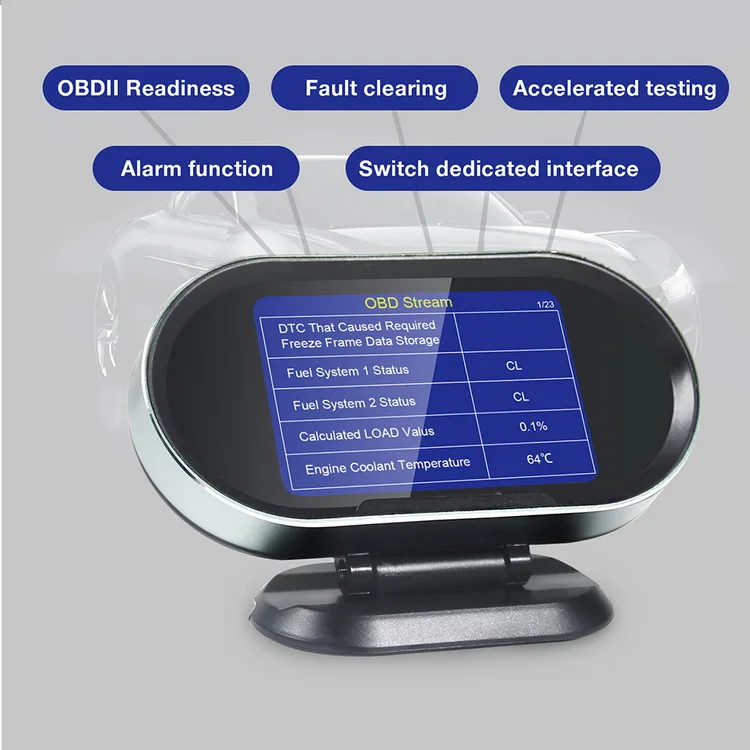
Figure 10: OBD Diagnose Data Stream
To perform a diagnosis:
- From the Main Menu, navigate to 'OBD Diagnose' and press 'OK'.
- The device will scan for fault codes and display relevant data streams.
- You can choose to clear fault codes from this menu. The V70 also supports printing faulty codes (requires connection to a compatible printer, not included).
4.5 Acceleration Test (0-100KM Time)
The V70 includes a feature to measure your vehicle's 0-100KM acceleration time.
- From the Main Menu, navigate to '0-100KM Time' and press 'OK'.
- Follow the on-screen instructions to initiate and complete the acceleration test.
5. Maintenance
5.1 Software Updates
The V70 supports lifetime free software updates and upgrades. To update the device:
- Connect the V70 to a computer using the provided USB cable.
- Visit the VJOYCAR official website (www.vjoychina.com) to download the latest software.
- Follow the instructions provided with the software update package to install it on your device.
5.2 General Care
- Keep the device clean and free from dust and moisture.
- Avoid exposing the device to extreme temperatures or direct sunlight for prolonged periods.
- Handle the device with care to prevent physical damage.
6. Troubleshooting
6.1 Common Issues
- Device does not power on: Ensure the OBD2 cable is securely connected to both the V70 and the car's OBD2 port. Check if the car's ACC is on.
- No data display or incorrect data: Verify that your car is OBD2 compliant and manufactured within the supported years (USA 1996+, Europe 2003+, Asia 2008+, China 2010+). Some specific car models might be incompatible.
- Alarm sounds continuously: Check your alarm settings in the 'Alarm Set' menu and adjust the thresholds as needed.
- How to reset the scanner: If the device is unresponsive or displaying errors, try navigating to 'System Para Set' in the Main Menu and selecting 'Restore Default' to reset all settings.
6.2 Compatibility Notes
- The V70 has broad OBD2 compatibility, but some specific car models may not be fully supported. For example, some users have reported issues with Dacia vehicles and older models like a Golf GTI 2001.
- It has been confirmed to work with a Fiat 1.6 16V NFU (PSA) from 2006.
- Compatibility with a Hyundai Terracan 2005, Skoda Octavia 2005, or Toyota Prius Plus 2020 should be verified.
- For any specific compatibility concerns, please contact VJOYCAR customer support.
7. Specifications
| Feature | Description |
|---|---|
| Product Name | Vjoycar V70 OBD2 HUD Car GPS Head Up Display |
| Model No. | V70 |
| Brand Name | VJOYCAR |
| Screen Size | 5.8 inches (130*80mm) |
| Display Channel | HD LCD Display |
| Display Mode | Car Speed Projector On-Board Computer |
| Rated Power | 11V~18Vdc (12Vdc/200mA) |
| Wire or Wireless | Wired |
| Speed Unit | KM/H, MPH |
| Display Language | English, Russian, Spanish |
| Supported Protocols | ISO9141, KWP2000, SAE J1850, CAN Bus, J1850 VPW, J1850 PWM |
| Special Feature | Only OBD HUD with oil temperature display |
| Software Version | Newest OBD2 On-board computer HUD Gauge |
| Item Type | Code Readers & Scan Tools |
| Origin | Mainland China |
8. Warranty and Support
The Vjoycar V70 comes with a 1-year warranty. For any technical assistance or warranty claims, please contact VJOYCAR Official Store customer support. They offer lifelong free technical support.
9. User Tips
- Check Compatibility: Before purchasing or if experiencing issues, double-check your vehicle's compatibility with the V70, especially for older models or specific brands like Dacia.
- Customize Your Display: Take advantage of the 'DATASTREAM SELECT' option to choose the most relevant engine data for your driving needs.
- Utilize Alarms: Set appropriate speed, RPM, and temperature alarms to enhance driving safety and prevent potential engine damage. The device includes audible warning beeps.
- Keep Software Updated: Regularly check the VJOYCAR website for software updates to ensure optimal performance and access to new features.
- Screen Customization: The display scale is not limited to yellow; you can customize the display interface to your preference.