1. Product Overview
The Fairywill FW-508 Sonic Electric Toothbrush is designed to provide an effective and comfortable brushing experience. It features advanced sonic technology, multiple brushing modes, a smart timer, and a long-lasting rechargeable battery.

2. Setup
2.1 Initial Charge
Before first use, fully charge the toothbrush. A 4-hour fast charge provides approximately 30 days of use. The toothbrush is compatible with any charger or equipment featuring a USB port.

2.2 Attaching the Brush Head
Align the brush head with the metal shaft on the toothbrush handle and push it down until it clicks into place. Ensure it is securely attached before use.
3. Operating Instructions
3.1 Power On/Off and Mode Selection
Press the power button to turn the toothbrush on. Press the power button repeatedly to cycle through the available brushing modes. To turn off the toothbrush, press and hold the power button for a few seconds, or cycle through all modes until it turns off automatically.

3.2 Brushing Modes
The Fairywill FW-508 offers 5 distinct modes to cater to various oral care needs:
- White (W): For removing surface stains and whitening teeth.
- Clean (C): Standard mode for daily cleaning, effectively removing plaque.
- Sensitive (S): Gentle cleaning for sensitive teeth and gums.
- Polish (P): For polishing teeth and brightening the smile.
- Massage (M): Gently stimulates gums for improved gum health.
3.3 Smart Timer
The toothbrush features a 2-minute smart timer, recommended by dentists for optimal brushing time. It also includes a 30-second interval pause reminder, prompting you to move to a different quadrant of your mouth, ensuring all areas are cleaned thoroughly.

3.4 Brushing Technique
Apply a small amount of toothpaste to the brush head. Place the bristles against your teeth at a slight angle towards the gum line. Move the brush slowly across each tooth, allowing the sonic vibrations to do the work. Do not scrub vigorously. Follow the 30-second quadrant reminders to ensure even cleaning.

4. Maintenance
4.1 Cleaning the Toothbrush
After each use, rinse the brush head thoroughly under running water. Wipe the handle with a damp cloth. The toothbrush is IPX7 waterproof, allowing for safe rinsing, but avoid prolonged submersion.

4.2 Replacing Brush Heads
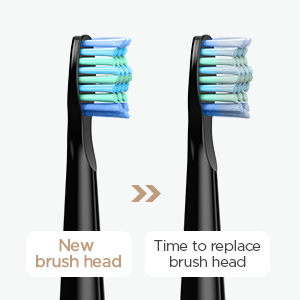
The brush heads feature blue indicator bristles that fade in color over time, signaling when it's time for a replacement. It is generally recommended to replace brush heads every 3 months, or sooner if the bristles appear frayed.
4.3 Storage
Store the toothbrush in a dry place when not in use. If traveling, utilize the provided travel case to protect the toothbrush and brush heads.

5. Troubleshooting
- Toothbrush does not turn on: Ensure the toothbrush is fully charged. If the issue persists, contact customer support.
- Weak vibration: The battery might be low. Charge the toothbrush fully. If the vibration remains weak after charging, the brush head might be worn out and needs replacement.
- Charging indicator not working: Verify the charging cable and power source are functioning correctly. Ensure the toothbrush is properly connected.
6. Specifications
| Feature | Specification |
|---|---|
| Model | FW-508 |
| Vibration Frequency | Up to 40,000 strokes/minute |
| Brushing Modes | 5 (White, Clean, Sensitive, Polish, Massage) |
| Smart Timer | 2-minute auto timer with 30-second interval reminders |
| Charging Time | 4 hours |
| Battery Life | Up to 30 days per full charge |
| Waterproof Rating | IPX7 |
| Power Type | Rechargeable, 220V (USB charging) |
| Bristle Stiffness | SOFT |
| Material | ABS/TPE/Dupont nylon |
| Certifications | CE, GS |
| Age Group | Adults |
| Package Size | 22 x 12.5 x 4.5 cm |
7. Warranty and Support
7.1 Warranty Information
The Fairywill FW-508 Sonic Electric Toothbrush comes with a 1-year warranty covering quality problems. Please retain your proof of purchase for warranty claims.
7.2 Customer Support
For any questions, technical assistance, or warranty claims, please contact the manufacturer or your retailer. Refer to your purchase documentation for specific contact details.
8. User Tips
- Travel Case: If your product package includes a travel case, remember to use it for hygienic and convenient portability, especially when traveling.
- Brush Head Lifespan: Pay attention to the blue indicator bristles on your brush head. When they fade, it's a clear sign that it's time to replace the brush head for optimal cleaning performance.
- Gentle Brushing: Let the sonic vibrations do the work. There's no need to apply excessive pressure or scrub aggressively, as this can harm your gums and teeth.


