

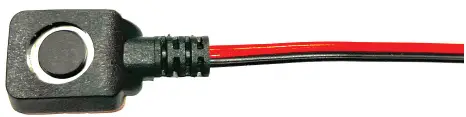
NAV TOOL Video Input Interface Push Button

Product Information
Video Input Interface Push Button
Manual Version: 1.0
This product is designed and manufactured in the USA. Please note that it is recommended to have a certified technician install this product. All product names, logos, brands, trademarks, and registered trademarks are the property of their respective owners.
Product Usage Instructions
- Connect the video source to the video input interface push button using the appropriate cables.
- Press the push button to switch between video sources.
- Adjust the settings on your display device to view the desired video source.
- If you experience any issues with the product, refer to the troubleshooting section of the user manual or contact customer support.
For further assistance or inquiries, please contact NavTool.com at:
- Phone: +1-877-628-8665
- Text: +1-646-933-2100
NOTICE: We recommend having this installation performed by a certified technician. All product names, logos, brands, trademarks and registered trademarks are the property of their respective owners.
Camera Installed
You do not need to use the push button if only a reverse camera was installed
- The reverse camera will automatically display when the vehicle is placed in Reverse.
- It will automatically Turn OFF when the vehicle is placed in any other gear and will display the factory screen.
To View Video 2 (Front Camera if Installed)
If no video source is connected you will see a “No Signal” message.
- Step 1: Press the push button once to Turn ON the interface. This will display Video 1.
- Step 2: Press the push button once to switch from Video 1 source to Video 2 source.
- Step 3: Press and Hold the push button for 2 seconds to return to the factory screen.
Contact
- NavTool.com
- Call: +1-877-628-8665
- Text: +1-646-933-2100
Documents / Resources
 | Video Input Interface Push Button |
References
- NAVTOOL INCnavtool.com
- User Manualmanual.tools