

MIDLAND BTR1 Advanced Intercom

Product Specifications
- Model: BTR1 ADVANCED
- High Definition Sound
- Output Power: 100mW
- Frequency (GHz) 2.402 – 2.480
- Max power (mW) 100
ON/OFF
DESCRIPTION OF BUTTONS

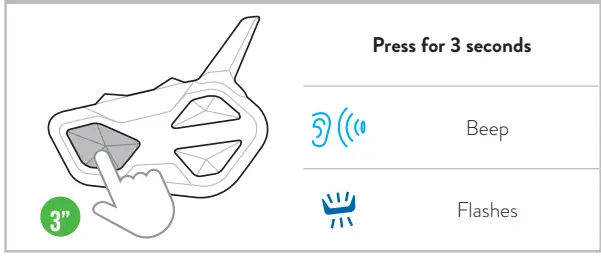
SWITCH ON
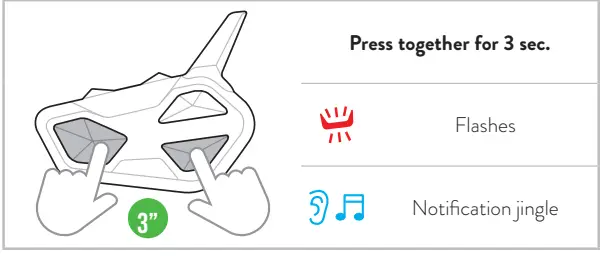
SWITCH OFF
PAIRINGS
DESCRIPTION OF BUTTONS

ATTENTION: To carry out any pairings you need to access Settings. If the Control button is pressed for fewer than 7 seconds, the device will switch itself on instead of accessing Settings. If this occurs, repeat the process.
ACCESS SETTINGS

PHONE, GPS, TFT PAIRING

Note: to pair a 2nd device in mono audio, repeat this procedure using Vol -.
MIDLAND INTERCOM PAIRING

Note: to pair another Midland intercom, follow the same procedure using the Up/Down buttons.
OTHER BRAND INTERCOM PAIRING (UNIVERSAL INTERCOM)

PAIRING 4 UNITS IN CONFERENCE

Note: the Conference mode allows the simultaneous communication amongst units. All units must be paired in a “chain” configuration: the Down button of the first unit must be paired to the Up button of the second unit and so on. For a detailed description of the function go to paragraph “Conference” of the complete user manual or watch the video tutorial
RESET BLUETOOTH PAIRINGS

EXIT SETTINGS MODE CANCEL PAIRING

OPERATING MODES
- Intercom Mode: to communicate with another device.
- Phone Mode: for phone calls or for managing music.
- FM Radio Mode: to listen to radio, search and store stations.
Note: Phone mode and Intercom mode are enabled only when your intercom is paired to other devices.

INTERCOM MODE
FUNCTION DESCRIPTION

TO OPEN/CLOSE INTERCOM MANUALLY

Nota: to communicate with Rider 1/3 repeat the process pressing the Up/(Rider 1)/Down (Rider 3) buttons.
VOX ACTIVATION/DEACTIVATION

TO OPEN/CLOSE INTERCOM BY VOICE

Note: Voice activation is only possible when the intercom device is paired with the Control button.
SHORTCUT: In Intercom/FM radio modes pressing Control 2 times activates/deactivates the music.
TO OPEN/CLOSE UNIVERSAL INTERCOM

Note: to activate/deactivate the audio from a different brand device, use the voice call command (for some models it is necessary to send the voice call twice)
TO ENABLE/DISABLE THE CONFERENCE MODE

Note: in Conference mode, the devices paired to Vol+/Vol- are temporarily disconnected.
TO OPEN/CLOSE CONFERENCE

PHONE MODE
FUNCTION DESCRIPTION

MAKING A CALL

Note: If you have a phone paired with the Vol – button, use the Down button.
SHORTCUT: In Phone mode by pressing the UP/DOWN buttons twice, turns the Intercom on/off (Rider 1, 3).
ANSWERING/ENDING A CALL – REJECTING A CALL

Note: If you have a phone paired with the Vol – button, use the Down button.
MUSIC

RADIO MODE
FUNCTION DESCRIPTION

FM RADIO

Go to our website midlandeurope.com, download the complete manual and the BT Updater software.
Customize your intercom and discover all the functions with the BTPRO SetApp. Download it here:
Frequently Asked Questions
- How do I pair the device with other intercom systems?
To pair with other intercom systems, follow the pairing instructions provided in the manual. Ensure both devices are in pairing mode and follow the specific steps for successful connection. - How do I switch between different operating modes?
To switch between operating modes (Intercom, Music Playback, Radio), use the designated buttons as outlined in the manual. Press once or hold for a specified duration to switch modes accordingly.
Documents / Resources
 | BTR1 Advanced Intercom |
 | BTR1 Advanced Intercom |
 | BTR1 Advanced Intercom |
References
- Midland Europe | Radio and CB, Motorbike intercom systems and Action Camsmidlandeurope.com
- User Manualmanual.tools