
Isingeniso
Siyabonga ngokuthengaasing the Soundcore Icon Mini Portable Speaker. This manual provides important information regarding the setup, operation, and maintenance of your device. Please read this manual thoroughly before using the product to ensure proper function and longevity.
Yini EseBhokisini
- Soundcore Icon Mini Portable Speaker (Model: A3122)
- Ikhebula lokushaja le-USB
Umkhiqizo Uphelileview

Umfanekiso 1: Ngaphambili view of the Soundcore Icon Mini speaker.
This image displays the Soundcore Icon Mini portable speaker from the front, showcasing its compact, cylindrical design with a mesh grille covering the speaker drivers and a durable strap on the right side.

Umfanekiso 2: Ingaphambili eline-engeli view of the Soundcore Icon Mini speaker.
This image provides an angled front view of the Soundcore Icon Mini, highlighting its textured surface and the integrated strap, giving a better perspective of its overall shape.

Umfanekiso 3: Uhlangothi view of the Soundcore Icon Mini speaker showing control buttons.
This image shows the side panel of the speaker, where the control buttons are located. From top to bottom, these include the Bluetooth pairing button, volume up, play/pause, volume down, and power button. A small LED indicator is visible near the top.

Figure 4: Alternate side view of the Soundcore Icon Mini speaker with controls.
Similar to Figure 3, this image provides another side view of the speaker, clearly displaying the tactile control buttons for Bluetooth, volume adjustment, playback, and power, along with the LED indicator.
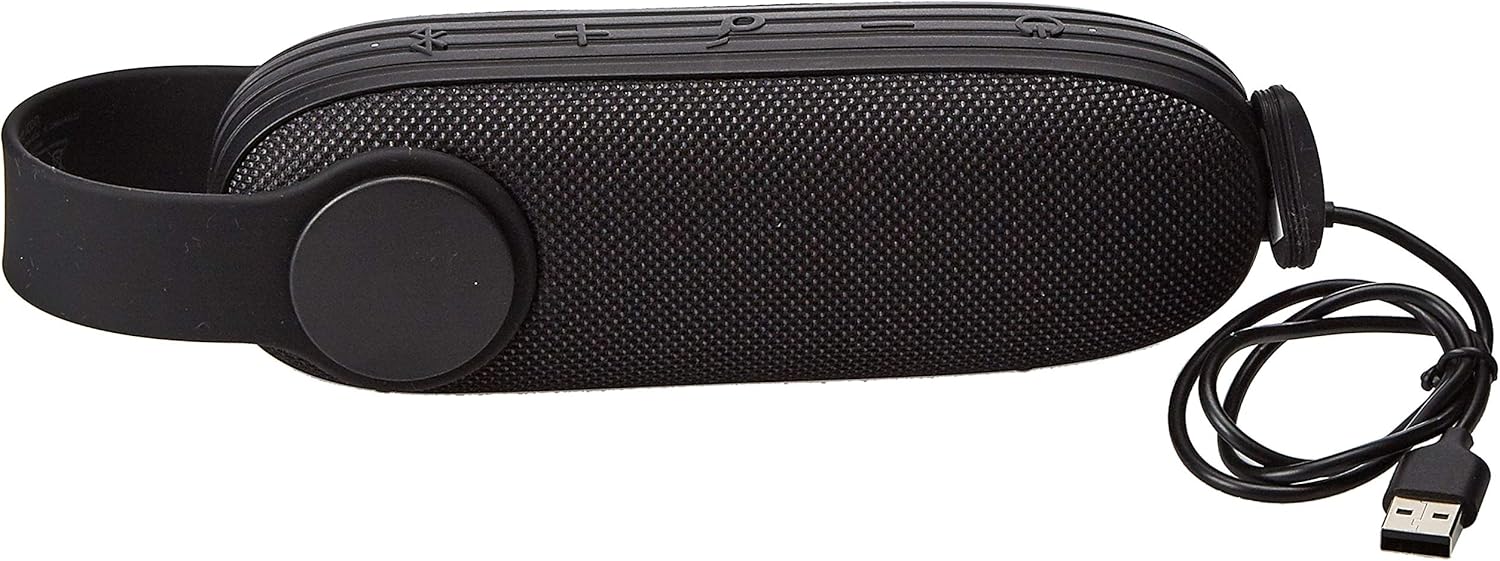
Figure 5: Soundcore Icon Mini speaker with its USB charging cable.
This image shows the Soundcore Icon Mini speaker alongside its included USB charging cable, demonstrating the accessory provided for power replenishment.
Izilawuli Nezinkomba
| Inkinobho / Inkomba | Umsebenzi |
|---|---|
| Inkinobho Yamandla | Cindezela bese ubamba ukuze uvule/uvale. |
| Inkinobho ye-Bluetooth | Cindezela ukuze ufake imodi yokumatanisa ye-Bluetooth. |
| Ivolumu ephezulu (+) | Cindezela ukuze ukhuphule ivolumu. Cindezela bese ubamba ukuze uthole ithrekhi elandelayo. |
| Ivolumu Phansi (-) | Cindezela ukuze wehlise ivolumu. Cindezela bese ubamba ukuthola ingoma yangaphambilini. |
| Inkinobho Yokudlala/Yemisa isikhashana | Press to play/pause audio. Press to answer/end calls. Press and hold to reject calls. |
| Isibonisi se-LED | Ibonisa isimo samandla, isimo sokushaja, kanye nesimo sokubhanqa i-Bluetooth. |
Setha
1. Ukushaja uSomlomo
Before first use, fully charge the Soundcore Icon Mini. Connect the included USB charging cable to the charging port on the speaker and the other end to a USB power adapter (not included) or a computer's USB port. The LED indicator will show charging status and turn off when fully charged.
- Ukushaja okuphelele kuthatha cishe amahora angu-3.
- The speaker provides up to 8 hours of playtime on a single charge, depending on volume and audio content.
2. Ukubhanqa kwe-Bluetooth
- Power on the speaker by pressing and holding the Power button. The LED indicator will flash blue, indicating it is in pairing mode.
- On your Bluetooth-enabled device (e.g., smartphone, tablet), enable Bluetooth.
- Cinga "Soundcore Icon Mini" in the list of available devices and select it.
- Once connected, the LED indicator will turn solid blue, and you will hear an audible confirmation.
- To pair with another device, press the Bluetooth button on the speaker to re-enter pairing mode.
Eqhuba uSomlomo
Idlala Umsindo
After successful Bluetooth pairing, you can play audio from your connected device. Use the volume buttons on the speaker or your device to adjust the volume. Use the Play/Pause button to control playback.
Ukushaya Ngezandla
The Soundcore Icon Mini features a built-in microphone for hands-free calls when connected via Bluetooth.
- Phendula/Phendula ikholi: Cindezela inkinobho ethi Dlala/Misa isikhashana kanye.
- Yenqaba Ucingo: Cindezela bese ubamba inkinobho ethi Dlala/Misa kancane imizuzwana emi-2.
Imodi ye-AUX
The speaker supports audio input via a 3.5mm AUX cable (not included). Connect one end of the AUX cable to the speaker's AUX port and the other end to your audio device. The speaker will automatically switch to AUX mode.
Ukumelana Namanzi (IP67)
The Soundcore Icon Mini is designed with an IP67 water and dust resistance rating. This means it can be submerged in up to 1 meter of water for up to 30 minutes. While it is water-resistant, please observe the following precautions:
- Qinisekisa ukuthi isembozo sembobo yokushaja sivaliwe kahle ngaphambi kokufaka isipikha emanzini.
- Do not expose the speaker to saltwater or other chemicals.
- Ngemva kokuchayeka emanzini, yomisa kahle isipikha ngaphambi kokushaja.
- Avoid extreme temperatures while the speaker is wet.
Isondlo Nokunakekela
- Hlanza isipikha ngesithambile, damp indwangu. Ungasebenzisi izinto zokuhlanza abrasive noma izincibilikisi.
- Gcina isipikha endaweni epholile, neyomile uma singasetshenziswa.
- Gwema ukuwisa isipikha noma ukusifaka emsindweni onamandla.
- To preserve battery life, fully charge the speaker at least once every 3 months if not used regularly.
Ukuxazulula inkinga
| Inkinga | Isixazululo Esingenzeka |
|---|---|
| Isipikha asikhanyisi. | Qinisekisa ukuthi isipikha sishajiwe. Sixhume emthonjeni wamandla bese uzama futhi. |
| Ayikwazi ukubhanqa nedivayisi ye-Bluetooth. |
|
| Awukho umsindo noma ivolumu ephansi. |
|
| Ukuhlanekezelwa komsindo. |
|
Imininingwane
| Isici | Imininingwane |
|---|---|
| Inombolo Yemodeli | A3122 |
| Ubuchwepheshe bokuxhumana | I-Bluetooth |
| Imodi Yokukhipha Umsindo | Zungeza |
| Uhlobo Lokukhweza | Ithebulethi |
| Okubalulekile | Izinto Ezixubile |
| Ubukhulu bomkhiqizo | 9 x 9 x 15 cm; 580g |
| Amabhethri | Ibhethri ye-Lithium Ion engu-1 (ifakiwe) |
| Umkhiqizi | ANKER |
| Idethi Yokuqala Etholakalayo | 6 Meyi 2019 |
Iwaranti kanye Nokusekela
Soundcore products are designed to provide reliable performance. For warranty information or technical support, please refer to the warranty card included with your purchase or visit the official Soundcore website ngemininingwane yokuxhumana.