
1. Isingeniso
The Life Fitness T5 Treadmill with Go Console is designed to provide an effective and comfortable workout experience. It features a FlexDeck Select Shock Absorption system, heart rate monitoring, and a user-friendly Go Console with various pre-programmed workouts. This manual provides essential information for the safe and efficient operation, setup, and maintenance of your treadmill.
2. Ulwazi Olubalulekile Lokuphepha
Ngaphambi kokusebenzisa i-treadmill, sicela ufunde futhi uqonde yonke imiyalelo yokuphepha. Ukwehluleka ukwenza kanjalo kungabangela ukulimala noma ukulimala kwemishini.
- Njalo xhumana nodokotela ngaphambi kokuqala noma yiluphi uhlelo olusha lokuzivocavoca.
- Gcina izingane nezilwane ezifuywayo kude ne-treadmill ngesikhathi sokusebenza.
- Beka i-treadmill endaweni eqinile, eqondile enesikhala esanele nxazonke.
- Gqoka izicathulo nezingubo ezifanele zemidlalo.
- Do not operate the treadmill if it is damaged or malfunctioning.
- Use the safety stop key at all times. Attach the clip to your clothing before starting your workout.
- Unganyatheli noma ukhiphe i-treadmill ngenkathi ibhande lihamba.
- Hold the handrails for support, especially when starting or stopping the treadmill, or adjusting speed/incline.
- Unplug the treadmill from the power source when not in use or before cleaning/maintenance.
3. Ukusetha nokuhlanganisa
The Life Fitness T5 Treadmill with Go Console is designed for minimal assembly. Please ensure you have adequate space and the correct power source before beginning.
3.1 Ukuqaqa nokubeka
Carefully remove all components from the packaging. This treadmill does not require assembly. Place the treadmill on a firm, level surface. Ensure there is at least 2 meters (6.5 feet) of clear space behind the treadmill and 0.5 meters (1.6 feet) on each side for safe operation and access.
3.2 Ukuxhuma Amandla
Connect the treadmill to a grounded electrical outlet using the provided power cord. The treadmill operates on a standard corded electric power source. Ensure the power switch is in the OFF position before plugging in.
3.3 Included Components Overview
Your treadmill package includes the following main components:
- I-Treadmill Base
- Go Console with Blue LCD Screen
- Iphaneli yokulawula
- Ergobar
- Integrated Accessory Tray
- 2 Removable Dishwasher-Safe Cup Holders
- Hand Sensors for Heart Rate Monitoring
- Smartphone/Tablet Holder (also serves as a reading rack)
- User Manuals and Warranty Documentation
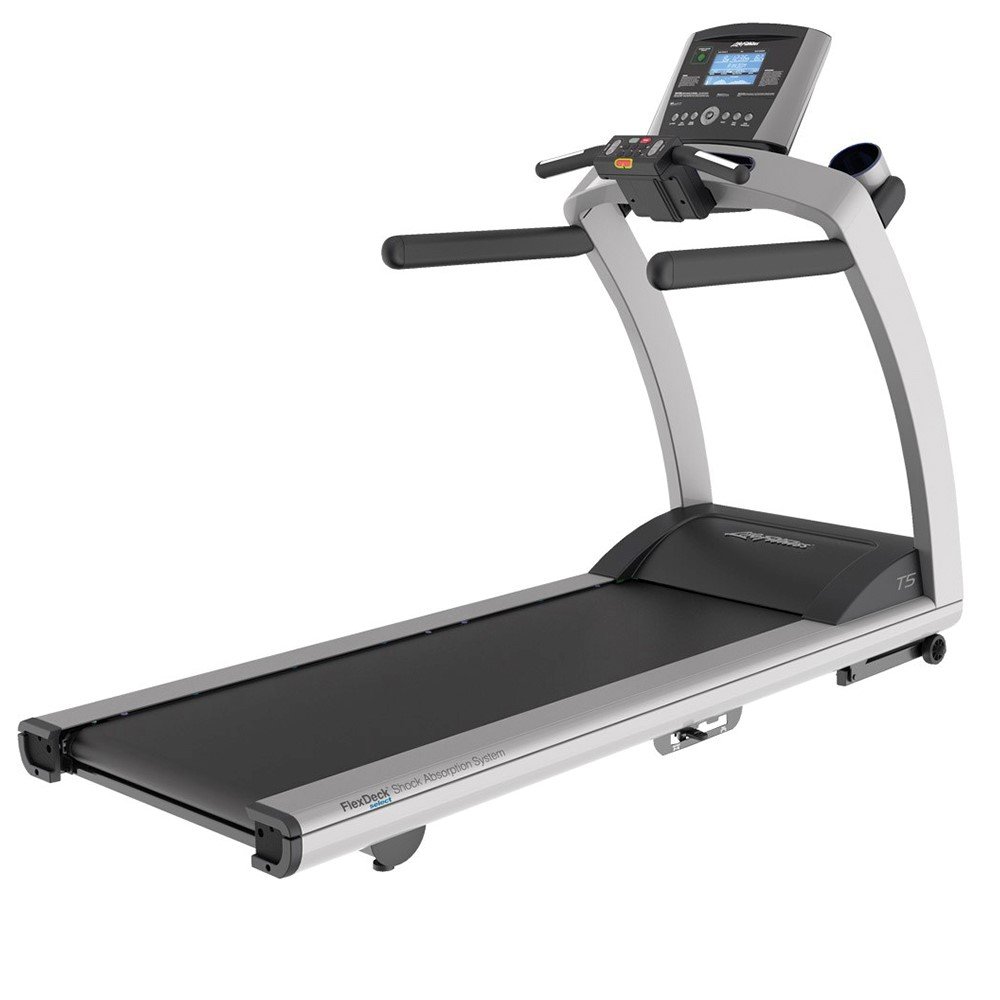
Image 1: Life Fitness T5 Treadmill with Go Console. This image shows the complete treadmill unit, including the base, running deck, and the Go Console with its display and controls.
4. Iziqondiso Zokusebenza
Familiarize yourself with the Go Console and its functions before beginning your workout.
4.1 Go Console Overview
The Go Console features an intuitive design with an energy-saving capability and a blue, custom-etched LCD screen. It displays key workout metrics and allows access to various programs.
- Amamethrikhi Okubonisa: The LCD screen shows Resistance Levels, Time, Speed, Distance, Heart Rate, and Calories Burned.
- Izinhlelo zokujima: The console includes 12 pre-programmed workouts, 2 custom workouts, and supports 2 user profiles.
- Quick Start Button: This button remembers your preferred walk, jog, or run speed for quick access to your favorite settings.
4.2 Ukuqala Ukujima
- Ensure the treadmill is plugged in and the power switch is ON.
- Attach the safety stop key clip to your clothing.
- Ngena ku-treadmill, ubeke izinyawo zakho ezisekelweni.
- Cindezela inkinobho Ukuqala Ngokushesha button to begin a manual workout at your saved speed, or select a pre-programmed workout from the console.
- The belt will start moving at a low speed. Begin walking and gradually increase speed as desired.
4.3 Ukulungisa Isivinini Nokuthambekela
- Isivinini: Use the speed control buttons on the console to increase or decrease the belt speed. The minimum speed is 0.5 mph, and the maximum speed is 12 mph.
- Thambekela: Use the incline control buttons to adjust the running surface angle. The treadmill offers 3 different incline positions, with an increment of 0.5 percent.
4.4 Ukuqapha Isilinganiso Senhliziyo
The treadmill is equipped with hand sensors and a wireless telemetry system for heart rate monitoring. To use the hand sensors, grip them firmly with both hands during your workout. Your heart rate will be displayed on the Go Console screen.
4.5 FlexDeck Select Shock Absorption System
The FlexDeck Select system allows you to choose from 3 kinds of running surface firmness to customize your workout comfort and impact reduction.
4.6 Ending a Workout
To end your workout, press the IMA button on the console. The treadmill belt will gradually slow down and stop. Alternatively, pull the safety stop key to immediately stop the treadmill in an emergency.
5. Isondlo
Regular maintenance ensures the longevity and optimal performance of your Life Fitness T5 Treadmill.
5.1 Ukuhlanza
- Njalo khipha i-treadmill ngaphambi kokuhlanza.
- Sula ikhonsoli nengaphandle ngesikhangisoamp indwangu nensipho ethambile. Gwema izinto zokuhlanza abrasive noma izincibilikisi.
- Regularly clean the running deck and belt to prevent dust and debris buildup.
- The cup holders are removable and dishwasher-safe for easy cleaning.
5.2 Ukuhlola
- Hlola intambo yamandla ngezikhathi ezithile ukuze uthole noma yimuphi umonakalo.
- Check the running belt for signs of wear or fraying.
- Ensure all visible bolts and screws are tight.
5.3 Ukuthambisa
Refer to the separate lubrication guide or contact customer support for specific instructions on running belt lubrication, if required. Over-lubrication can damage the treadmill.
6. Ukuxazulula izinkinga
This section addresses common issues you might encounter with your treadmill. For problems not listed here, please contact customer support.
6.1 Treadmill Does Not Power On
- Ensure the power cord is securely plugged into a grounded outlet and the treadmill.
- Check that the power switch on the treadmill is in the ON position.
- Verify the circuit breaker in your home has not tripped.
6.2 Running Belt Stops or Hesitates
- Ensure the safety stop key is fully engaged.
- Check if the maximum user weight (400 lbs) is exceeded.
- The running belt may require lubrication or adjustment. Refer to the maintenance section or contact support.
6.3 Inaccurate Heart Rate Reading
- Ensure your hands are firmly gripping the hand sensors.
- Moisture or dry skin can affect readings; ensure hands are clean and slightly moist.
- Interference from other electronic devices may occur.
7. Imininingwane
| Isici | Ukucaciswa |
|---|---|
| Product Dimensions (Base Unit) | 79.5 ku-L x 32 ku-W x 61 ku-H (201.93 cm L x 81.28 cm W x 154.94 cm H) |
| Control Panel Ubukhulu | 23 kokungu-x 20 kokungu-x 6 in |
| Isisindo Esihlanganisiwe | 349.5 lbs |
| Ubuso obugijimayo | 60 ku x 22 in |
| Motor System | 3.0 HP (6.0 HP Peak) DC Motor with MagnaDrive Controller |
| Isivinini Esincane | 0.5 mph |
| Isivinini esikhulu | 12 mph |
| Incline Increment | 0.5% |
| Isisindo Somsebenzisi Esiphezulu | 400 lbs |
| Umthombo wamandla | I-Corded Electric |
| Uhlobo lokubonisa | I-LCD eluhlaza okwesibhakabhaka |
| I-Frame Material | I-alloy Steel |
| Inombolo Yezinhlelo | 12 Pre-programmed, 2 Custom |
| Izici ezikhethekile | Heart Rate Monitor, FlexDeck Select System, Quick Start Button, Smartphone/Tablet Holder |
8. Iwaranti kanye Nokusekela
Life Fitness provides comprehensive warranty coverage for the T5 Treadmill with Go Console:
- Uhlaka: Iwaranti yempilo yonke
- IDrayivu Yezimoto: Iwaranti yeminyaka emi-10
- Izingxenye: Iwaranti yeminyaka emi-7
- Ikhonsoli: Iwaranti yeminyaka emi-3
- Umsebenzi: Iwaranti yeminyaka emi-1
For technical support, service, or warranty claims, please contact Life Fitness customer service. Refer to the warranty documentation included with your product for detailed terms and conditions.