
1. Isingeniso
This manual provides detailed instructions for the installation, operation, and maintenance of your ALEKO AR900 Rack Driven Sliding Gate Opener. Please read this manual thoroughly before beginning installation or operation to ensure safe and efficient use of the product. Keep this manual for future reference.
2. Umkhiqizo Uphelileview
2.1 Okufakiwe
The ALEKO AR900 Sliding Gate Opener package typically includes the following components:
- 1 x AR900 Sliding Gate Operator Unit
- 1 x Mounting Metal Plate
- 2 x 433MHz RF Hopping Code Remotes
- 13 ft. of Nylon Gear Racks (reinforced with metal insert)
- All necessary installation hardware (bolts, nuts, washers, etc.)
- Imaniwali yosebenzisayo
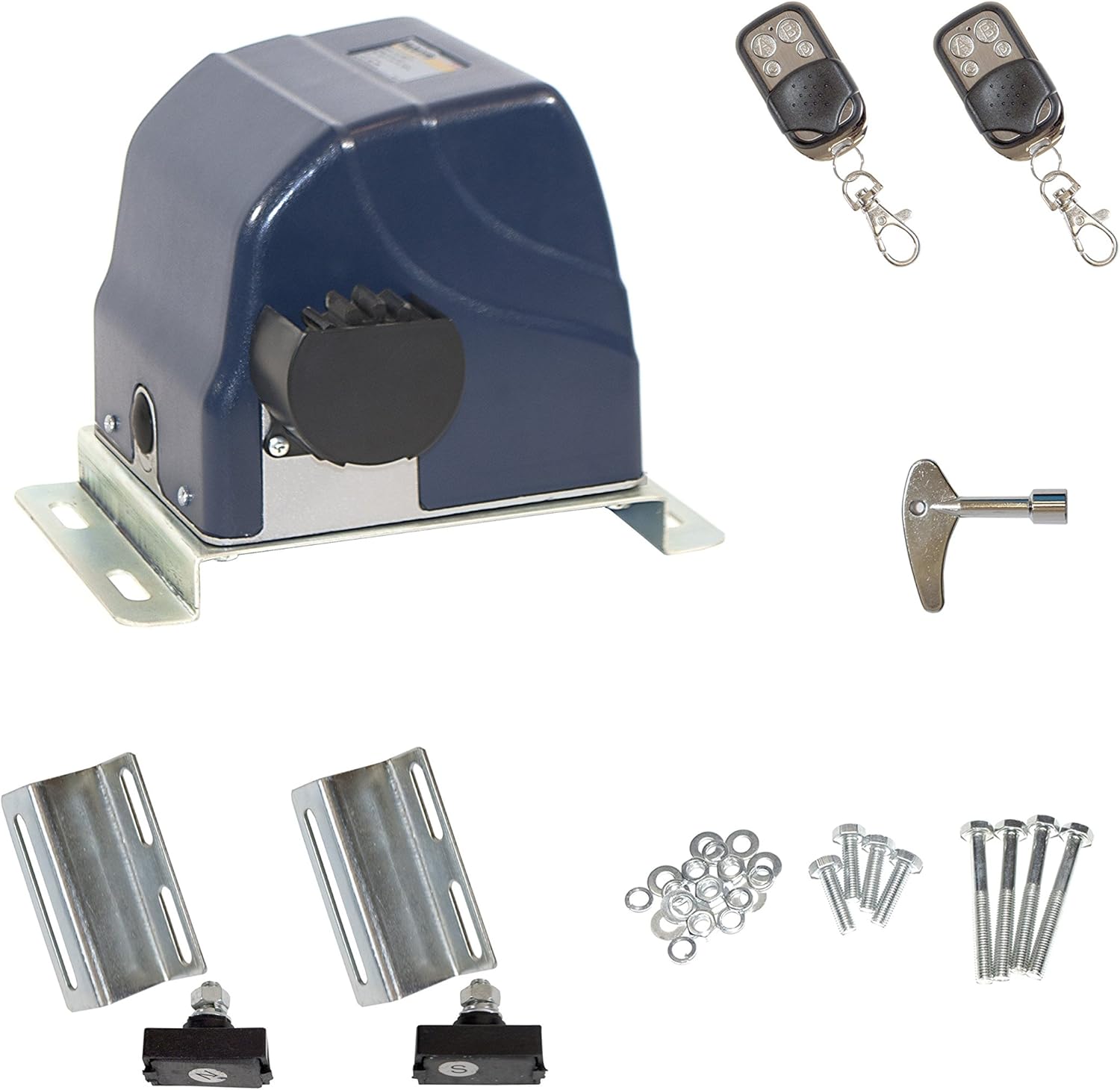
Image: Main components of the ALEKO AR900 Sliding Gate Opener, showing the operator unit, two remote controls, a manual release key, mounting brackets, and various bolts and washers.
2.2 Izici ezibalulekile
- Amandla esango: Can move gates up to 900 lbs. or 30 ft. long.
- Imoto: 1/2 HP motor with an operating time of 44 seconds.
- Soft Start and Soft Stop: Ensures smooth gate operation, reducing wear and tear.
- Adjustable Auto-Close: Allows for automatic gate closing after a set time.
- Electromagnetism Limit Switch: Inikeza ukulawula okunembile kwemingcele yokuhamba kwesango.
- Secure Rolling Code Remotes: Enhances security against unauthorized access.
- Obstacle Adjustment: Features stop/reverse functionality in case of obstruction for safety.
- Manual Key Release: Allows for manual gate operation during power loss.
- Ukusebenza Komsindo Ophansi: Designed for quiet performance.
- Idizayini engenamanzi: Built to withstand outdoor conditions.

Image: Visual representation of key features: Easy Installation, Waterproof, Very Safe to Use, Low Noise, DC 24V Motor, and Reliable Quality.
2.3 Ividiyo Yomkhiqizo Iphelileview
Video: An official product video from ALEKO Products demonstrating the features and components of the AR900/950NOR Rack Driven Sliding Gate Opener. This video provides a visual guide to the product's capabilities and included items.
3. Ulwazi Lokuphepha
Always prioritize safety during installation and operation. Failure to follow safety instructions may result in serious injury or property damage.
- Qinisekisa ukuthi konke ukuxhumeka kukagesi kwenziwa nguchwepheshe kagesi oqeqeshiwe futhi kuhambisana nemithetho yendawo.
- Gcina izingane nezilwane ezifuywayo kude nendawo yesango ngesikhathi sokusebenza.
- Do not attempt to repair the unit if you are not qualified. Contact customer support.
- Regularly inspect the gate and opener for any signs of wear, damage, or obstruction.
- The gate opener is designed for sliding gates only. Do not use for other applications.
4. Ukufakwa
Proper installation is crucial for the reliable operation of your gate opener. Refer to the detailed diagrams and instructions provided in the included user manual for specific steps.
4.1 Mounting the Operator
Securely mount the gate operator unit on a stable, level concrete pad or suitable foundation using the provided mounting metal plate and hardware. Ensure the unit is positioned correctly relative to the gate and the gear rack.

Image: Figure 4, an installation diagram illustrating the placement of the gate operator, gear rack, magnets, and upper guiding for a sliding gate system. It also shows the recommended use of PVC conduit for electrical wiring.
4.2 Attaching the Gear Racks
Attach the nylon gear racks along the bottom edge of your sliding gate. Ensure the racks are level and properly aligned with the operator's drive gear. The gear racks are reinforced with a metal insert for durability.
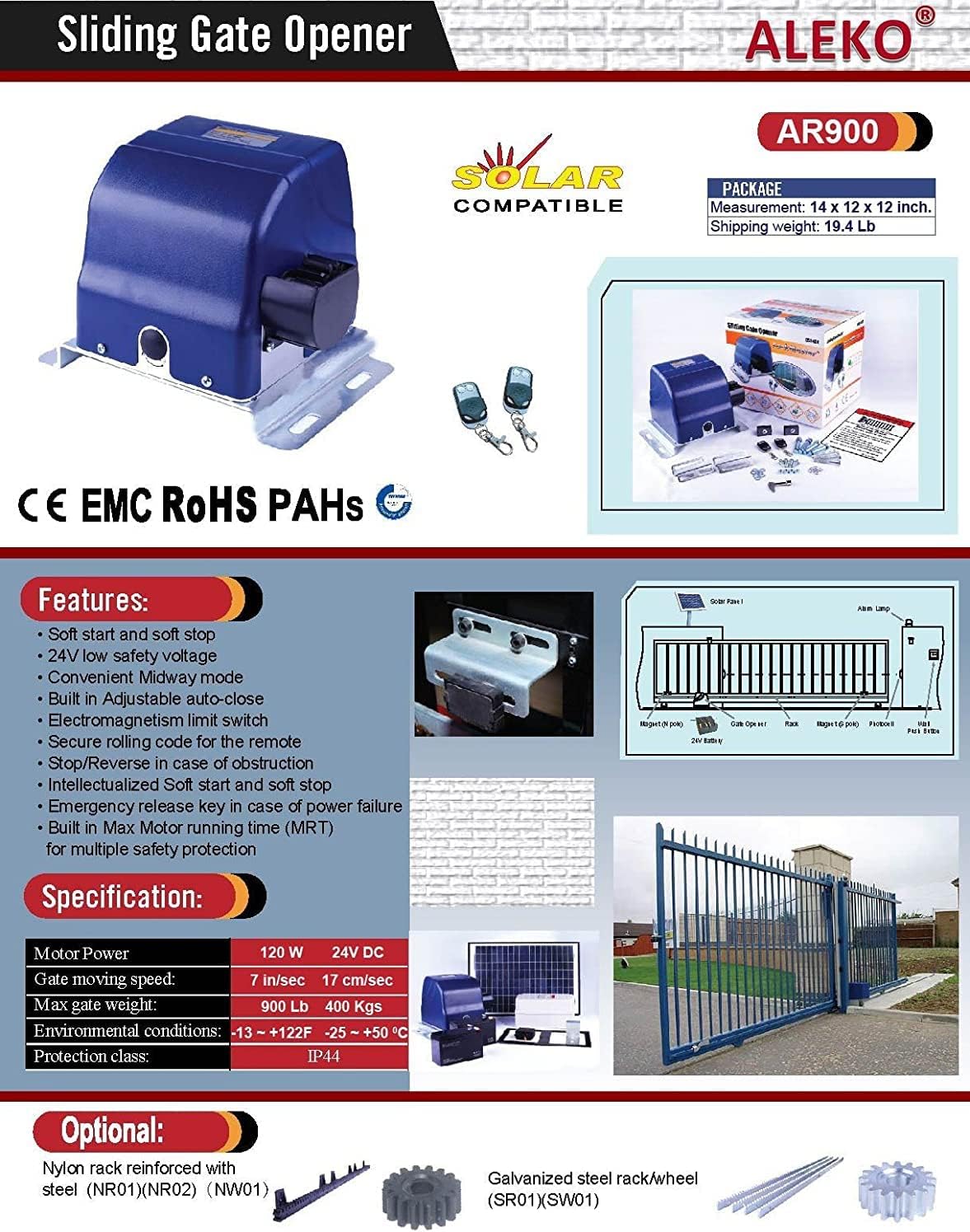
Image: A detailed diagram highlighting the features and specifications of the AR900, including a visual of the gear rack and its connection to the gate opener.
4.3 Ukuxhunywa kukagesi
Connect the power supply and any optional accessories (e.g., photocells, keypads) according to the wiring diagram in the full manual. Ensure all connections are secure and insulated.
5. Setha
5.1 Ukumatanisa kwesilawuli kude
To pair the remote controls with your gate opener, follow the specific instructions in the full user manual. Typically, this involves pressing a learning button on the control board and then a button on the remote.
Image: Two 433MHz remote controls, which are included with the gate opener for convenient operation.
5.2 Adjusting Limit Switches
The electromagnetism limit switches define the open and closed positions of your gate. Adjust these switches to ensure the gate stops precisely at the desired points without over-traveling or hitting obstacles.
5.3 Auto-Close Settings
The auto-close feature can be configured to automatically close the gate after a user-defined delay. Refer to the control board settings in your manual to enable and adjust this function.
6. Iziqondiso Zokusebenza
6.1 Ukusebenzisa Isilawuli kude
Press the designated button on your remote control to open or close the gate. A single press typically initiates the movement, and another press can stop it.
6.2 Manual Release in Case of Power Loss
Uma kwenzeka amandla outage, use the provided manual release key to disengage the motor and operate the gate manually. Insert the key into the release mechanism and turn it as indicated to unlock the gate.
Isithombe: Ukuvala view of the manual key release mechanism on the gate opener, showing the 'RELEASE' label and the keyhole for emergency manual operation.
7. Isondlo
Ukunakekelwa okuvamile kuqinisekisa ukuphila isikhathi eside nokusebenza kahle kwesivuli sesango lakho.
- Inhlanzeko: Keep the gear rack and drive gear free from dirt, debris, and ice.
- Ukuthambisa: Periodically lubricate moving parts as recommended in the full manual.
- Ukuhlola: Check all mounting hardware, electrical connections, and safety features regularly for wear or damage.
- Ukuhlola Ibhethri (uma kusebenza): If using a backup battery system, ensure batteries are charged and in good condition.
8. Ukuxazulula izinkinga
If you encounter issues with your ALEKO AR900 gate opener, refer to the following common troubleshooting steps:
| Inkinga | Imbangela Engenzeka | Isixazululo |
|---|---|---|
| Isango alinyakazi | No power, remote battery dead, safety sensor obstructed, manual release engaged. | Check power supply, replace remote battery, clear sensor path, disengage manual release. |
| Isango liyama kungalindelekile | Ukuvinjelwa kutholakele, inkinga yokushintsha umkhawulo, ukushisa ngokweqile kwemoto. | Remove obstruction, check limit switch settings, allow motor to cool. |
| Isilawuli kude asisebenzi | Battery dead, remote out of range, remote not paired. | Replace battery, move closer to opener, re-pair remote (see Section 5.1). |
| Gate opens/closes partially | Limit switches incorrectly set, obstruction. | Adjust limit switches, check for obstructions. |
For more complex issues, consult the complete troubleshooting guide in your user manual or contact ALEKO customer support.
9. Imininingwane
- Umkhiqizi: I-ALEKO
- Inombolo Yengxenye: AR900NOR-APE
- Isisindo Sento: 18.76 amakhilogremu
- Ubukhulu bomkhiqizo: 12 x 15 x 12 amayintshi
- Inombolo Yemodeli Yento: AR900NOR-APE
- Usayizi: I-AR900
- Umthombo wamandla: I-Corded Electric
- Izingxenye ezifakiwe: (1) AR900NOR Sliding Gear Driven Opener ONLY
10. Iwaranti kanye Nokusekela
For warranty information and customer support, please refer to the warranty card included with your product or visit the official ALEKO website. You can also contact ALEKO customer service directly for assistance with installation, operation, or troubleshooting.