
KOSPET KOSPET MAGIC P10
KOSPET Magic P10 智慧手錶使用手冊
您的全面設定、操作和功能指南。
一、簡介
Welcome to the KOSPET Magic P10 Smart Watch user manual. This guide provides detailed instructions to help you get the most out of your new smartwatch. The KOSPET Magic P10 combines a sleek, durable design with advanced health monitoring, comprehensive sport tracking, and smart features to enhance your daily life.

The KOSPET Magic P10 Smart Watch in black, showcasin其鮮豔的 AMOLED 顯示器。
2. 包裝內容
Upon unboxing your KOSPET Magic P10, you will find the following items:
- 1支 KOSPET MAGIC P10 智慧手錶
- 1 條充電線
- 1 本使用手冊
- 1條矽膠錶帶

Diagram showing the KOSPET Magic P10 watch, charging cable, user manual, and silicone watch band included in the packaging.
3 設計與展示
The KOSPET Magic P10 features a durable stainless steel body, weighing only 56g for comfortable all-day wear. Its 1.96-inch AMOLED display with Corning Gorilla Glass ensures crystal-clear visibility even in bright sunlight, resisting daily scratches and damage. The display boasts up to 1000 nits brightness, making it easily readable outdoors. It also supports wet-touch operations, allowing for responsive interaction even with wet fingers.

特寫 view of the KOSPET Magic P10's design, highlighting the detailed crown and seamless strap integration.
4. 設定
4.1 頻段安裝
To install or change the watch band:
- Remove the existing band by sliding the lever on the spring bar.
- Align the new band's spring bar with the holes on the watch lugs.
- Push the lever down to retract the spring bar, insert one end into the lug hole, then release the lever to secure the other end.
4.2 應用連接
To connect your KOSPET Magic P10 to your smartphone:
- Download the 'Apexmove' app from the Google Play Store or Apple App Store.
- 打開手機上的藍牙。
- 開啟 Apexmove 應用,前往“裝置”,然後點選“新增裝置”。
- Click 'Pair' in the pop-up window on the watch and app to complete the connection.

Visual guide for connecting your KOSPET Magic P10 to the Apexmove app on your smartphone.
4.3 通知設置
To receive messages and app notifications:
對於iOS設備:
- Ensure the 'Apexmove' app remains active.
- Disable 'Do Not Disturb' and 'Low Power Mode' on your iPhone.
- In the Apexmove app, go to 'Device' and click 'SMS', then enable for desired apps.
- 請前往手機的「設定」中,允許「Apexmove」存取「通知」。

Instructions for enabling message and app notifications on iOS devices.
對於 Android 裝置:
- Keep Apexmove active (add to whitelist in settings if necessary).
- Turn off 'Do Not Disturb' and 'Low Power Mode'.
- In the Apexmove app, go to 'Device' and click 'SMS Reminder', then enable for desired apps.
- 請前往手機的「設定」中,允許「Apexmove」存取「通知」。

Instructions for enabling message and app notifications on Android devices.
5. 智慧型手錶的操作
The KOSPET Magic P10 offers seamless integration with your smartphone for various smart features:
- 藍牙通話: 直接透過手腕撥打和接聽電話。
- 消息通知: View incoming messages and app notifications.
- 音樂控制: 控製手機上的音樂播放(播放、暫停、跳過曲目)。
- AI語音助理: Utilize the built-in AI voice assistant for quick commands and information.

The KOSPET Magic P10 displaying its multifunctional capabilities, including call handling, voice assistant, and message reminders.

The Magic P10 allows you to manage calls and music directly from your wrist, providing convenience on the go.
6. 健康監測
Equipped with the advanced VC9213-4PD sensor, the KOSPET Magic P10 provides precise and reliable health data. It tracks various metrics in real-time:
- 心率: 全天候24小時持續心率監測。
- 血氧(SpO2): Real-time blood oxygen saturation levels.
- 睡眠監測: 追蹤睡眠tages (deep sleep, light sleep, REM) and provides sleep quality analysis.
- 壓力監測: 全天評估壓力水平。
- Emotion Tracking: Monitors emotional states.
- 月經週期: Supports tracking for women's health.

Visual representation of the KOSPET Magic P10's health monitoring capabilities, including blood oxygen, sleep, heart rate, and menstrual cycle tracking.

The P10 utilizes a 4PD sensor for accurate and consistent health tracking, whether during training or recovery.
7. Sport Modes and GPS Tracking
The KOSPET Magic P10 supports 180 sport modes, ensuring comprehensive tracking for almost any activity. It features built-in dual-band L1+L5 GPS with 6 satellite systems for fast and precise positioning, even in urban or wooded environments. Integrated sensors like a compass, barometer, and altimeter accurately track direction, air pressure, and elevation.

The KOSPET Magic P10 provides fast, clear, and reliable multi-GNSS positioning for accurate outdoor activity tracking.

The Apexmove app, designed exclusively for sports, helps create personalized training plans and track unique data.

Precision tracking with L1+L5 dual-frequency GNSS and 6 satellite systems, along with altitude, air pressure, and compass data.

The Magic Series tracks 180 sports with precision, helping users understand their body and stay consistent.
官方產品影片展示asing the KOSPET Magic P10's features, including its display, sensors, and various sport modes.
8.防水
The KOSPET Magic P10 boasts 5ATM water resistance, making it suitable for swimming and various water activities. It can withstand pressures equivalent to a depth of 50 meters. The watch is designed to recognize your stroke and record essential swimming metrics like lap splits, stroke count, pace, heart rate zones, and SWOLF.
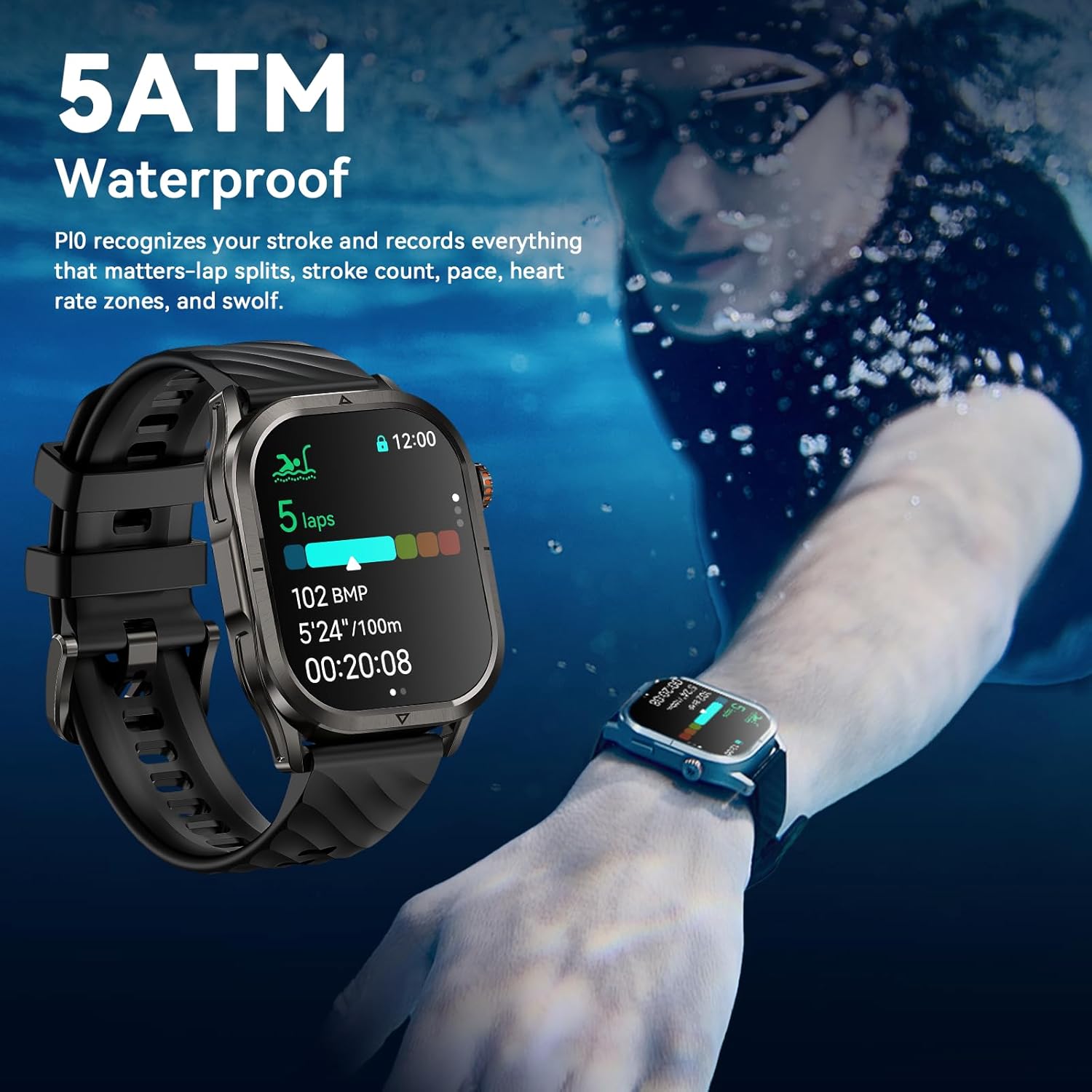
The KOSPET Magic P10 is 5ATM waterproof, capable of tracking swimming performance.

Designed for professional swimming, the P10 records lap splits, stroke count, pace, heart rate zones, and SWOLF.
9.電池壽命
The KOSPET Magic P10 is equipped with a high-density 450mAh battery, offering impressive endurance. Combined with an advanced AI power-saving algorithm, it maximizes battery efficiency to provide:
- 待機時間最長可達 50 天。
- 14–21 days of typical use.
- Up to 18 hours in GPS workout mode.
This extended battery life minimizes the need for frequent recharging, making it ideal for daily use and extended adventures.
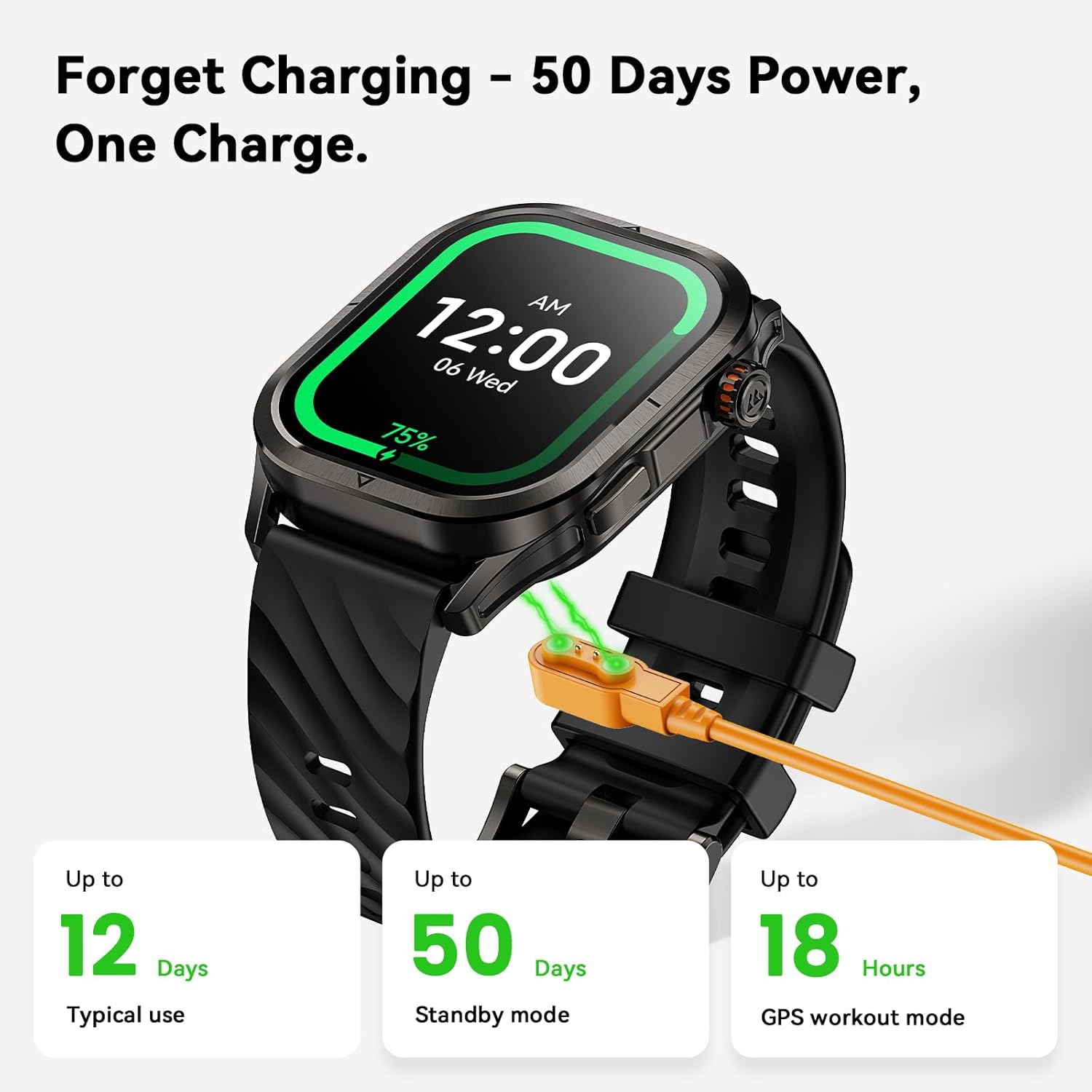
The KOSPET Magic P10 offers up to 50 days of standby power on a single charge.

Detailed breakdown of the KOSPET Magic P10's extra-long battery life under various usage scenarios.
10. 規格
| 特徵 | 細節 |
|---|---|
| 品牌 | 科斯佩特 |
| 型號 | 科斯佩特魔法 P10 |
| 螢幕尺寸 | 1.96吋AMOLED |
| 耐水性 | 5個大氣壓力 |
| 全球定位系統 | Built-in Dual-Band L1+L5 GPS (6 satellite systems) |
| 感應器 | VC9213-4PD (Heart Rate, SpO2), Compass, Barometer, Altimeter |
| 電池容量 | 450 毫amp 時間 |
| 典型使用電池壽命 | 14-21天 |
| 待機電池壽命 | 長達 50 天 |
| 連接性 | 藍牙 |
| 作業系統相容性 | Android 5.1以上版本和iOS 10.0以上版本 |
| 物品重量 | 9.5 盎司 |
| 材料 | 不銹鋼機身 |
11、維護保養
To ensure the longevity and optimal performance of your KOSPET Magic P10 Smart Watch, follow these maintenance guidelines:
- 打掃: 定期用柔軟的無絨布擦拭手錶螢幕和機身。對於頑固污漬,只需輕輕擦拭即可。amp用水擦拭布。避免使用刺激性化學物質或研磨材料。
- 錶帶保養: Clean silicone straps with mild soap and water. For leather straps, avoid prolonged exposure to water and direct sunlight; clean with a specialized leather cleaner if necessary.
- 收費: 請僅使用隨附的磁吸式充電線。充電前,請確保手錶和充電線上的充電接點清潔乾燥,以防止腐蝕。
- 貯存: 長時間不使用時,請將手錶存放在陰涼乾燥處,避免陽光直射和極端溫度。
- 水暴露: While 5ATM water-resistant, avoid exposing the watch to high-velocity water (e.g., jet skiing) or hot water/steam (e.g., hot showers, saunas) as this can compromise the seals.
12。 故障排除
If you encounter issues with your KOSPET Magic P10, try the following common troubleshooting steps:
- 手錶無法開機: 請確保手錶已充滿電。將其連接到充電器並等待幾分鐘後再嘗試開機。
- 無法與手機配對: Make sure Bluetooth is enabled on your phone and the watch. Ensure the watch is within range. Try restarting both the watch and your phone. If issues persist, try unpairing and re-pairing the device in the Apexmove app.
- 未出現通知: Verify that notification permissions are granted for the Apexmove app in your phone's settings (refer to Section 4.3). Ensure 'Do Not Disturb' or 'Low Power Mode' are off.
- 不準確的健康數據: 確保手錶佩戴在手腕上貼合舒適,不要太緊或太鬆。清潔手錶背面的感應器。測量過程中避免過度晃動。
- GPS無法鎖定: 確保您在室外空曠的地方, view 天空。請稍等幾分鐘,讓GPS取得訊號。
- 螢幕無反應: If the screen is unresponsive, try restarting the watch by long-pressing the power button. If wet, ensure the screen is dry or use the wet-touch feature.
- 電池電量快速耗盡: 降低螢幕亮度,關閉不必要的通知,並盡可能減少持續心率監測。確保沒有後台應用過度耗電。
For persistent issues, please refer to the official KOSPET support resources or contact customer service.
13. 保固和支持
KOSPET products are designed for durability and performance. For information regarding warranty coverage, returns, or technical support, please visit the official KOSPET web請造訪網站或參閱產品包裝內附帶的保固卡。
您也可以造訪以下網址以取得更多支援和產品資訊: 亞馬遜上的 KOSPET 商店.
Ask a question about this manual
Ask about setup, troubleshooting, compatibility, parts, safety, or missing instructions. Manuals+ will review the question and use this page’s manual context to help answer it.