
CAMECHO B0DRVTKJS3
CAMECHO 4 Channel Dash Cam User Manual
Model: B0DRVTKJS3
介紹
This user manual provides detailed instructions for the installation, operation, and maintenance of your CAMECHO 4 Channel Dash Cam. Please read this manual thoroughly before using the device to ensure proper functionality and safety.
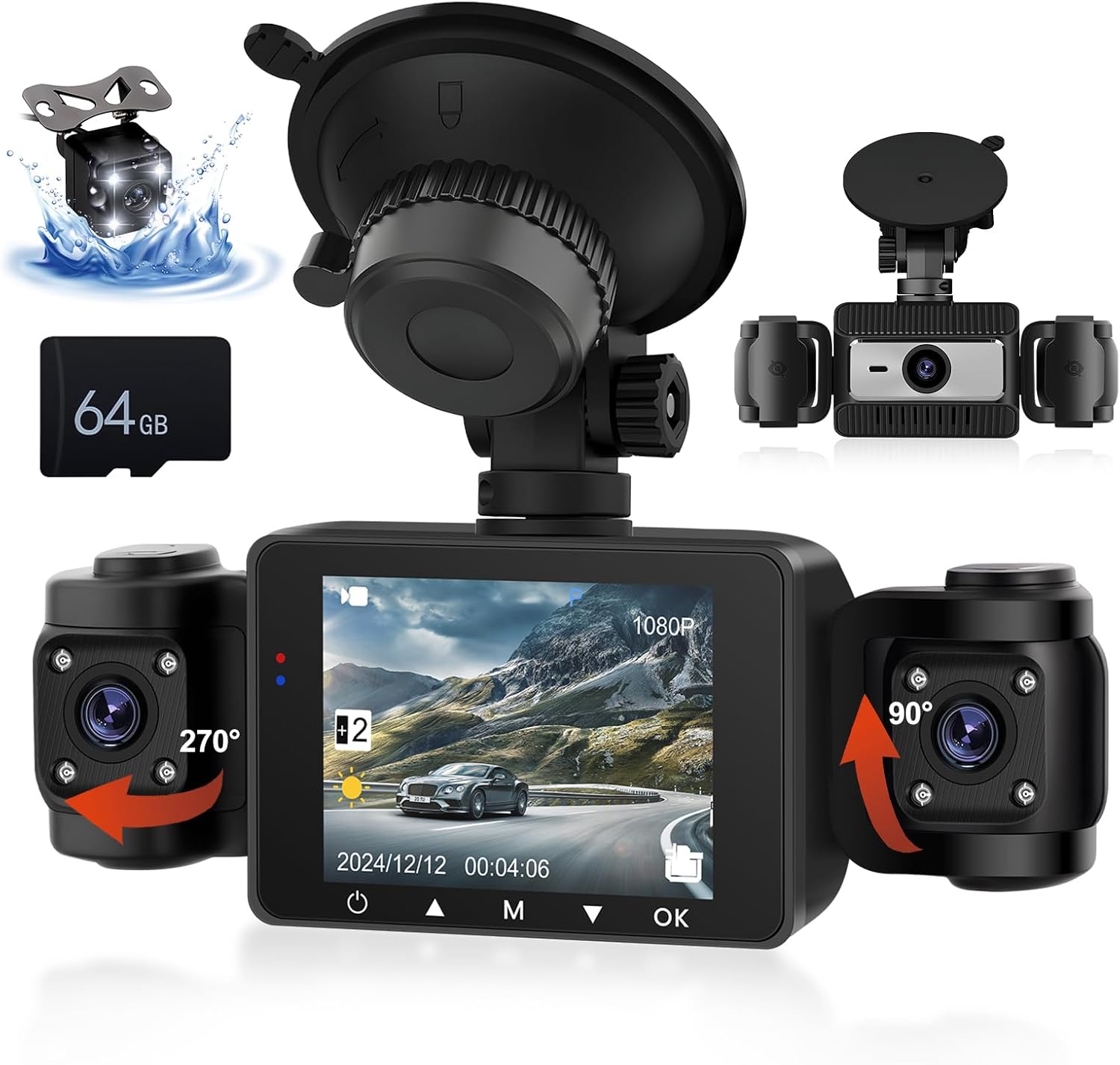
Image: The CAMECHO 4 Channel Dash Cam system, showing the main unit with its display, two adjustable side cameras, a separate rear camera, and an included 64GB TF card.
包裝內容
確認您的包裹含有下列所有物品:
- 1 x Dash Camera (Main Unit)
- 1 個後部 View 相機
- 1 x 64GB TF 卡
- 1 x Power Cord (Car Charger)
- 1 x Extended Line (for Rear Camera)
- 1 x Anti-skid Pad
- 1 本使用手冊

Image: An illustration detailing the various components included in the product package, such as the dash cam, rear camera, TF card, power cord, extended line, anti-skid pad, and user manual.
產品結束view
The CAMECHO 4 Channel Dash Cam provides comprehensive vehicle monitoring with its multi-camera system. Key features include:
- Quadruple Channel Recording: Simultaneous monitoring of front (150°), rear (120°), and interior (dual 120°) views.
- High Definition Capture: 1080P front camera, 480P interior and rear cameras with a 2.4-inch IPS screen.
- 紅外夜視: Enhanced low-light performance with 4 infrared LEDs for clear interior capture.
- 循環錄音: Automatic overwriting of oldest footage 確保連續錄音。
- G 感測器: 自動鎖定影片 footage upon detecting collisions or bumps.

Image: A detailed diagram illustrating the various parts of the dash cam, including HD lenses, display screen, night vision light, reset button, OK button, down-page button, menu key, flip up button, power button, AV-IN port, TF card slot, bracket holes, baffle, speaker, and brackets.
設定和安裝
請依照以下步驟正確安裝行車記錄器系統:
- 準備好擋風玻璃: 清潔擋風玻璃上您打算安裝行車記錄器的區域。確保該區域無灰塵和油脂。
- 安裝行車記錄器: Attach the dash cam to the windshield using the suction cup mount. Press firmly to ensure a secure adhesion. Position it so it does not obstruct your view.
- 插入TF卡: Insert the provided 64GB TF card into the TF card slot on the dash cam. Ensure it is inserted correctly until it clicks into place.
- 連接電源: Connect the power cord to the dash cam and plug the other end into your vehicle's cigarette lighter socket. Route the cable neatly to avoid interference with driving.
- 安裝後置相機:
- 將後置攝影機安裝在車輛後部,通常靠近車牌或後窗內側。
- Connect the extended line to the rear camera and route it to the main dash cam unit.
- Connect the extended line to the AV-IN port on the main dash cam.
- 反向 view functionality, connect the reverse trigger wire of the extended line to your vehicle's reverse light anode (positive wire).
- 調整相機角度: Adjust the angles of the front, interior, and rear cameras to ensure optimal coverage. The interior cameras can rotate 270° and 90° respectively, and the main unit can rotate 360° on its mount.

Image: A visual guide demonstrating the installation process, including cleaning the windshield, attaching the mounting bracket, connecting the power cable, and routing the rear camera cable.

Image: A schematic showing the connection points for the dash cam, power cable, and rear camera, along with suggested cable routing for a clean installation.
操作說明
電源開/關
- The dash cam will automatically power on and begin recording when your vehicle's ignition is turned on (power is supplied to the cigarette lighter socket).
- 若要手動開/關機,請按住 電源按鈕 (請參閱產品概述)view 位置示意圖)。
錄製模式
- 正常錄製: The camera continuously records when powered on. Footage is saved in segments (e.g., 1-minute files)。
- 循環錄音: 當TF卡已滿時,將播放最早解鎖的影片。 files 將會被新的錄音自動覆蓋。
- G感應器(緊急錄影): If a sudden impact or collision is detected, the G-sensor will automatically trigger and lock the current video file,防止被循環錄音覆蓋。

Image: A visual representation of the loop recording function, showing how older files are overwritten to make space for new recordings on the 64GB TF card.

Image: An illustration demonstrating the G-Sensor's function, where a collision triggers the automatic locking of video footage 以防止其被覆蓋。
菜單導航
使用 菜單鍵 to access settings. Navigate through options using the 上/下按鈕 (Flip up/Down-page buttons) and confirm selections with the 確定按鈕.
- 視訊解析度: Adjust front camera resolution (e.g., 1080P). Interior and rear cameras are fixed at 480P.
- 曝光補償: Adjust brightness settings for optimal video quality in varying light conditions.
- 錄音: 啟用或停用麥克風錄音。
- 日期/時間amp: Set the correct date and time for accurate video timestamps.

Image: A visual representation of the exposure compensation feature, illustrating how the dash cam automatically adjusts light sensitivity to prevent overexposure or underexposure, improving picture quality in various lighting conditions.
View英福tage
- 設備端播放: Use the display screen and navigation buttons to review recorded videos directly on the dash cam.
- 電腦播放: Remove the TF card and insert it into a computer's card reader. Video files are typically saved in separate folders for each camera (FRONT, BACK, LEFT, RIGHT).
停車協助
When the rear camera is properly connected to the reverse light trigger, the dash cam display will automatically switch to the rear view with auxiliary parking lines when the vehicle is put into reverse. This assists with parking by reducing blind spots.

Image: An illustration of the parking assistance feature, displaying the rear camera view with adjustable parking auxiliary lines on the dash cam screen to aid in safe parking maneuvers.
維護
- 清潔鏡片: Regularly clean the camera lenses with a soft, lint-free cloth to ensure clear video quality. Avoid abrasive materials.
- TF卡維護: Format the TF card periodically (e.g., once a month) through the dash cam's menu to prevent data corruption and ensure optimal recording performance. Back up any important footag格式化之前。
- 固件更新: Check the CAMECHO official website for any available firmware updates to improve performance and add new features. Follow instructions carefully if updating.
- 工作溫度: 避免將行車記錄器長時間暴露在極端溫度(過熱或過冷)下,因為這會影響電池壽命和組件壽命。
故障排除
| 問題 | 可能的原因 | 解決方案 |
|---|---|---|
| 行車記錄器無法開機。 | No power supply; faulty power cord; vehicle's cigarette lighter socket is off. | Check power connection. Ensure vehicle ignition is on. Test power cord in another socket or with another device. |
| 錄製停止或卡住。 | TF card full; TF card error/corruption; low quality TF card. | Format the TF card. Replace with a high-speed, reputable brand TF card if issues persist. |
| 視頻質量差。 | Dirty lens; incorrect resolution settings; extreme lighting conditions. | Clean camera lenses. Adjust exposure compensation in settings. Ensure resolution is set to desired quality (e.g., 1080P for front). |
| G-Sensor not working. | G-Sensor sensitivity set too low or off. | Adjust G-Sensor sensitivity in the settings menu. |
| 後置相機不顯示。 | 連接鬆動;電纜/攝影機故障。 | Check all connections for the rear camera and extended line. Ensure the AV-IN port is secure. |
規格
| 特徵 | 細節 |
|---|---|
| 模型 | B0DRVTKJS3 |
| 品牌 | 卡梅喬 |
| 產品尺寸 | 1.5 x 5.4 x 2 英吋(主機) |
| 物品重量 | 7 盎司 |
| 螢幕尺寸 | 2.4 吋(IPS) |
| 視訊擷取分辨率 | Front: 1080p; Interior/Rear: 480p |
| 攝像機角度 | Front: 150°; Interior: Dual 120°; Rear: 120° |
| 特色 | Loop Recording, G-Sensor, Infrared Night Vision, Parking Assistance |
| 附贈TF卡 | 64GB |
| 安裝類型 | 擋風玻璃安裝座 |
| 控制方式 | Touch (referring to screen interaction, though buttons are also present) |
保固和支持
CAMECHO products are designed for reliability and performance. For warranty information, please refer to the documentation included with your purchase or visit the official CAMECHO web地點。
For technical support or inquiries, you may contact CAMECHO customer service. The provided information indicates online help is available via email:
電子郵件: yanningqiu2021@163.com
When contacting support, please provide your product model (B0DRVTKJS3) and a detailed description of your issue.

Image: A customer service representative with a headset, accompanied by text indicating online help and user manual support available via the email address yanningqiu2021@163.com.
Ask a question about this manual
Ask about setup, troubleshooting, compatibility, parts, safety, or missing instructions. Manuals+ will review the question and use this page’s manual context to help answer it.