
1. 安全訊息
請在組裝和使用前閱讀並理解所有說明。請妥善保管本手冊以供日後參考。
- 在開始組裝之前,請確保所有零件均存在且未損壞。
- 組裝時請勿過度鎖緊螺絲,以免損壞零件。
- 將桌子放在平坦、穩定的表面上,以防傾倒。
- 讓兒童和寵物遠離集合區域。
- 請勿超過桌子的最大承重能力。
- The built-in power strip is designed for standard electronic devices. Do not overload it.
- Avoid contact with water or excessive moisture to prevent electrical hazards and damage to the desk material.
2. 零件清單
請確認包裹內所有零件齊全。如有任何零件缺失或損壞,請聯絡客服。
| 部分 | 描述 | 數量 |
|---|---|---|
| A | 桌面面板 | 1 |
| B | 左腿架 | 1 |
| C | 右腿架 | 1 |
| D | 交叉開關 | 1 |
| E | 電源插座單元 | 1 |
| F | 收納袋 | 1 |
| G | 耳機掛鉤 | 1 |
| H | 可調式腳墊 | 4 |
| I | Assembly Tool (Allen Wrench) | 1 |
| J | 螺絲(各種尺寸) | (如所須) |
Note: The exact number and type of screws may vary slightly. Refer to the included hardware pack.
3. 安裝與組裝
Assembly typically takes approximately 15 minutes with one person. No additional tools are required beyond what is provided.
逐步說明:
- 拆開組件包裝: 小心地將所有零件從包裝中取出,並平鋪在柔軟、乾淨的表面上,以防止刮傷。

Image: The fully assembled Lufeiya computer desk, showcasing its design and features in a home office setting.
- 安裝腿架: Connect the Left (B) and Right (C) Leg Frames to the Desktop Panel (A) using the appropriate screws (J) and the provided Allen wrench (I). Ensure the frames are securely fastened but do not overtighten.

Image: A diagram illustrating the overall dimensions of the desk, including length, width, and height.
- 安裝 Crossbar: Attach the Crossbar (D) between the two leg frames for added stability. Secure with screws (J).
- Insert Power Outlet Unit: Carefully place the Power Outlet Unit (E) into the designated cutout on the Desktop Panel (A). Ensure it sits flush and is secure.

圖片:特寫 view of the integrated power strip with two AC outlets and two USB ports on the desktop.
- 安裝可調式腿墊: Screw the Adjustable Leg Pads (H) into the bottom of each leg frame. Adjust them to ensure the desk is level on uneven surfaces.

Image: An illustration highlighting the desk's waterproof surface, heavy-duty metal design, and adjustable leg pads for stability.
- Install Storage Bag and Headphone Hook: Attach the Storage Bag (F) and Headphone Hook (G) to the desired side of the desk using the provided hardware. These accessories are removable and can be placed on either side.

Image: A removable headphone hook is shown attached to the side of the desk, providing convenient storage.

Image: A removable fabric storage bag is attached to the side of the desk, ideal for holding books or documents.
- 最後緊固: Once the entire desk is assembled, firmly tighten all screws for maximum stability.
4. 操作說明
The Lufeiya Computer Desk is designed for versatile use in home offices, study areas, or gaming setups.
- 電源插座使用情況: Plug the desk's power cord into a standard wall outlet. Use the two AC outlets and two USB charging ports on the desktop to power and charge your electronic devices.
- 收納袋: Utilize the removable storage bag for documents, magazines, or other small items to keep your desktop clutter-free.
- 耳機掛鉤: Hang headphones, bags, or other accessories on the removable hook for easy access and organization.
- 可調式腿墊: Periodically check and adjust the leg pads to maintain desk stability, especially if moving the desk or if the floor surface is uneven.
5、維護保養
Regular maintenance will prolong the life and appearance of your desk.
- 打掃: 用軟布擦拭桌面和金屬框架。amp 布。避免使用可能損壞表面的刺激性化學物質或研磨性清潔劑。
- 溢出: Immediately wipe up any spills to prevent water damage to the particle board. The desktop is designed to be waterproof, but prolonged exposure to liquids should be avoided.
- 擰緊緊固件: Periodically check all screws and bolts and tighten them as needed to ensure the desk remains stable.
- 避免體重過重: Do not place excessively heavy items on the desk to prevent structural damage.
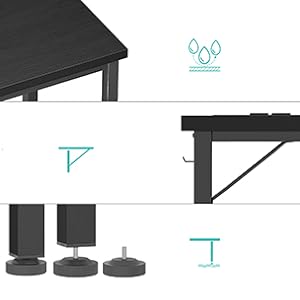
Image: Close-up showing water droplets on the desk surface, highlighting its waterproof properties.
6。 故障排除
如遇到任何問題,請參考以下常見問題及解決方法。
| 問題 | 可能的原因 | 解決方案 |
|---|---|---|
| 桌子搖搖晃晃 | 螺絲鬆脫或地面不平整。 | Tighten all assembly screws. Adjust the leg pads until the desk is stable. |
| 電源插座無法運作 | Desk power cord not plugged in, or wall outlet issue. | Ensure the desk's power cord is securely plugged into a functional wall outlet. Check the wall outlet with another device. |
| 組裝過程中零件無法對齊 | Screws overtightened prematurely or incorrect orientation. | Loosen all screws slightly, realign parts, then tighten. Refer to the assembly diagrams for correct orientation. |
7. 規格
- 品牌: 露菲婭
- 型號: LFY-PO-Black-39
- 產品尺寸: 19.5 英吋深 x 39.4 英吋寬 x 29.5 英吋高
- 顏色: 黑色的
- 風格: 現代的
- 頂部材質類型: FSC-Certified Wood (Particle board with scratch-resistant, anti-collision, and waterproof finish)
- 基材: 金屬
- 特色: Built-In Power Strip (2 AC outlets, 2 USB charging ports)
- 包含的組件: Built-in Outlet, Built-in USB Port, Headphone Hook, Storage Bag
- 建議集會人數: 1
8.保修與支持
Lufeiya provides professional customer service and a limited warranty for this product.
- 保修類型: 有限的
- 客戶服務: For any quality problems, missing parts, or assembly assistance, please contact Lufeiya customer service. Easy and fast replacement is guaranteed for quality issues.
- 聯絡資訊: Refer to your purchase documentation or the official Lufeiya web提供最新客戶支援聯絡方式的網站。
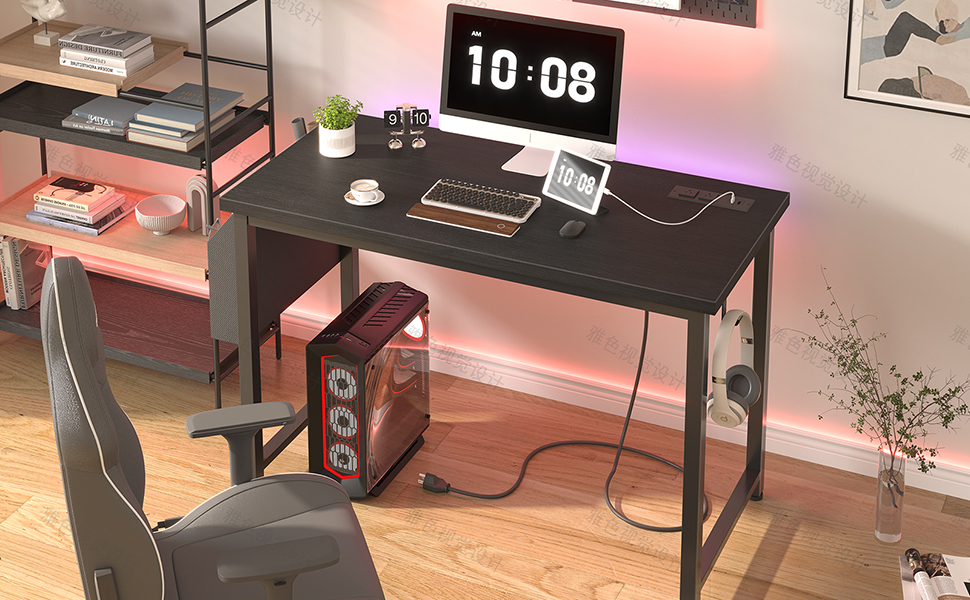
Image: A visual guide on how to contact Lufeiya seller customer service for support.