
TOPDON Phoenix Plus
TOPDON Phoenix Plus 2 雙向掃描工具使用手冊
Model: TOPDON Phoenix Plus 2 | Brand: TOPDON
一、簡介
The TOPDON Phoenix Plus 2 is an advanced bidirectional scan tool designed for comprehensive automotive diagnostics. It integrates OE-level full diagnosis, topology mapping, and over 40 reset services, making it suitable for professional technicians and advanced DIY enthusiasts. This manual provides detailed instructions for setting up, operating, maintaining, and troubleshooting your device.
主要特點包括:
- ECU編碼: Writes adaptive data into components and allows for vehicle customization.
- 雙向控制(主動測試): Enables direct control and testing of car functions from the tablet.
- 全面系統診斷: Provides one-touch AutoVIN acquisition and AutoScan for quick diagnostics across all vehicle systems.
- OE-Level Topology Module Tree: Visually displays DTCs and communication status between vehicle modules.
- 40+ 重置服務: Covers a wide range of maintenance and reset functions including Oil Reset, DPF Regeneration, EPB Reset, and more.
- CAN-FD協定支援: Ensures compatibility with newer vehicle models.
- FCA SGW 的自動授權: Bypasses the Security Gateway Module in FCA vehicles for advanced diagnostics.
- 廣泛的車輛覆蓋範圍: Supports over 150 car brands and 10,000+ models worldwide.
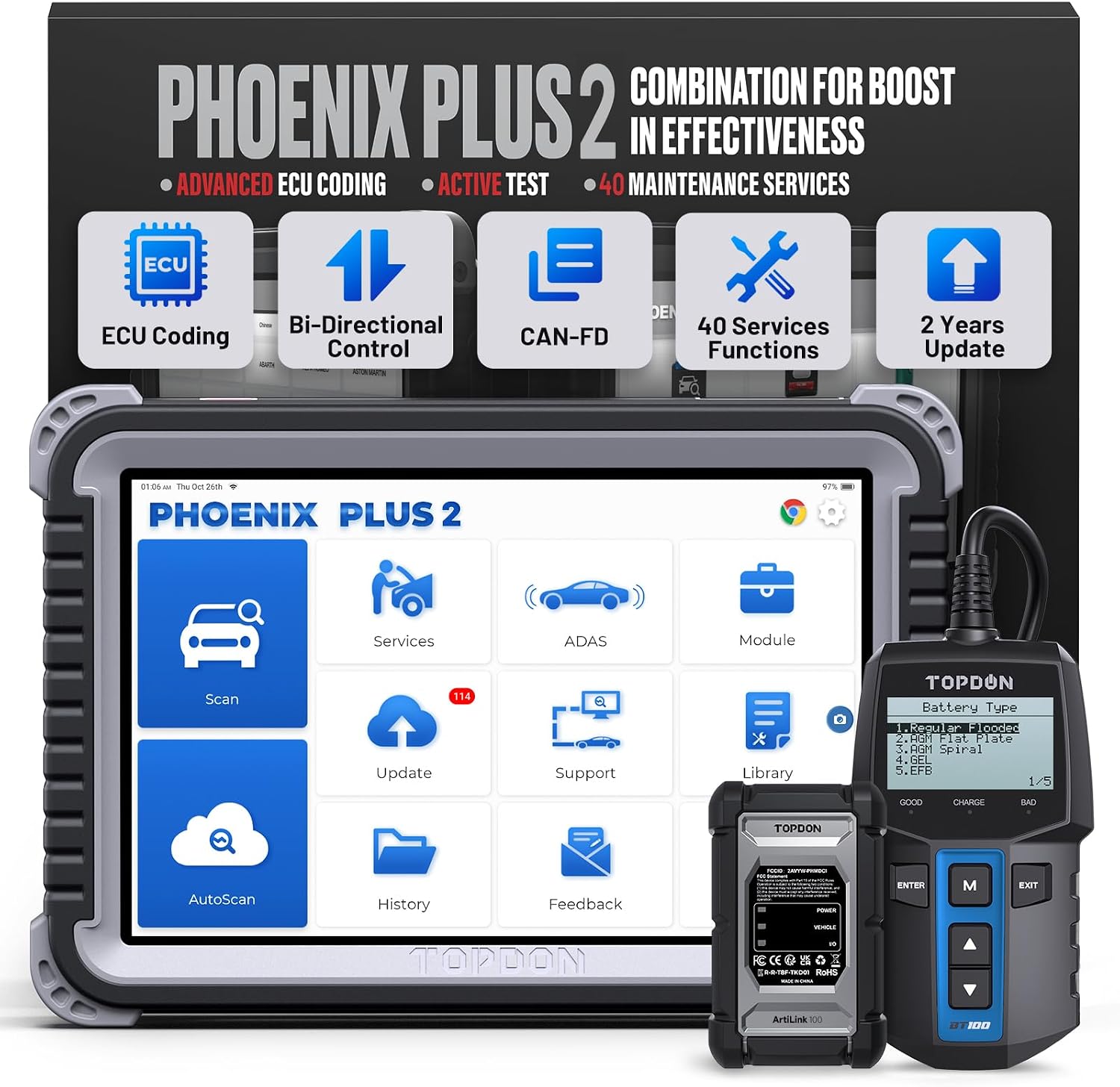
Figure 1.1: TOPDON Phoenix Plus 2 Bidirectional Scan Tool with Battery Tester.
2. 設定和初始使用
2.1 包裝內容
Upon unboxing your TOPDON Phoenix Plus 2, verify that all components are present:
- OBD2 Scanner (Main Unit)
- 使用者手冊
- USB 連接線(A 型至 C 型)
- 電源適配器
- VCI Dongle(車輛通訊介面)
- OBDI 適配器 BOX 傳輸線
- OBDII 延長線
- 點煙器電纜
- 電池組amps/電纜組
- Fuses (φ5x20mm)*4, (φ6x30mm)*2
- Non-16pin Adaptor Cable Kit: HONDA-3, TOYOTA-17, TOYOTA-22, BENZ-38, FIAT-3, NISSAN-14+16, CHRYSLER-6, GM/VAZ-12
- 密碼信封

Figure 2.1: All components included in the TOPDON Phoenix Plus 2 package.
Video 2.1: An unboxing video demonstrating the contents of the TOPDON Phoenix Plus 2 scan tool package.
2.2 Device Registration and Activation
To fully utilize your Phoenix Plus 2, you must register and activate the device. Ensure you have a stable Wi-Fi connection.
- After Wi-Fi connection, select "User Info" -> "Settings" -> "Login".
- Enter the "New Registration" page.
- Follow the steps to create your account. Input your username, password, and email address.
- Tap "CAPTCHA" to send the verification code to your email box.
- Input the verification code received in your email.
- Input the Serial Number and Activation Code which can be found in the password envelope.
- Tap "Activate" to finish your registration.
Video 2.2: A step-by-step guide on how to register and activate your TOPDON Phoenix Plus 2 device.
3. 操作說明
3.1 與車輛連接
Connect the VCI dongle to the vehicle's OBD-II port. For older vehicles, use the appropriate non-16pin adapter from the kit. The Phoenix Plus 2 supports wireless diagnostics via Bluetooth, allowing you to operate the tablet away from the vehicle's OBD-II port.
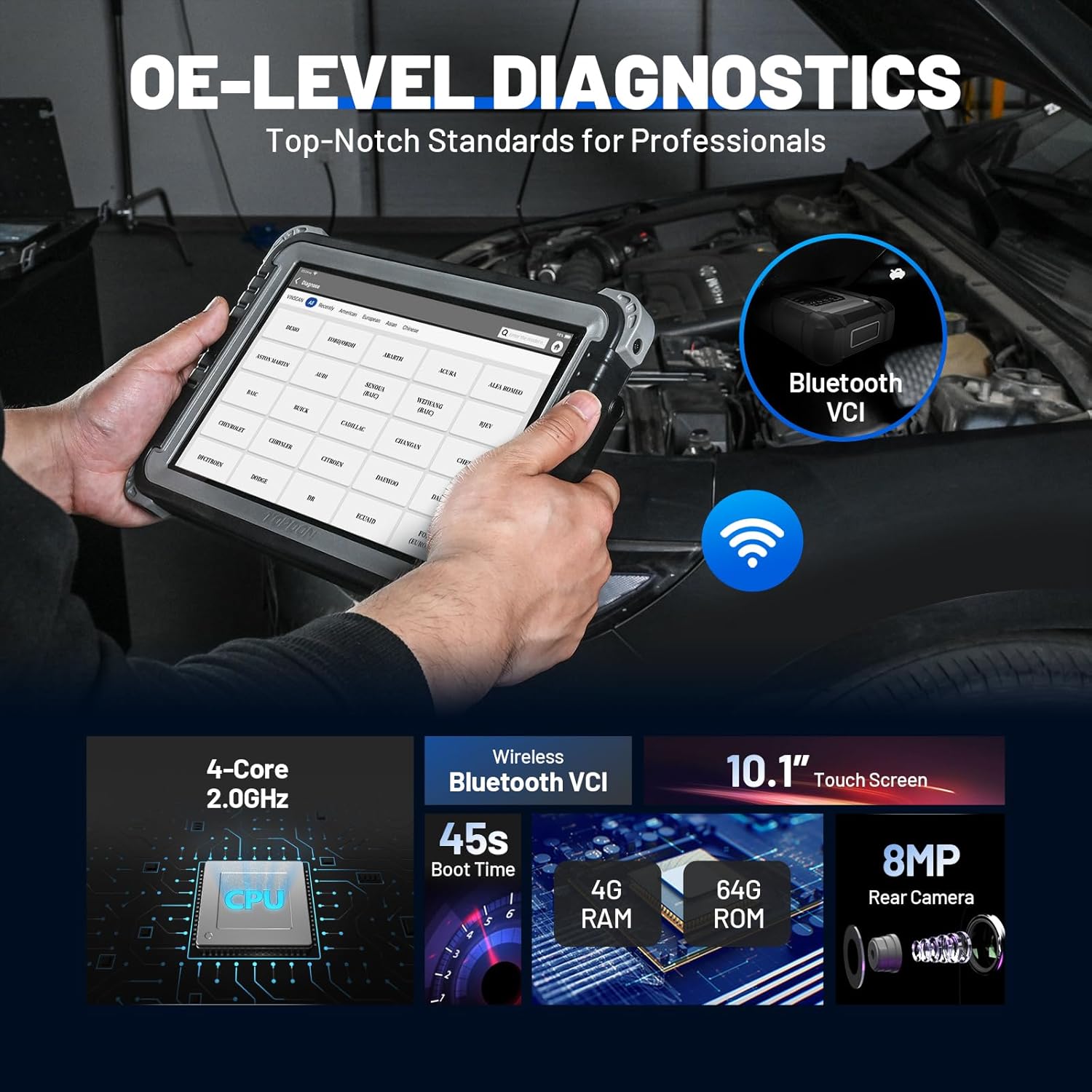
Figure 3.1: The Phoenix Plus 2 performing OE-level diagnostics with wireless Bluetooth VCI connectivity.
3.2 全系統診斷
The device performs OE-level diagnostics across all accessible electronic control units (ECUs). It can read and clear fault codes, read data streams, and retrieve vehicle information.

Figure 3.2: Visual representation of OE-Level All System Diagnostics, highlighting various vehicle systems.
3.3 Topology Module Mapping
The Topology Module Mapping feature provides an intuitive visual display of all structures and communication statuses between vehicle modules. This allows technicians to quickly identify problematic areas and streamline diagnosis.

Figure 3.3: The OE-Level Topology Module Tree interface, showing system status and fault codes.
3.4 ECU Coding and Online Coding
ECU Coding allows for writing adaptive data to components, improving efficiency. Online ECU Coding helps restore functional status after ECU replacement, ensuring new actuators are recognized by vehicle systems. This function also enables customization of vehicle features.

Figure 3.4: Illustration of ECU Coding capabilities, including customization and restoration of functional status.

圖 3.5:Examples of ECU Coding and Online Coding applications, such as automatic side mirror folding and customized daytime running lights.
3.5 主動測試(雙向控制)
The active test function allows direct control and testing of various car components on demand. This helps in quickly pinpointing actuator faults and verifying system functionality.

Figure 3.6: Demonstrates the Active Test feature, showing command and receive actions for components like sunroof, headlight, and air conditioning.
3.6 40+ 維護服務
The Phoenix Plus 2 offers a comprehensive suite of over 40 maintenance and reset services to address common vehicle issues. These services include, but are not limited to:
- 機油復位
- 噴油器編碼
- 電子駐車煞車復位
- ABS出血
- 油門匹配
- 電池管理系統重置
- 柴油顆粒過濾器再生
- SAS Service (Steering Angle Sensor)
- 胎壓監測系統重置
- 變速箱匹配
- 牙齒學習
- 大燈匹配
- 懸吊水平校準
- EGR 適應
- ODO重置
- 安全氣囊重置
- 運輸方式
- 音頻重置
- 停止/啟動重置
- 氮氧化物傳感器重置
- AdBlue 重置(柴油機廢氣過濾器)
- 座椅校準
- 冷卻液滲漏
- 輪胎復位
- 窗口校準
- 語言變化
- ECU 重置
- 空調系統重新學習/初始化
- 智慧型巡航控制系統
- 引擎功率平衡監測
- 氣體顆粒過濾器再生
- 馬達角度校準
- 高音量tage 電池診斷
- FRM匹配
- 離合器匹配
- 網關模組資料校準
- 雨量光感測器
- 渦輪增壓匹配

圖 3.7:結束view of various maintenance services available on the scan tool, including Oil Reset, Injector Coding, and EPB Reset.

Figure 3.8: A comprehensive list of the 40+ maintenance services provided by the Phoenix Plus 2.
4、維護保養
4.1 軟件更新
The TOPDON Phoenix Plus 2 comes with 2 years of free software updates. Regular updates ensure your device has the latest vehicle coverage, bug fixes, and new features. Connect to Wi-Fi and navigate to the "Update" section on the main interface to check for and install available updates.

Figure 4.1: The "One-Touch Update" feature, showing the update progress on the device screen.
4.2一般護理
- 保持設備清潔,無灰塵和碎屑。
- 避免將設備長時間暴露在極端溫度或陽光直射下。
- Store the device in its durable carrying case when not in use to prevent damage.
- Ensure all cables and connectors are properly stored and not kinked or damaged.
5。 故障排除
This section addresses common issues you might encounter with your TOPDON Phoenix Plus 2.
| 問題 | 可能的原因 | 解決方案 |
|---|---|---|
| 設備無法開機。 | 電池電量低或電源轉接器有問題。 | Charge the device using the provided power adapter. Ensure the adapter is properly connected to a power source and the device. |
| 無法連接到車輛。 | Incorrect VCI connection, vehicle ignition off, or VCI dongle not paired. | Ensure the VCI dongle is securely plugged into the vehicle's OBD-II port. Turn the vehicle ignition to ON. Check Bluetooth pairing between the tablet and VCI dongle. |
| 軟體更新失敗。 | Wi-Fi連線不穩定或儲存空間不足。 | Ensure a strong and stable Wi-Fi connection. Check available storage space on the device and clear unnecessary files if needed. Retry the update. |
| 設備運作緩慢或無響應。 | Too many applications running in the background or low memory. | Close unused applications. Restart the device. Consider performing a factory reset if the issue persists (backup data first). |
For further assistance, please refer to the official TOPDON support channels.

Figure 5.1: TOPDON offers 24/7 online service for customer support.
6. 規格
| 特徵 | 細節 |
|---|---|
| 品牌 | 拓普頓 |
| 模型 | 鳳凰加2 |
| 作業系統 | 安卓10.0 |
| 處理器 | 2.0GHz 四核 |
| 記憶體 | 4GB |
| 唯讀記憶體 | 64GB |
| 展示 | 10.1" 1280x800 Touchscreen |
| 相機 | 8MP 後置攝像頭 |
| 電池 | 1 顆鋰離子電池(隨附) |
| 產品尺寸 | 10.92 英吋長 x 1.75 英吋寬 x 7.51 英吋高 |
| 物品重量 | 3.43磅 |
| 語言 | 英語 |
7. 保固和支持
The TOPDON Phoenix Plus 2 comes with a 1-year product support and a 30-day free return or replacement policy. For any inquiries or technical assistance, TOPDON provides 24/7 online customer service.
重要提示:
- The diagnostic feature menus and service availability may vary by vehicle's make, model, and year.
- Some services like ECU Online Coding, ECU Coding, Oil Reset, ABS Bleeding, DPF Regeneration, etc., may not be available for all vehicle models.
- AutoAuth access may require yearly subscription fees.
For detailed information regarding specific functions for your vehicle, please contact TOPDON customer support with your vehicle's make, model, and year.
Ask a question about this manual
Ask about setup, troubleshooting, compatibility, parts, safety, or missing instructions. Manuals+ will review the question and use this page’s manual context to help answer it.