
酷奧D20
COOAU D20 雙鏡頭行車記錄器使用手冊
型號:D20
介紹
Thank you for choosing the COOAU D20 Dual Dash Cam. This manual provides detailed instructions for setting up, operating, and maintaining your device. The D20 is designed to capture high-quality video footage both in front of and inside your vehicle, offering enhanced safety and evidence in case of incidents. Its advanced features include built-in GPS, Wi-Fi connectivity, superior night vision, and robust parking monitoring.
盒子裡有什麼
請確認您的包裹含有下列所有物品:
- COOAU D20 Dash Cam (1)
- 11.81ft USB Data Cable (1)
- 車用充電器 (1)
- D20 Dash Cam User Manual (1)
- Suction Mount (1)

Image: All components included in the COOAU D20 Dash Cam package.
產品結束view
The COOAU D20 features a compact design with dual cameras for front and interior recording. It includes a display screen for live view and settings adjustment, along with intuitive buttons for navigation.

Image: The COOAU D20 Dual Dash Cam with its suction mount and a smartphone showing the app interface.

圖片:爆炸 view of the dash cam, highlighting its elaborate design and components.
設定
1. 安裝吸盤支架
Attach the suction mount to the dash cam. Choose a location on your windshield that does not obstruct your view. Ensure the surface is clean and dry. Press the suction cup firmly against the windshield and flip the lock lever to secure it. The mount allows for 360° rotation and 120° tilt for optimal positioning.

Image: Step-by-step guide for installing the dash cam with the suction mount.
2. 電源連接
Connect the provided car charger to your vehicle's 12V power outlet and the dash cam. Route the cable neatly to avoid interference with driving. The dash cam will power on automatically when the vehicle starts.
3. 插入Micro SD卡
Insert a Micro SD card (not included, up to 256GB supported) into the designated slot on the dash cam. Ensure the card is inserted correctly until it clicks into place. It is recommended to format the SD card within the dash cam's settings before first use to ensure optimal performance.
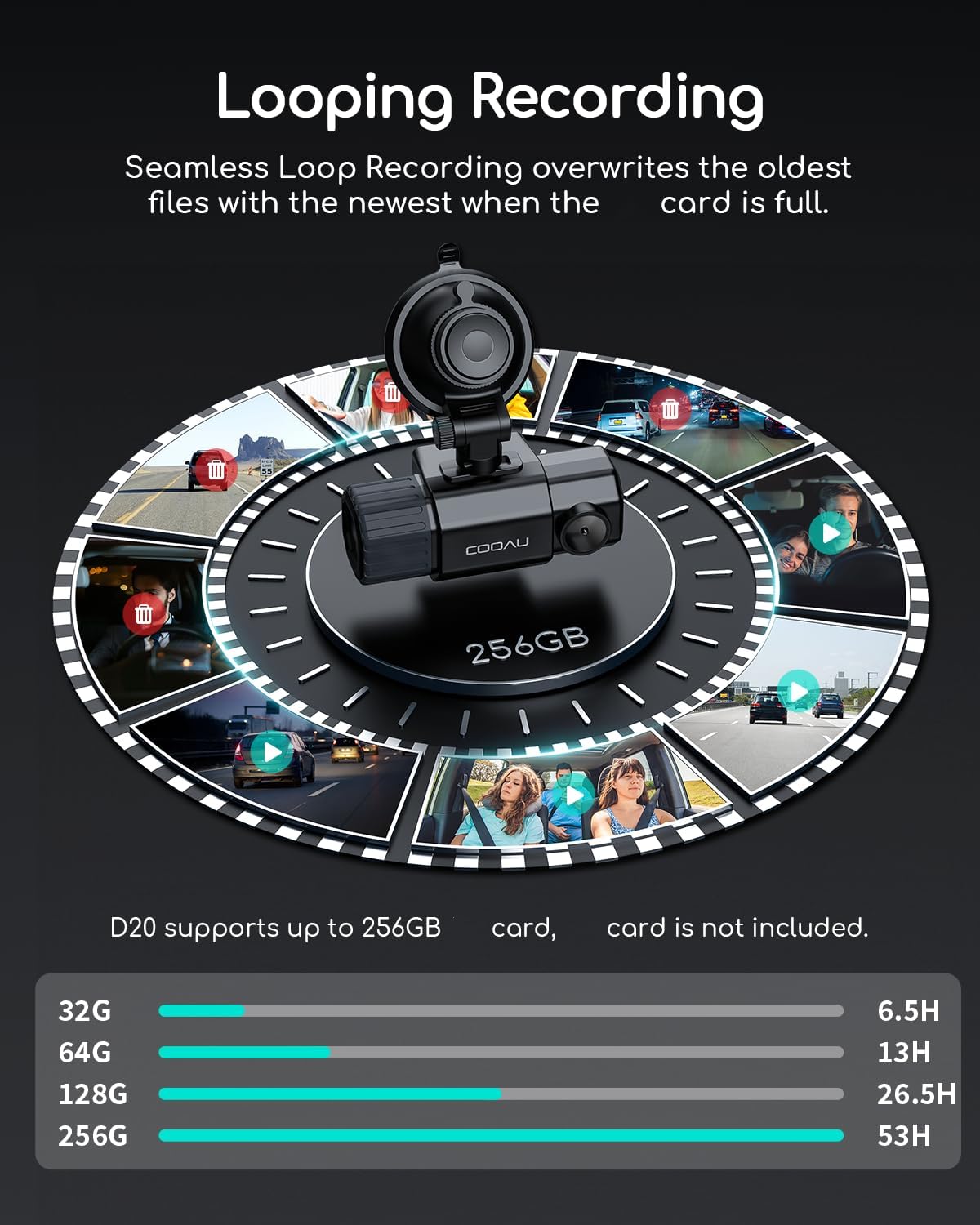
Image: Visual representation of loop recording and supported SD card capacities.
操作說明
1. 循環錄音
The dash cam automatically records video in continuous loops (e.g., 1/3/5 minute segments). When the SD card is full, the oldest unlocked files are overwritten by new recordings. Locked videos (triggered by G-sensor) are stored separately and will not be overwritten.

Image: Loop recording mechanism, ensuring continuous recording without manual deletion.
2. Excellent Night/Day Vision
Equipped with a dual IMX323 sensor, Novatek NT96663 processor, 4 infrared LED lights, and an F1.8 large aperture, the D20 provides clear video capture in various lighting conditions, including low light and total darkness. WDR technology further enhances image quality.

Image: Night vision capabilities of the dash cam, showing clear visibility in dark environments.
3. G感測器(碰撞偵測)
The built-in G-sensor automatically detects sudden shakes or collisions. When an impact is detected, the current video footage is locked to prevent it from being overwritten, serving as crucial evidence in accidents.
4. 24/7 停車模式
For continuous protection, the parking mode monitors your vehicle even when parked. It can detect collisions (G-sensor) and motion, automatically recording and locking footage. Note: This feature requires an ACC hardwire kit with a Micro USB interface (not included) for continuous power.

Image: Parking monitoring features, including collision detection and motion detection.
5. 內建GPS追踪
The integrated GPS module automatically records your vehicle's location, driving route, and speed. This data is embedded in the video footage, providing comprehensive information for every journey.

Image: The dash cam's app interface displaying GPS tracking and video management.
6. Wi-Fi Connection & App (Aoni CarDVR)
Connect the dash cam to your smartphone via Wi-Fi using the "Aoni CarDVR" app (available on iOS and Android). This allows you to view 住 footage,播放錄製的視頻,下載 files to your phone, change settings, and perform firmware updates (OTA Upgrade) without removing the SD card.

Image: Seamless connectivity between the dash cam and the smartphone app for easy control and access.
7. Personalized Features
You can set your car's license plate to be watermarked onto the video recordings. The dash cam also includes a fatigue driving alert to remind you to take breaks during long drives, promoting safer driving habits.
維護
1.SD卡管理
Regularly format your Micro SD card (at least once a month) through the dash cam's settings to prevent data corruption and ensure smooth recording. Back up any important footag格式化之前。
2. Supercapacitor Technology
The D20 dash cam utilizes a supercapacitor instead of a traditional lithium-ion battery. This provides superior heat resistance, allowing the device to withstand extreme temperatures (from -4°F to 158°F). This technology enhances the device's long-term reliability and stability, reducing the risk of internal damage due to temperature fluctuations.

Image: Advantages of supercapacitor technology for enhanced durability and performance.
故障排除
If you encounter any issues with your COOAU D20 Dash Cam, please refer to the following common problems and solutions:
- 行車記錄器無法開機: Ensure the car charger is securely connected to both the dash cam and the vehicle's power outlet. Check if the vehicle's 12V outlet is functioning.
- 錄音問題: Format the Micro SD card regularly. Ensure the card is not full (unless locked files are intended). Try a different, high-speed Micro SD card if issues persist.
- Wi-Fi 連線問題: 確保行車記錄器的Wi-Fi功能已開啟。重新啟動行車記錄器和您的智慧型手機。確保您在行車記錄器Wi-Fi訊號覆蓋範圍內。
- GPS 無法追蹤: 確保行車記錄器畫面清晰。 view of the sky for satellite reception. It may take a few minutes for the GPS signal to be acquired.
- 按鈕無響應: In extreme heat, the buttons may temporarily become unresponsive. Allow the device to cool down. If the issue persists, perform a factory reset (refer to the full user manual for instructions).
For more detailed troubleshooting or persistent issues, please consult the full user manual or contact COOAU customer support.
規格
| 特徵 | 細節 |
|---|---|
| 產品尺寸 | 1.65 x 3.94 x 1.65 英寸 |
| 物品重量 | 12.7 盎司 |
| 型號 | D20 |
| 連接技術 | 無線上網 |
| 全球定位系統 | 啟用 GPS |
| 顏色 | Black&Silver |
| 視訊擷取分辨率 | 1080p |
| 方向 | 正面和內側 |
| 現場 View | 170度 |
| 製造商 | 酷奧 |
| 首次可用日期 | 9 年 2021 月 XNUMX 日 |
保固和支持
COOAU is committed to providing high-quality products and excellent customer service. While specific warranty terms may vary by region and purchase date, COOAU generally offers comprehensive support for its products.
客戶支援
For any questions, technical assistance, or warranty claims, please contact COOAU customer support. They offer lifetime support, 24-hour service support, and a 30-day free return policy.

圖:COOAU致力於提供卓越的客戶服務。
You can also refer to the official user manual PDF for additional information: 下載使用手冊(PDF)
Ask a question about this manual
Ask about setup, troubleshooting, compatibility, parts, safety, or missing instructions. Manuals+ will review the question and use this page’s manual context to help answer it.