
Gembird KB-BT-001-W-DE
Gembird KB-BT-001-W-DE 超薄藍牙鍵盤使用手冊
Model: KB-BT-001-W-DE | Brand: Gembird
一、簡介
This manual provides detailed instructions for the Gembird KB-BT-001-W-DE Slimline Bluetooth Keyboard. Please read this manual thoroughly before using the product to ensure proper operation and to maximize its lifespan. This keyboard is designed for seamless wireless connectivity with various Bluetooth-enabled devices.
2. 包裝內容
- Gembird KB-BT-001-W-DE Bluetooth Keyboard (German QWERTZ Layout, White)
- USB 線
- 使用者手冊
3.主要特點
- Slimline Bluetooth V 3.0 Wireless Keyboard (German QWERTZ Layout)
- Ultra-flat and ergonomic design
- Supports common Bluetooth-enabled devices: smartphones, tablets, PCs, and laptops
- Soft-touch keys for comfortable typing
- Convenient multimedia keys
- Compact size (28.7 x 2 x 13.7 cm) ideal for travel
- Compatible with Windows (XP, Vista, 7, 8) and Apple (iPad, iPhone, iPod Touch, MAC OS)
- 操作範圍:最遠10米
4. 系統要求
- Device with Bluetooth connectivity (e.g., PC, laptop, tablet, smartphone)
- Supported Operating Systems: Windows XP/Vista/7/8, Apple iOS (iPad, iPhone, iPod Touch), Mac OS
5. 設定和配對
5.1. 開啟鍵盤
Locate the power switch on the keyboard, usually on the side or back. Slide it to the "ON" position. The keyboard's indicator light (often blue or green) should illuminate briefly, indicating it is powered on and ready for pairing.
5.2. 與您的裝置配對
- 在您的裝置上啟用藍牙: Go to your device's settings and ensure Bluetooth is turned on.
- 進入配對模式: On the Gembird keyboard, press the 連接 or 配對 button (if available, typically a small button on the back or bottom, or a key combination like Fn + C). The indicator light should start blinking rapidly, signifying it is in pairing mode.
- 搜尋 裝置: On your device, search for available Bluetooth devices. The keyboard should appear as "Gembird KB-BT-001-W-DE" or similar.
- 選擇並連接: Select the keyboard from the list. Your device may prompt you to enter a pairing code displayed on the screen. Type this code using the Gembird keyboard and press 進入.
- 確認: Once successfully paired, the indicator light on the keyboard will stop blinking and remain solid or turn off, and your device will show the keyboard as "Connected."
Note: The exact pairing process may vary slightly depending on your device's operating system. Refer to your device's manual for specific Bluetooth pairing instructions.
6. 操作說明
6.1. 基本使用
Once paired, the keyboard functions like a standard QWERTZ keyboard. Simply begin typing. Ensure the keyboard is within the 10-meter operating range of your device for optimal performance.
6.2. 多媒體與功能鍵
The Gembird KB-BT-001-W-DE keyboard includes dedicated function keys (F1-F12) and multimedia shortcuts. To activate the secondary functions (blue icons) on the F-keys, press and hold the Fn key (located near the left Ctrl key) and then press the desired F-key.
| 組合鍵 | 功能 | 描述 |
|---|---|---|
| Fn+F1 | F11 | Standard F11 key function. |
| Fn+F2 | F12 | Standard F12 key function. |
| Fn+F3 | 電子郵件 | 開啟預設郵件客戶端。 |
| Fn+F4 | Browser/Home | 開啟預設 web browser or navigates to home page. |
| Fn+F5 | 媒體播放器 | Launches default media player. |
| Fn+F6 | 上一曲目 | Skips to the previous track in media playback. |
| Fn+F7 | 播放/暫停 | Toggles play/pause for media playback. |
| Fn+F8 | 下一曲目 | Skips to the next track in media playback. |
| Fn+F9 | 沉默的 | 靜音/取消靜音音頻。 |
| Fn+F10 | 調低音量 | 降低系統體積。 |
| Fn+F11 | 調高音量 | 增加系統音量。 |
| Fn+F12 | 鎖定畫面 | 鎖定電腦螢幕。 |
| Fn + 數字鎖定 | Numeric Keypad Toggle | Activates/deactivates the embedded numeric keypad (U, I, O, J, K, L, M keys). |
6.3. Keyboard Layout (German QWERTZ)
This keyboard features a German QWERTZ layout. Key positions for special characters and symbols may differ from standard QWERTY layouts. Refer to the keycaps for specific character placements.
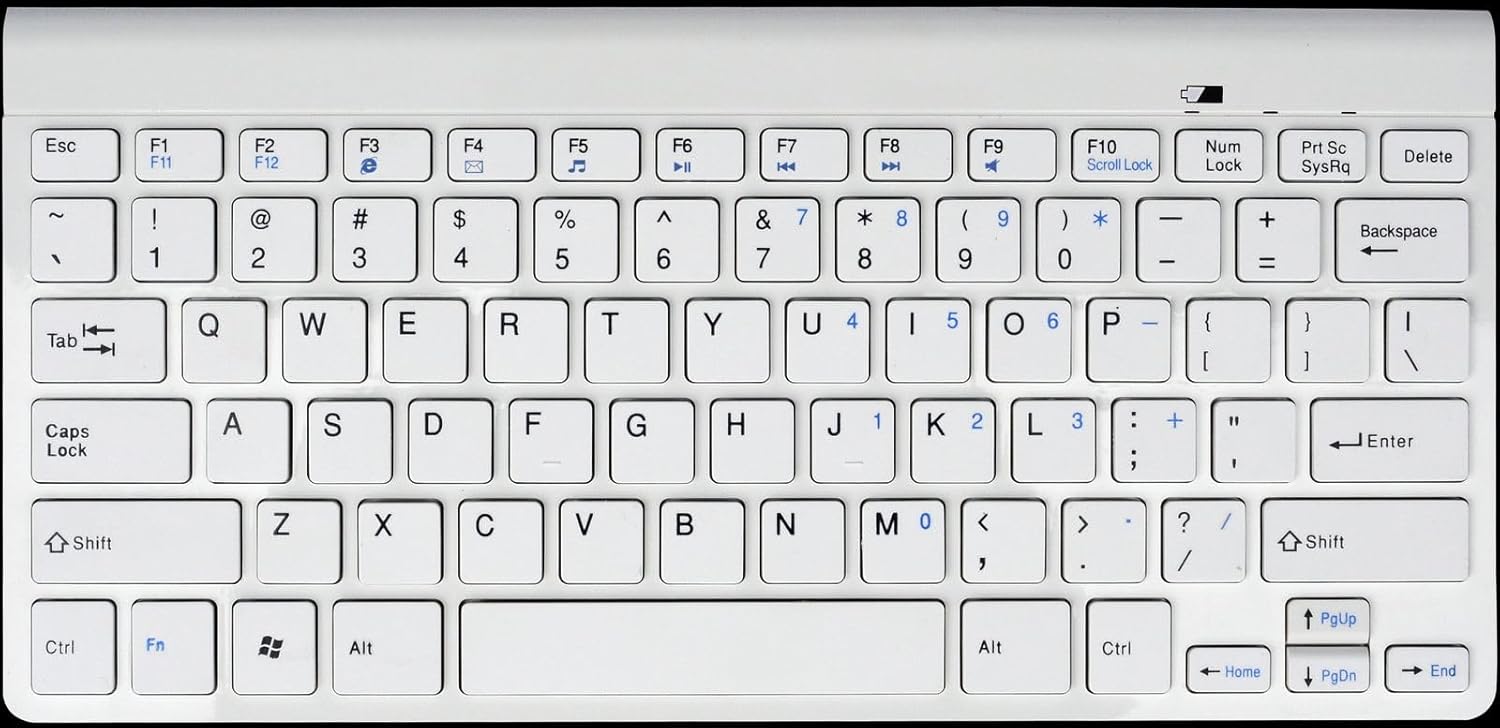
圖1: Gembird KB-BT-001-W-DE Slimline Bluetooth Keyboard. This image displays the full keyboard, highlighting its compact design and German QWERTZ key layout, including function keys with multimedia shortcuts and the embedded numeric keypad on the right side.
7、維護保養
7.1. 清潔
- Disconnect the keyboard from power and turn it off before cleaning.
- 使用柔軟、不起毛的布稍微擦拭一下amp用水或溫和的清潔溶液沖洗。
- 避免鍵盤過度潮濕,請勿將清潔劑直接噴灑在鍵盤上。
- 用壓縮空氣清除鑰匙間的灰塵和碎屑。
7.2. 電池保養
- If the keyboard uses rechargeable batteries, charge it regularly using the provided USB cable.
- If it uses disposable batteries, replace them when the low battery indicator (if present) illuminates or performance degrades.
- Turn off the keyboard when not in use for extended periods to conserve battery life.
8。 故障排除
| 問題 | 可能的原因 | 解決方案 |
|---|---|---|
| 鍵盤無法連線/配對。 | Bluetooth is off on device; keyboard not in pairing mode; low battery; too far from device. | Ensure Bluetooth is enabled. Put keyboard in pairing mode. Charge/replace batteries. Move keyboard closer to device (within 10m). Try re-pairing. |
| Keys not responding or delayed input. | 電池電量低;幹擾;超出範圍。 | Charge/replace batteries. Move away from other wireless devices. Ensure keyboard is within range. |
| Incorrect characters typed (e.g., Y and Z swapped). | Device's keyboard layout is set to QWERTY instead of QWERTZ. | Change your device's keyboard input language/layout to German (QWERTZ). |
| 多媒體按鍵無法使用。 | Fn key not pressed; software incompatibility. | 請確保你拿著 Fn key while pressing the F-key. Update device drivers if applicable. |
9. 規格
| 特徵 | 細節 |
|---|---|
| 品牌 | 寶石鳥 |
| 型號 | KB-BT-001-W-DE |
| 連接技術 | 藍牙 v3.0 |
| 相容設備 | 個人電腦、智慧型手機、平板電腦 |
| 鍵盤說明 | 多媒體 |
| 鑰匙數量 | 78 |
| 鍵盤佈局 | QWERTZ(德文) |
| 包含的組件 | USB 線 |
| 工作範圍 | 長達 10 米 |
| 尺寸(約) | 28.7 x 13.7 x 2 厘米(11.3 x 5.4 x 0.8 英寸) |
10. 保固和支持
For warranty information and technical support, please refer to the documentation included with your purchase or visit the official Gembird website. Contact details for support are typically provided in the product packaging or on the manufacturer's web地點。
- 製造商: 寶石鳥
- 支持: Telephone support and email support are mentioned in the product features. Please check the included manual or Gembird's official web本網站提供最新的聯絡資訊。
Ask a question about this manual
Ask about setup, troubleshooting, compatibility, parts, safety, or missing instructions. Manuals+ will review the question and use this page’s manual context to help answer it.