
1. Ifihan
Thank you for choosing the DazzlingStage 60W 9LED RGBW Stage Wall Wash Bar Light. This manual provides essential information for the safe and effective operation of your lighting fixture. Please read it thoroughly before installation and use, and retain it for future reference.
Eleyi stage light bar features 9 high-power RGBW LEDs, offering a wide spectrum of colors and dynamic lighting effects suitable for various events and venues.

Aworan 1.1: Pariview of the DazzlingStage 60W 9LED RGBW Stage Wall Wash Bar Lights in various colors.
2. Awọn ilana aabo
- Aabo Itanna: Rii daju pe ipese agbara voltage matches the specifications of the fixture. Always disconnect power before cleaning, servicing, or moving the unit.
- Fifi sori: Install the fixture in a well-ventilated area, away from heat sources. Ensure secure mounting to prevent accidental falls.
- Isẹ: Do not look directly into the light source when the fixture is operating, as it can cause eye damage. Avoid operating the unit in wet or damp awọn ipo.
- Itọju: Tọ́ka gbogbo iṣẹ́ ìtọ́jú sí àwọn òṣìṣẹ́ tó yẹ. Má ṣe gbìyànjú láti tún ẹ̀rọ náà ṣe fúnra rẹ.
- Awọn ọmọde: Jeki ẹrọ naa kuro ni arọwọto awọn ọmọde.
3. Package Awọn akoonu
Nígbà tí o bá ń tú àwọn ohun èlò tí o fẹ́ lò, jọ̀wọ́ rí i dájú pé gbogbo àwọn ohun èlò tí a kọ sí ìsàlẹ̀ yìí wà ní ipò tó dára:
- Dídánmọ́rántage 60W 9LED RGBW Stage Wall Wash Bar Light (x1 per pack)
- Power Cord (x1 per pack)
- Remote Control (x1 per pack)
- Mounting Bracket (x1 per pack)
- Knobs (x2 per pack)
- Black Gaskets (x2 per pack)
- Instruction Manual (x1 per pack)

Àwòrán 3.1: Àwọn àkóónú tó wà nínú àpò ọjà náà.
4. Ọja irinše
Familiarize yourself with the main components of the light bar:
- LED Array: 9 RGBW LEDs for color mixing.
- Ibi iwaju alabujuto: Features a 4-digit LED display and control buttons (MENU, UP, DOWN, ENTER) for mode selection and parameter adjustment.
- DMX IN/OUT Ports: For connecting to a DMX controller or linking multiple units.
- Power IN/OUT: For power connection and daisy-chaining power to other units.
- Iṣagbesori Akọmọ: Adjustable bracket for floor standing or truss mounting.
- Ooru rii: Integrated cooling system to maintain optimal operating temperature.

Image 4.1: Key components and dimensions of the light bar.
5. Eto ati fifi sori
The DazzlingStage Wall Wash Bar Light offers flexible installation options:
5.1 Iṣagbesori akọmọ
Attach the included mounting bracket to the light bar using the provided knobs and gaskets. Ensure the bracket is securely fastened.
5.2 Àwọn Àṣàyàn Ìgbékalẹ̀
- Iduro ti ilẹ: The bracket allows the light bar to stand upright on a flat surface. Adjust the angle as needed.
- Truss Mounting: Lo yẹ clamps (not included) to attach the bracket to a lighting truss. Ensure the truss and clamps can support the weight of the fixture.
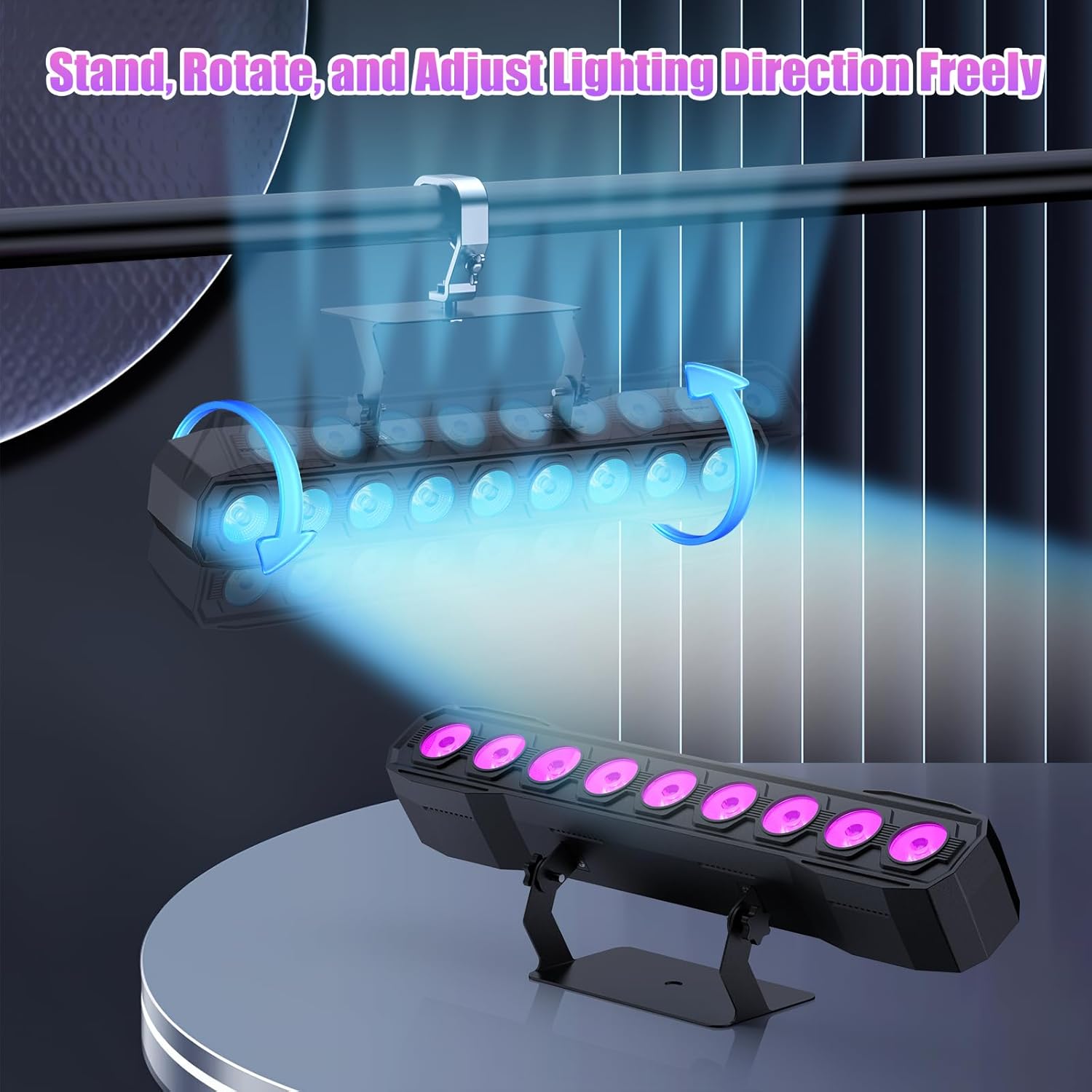
Image 5.1: Illustration of mounting and angle adjustment options.
5.3 Asopọ agbara
Connect the power cord to the Power IN port on the back of the fixture and then to a suitable power outlet. Multiple units can be daisy-chained using the Power OUT port to simplify wiring for larger setups.
6. Awọn ọna ṣiṣe
The DazzlingStage Wall Wash Bar Light supports several control modes:
- DMX512 Iṣakoso: For professional control via a DMX console.
- Ipo Aifọwọyi: Pre-programmed lighting sequences.
- Sound-Activated Control: Awọn imọlẹ fesi si ohun ibaramu.
- Isakoṣo latọna jijin: Convenient wireless control using the included remote.
- Ipo Titunto-Ẹrú: Link multiple units where one acts as a master and others as slaves, synchronizing effects.
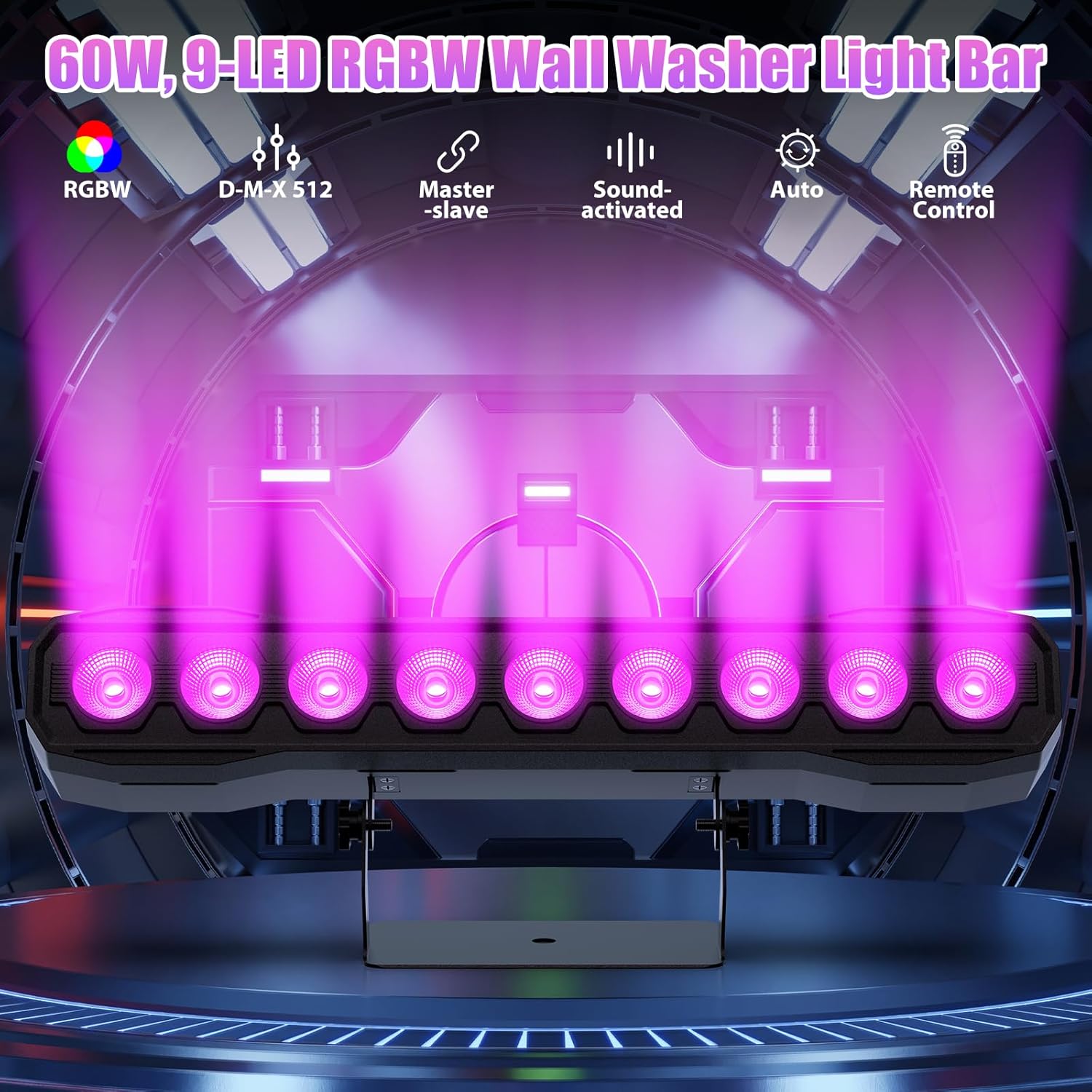
Aworan 6.1: Pariview of available control modes.
6.1 Display Panel Operation
Use the buttons on the back of the fixture to navigate the menu and select modes:
- Akojọ: Awọn iyipo nipasẹ awọn aṣayan akojọ aṣayan akọkọ.
- UP / isalẹ: Adjusts values or navigates sub-menus.
- Tẹ: Jẹrisi yiyan.
6.2 Awọn ipa ina
The fixture supports various dynamic effects:
- Idapọ awọ: Over 16.7 million color combinations with 0-100% linear dimming.
- Ẹ̀ka: Flashing effect.
- Lọ: Instant color changes.
- Ipare: Dan awọn iyipada laarin awọn awọ.
- Pulu: Gradual changing effects.
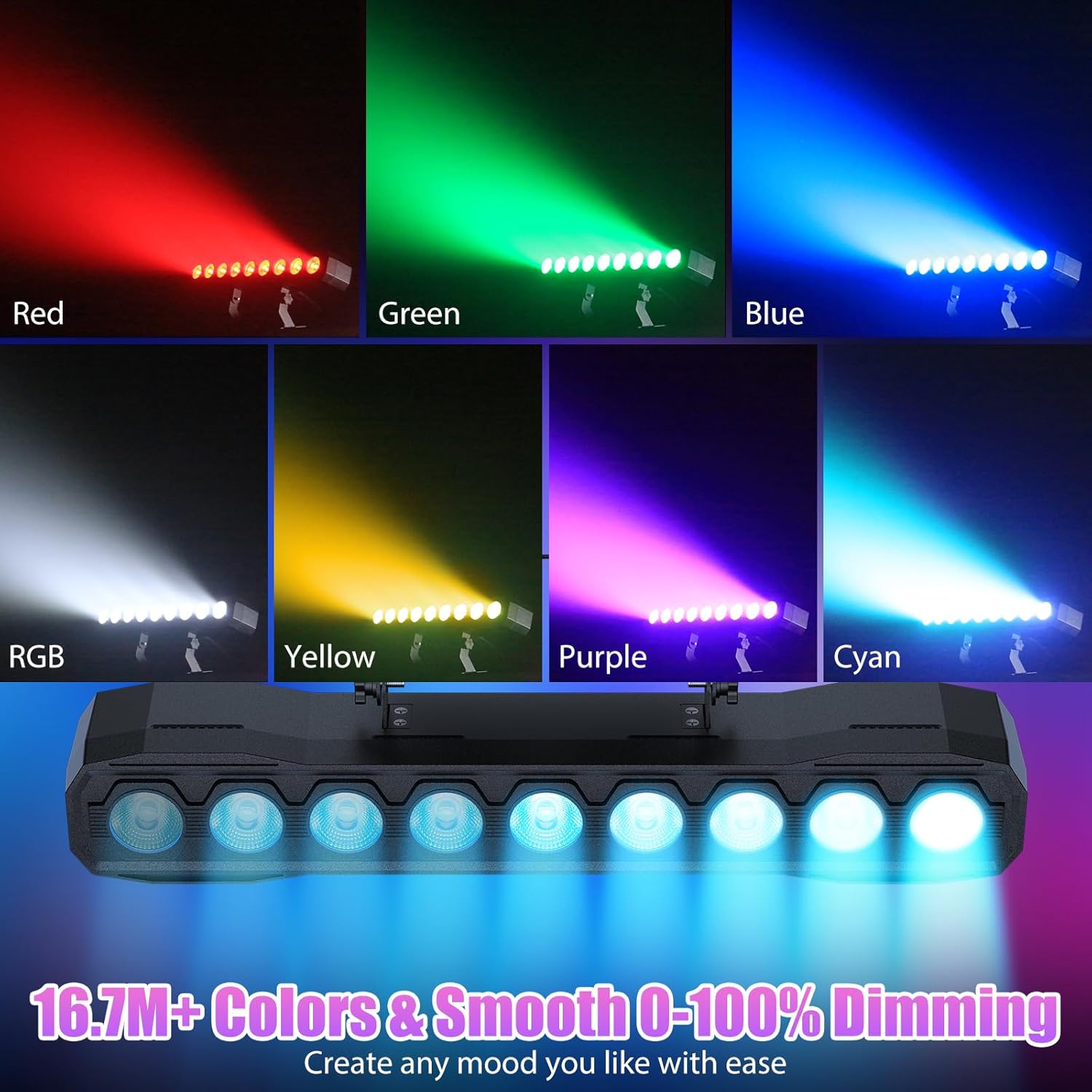
Aworan 6.2: Examples of color mixing and dimming capabilities.

Image 6.3: Visual representation of Strobe, Jump, Fade, and Pulse effects.
7. Awọn iṣẹ Iṣakoso latọna jijin
Iṣakoso latọna jijin ti o wa ninu rẹ pese iwọle irọrun si awọn iṣẹ oriṣiriṣi:
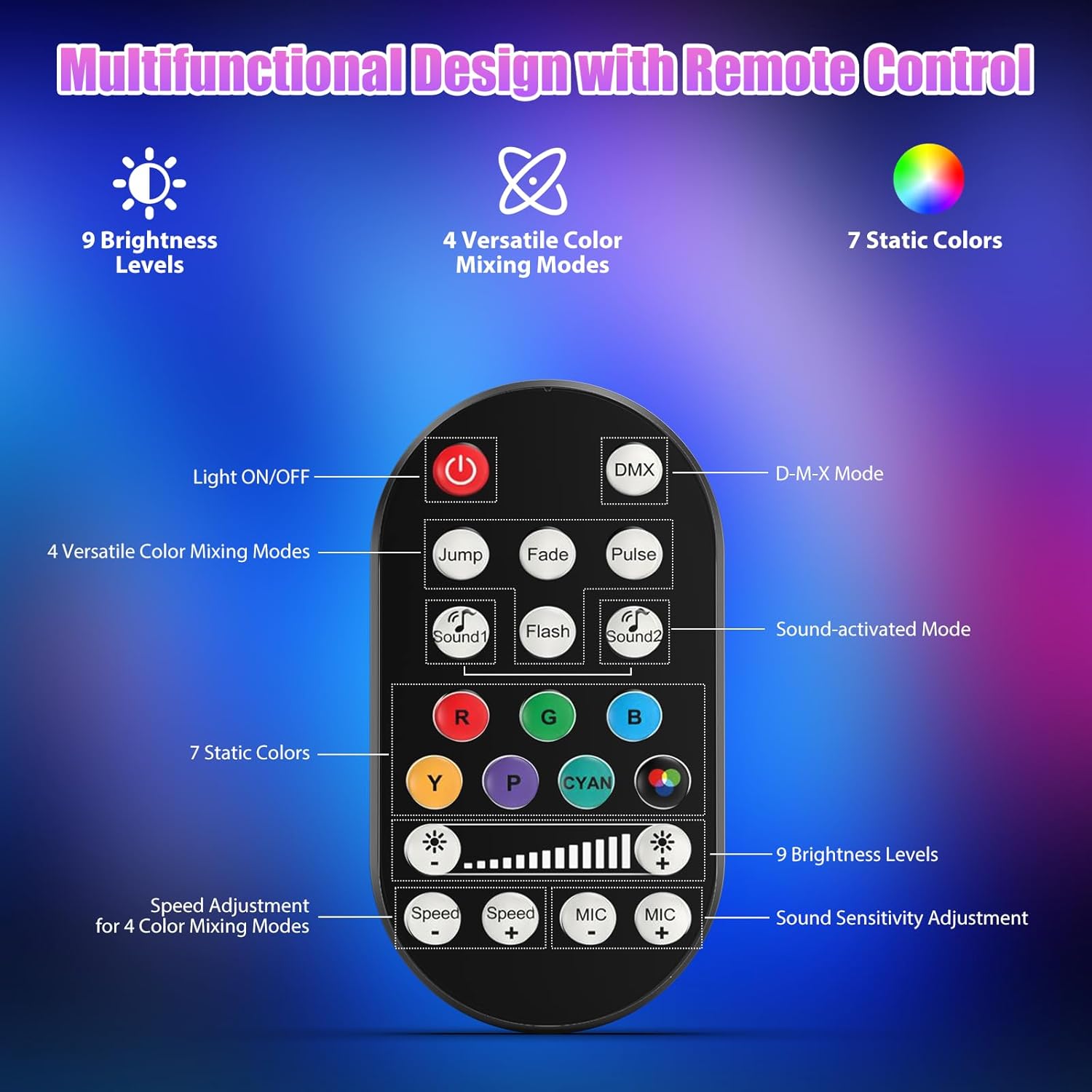
Aworan 7.1: Ifilelẹ iṣakoso latọna jijin ati awọn iṣẹ.
- Imọlẹ TAN/PA: Ṣe agbara ẹrọ naa tan tabi pa.
- DMX: Activates DMX control mode.
- Jump, Fade, Pulse, Flash: Selects different color mixing modes.
- Sound1, Sound2: Activates sound-activated modes with different sensitivities.
- R, G, B, Y, P, Cyan, White: Selects static colors.
- Awọn ipele Imọlẹ: Adjusts the overall intensity of the light (9 levels).
- Iyara +/-: Adjusts the speed of dynamic effects.
- MIC +/-: Adjusts the sound sensitivity for sound-activated modes (15 levels).
8. DMX512 Control
For advanced control, connect the fixture to a DMX512 controller. The light bar typically uses 4 or 8 DMX channels. Refer to the display panel for DMX address setting and channel assignments.
8.1 DMX Address Setting
Use the MENU, UP, DOWN, and ENTER buttons on the fixture's display panel to set the DMX starting address. The display will show 'AXXX' where XXX is the address (e.g., A001).
8.2 DMX Channel Functions (Example - 8 Channel Mode)
| ikanni | Išẹ | Ibiti iye | Apejuwe |
|---|---|---|---|
| CH1 | Titunto Dimmer | 0-255 | Imọlẹ Lapapọ (0% si 100%) |
| CH2 | Pupa kikankikan | 0-255 | Red LED brightness (0% to 100%) |
| CH3 | Alawọ ewe kikankikan | 0-255 | Green LED brightness (0% to 100%) |
| CH4 | Bulu kikankikan | 0-255 | Blue LED brightness (0% to 100%) |
| CH5 | White kikankikan | 0-255 | White LED brightness (0% to 100%) |
| CH6 | Strobe/Effect | 0-255 | 0-10: No function; 11-255: Strobe speed (slow to fast) |
| CH7 | Eto Aifọwọyi | 0-255 | Selects and controls speed of built-in auto programs |
| CH8 | Ti n ṣiṣẹ Ohun | 0-255 | Activates sound mode and adjusts sensitivity |
Tabili 8.1: Example DMX Channel Functions (may vary slightly by firmware version).
9. Itọju
Itọju deede ṣe idaniloju iṣẹ ṣiṣe to dara julọ ati fa igbesi aye imuduro rẹ pọ si.
- Ninu: Periodically clean the lens and housing with a soft, lint-free cloth. Do not use abrasive cleaners or solvents. Ensure the fixture is powered off and cool before cleaning.
- Ayewo: Regularly check power cables, DMX cables, and mounting hardware for any signs of wear or damage. Replace damaged components immediately.
- Ibi ipamọ: When not in use for extended periods, store the fixture in a dry, dust-free environment.
10. Laasigbotitusita
Ti o ba pade awọn ọran, tọka si awọn iṣoro ti o wọpọ ati awọn ojutu wọnyi:
| Isoro | Owun to le Fa | Ojutu |
|---|---|---|
| Ko si agbara | Power cable disconnected; No power from outlet; Blown fuse | Check power cable connection; Test outlet with another device; Replace fuse if necessary |
| Ko si ina jade | Dimmer channel at 0%; Incorrect mode selected; DMX signal issue | Increase dimmer level; Select desired operating mode; Check DMX cable and address settings |
| Incorrect colors/effects | Incorrect DMX channel values; Remote control interference | Verify DMX channel settings; Ensure remote is pointed directly at the sensor; Check for other IR interference |
| Ipo ti mu ohun ṣiṣẹ ko ṣiṣẹ | Microphone sensitivity too low; No sound input | Increase MIC sensitivity via remote or display; Ensure sufficient sound is present near the fixture |
| Imuduro overheating | Poor ventilation; Blocked heat sink | Ensure adequate airflow around the unit; Clean any dust or debris from the heat sink fins |
11. Awọn pato
| Ẹya ara ẹrọ | Ẹ̀kúnrẹ́rẹ́ |
|---|---|
| Brand | Dídánmọ́rántage |
| Nọmba awoṣe | ZQ06190 |
| Orisun Imọlẹ | 9 x 60W RGBW LED |
| Awọ Dapọ | RGBW 4-in-1, 16.7 million colors |
| Dimming | 0-100% PCM itanna dimming |
| Igun tan ina | 35° Wide Igun |
| Awọn ọna Iṣakoso | DMX512, Auto, Sound-Activated, Remote Control, Master-Slave |
| Awọn ikanni DMX | 4 or 8 Channels (selectable) |
| Ifihan | 4-nọmba LED àpapọ |
| Ohun elo | Acrylonitrile Butadiene Styrene (ABS) |
| Ọja Mefa | 18.1 x 5.5 x 5.1 inches (46 x 14 x 13 cm) |
| Iwọn Nkan | Isunmọ. 1.98 lbs (0.9 kg) |
| Agbara Input | AC 100-240V, 50/60Hz |
| Olupese | Shenzhen Zhuoqiong Technology Co., Ltd. |
12. Atilẹyin ọja ati Support
Dídánmọ́rántage products are designed for reliability and performance. For warranty information, please refer to the terms and conditions provided at the time of purchase or contact your retailer.
If you require technical assistance or have questions not covered in this manual, please contact DazzlingStage customer support through the retailer's platform or the official brand website. Please have your model number (ZQ06190) and purchase details ready when contacting support.