
1. Ifihan
This manual provides detailed instructions for the safe and efficient operation of your DazzlingStage 180W Dual-Color COB LED Par Light. This high-performance stage light features two 90W COB LEDs, offering both cool white (6500K) and warm white (3200K) illumination. It is designed for various applications including stage lighting, events, and parties. Please read this manual thoroughly before use and retain it for future reference.

Figure 1: DazzlingStage 180W Dual-Color COB LED Par Light. This image shows the front view of the black stage light with two circular COB LED elements, one emitting cool white light and the other warm white light.
2. Alaye Aabo
Lati rii daju iṣiṣẹ ailewu, jọwọ ṣe akiyesi awọn iṣọra wọnyi:
- Nigbagbogbo so ẹrọ pọ mọ iṣan agbara ti ilẹ.
- Ma ṣe fi ẹrọ naa han si ojo tabi ọrinrin.
- Rii daju pe fentilesonu to dara lati ṣe idiwọ igbona.
- Yago fun ifihan oju taara si orisun ina, nitori o le fa ibajẹ oju.
- Ge asopọ agbara ṣaaju ṣiṣe afọmọ tabi ṣiṣe.
- Awọn oṣiṣẹ ti o ni oye nikan yẹ ki o ṣe atunṣe.
- Use the included safety rope ring when suspending the light.
3. Package Awọn akoonu
Jẹrisi pe gbogbo awọn ohun kan wa ninu package:
- COB Light (quantity varies by pack size)
- Okun agbara
- Ilana itọnisọna
- Mu
- Awọn koko (2)
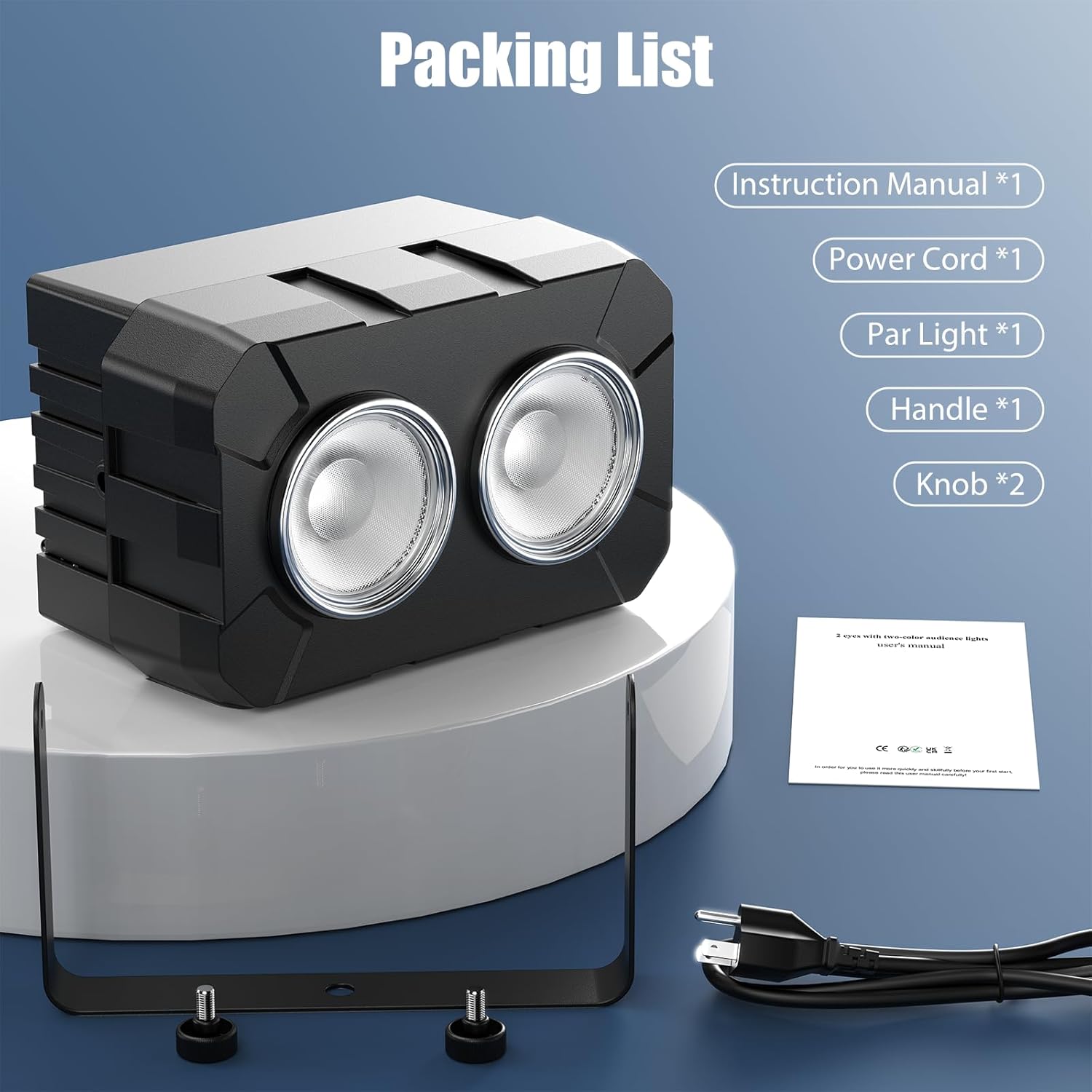
Figure 2: Illustrated packing list showing the COB light, power cord, handle, knobs, and instruction manual.
4. Eto ati fifi sori
The DazzlingStage COB LED Par Light is designed for flexible installation. It can be placed on a flat surface, mounted on a truss, or hung from a ceiling.
4.1 Iṣagbesori
- Attach the adjustable mounting bracket to the light using the provided knobs.
- Securely fasten the light to a truss, ceiling, or stand using appropriate clamps (not included) and the mounting bracket.
- Always use the safety rope ring to provide an additional layer of security when suspending the light.
4.2 Power Connection and Daisy-Chaining
Connect the power cable to the "Power In" port on the rear of the unit. For multiple units, you can daisy-chain up to 6 lights using the "Power Out" port to connect to the next unit's "Power In" port.

Figure 3: Four COB LED Par Lights connected in a daisy-chain configuration, illustrating easy power linking for multiple units.
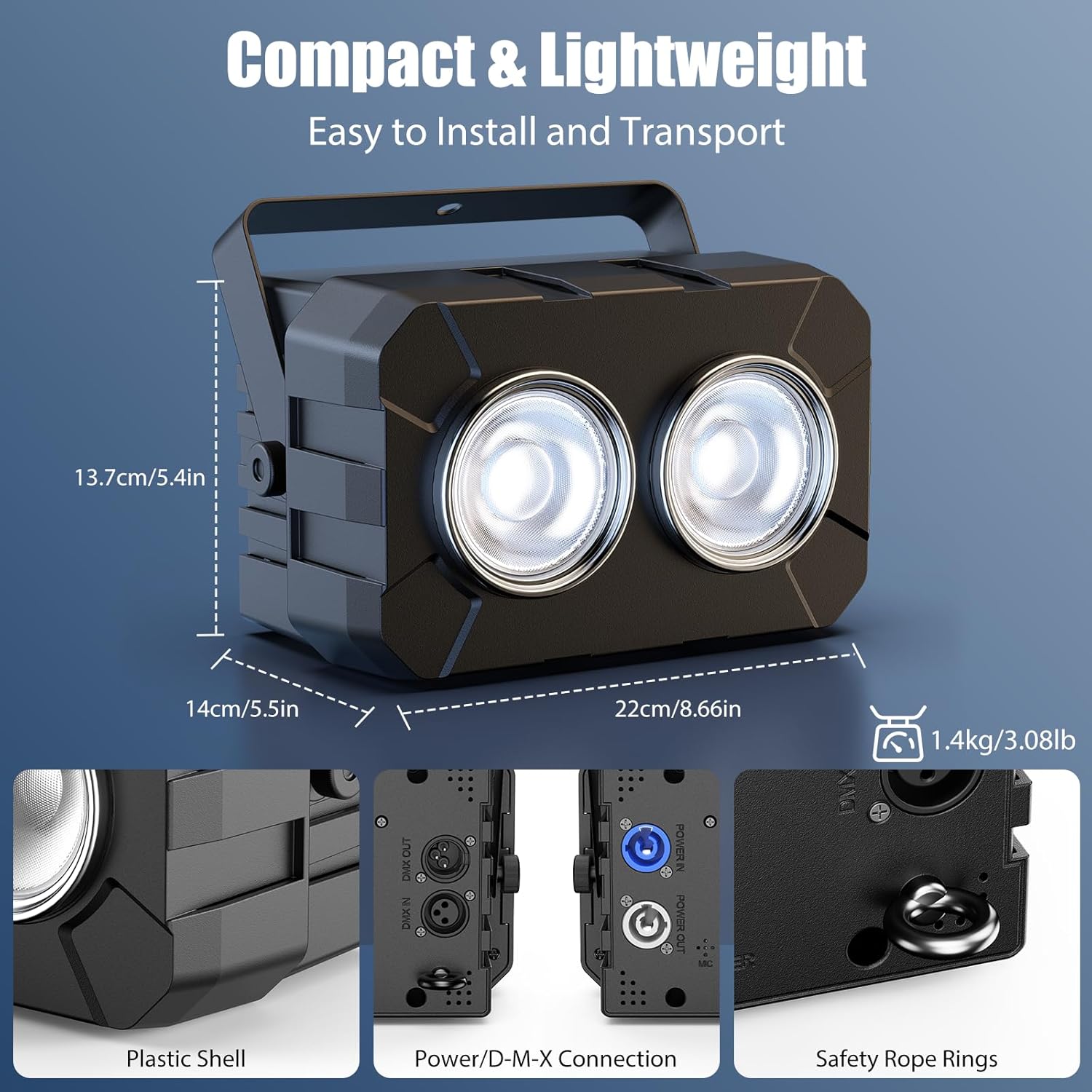
Nọmba 4: Alaye view of the light's rear panel, highlighting the Power In/Out, DMX In/Out, 4-digit display, control buttons, and safety rope ring.
5. Awọn ọna ṣiṣe
The DazzlingStage COB LED Par Light offers four primary control modes:
- Ipo Titunto-Ẹrú: Connect multiple units via DMX cables. Set one unit as the master, and others as slaves. Slave units will mirror the master's settings.
- DMX512 Mode (8 Channel): For professional control, connect the light to a DMX controller. Use the 4-digit display and buttons to set the DMX address and channel mode (8 channels). Refer to your DMX controller's manual for specific programming.
- Ipo Aifọwọyi: The light cycles through pre-programmed patterns and effects automatically.
- Ipo Mu Ohun-ṣiṣẹ: The light reacts to ambient sound and music, changing patterns and intensity in sync with the audio.
Video 1: Demonstration of the DazzlingStage 180W Dual-Color COB LED Par Light's various lighting effects and modes, including warm white, cool white, mixed white, strobe, jump, gradient, pulse, and DMX control.
6. Key Awọn ẹya ara ẹrọ ati awọn iṣẹ
6.1 Adjustable Color Temperature
The light features both cool white (6500K) and warm white (3200K) COB LEDs, allowing for a wide range of color temperatures. You can adjust the mix to achieve desired ambient lighting, from crisp cool white to rich warm white.

Figure 5: An illustration showing the adjustable color temperature range (3200K-6500K) of the COB LED Par Light, transitioning from warm white to cool white.
6.2 Dimming and Strobe Effects
- Dimming: Smooth 0-100% linear dimming allows for precise control over light intensity.
- Ẹ̀ka: The light supports strobe effects from 1 to 25 times per second, creating dynamic visual impacts.

Figure 6: Three lights demonstrating various light sources and effects, including jump, gradient, pulse, and strobe modes.
7. Itọju
Regular maintenance ensures optimal performance and extends the lifespan of your DazzlingStage COB LED Par Light.
- Ninu: Periodically clean the lens and housing with a soft, dry cloth. Do not use abrasive cleaners or solvents.
- Ayewo: Regularly check power cables and DMX connections for any signs of damage.
- Ibi ipamọ: When not in use, store the light in a dry, dust-free environment.
8. Laasigbotitusita
| Isoro | Owun to le Fa | Ojutu |
|---|---|---|
| Imọlẹ ko tan | Ko si ipese agbara tabi okun ti ko tọ. | Check power connection and cable. Ensure the power outlet is functional. |
| Ko si iṣakoso DMX | Incorrect DMX address, faulty DMX cable, or incorrect DMX mode setting. | Verify DMX address and channel settings. Check DMX cable connections. Ensure the unit is in DMX512 mode. |
| Imọlẹ ju imọlẹ/baibai | Dimming level not adjusted. | Adjust the dimming setting via the control panel or DMX controller. |
| Ipo ti mu ohun ṣiṣẹ ko ṣiṣẹ | No sound input or microphone sensitivity too low. | Ensure there is sufficient sound near the unit. Check microphone sensitivity settings if available. |
9. Awọn pato
| Ẹya ara ẹrọ | Ẹ̀kúnrẹ́rẹ́ |
|---|---|
| Oṣuwọn Voltage | AC100-240V, 50/60Hz |
| Lamp Awọn ilẹkẹ | 2 x 90W COB LED (Cool White + Warm White) |
| Output Angle | 35° |
| Iwọn otutu awọ (CCT) | 3200K-6500K |
| Apapọ LED Lifespan | wakati meji 50,000 |
| Dimming | 0-100% Linear Dimming |
| Igbohunsafẹfẹ Strobe | 1-25 igba / iṣẹju-aaya |
| Awọn ọna Ṣiṣẹ | DMX512, Master-Slave, Auto, Sound-Activated |
| Iṣakoso ikanni | 8 Awọn ikanni DMX |
| Ifihan | 4-Digit Digital Display + 4 Buttons |
| Ipele Idaabobo | IP20 |
| Awọn iwọn Ọja (L x W x H) | 22cm x 14cm x 13.7cm (8.66in x 5.5in x 5.4in) |
| Iwọn Ọja | 1.4kg (3.08lb) |
| Ohun elo | Acrylonitrile Butadiene Styrene (ABS) |
10. Atilẹyin ọja ati Support
For warranty information or technical support, please contact DazzlingStage customer service through the retailer where the product was purchased. Please have your model number (ZQ01321) and purchase date available when contacting support.