
EV SPACES EV-302
EV SPACES EV-302 2.4G Dual Wireless Microphone Headset User Manual
Model: EV-302
Ọrọ Iṣaaju
This manual provides detailed instructions for the setup, operation, and maintenance of your EV SPACES EV-302 2.4G Dual Wireless Microphone Headset. Please read this manual thoroughly before using the product to ensure proper function and longevity.
Package Awọn akoonu
Daju pe gbogbo awọn nkan ti a ṣe akojọ rẹ si isalẹ wa ninu package rẹ:
- 1 x Transmitter (Headset Microphone)
- 1 x olugba
- 1 x Akọkọ
- 1 x 6.35mm Adapter
- 1 x Okun Ngba agbara USB
- 1 x Itọsọna olumulo

Image: All components included in the EV SPACES EV-302 package.
Ọja Awọn ẹya ara ẹrọ
- 2.4G & UHF Wireless Technology: Utilizes 2.4G wireless transmission for stable connection and UHF technology for simultaneous use of up to 40 microphone sets without interference.
- Atilẹyin Gbohungbohun Meji: Allows two users to operate microphones simultaneously with a single receiver.
- Ibamu gbooro: Equipped with 3.5mm and 6.35mm jacks for connection to various devices such as PA systems, karaoke machines, voice ampliifiers, ati mixers. Akiyesi: Not compatible with PC, iPhone, iPad, Mac, or Bluetooth speakers.
- Batiri gbigba agbara: Built-in 400mAh lithium-ion batteries provide approximately 6 hours of working time after a 2-hour charge.
- IP67 Mabomire Rating: Resistant to sweat, moisture, and dust, suitable for active use.
- LED Digital Ifihan: Shows frequency, volume, and battery status.
- Ko Didara Ohun kuro: Features a smart noise-canceling chip and omnidirectional pickup technology.
- Ibi iṣẹ: Up to 165-260 feet (50-80 meters) in open areas.
Awọn ilana iṣeto
1. Ngba agbara si awọn ẹrọ
Before initial use, fully charge both the transmitter (headset) and the receiver.
- Connect the dual micro USB V2.0 cable to the charging ports on the transmitter and receiver.
- So okùn USB pọ mọ adapter agbara USB deede (ko si ninu rẹ) tabi ibudo USB kọmputa kan.
- The indicator light will turn red during charging and will turn off when fully charged. A full charge takes approximately 2 hours and provides about 6 hours of use.
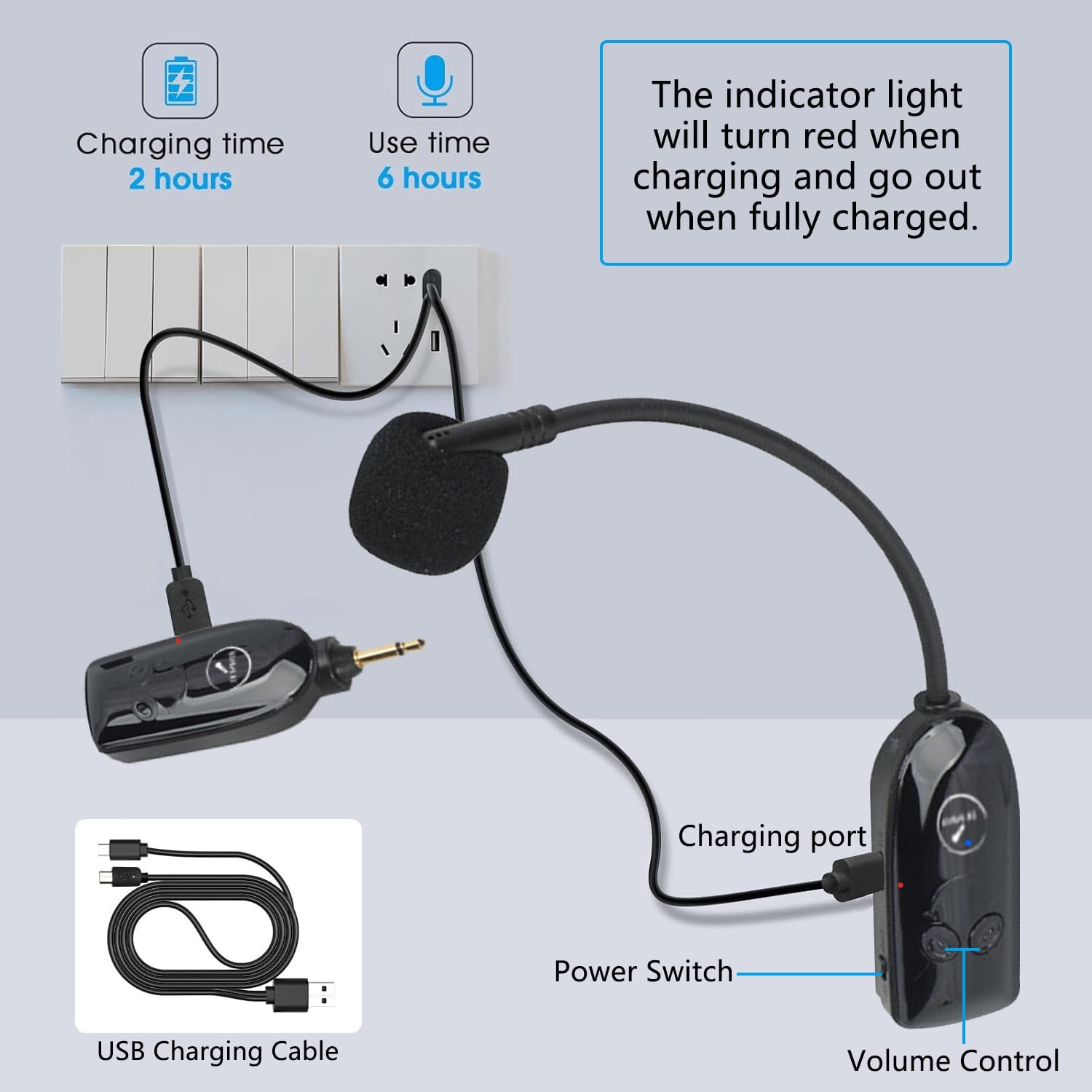
Image: Charging the transmitter and receiver using the provided USB cable.
2. Laifọwọyi Sisopọ
The system is designed for plug-and-play operation with automatic pairing.
- Ensure both the transmitter and receiver are fully charged.
- Switch on the power for both the transmitter and the receiver.
- The blue indicator light on both devices will flash for approximately 2 seconds, indicating they are searching for each other. Once paired, the blue light will remain solid. No further manual pairing is required.

Image: The receiver unit demonstrating 2.4G independent transmission and automatic pairing.
3. Sísopọ̀ mọ́ Ẹ̀rọ Ohùn kan
The receiver can be connected to devices with either a 3.5mm or 6.35mm microphone input jack.
- Identify the microphone input jack on your audio device (e.g., PA system, amplifier, alapọpo).
- If your device has a 3.5mm mic jack, plug the receiver directly into it.
- If your device has a 6.35mm mic jack, attach the included 6.35mm adapter to the receiver, then plug the receiver with the adapter into the 6.35mm mic jack.
- Ensure the audio device's volume is set to a low level before turning it on to prevent sudden loud noises.

Image: Compatibility with various audio devices using 3.5mm and 6.35mm jacks.
Awọn ilana Iṣiṣẹ
1. Agbara Tan / Paa
- To power on, slide the power switch on both the transmitter and receiver to the 'ON' position.
- To power off, slide the power switch on both devices to the 'OFF' position.
2. Iṣakoso iwọn didun
The transmitter features volume control buttons. Use these to adjust the microphone's output level.
- Tẹ bọtini '+' lati mu iwọn didun pọ si.
- Tẹ bọtini '-' lati dinku iwọn didun.
3. Awọn ọna lilo
The EV-302 supports both headset and handheld microphone configurations.
- Headset Mode: Attach the microphone unit to the headband for hands-free operation.
- Ipo Amusowo: The microphone unit can be used independently as a handheld microphone.
Itoju
- Ninu: Use a soft, dry cloth to clean the surfaces of the transmitter and receiver. Do not use liquid cleaners or solvents.
- Ibi ipamọ: Tọju eto gbohungbohun ni itura, aye gbigbẹ kuro lati oorun taara ati awọn iwọn otutu to gaju.
- Itọju Batiri: To prolong battery life, avoid fully discharging the batteries frequently. Recharge them regularly, even if not in constant use.
- Omi Resistance: While the product is IP67 waterproof, avoid submerging it in water or exposing it to heavy rain. Dry thoroughly if it comes into contact with moisture.
Laasigbotitusita
| Isoro | Owun to le Fa | Ojutu |
|---|---|---|
| Ko si ohun jade |
|
|
| Ohun ti daru tabi koyewa |
|
|
| Limited range or signal drops |
|
|
| Atọka gbigba agbara ko ṣiṣẹ |
|
|
Awọn pato
- Awoṣe: EV-302
- Imọ-ẹrọ Alailowaya: 2.4G, UHF
- Okunfa Fọọmu Gbohungbohun: Agbekọri
- Asopọmọra: Ailokun
- Orisi Asopọmọra: 3.5 mm Jack, 6.35 mm Jack (with adapter)
- Orisun Agbara: Agbara Batiri (Batiri Lithium Ion 2 wa ninu rẹ)
- Agbara Batiri: 400mAh (approx.)
- Akoko gbigba agbara: O fẹrẹ to awọn wakati 2
- Akoko iṣẹ: O fẹrẹ to awọn wakati 6
- Ibi iṣẹ: 165-260 feet (50-80 meters) in open areas
- Eto Ifihan-si-Noise: 95 dB
- Idahun Igbohunsafẹfẹ: 20 kHz
- Ohun elo: Acrylonitrile Butadiene Styrene, Irin
- Ìwọ̀n Nkan: 3.2 iwon
- Idiwon ti ko ni omi: IP67
Atilẹyin ọja ati Support
EV SPACES provides a 1-odun atilẹyin ọja for this product, which includes support for unconditional returns. For any questions, issues, or technical assistance, please contact our dedicated customer service team. They are available 24/7 to provide support.
Fun iranlọwọ siwaju sii, jọwọ ṣabẹwo si EV SPACES Store on Amazon.