Ọja Pariview
The K98 Wireless Mechanical Keyboard is engineered for versatility and performance, supporting triple-mode connectivity to seamlessly switch between devices. Its advanced gasket structure and pre-lubed switches ensure a premium typing feel with reduced noise.
Awọn ẹya pataki:
- Tri-mode Connection: Supports 2.4GHz wireless, Bluetooth 5.0, and USB wired modes, connecting up to five devices simultaneously.
- Roller Design: Multi-function metal knob for quick volume adjustment, connection mode switching, and power control.
- Iṣeto Oke Gasket: Built-in multiple sound absorbing layers (IXPE switch dampener pad, sound-absorbing foams, silicone dampener pad) for a creamy sound and natural feedback.
- RGB Backlit & Software Support: 18+ RGB backlight modes, separate strip light, macro customization, 16.8 million colors, and music rhythm lighting effects via driver.
- Batiri Agbara giga: 6300mAh battery provides up to 600 hours of battery life with lights off or 40 hours with lights on.
- Durable Keycaps & Switches: PBT keycaps with side-printed keys, compatible with PC and Mac. Pre-lubricated linear Rain switches for a smooth typing experience.
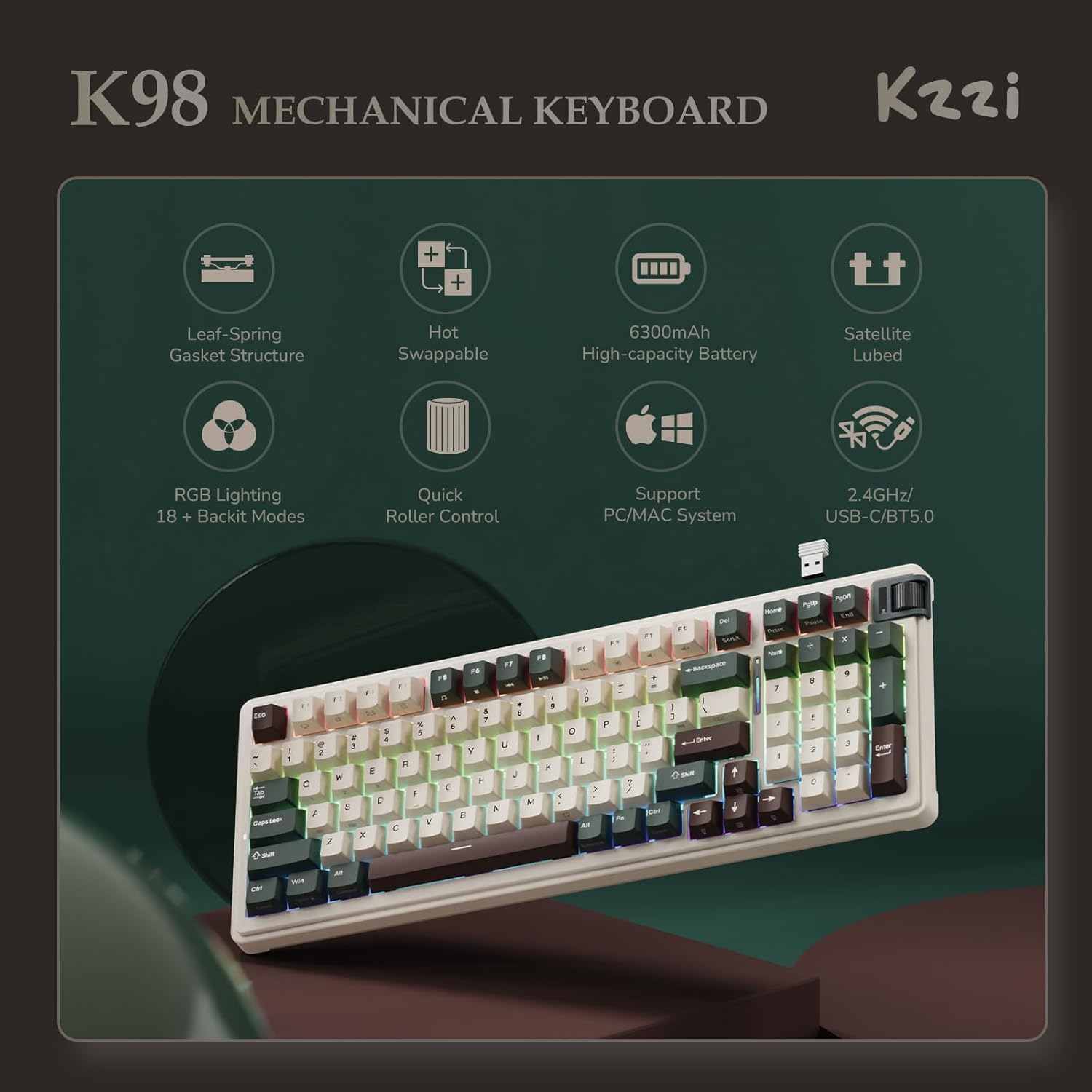
Figure 1: K98 Mechanical Keyboard highlighting its main features.

olusin 2: Iwaju view of the K98 Wireless Mechanical Keyboard.
Kini To wa
Your KZZI K98 Mechanical Keyboard package includes the following items:
- 1x KZZI K98 Keyboard
- 1x Okun Iru-C
- 1x Itọsọna olumulo
- 1x 2.4GHz olugba
- 4x Custom Rain Switches (extra)
- 1x 2-in-1 Keycap & Switch Puller

Figure 3: All items included in the K98 Mechanical Keyboard package.
Eto Itọsọna
Awọn ipo Asopọ
The K98 keyboard supports three connection modes: 2.4GHz wireless, Bluetooth 5.0, and USB wired. You can connect to up to five devices simultaneously.
- Ipo Ti Asopọ USB: So keyboard naa taara mọ ẹrọ rẹ nipa lilo okun USB-C ti a pese.
- Ipo Alailowaya 2.4GHz: Insert the 2.4GHz receiver into your device's USB port. Use the roller knob to switch to 2.4G mode.
- Ipo Bluetooth 5.0: Pair the keyboard with your Bluetooth-enabled device. The keyboard can store up to three Bluetooth connections.

Figure 4: Visual guide to the keyboard's triple connection modes.
Roller Knob Functions
The multi-function metal knob located on the top right of the keyboard allows for quick adjustments:
- TAN/PAPA: Tẹ gun fun awọn aaya 3.
- Awọn ọna Yipada: Short press and scroll to cycle between USB, 2.4G, and Bluetooth modes.
- Ṣatunṣe Iwọn didun: Scroll the knob to increase or decrease volume.
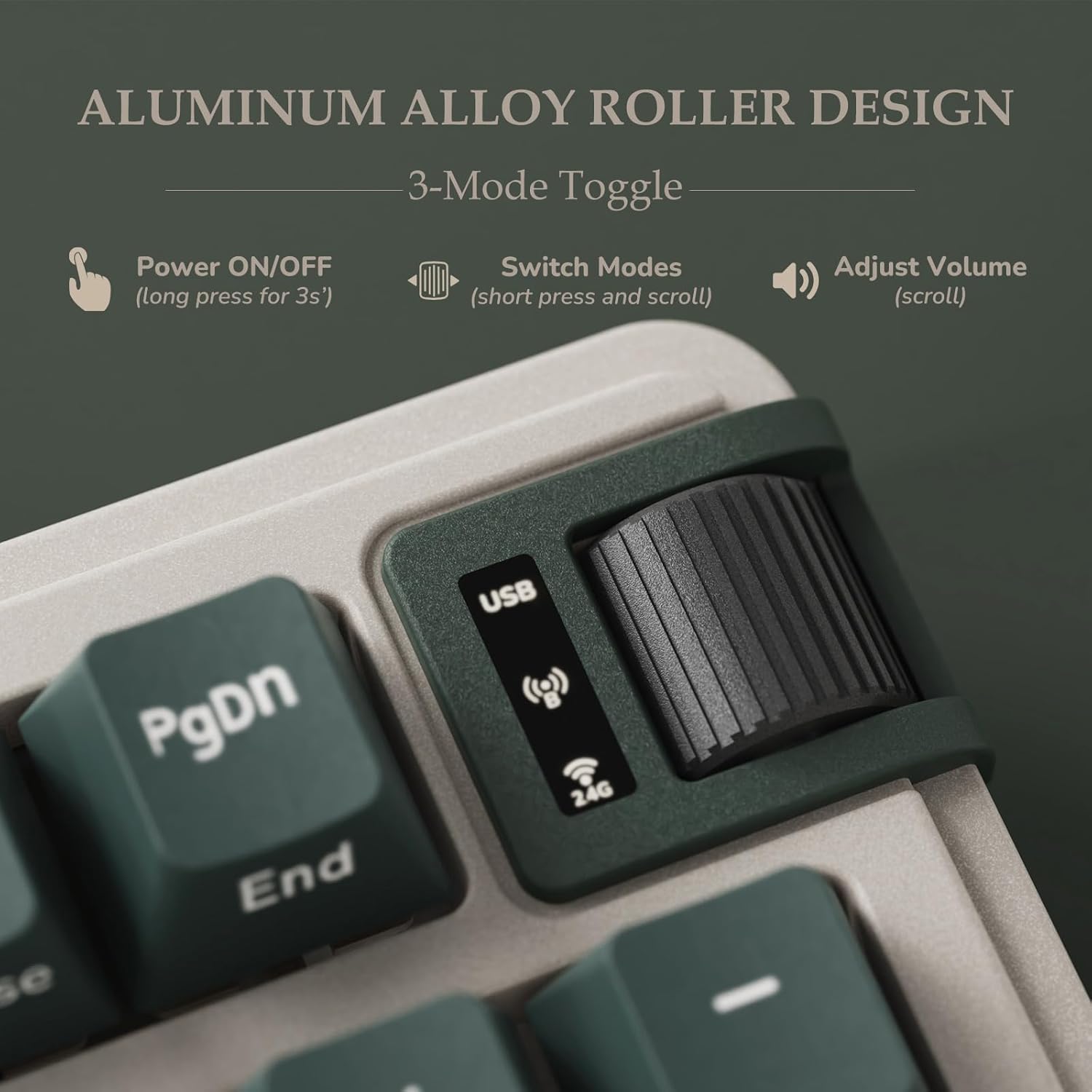
Nọmba 5: Alaye view of the roller knob and its functionalities.
Batiri Alaye
The K98 features a built-in 6300mAh large capacity battery, offering extended usage times:
- Up to 600 hours of battery life with RGB lights off.
- Up to 40 hours of battery life with RGB lights on.
- Standby time of up to 90 days.
To check the battery status, press FN + Wọle. The light bar will indicate the current battery level.
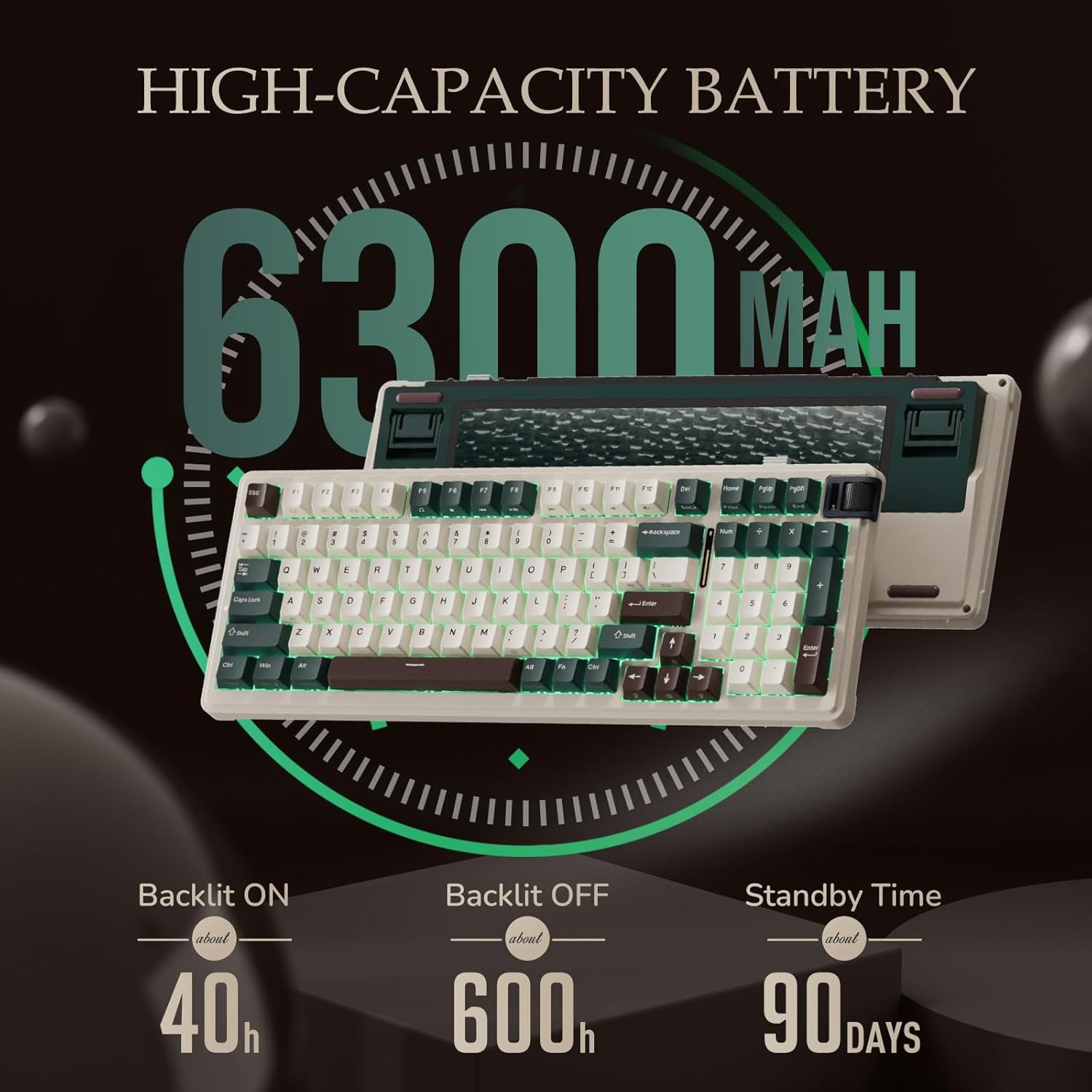
Nọmba 6: Agbara batiri ati awọn akoko lilo ifoju.

Figure 7: How to check the keyboard's battery status.
Ibamu eto
The K98 keyboard is compatible with both PC and Mac systems. You can quickly switch between layouts using the following key combinations:
- [Fn] + [S]: Yípadà sí ìṣètò ètò Mac.
- [Fn] + [A]: Yipada si Eto Windows System.

Figure 8: Keycap legends for Mac and Windows system switching.
Awọn ilana Iṣiṣẹ
Ṣíṣe Àtúnṣe Ìmọ́lẹ̀ Ẹ̀yìn RGB
Personalize your typing experience with extensive RGB backlight options:
- Choose from over 18 RGB backlight modes.
- Customize key functions and 16.8 million light colors using the dedicated software.
- Enjoy cool music rhythm lighting effects with driver support.
Use the following FN key combinations for backlight settings:
- FN + \|: Switch light mode.
- FN + <: Switch light colors.
- FN + ←: Slow down light speed.
- FN + →: Accelerate light speed.
- FN + ↑: Mu imọlẹ ina ẹhin pọ si.
- FN + ↓: Din ina backlight din.
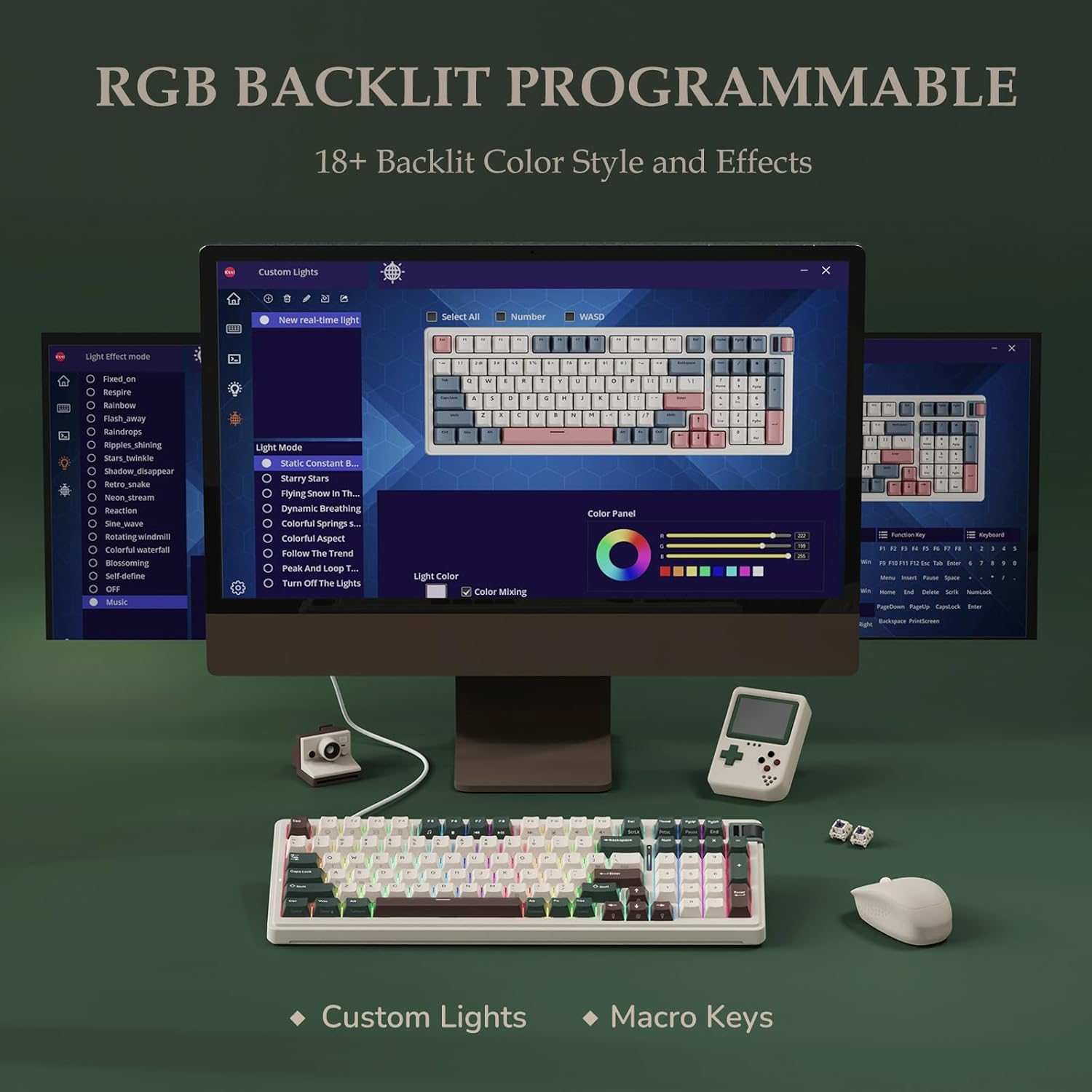
Figure 9: Software for advanced RGB and macro customization.

Figure 10: FN key combinations for adjusting backlight settings.
Awọn iṣẹ bọtini ati Ifilelẹ
The K98 features a gasket-mounted design with multiple sound-absorbing layers, including an IXPE switch dampener pad, two layers of thicker sound-absorbing foams, and a silicone dampener pad. This design effectively reduces vibration and noise, providing a natural and clear feedback without cavity noise.
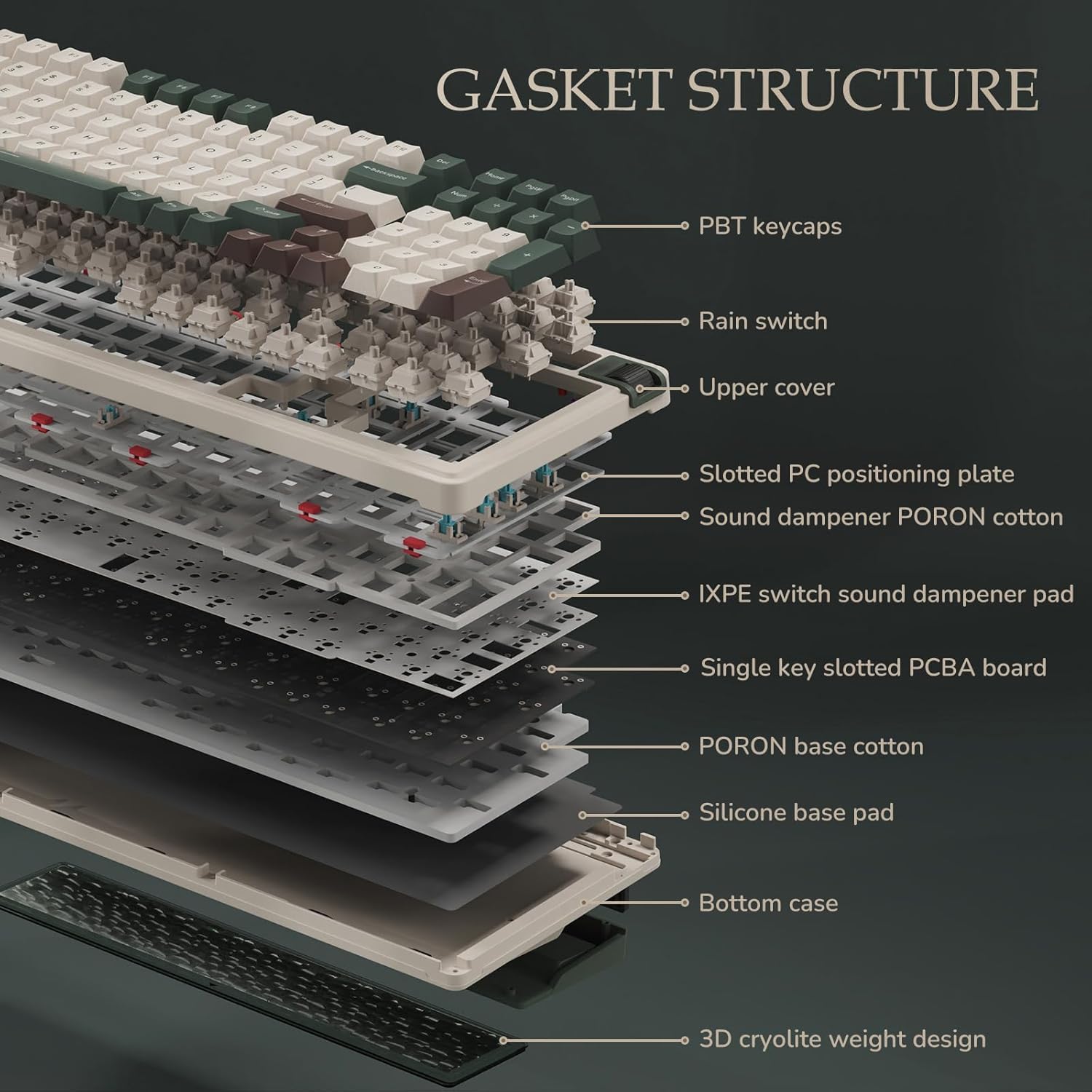
Figure 11: Internal layers of the K98's gasket structure.
The keyboard is hot-swappable, supporting both 3-pin and 5-pin switches. The included pre-lubed linear Rain switches offer a smooth typing experience with a creamy sound.
- Ṣiṣẹ Agbara: 40±10gf
- Ìkọlù ìdarí: 1.6 ± 0.4mm
- Lapapọ Irin-ajo: 3.4 ± 0.4mm

Figure 12: Hot-swappable PCB supporting various switch types.

Figure 13: Details of the custom Rain switches.
The Caps Lock key features an indicator light that turns on when uppercase mode is active and turns off when exiting uppercase mode.

Figure 14: Caps Lock indicator and light bar settings.
Itoju
Ìyípadà àti Ìyípadà Kọ́kọ́rọ́
The K98 keyboard is designed for easy maintenance with its hot-swappable switches. Use the included 2-in-1 keycap & switch puller to safely remove and replace keycaps and switches.
Ninu
Regular cleaning will help maintain the performance and appearance of your keyboard. Use a soft, dry cloth to wipe down the keycaps and chassis. For deeper cleaning, remove keycaps and use compressed air to clear debris from between the switches.
Laasigbotitusita
Tí o bá ní ìṣòro kankan pẹ̀lú keyboard K98 rẹ, jọ̀wọ́ wo àwọn ìdáhùn tó wọ́pọ̀ wọ̀nyí:
- Awọn oran Asopọmọra: Ensure the keyboard is fully charged. For 2.4GHz mode, verify the receiver is properly inserted and the keyboard is switched to the correct mode. For Bluetooth, ensure the keyboard is in pairing mode and within range of your device.
- Awọn bọtini Ko Dahun: Check if the switches are properly seated. If a specific switch is faulty, utilize the hot-swappable feature to replace it with one of the included spare switches.
- Backlight Problems: Use the FN key combinations (refer to RGB Backlight Customization section) to adjust brightness or switch modes. Ensure the keyboard software is up-to-date for full customization options.
Awọn pato ọja
| Ẹya ara ẹrọ | Ẹ̀kúnrẹ́rẹ́ |
|---|---|
| Ọja Mefa | 15.71 x 5.71 x 1.73 inches |
| Iwọn Nkan | 3.47 iwon |
| Olupese | KZZI |
| ASIN | B0D6RDMSTS |
| Ilu isenbale | China |
| Nọmba Awoṣe Nkan | K98 |
| Awọn batiri | Awọn batiri Lithium Ion 1 nilo (pẹlu) |
| Awọn ẹrọ ibaramu | Kọǹpútà alágbèéká, PC, Console ere |
| Asopọmọra Technology | Bluetooth, USB-C |
| Apejuwe Keyboard | Ẹ̀rọ |
| Niyanju Lilo | Everyday Use, Gaming, Business |
| Pataki Ẹya | Backlit, Silent, Customizable Display Keys, Hot-Swappable |
| Àwọ̀ | Alawọ ewe |
| Nọmba ti Awọn bọtini | 98 |
| Keyboard Backlighting | RGB |
| Ara | Alailẹgbẹ |
Awọn fidio ọja osise
K98 Sound Test
This video demonstrates the sound profile of the K98 keyboard during typing. It highlights the creamy and natural sound produced by the gasket structure and pre-lubed Rain switches.
K98 Unboxing Video
This video provides an unboxing experience of the K98 keyboard, showcasing the packaging and all included accessories upon arrival.
Atilẹyin ọja ati Support
KZZI products are designed for durability and performance. For specific warranty details and support inquiries, please visit the official KZZI store on Amazon or contact customer service directly.
Ṣabẹwo si Ile itaja KZZI fun alaye siwaju sii ati support oro.