Ọrọ Iṣaaju
Thank you for choosing the ERYUE S-288 Mini 4.1 Channel Digital Audio Power Amplifier. This compact and versatile amplifier is designed to enhance your home audio experience, offering multiple input options including Bluetooth 5.0, AUX, and U-disk playback. With a powerful 50W*4 output, it can drive two pairs of speakers, delivering clear and crisp sound. This manual provides detailed instructions for setup, operation, maintenance, and troubleshooting to ensure optimal performance and longevity of your device.

Image: The ERYUE S-288 Mini 4.1 Channel Digital Audio Power Amplifier shown with its accompanying remote control.
Alaye Aabo
Please read all safety warnings and instructions carefully before using this product to prevent injury or damage to the device.
- Maṣe fi han awọn amplifier to rain, moisture, or extreme temperatures.
- Rii daju pe fentilesonu to dara ni ayika ẹyọ naa lati ṣe idiwọ igbona.
- Lo adapter agbara ati okun waya ti a pese nikan.
- Maṣe ṣii casing; ko si awọn ẹya olumulo-iṣẹ inu. Tọkasi gbogbo iṣẹ si oṣiṣẹ oṣiṣẹ.
- Jeki kuro ni arọwọto awọn ọmọde.
- Ge agbara kuro ṣaaju ki o to nu tabi gbe ẹrọ naa.
Package Awọn akoonu
Jẹrisi pe gbogbo awọn ohun kan wa ninu package:
- 1 x ERYUE S-288 Audio Ampitanna
- 1 x Isakoṣo latọna jijin
- 1 x Adaparọ Agbara AC
- 1 x Okun AC
- Okun eriali FM 1 x
- 1 x Itọsọna olumulo (iwe yii)
Ọja Pariview
Familiarize yourself with the various components and controls of your ERYUE S-288 amplifier.
Iwaju Panel

Aworan: Alaye view ti awọn amplifier's front panel, indicating the USB socket, digital display, microphone socket, microphone volume adjustment, rhythm lamp, bass/treble adjustment, master volume, mode button, previous track, play/pause, and next track buttons.
- Socket USB: Fun ṣiṣiṣẹsẹhin U-disk.
- Ifihan Digital: Shows current mode and playback information.
- MIC1 Socket: Gbigbe gbohungbohun.
- MIC.VOL: Bọtini atunṣe iwọn gbohungbohun.
- Rítìmù Lamp: Visual indicator for audio rhythm.
- TONE (Bass/Treble): Ṣe atunṣe baasi ati awọn ipele tirẹble.
- IDAGBASOKE: Bọtini iṣakoso iwọn didun Titunto.
- Ipo: Switches between input modes (Bluetooth, AUX, U-disk).
- Previous Track / Play/Pause / Next Track: Control buttons for media playback.
Ru Panel

Aworan: Alaye view ti awọn amplifier's rear panel, showing the 3.5 audio input port, signal input port (RCA), right and left channel speaker outputs, FM antenna socket, and 12V power input.
- ÌWỌLÉ OHUN TÍ Ó WỌLE (RCA): Left and Right channel audio input.
- 3.5 Ibudo Itẹwọle Ohun: Iṣawọle ohun afetigbọ oluranlọwọ.
- Speaker Outputs (FR, FL, SR, SL): Connect your speakers here. Supports 4-8 ohms impedance.
- FM ANT: FM antenna connection.
- POWER INPUT (DC 12V): So ohun ti nmu badọgba agbara pọ nibi.
Ṣeto
Tẹle awọn igbesẹ wọnyi lati ṣeto ipolowo rẹ amplifier fun igba akọkọ.
1. Agbọrọsọ Asopọ
Connect your passive speakers to the speaker output terminals on the rear panel. Ensure correct polarity (+ to + and - to -) for each channel (FR: Front Right, FL: Front Left, SR: Surround Right, SL: Surround Left). The amplifier n ṣe atilẹyin fun awọn agbọrọsọ pẹlu impedance ti 4-8 ohms.
2. Audio Input Asopọ
Yan ọ̀nà ìtẹ̀wọlé ohùn tí o fẹ́:
- Iṣawọle RCA: Connect your audio source (e.g., DVD player, CD player) to the RCA "AUDIO INPUT" ports using an RCA cable.
- Iṣawọle AUX 3.5mm: Connect your audio source (e.g., smartphone, laptop) to the 3.5mm AUX input port using a 3.5mm audio cable.
- Eriali FM: Connect the provided FM antenna cable to the "FM ANT" port for radio reception.

Aworan: Awọn ru nronu ti awọn amplifier demonstrating connections to an external device, such as a television, via audio cables.
3. Asopọ agbara
Connect the AC power adapter to the "POWER INPUT (DC 12V)" port on the rear panel, then plug the AC cable into a wall outlet. The amplifier will power on automatically or can be turned on using the power button on the front panel or remote.
Awọn ilana Iṣiṣẹ
Learn how to operate your ERYUE S-288 amplifier and utilize its various features.
Titan / Paa
Tẹ bọtini agbara lori iwaju nronu tabi isakoṣo latọna jijin lati tan amplifier tan tabi pa.
Yíyan Ipò Ìtẹ̀wọlé
Press the "MODE" button on the front panel or remote control to cycle through available input sources: Bluetooth (BT), AUX, and U-disk.
Bluetooth Connection (BT5.0)
- Yipada awọn amplifier to Bluetooth mode using the "MODE" button. The digital display will show "BLUE" or a similar indicator.
- Lori ẹrọ alagbeka rẹ (foonuiyara, tabulẹti, kọǹpútà alágbèéká), mu Bluetooth ṣiṣẹ ki o wa awọn ẹrọ to wa.
- Select "S-288" or a similar name from the list of found devices to pair.
- Ni kete ti so pọ, o le mu ohun lati ẹrọ rẹ nipasẹ awọn amplifier.

Image: A smartphone displaying a music player interface, with a Bluetooth signal icon indicating connection to the amplifier, which is shown with its "BLUE" display.
U-Disk Playback
- Insert a USB flash drive (U-disk) containing audio files into the USB socket on the front panel.
- Awọn amplifier should automatically switch to U-disk mode and begin playback. If not, press the "MODE" button to select U-disk mode.
- Use the Previous Track, Play/Pause, and Next Track buttons on the front panel or remote control to manage playback.
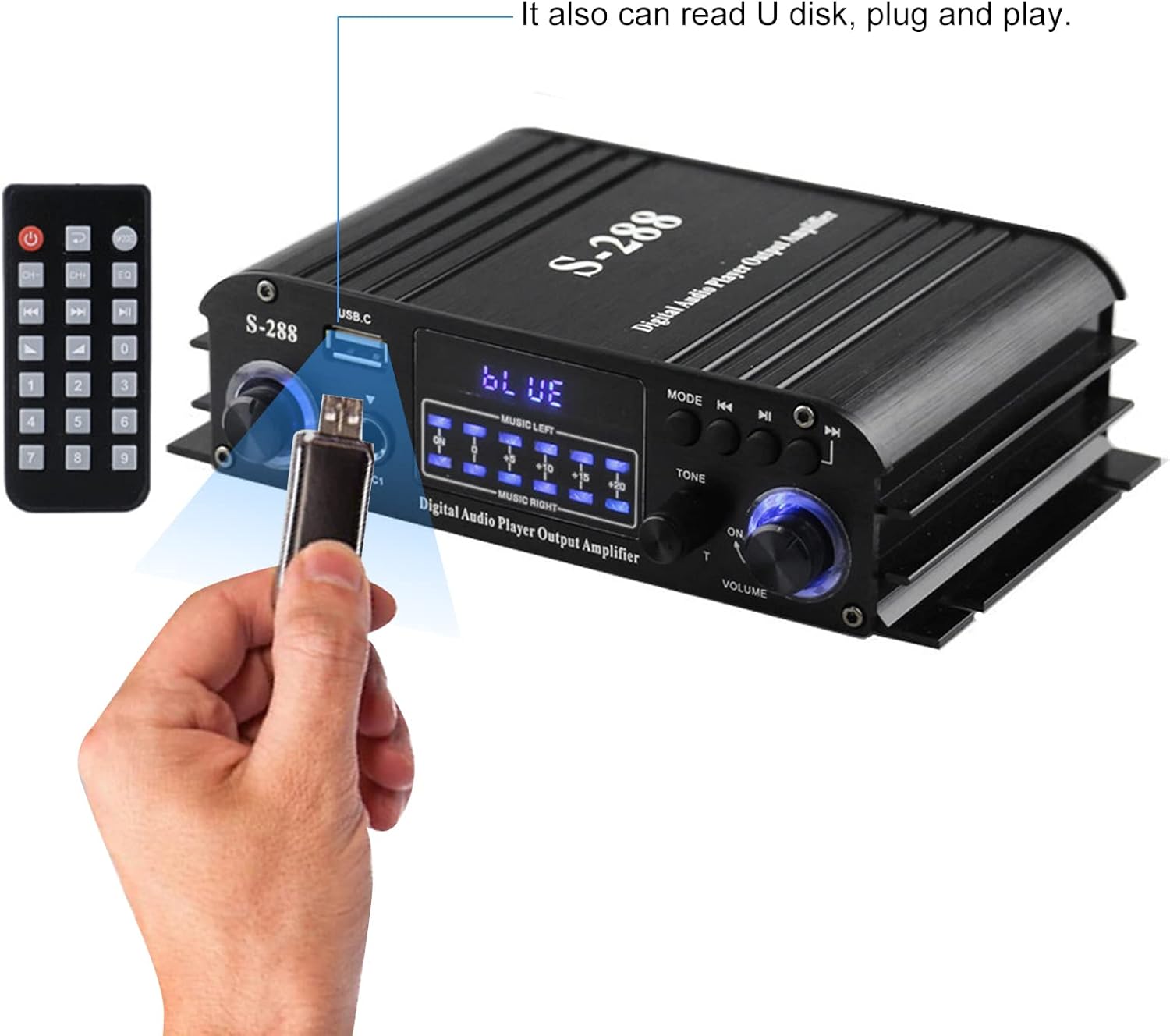
Image: A hand inserting a USB flash drive into the USB socket on the front panel of the amplifier, illustrating the U-disk playback feature.
Latọna Iṣakoso Lilo
Iṣakoso latọna jijin ti o wa ninu rẹ gba ọ laaye lati ṣiṣẹ ni irọrun lati ijinna kan.

Image: A hand holding the remote control, pointing towards the amplifier, with speakers and a television in the background, demonstrating remote operation.
- Bọtini agbara: Yipada awọn amplifier lori / pa.
- Bọtini Ipo: Awọn iyipo nipasẹ awọn orisun titẹ sii.
- Iwọn didun +/-: Ṣe atunṣe iwọn didun titunto si.
- EQ/Tone Buttons: Adjusts bass and treble (if available on remote).
- Awọn bọtini nọmba: For direct track selection or FM station tuning (if applicable).
- Awọn idari Sisisẹsẹhin: Play/Pause, Previous/Next Track.
N ṣatunṣe Audio
- Iwọn Titunto: Rotate the "VOLUME" knob on the front panel or use the Volume +/- buttons on the remote.
- Bass/Treble: Use the "TONE" knob on the front panel to adjust bass and treble levels to your preference.
- Iwọn Gbohungbohun: Adjust the "MIC.VOL" knob for microphone input level.
Itoju
Itọju to peye yoo rii daju pe ọmọ rẹ ti pẹ to amplifier.
- Ninu: Use a soft, dry cloth to wipe the exterior of the unit. Do not use liquid cleaners or aerosols.
- Afẹfẹ: Rii daju pe awọn ṣiṣi afẹfẹ ko ni dina.
- Ibi ipamọ: Nigbati o ko ba wa ni lilo fun awọn akoko ti o gbooro sii, tọju awọn amplifier in a cool, dry place away from direct sunlight and dust.
Laasigbotitusita
If you encounter any issues, refer to the following table for common problems and solutions.
| Isoro | Owun to le Fa | Ojutu |
|---|---|---|
| Ko si agbara | Okùn agbára kò sopọ̀ mọ́; Ibùdó agbára kò ní àbùkù; Amplifier ni pipa. | Check power connections; Try a different outlet; Press power button on unit/remote. |
| Ko si ohun jade | Incorrect input mode selected; Speaker cables loose/incorrectly connected; Volume too low; Audio source issue. | Press MODE button to select correct input; Reconnect speaker cables, ensuring polarity; Increase volume; Check audio source device. |
| Bluetooth ko so pọ | Amplifier not in Bluetooth mode; Device too far; Bluetooth disabled on source device. | Yipada amplifier to BT mode; Move device closer; Enable Bluetooth on your device and rescan. |
| Ohun ti o daru | Volume too high; Speaker impedance mismatch; Poor audio source quality. | Reduce volume; Ensure speakers are 4-8 ohms; Try a different audio source. |
| U-disk not playing | U-disk not inserted correctly; Unsupported file format; Amplifier not in U-disk mode. | Re-insert U-disk; Ensure audio files are common formats (e.g., MP3); Switch amplifier to U-disk mode. |
Awọn pato
Detailed technical specifications for the ERYUE S-288 amplifier.
| Ẹya ara ẹrọ | Sipesifikesonu |
|---|---|
| Agbara titẹ sii | AC 100-240V 50 / 60Hz, 1.7A; DC 12V 3A-5A |
| Ti won won Igbohunsafẹfẹ | 20-20KHz |
| Agbara Ijade | 50W x 4 awọn ikanni |
| Oṣuwọn iparun | <0.4% |
| Ifihan Ibuwọlu-si-Noise | > 80dB |
| Impedance Agbọrọsọ | 4-8 ohms |
| Ohun elo | Aluminiomu Alloy |
| Àwọ̀ | Dudu |
| Ọja Mefa | 17.5 x 10.5 x 4.5 cm (6.89 x 4.13 x 1.77 ni) |
| Iwọn Ọja | 469g (16.5 iwon) |
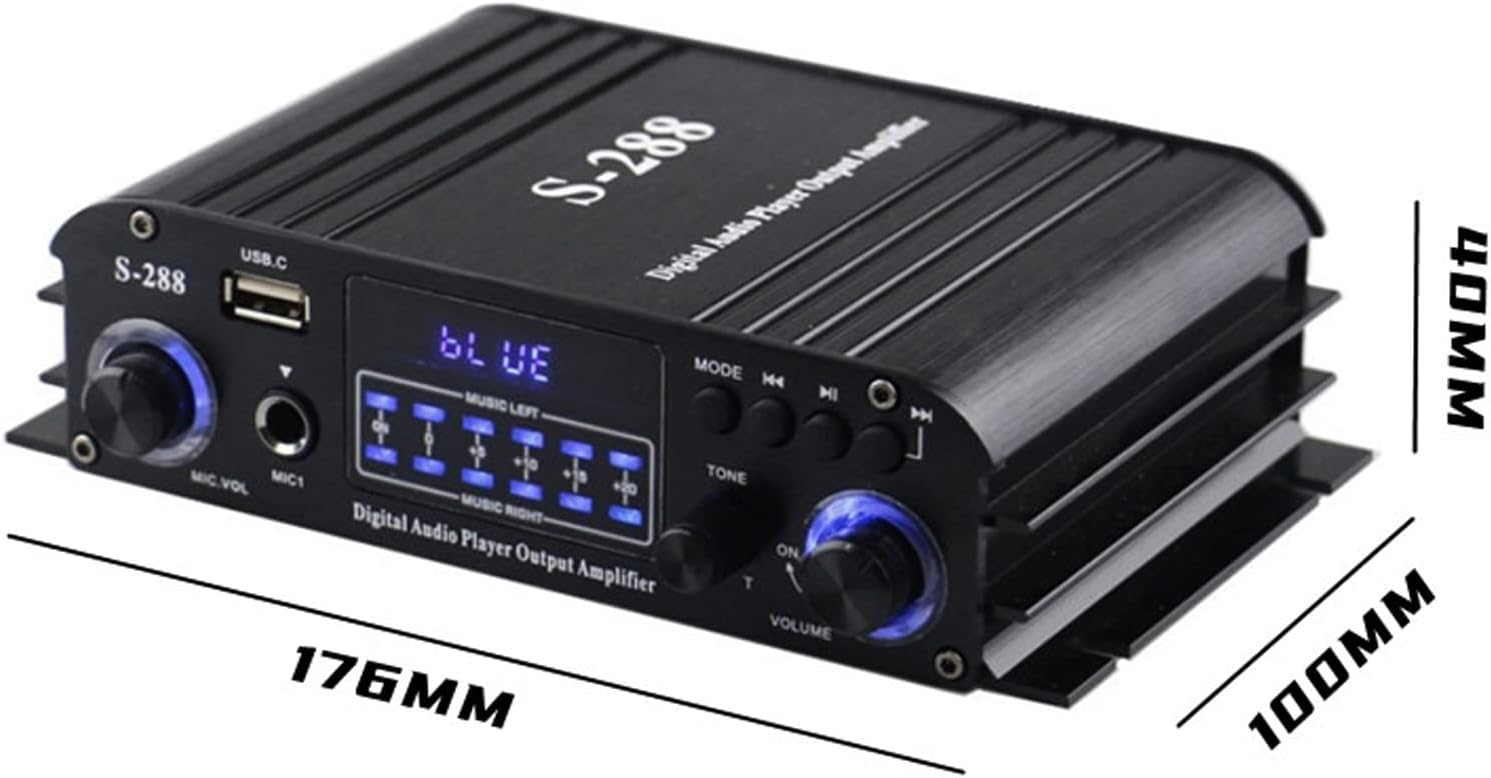
Image: The ERYUE S-288 amplifier with its key dimensions (length, width, height) indicated in millimeters.
Atilẹyin ọja ati Support
This product comes with a standard manufacturer's warranty. For specific warranty terms and conditions, please refer to the warranty card included in your package or contact your retailer. For technical support or service inquiries, please reach out to the ERYUE customer service team through the contact information provided with your purchase or on the official ERYUE webojula.
Jọwọ ṣe idaduro ẹri rira rẹ fun awọn iṣeduro atilẹyin ọja.