
1. Ifihan
The amiciSmart WiFi Energy Meter (Model: 1xWIFI-MUL-PRO) is a multi-functional device designed for comprehensive electrical protection and smart home automation. It integrates over/under voltage protection, leakage protection, over current/load protection, and a timer switch, all controllable via the SmartLife App. This device also functions as an energy meter, providing real-time and historical energy consumption data. It is designed for DIN rail mounting and enhances the safety and efficiency of your electrical system.

olusin 1: Iwaju view of the amiciSmart WiFi Energy Meter, showing the display and control buttons.
2. Alaye Aabo
WARNING: Electrical installation should only be performed by qualified personnel. Failure to follow these instructions may result in electric shock, fire, or serious injury.
- Rí i dájú pé a ti ge agbára kúrò ní ibi tí ẹ̀rọ ìfọ́mọ́ra àkọ́kọ́ ti ń bàjẹ́ kí a tó fi sí tàbí kí a ṣe àtúnṣe rẹ̀.
- Verify correct wiring connections (Live and Neutral) as indicated on the device.
- Do not exceed the maximum current rating of the device (63A).
- This product operates exclusively on a 2.4GHz WiFi network and is not compatible with 5GHz WiFi.
- Jeki ẹrọ naa kuro ninu omi ati ọriniinitutu pupọ.
- Do not attempt to repair or modify the device. Contact support for assistance.
3. Awọn ẹya Ọja
The amiciSmart WiFi Energy Meter offers a comprehensive suite of features for electrical protection and smart control:
- All-in-One Protection: Combines over/under voltage, leakage, and over current/load protection.
- Adjustable Protection Values: Customize voltage, current, and leakage protection thresholds.
- kWh Meter: Monitors and displays energy consumption in kilowatt-hours.
- Instant Power Off: Automatically disconnects power in case of electrical anomalies to prevent damage.
- Voltage Idaabobo: Adjustable over-voltage range (110~300V) and under-voltage range (85~220V).
- Ju Idaabobo lọwọlọwọ: Adjustable range from 1~63A.
- Idaabobo jijo: Adjustable range from 10~99mA, with an option to disable.
- Isakoṣo latọna jijin: Manage the device and monitor activity via the SmartLife App from anywhere.
- Abojuto Igba-gidi: View real-time and historical energy consumption, voltage, and current readings through the app.
- Iṣeto: Automate power on/off times using the timer switch function within the app.
- Ifihan LED didan: Provides clear readings of voltage, lọwọlọwọ, agbara, ati agbara agbara.

Olusin 2: Pariview of the device's display and control elements.
- V: Lori / Labẹ Voltage Itaniji Atọka
- A: Over Current Alarm Indicator
- L: Leakage Alarm Indicator
- WiFi: Atọka WiFi
- Pulu: Kilo Watt Hour Meter Pulse Indicator
- Bọtini agbara: Afowoyi Yipada
- Ṣeto Bọtini: Long press for 3 seconds to enter setting interface
- Up/Test Button: Long press for 3 seconds to test leakage
- Down/WiFi Button: Long press for 3 seconds to configure WiFi

Figure 3: The easy-to-read display panel showing Kilo Watt Hour, Kilo Watt, and Power Factor readings.
4. Package Awọn akoonu
Nígbà tí o bá ṣí àpótí náà, o yẹ kí o rí ohun kan wọ̀nyí:
- 1 x amiciSmart WiFi Energy Meter (Model: 1xWIFI-MUL-PRO)
5. Awọn pato
| Ẹya ara ẹrọ | Sipesifikesonu |
|---|---|
| Nọmba awoṣe | 1xWIFI-MUL-PRO |
| Awọn iwọn (LxWxH) | 9.6 x 6.8 x 5 cm |
| Iwọn Nkan | 270 g |
| Lori Voltage Idaabobo Ibiti | Adijositabulu lati 110V to 300V |
| Labẹ Voltage Idaabobo Ibiti | Adijositabulu lati 85V to 220V |
| Ju Ibiti Idaabobo lọwọlọwọ | Atunṣe lati 1A si 63A |
| Ibiti Idaabobo Jijo | Adjustable from 10mA to 99mA (can be turned off) |
| Ibamu WiFi | 2.4GHz only (not compatible with 5GHz) |
| Ibamu App | Ohun elo SmartLife |
| Iṣagbesori Iru | DIN Rail Agesin |

Figure 4: Physical dimensions of the amiciSmart WiFi Energy Meter.
6. Eto & Fifi sori
Follow these steps for safe and proper installation of your amiciSmart WiFi Energy Meter:
- Ge asopọ agbara: Before beginning any electrical work, ensure the main power supply to your distribution board is completely switched off. Use a voltagOlùdánwò e láti fìdí rẹ̀ múlẹ̀ pé kò sí agbára kankan.
- Iṣagbesori: Mount the amiciSmart WiFi Energy Meter onto a standard DIN rail within your electrical distribution box.
- Awọn isopọ onirin:

Figure 5: Wiring diagram showing input (IN) and output (OUT) connections for Neutral (N) and Live (L) wires.
- Connect the incoming Neutral (N) wire to the 'N IN' terminal.
- Connect the incoming Live (L) wire to the 'L IN' terminal.
- Connect the outgoing Neutral (N) wire (to your load) to the 'N OUT' terminal.
- Connect the outgoing Live (L) wire (to your load) to the 'L OUT' terminal.
- Rii daju pe gbogbo awọn asopọ wa ni aabo ati ni ihamọ daradara.
- Imupadabọ agbara: Once all wiring is complete and verified, restore power to the main circuit. The device display should light up.
- App Download & Installation:
- Download the "SmartLife" app from the Google Play Store (for Android) or Apple App Store (for iOS).
- Forukọsilẹ fun iroyin titun tabi wọle ti o ba ti ni ọkan tẹlẹ.
- Iṣeto WiFi:
- Ensure your smartphone is connected to a 2.4GHz WiFi network. The device is not compatible with 5GHz networks.
- Long press the 'Down/WiFi' button on the device for 3 seconds until the WiFi indicator starts blinking rapidly, indicating pairing mode.
- Open the SmartLife app, tap '+' to add a new device, and follow the on-screen instructions to connect your energy meter to your WiFi network.
7. Isẹ
Operating your amiciSmart WiFi Energy Meter involves both direct interaction with the device and control via the SmartLife App.
7.1. Awọn iṣakoso ẹrọ
- Yiyipada afọwọṣe (Bọtìnì Agbára): Press briefly to manually turn the power ON or OFF.
- Ṣeto Bọtini: Long press for 3 seconds to enter the device's local setting interface for adjusting parameters directly on the unit.
- Up/Test Button: Long press for 3 seconds to perform a leakage test.
- Down/WiFi Button: Long press for 3 seconds to enter WiFi configuration mode.
7.2. SmartLife App Functions
Once connected to the SmartLife App, you can access the following features:
- Tan/PA Latọna jijin: Switch the power supply on or off from anywhere.
- Abojuto Igba-gidi: View live data for voltage (V), current (A), power (W), and energy consumption (kWh).
- Data Itan: Access graphs and logs of past energy consumption.
- Adjustable Protection Settings:
- Voltage Idaabobo: Ṣètò àwọn ààlà àṣà fún ìfọ́-òkètage ati labẹ-voltage alarms and automatic power cutoff.
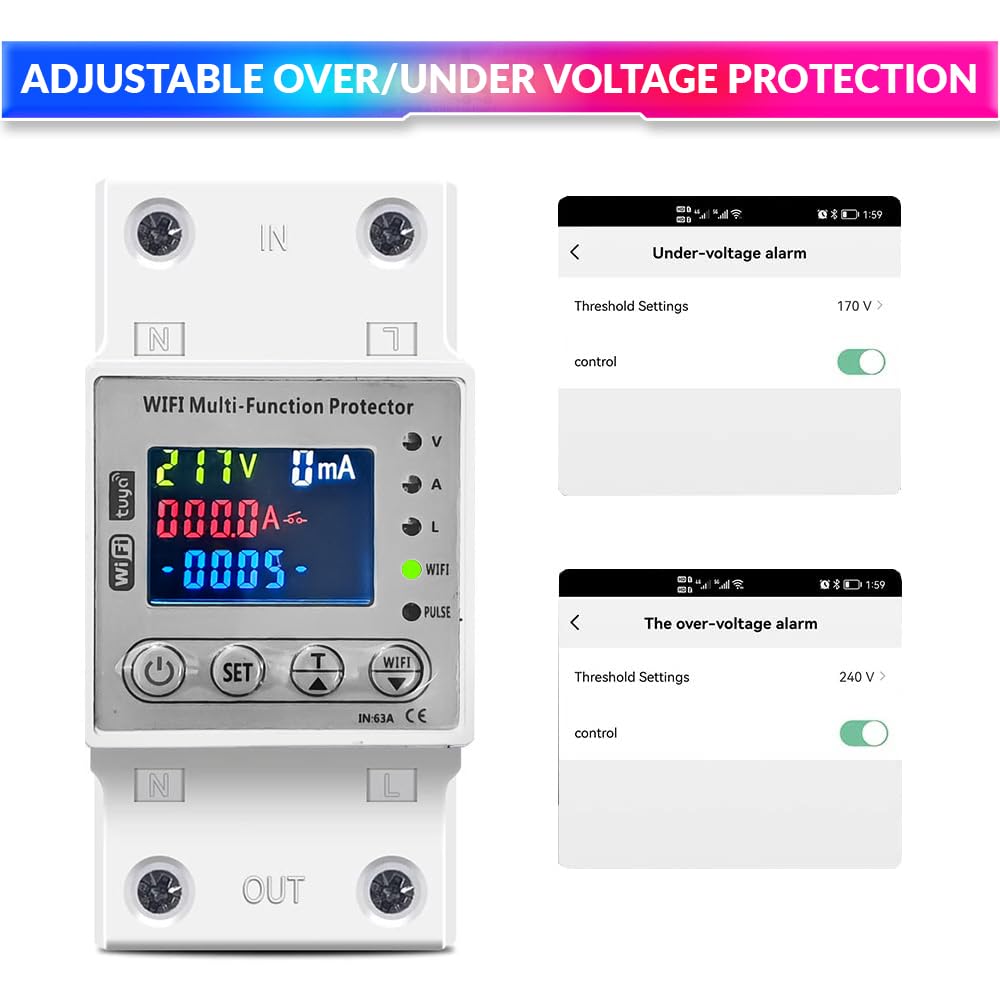
Figure 6: SmartLife App interface for setting under-voltage ati lori-voltage àbáwọlé.
- Ju Idaabobo lọwọlọwọ: Define the maximum allowable current before the device trips.
- Idaabobo jijo: Set the leakage current threshold (10-99mA) or disable this feature.

Figure 7: SmartLife App interface for setting leakage alarm thresholds.
- Voltage Idaabobo: Ṣètò àwọn ààlà àṣà fún ìfọ́-òkètage ati labẹ-voltage alarms and automatic power cutoff.
- Iṣeto & Aago: Create schedules for automatic power on/off at specific times or after a set duration.
- Awọn akọọlẹ iṣẹlẹ: Review records of power cutoffs and their reasons (e.g., over-voltage, over-current).
8. Itọju
The amiciSmart WiFi Energy Meter is designed for minimal maintenance. However, regular checks can ensure its longevity and optimal performance:
- Ninu igbagbogbo: Periodically wipe the device with a dry, soft cloth to remove dust. Do not use liquid cleaners or solvents.
- Awọn ayẹwo Asopọmọra: Annually, or if you suspect an issue, ensure all wiring connections are still secure and free from corrosion. Always disconnect main power before checking connections.
- Awọn imudojuiwọn famuwia: Check the SmartLife App periodically for any available firmware updates for your device. Install updates to ensure you have the latest features and security enhancements.
- Idanwo jijo: Perform the leakage test function (long press Up/Test button) periodically to ensure the leakage protection mechanism is functional.
9. Laasigbotitusita
If you encounter issues with your amiciSmart WiFi Energy Meter, refer to the following common problems and solutions:
| Isoro | Owun to le Fa | Ojutu |
|---|---|---|
| Ẹrọ ti ko ni agbara lori. | Kò sí ìpèsè agbára; àwọn wáyà tí kò tọ́; àṣìṣe ẹ̀rọ. |
|
| Ko le sopọ si WiFi. | Incorrect WiFi band; wrong password; device too far from router; router issues. |
|
| Awọn ẹrọ n lọ nigbagbogbo. | Lori-voltage, labẹ-voltage, over-current, or leakage detected; sensitive settings. |
|
| Isakoṣo latọna jijin ko ṣiṣẹ. | No internet connection; app issues; device offline. |
|
10. Atilẹyin ọja & Atilẹyin
The amiciSmart WiFi Energy Meter (Model: 1xWIFI-MUL-PRO) comes with a standard manufacturer's warranty. Additionally, an optional 1-Year Extended Warranty by Onsitego may be available for purchase.
Fun atilẹyin imọ-ẹrọ, awọn ẹtọ atilẹyin ọja, tabi eyikeyi awọn ibeere ti o ni ibatan si ọja, jọwọ kan si:
Amicikart Online Services Pvt Ltd
A-28B, Sector-58, Noida
Olubasọrọ No.: +91 9809709898
Please have your product model number (1xWIFI-MUL-PRO) and purchase details ready when contacting support.