
1. Ifihan
O ṣeun fun riraasing the Better Homes & Gardens Dual Power Portable Circulator Fan, Model BHS136111442001. This manual provides important information regarding the safe operation, installation, maintenance, and troubleshooting of your new fan. Please read this manual thoroughly before using the product and retain it for future reference.
This portable fan is designed to provide efficient airflow and cooling in various settings, including homes, offices, and outdoor environments. Its compact and lightweight design ensures convenient portability.
2. Awọn Ilana Aabo pataki
Nigbati o ba nlo awọn ohun elo itanna, awọn iṣọra ipilẹ yẹ ki o tẹle nigbagbogbo lati dinku eewu ina, mọnamọna, ati ipalara si eniyan, pẹlu atẹle naa:
- Ka gbogbo awọn ilana ṣaaju lilo olufẹ yii.
- Use this fan only as described in this manual. Other uses not recommended by the manufacturer may cause fire, electric shock, or injury to persons.
- To reduce the risk of fire or electric shock, do not expose this fan to water or rain.
- Never insert fingers or any other objects through the grille when the fan is in operation.
- Unplug the fan from the power source when moving it from one location to another, and before cleaning.
- Ma ṣe ṣiṣẹ afẹfẹ eyikeyi pẹlu okun ti o bajẹ tabi plug. Jabọ afẹfẹ kuro tabi pada si ile-iṣẹ iṣẹ ti a fun ni aṣẹ fun idanwo ati/tabi atunṣe.
- Ma ṣe ṣisẹ okun labẹ carpeting. Ma ṣe bo okùn pẹlu awọn rogi jiju, awọn asare, tabi awọn ibora ti o jọra. Ma ṣe fi okun sii labẹ aga tabi awọn ohun elo. Ṣeto okun kuro ni agbegbe ijabọ ati nibiti kii yoo ja.
- Always place the fan on a stable, flat surface to prevent it from tipping over.
- Ohun elo yii ni plug polarized (abẹfẹlẹ kan gbooro ju ekeji lọ). Lati din eewu ina-mọnamọna ku, plug yii jẹ ipinnu lati baamu ni iṣan pola kan nikan ni ọna kan. Ti pulọọgi naa ko ba ni ibamu ni kikun ninu iṣan, yi plug naa pada. Ti ko ba baamu, kan si onisẹ ina mọnamọna. Maṣe gbiyanju lati ṣẹgun ẹya aabo yii.
3. Awọn ẹya Ọja
- Iṣe Alagbara: Enjoy a refreshing breeze anywhere with this portable fan. Its powerful motor ensures constant airflow and effective cooling thanks to its 3 speeds.
- Gbigbe Rọrun: Designed to be compact and lightweight, this fan is perfect to take with you anywhere. Ideal for use at home, office or outdoor activities.
- Iṣakoso Iyara Atunṣe: Adjust the fan speed according to your needs. From a gentle breeze to more intense cooling, you can adapt it to different climates and personal preferences.
- Isẹ idakẹjẹ: Enjoy a quiet environment while cooling off. This fan operates quietly, preventing hearing discomfort while providing refreshing relief.
- Durable & Safe Construction: Made with high-quality materials, this fan is designed for a long service life. In addition, it features a safety grid that protects your fingers and offers additional peace of mind during use.
4. Eto
- Ṣii silẹ: Carefully remove the fan from its packaging. Retain the packaging for storage or if the product needs to be returned.
- Ibi: Place the fan on a firm, level surface. Ensure there is adequate space around the fan for proper air circulation. Avoid placing it near curtains or other objects that could obstruct the airflow or get caught in the fan blades.
- Asopọ agbara:
This fan supports dual power: corded electric and batteries. For corded operation, insert the power adapter into the DC input port on the back of the fan, then plug the adapter into a standard electrical outlet. Ensure the voltage matches the fan's requirements.

Figure 4.1: Power input port on the back of the fan. The image shows a black power cord connected to the circular DC input port, with "9V DC IN" text visible nearby, indicating the power specification.
For battery operation, ensure compatible batteries (not included) are correctly installed in the designated battery compartment (if applicable, based on product design, as "Batteries" is listed as a power source). Refer to the battery compartment markings for correct polarity.
5. Awọn ilana Iṣiṣẹ
The fan features intuitive controls for ease of use.
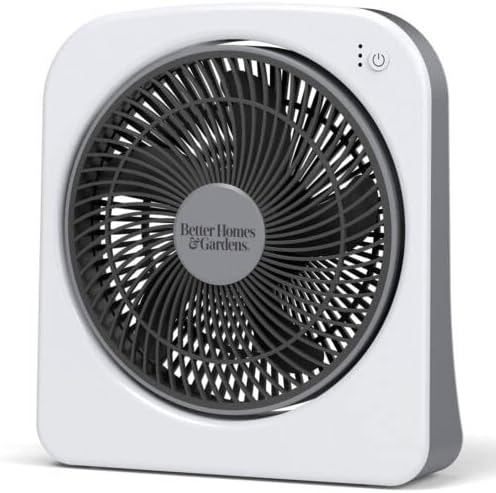
olusin 5.1: Iwaju view of the fan, showing the grille, central logo, and control panel with power and speed indicator lights at the top right.
- Titan/Apapa: Press the power button (usually marked with a ⏻ symbol) located on the control panel to turn the fan on or off.
- Titunṣe Iyara Olufẹ: This fan offers 3 speed settings. Each press of the power button will cycle through the speeds (Low, Medium, High) and then off. Indicator lights on the control panel will illuminate to show the current speed setting.
- Gbigbe: The fan is designed with a convenient handle for easy carrying.
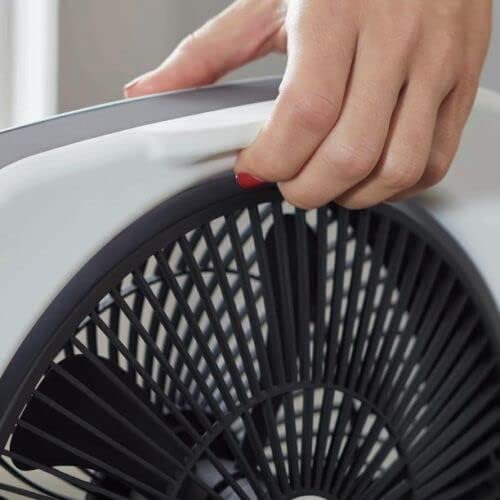
Figure 5.2: A hand gripping the integrated handle on the top edge of the fan, demonstrating its portability.
6. Itọju
Regular cleaning and maintenance will ensure optimal performance and extend the lifespan of your fan.
- Ṣaaju ki o to sọ di mimọ: Máa yọ afẹ́fẹ́ kúrò nínú ihò agbára kí o tó sọ ọ́ di mímọ́ tàbí kí o ṣe àtúnṣe èyíkéyìí.
- Ninu Ode: Lo asọ, damp asọ lati mu ese awọn ita ita ti awọn àìpẹ. Ma ṣe lo awọn olutọpa abrasive tabi awọn olomi, nitori iwọnyi le ba ipari jẹ.
- Ninu Grille ati Blades: Use a vacuum cleaner with a brush attachment or a soft, dry cloth to gently remove dust and debris from the front and rear grilles and the fan blades. Do not attempt to disassemble the fan to clean the blades directly unless specified by the manufacturer.
- Ibi ipamọ: Nigbati o ko ba wa ni lilo fun awọn akoko ti o gbooro sii, tọju afẹfẹ naa ni itura, aye gbigbẹ, ni pataki ninu apoti atilẹba rẹ, lati daabobo rẹ lati eruku ati ibajẹ.
7. Laasigbotitusita
If your fan is not operating correctly, please refer to the following troubleshooting guide before contacting customer support.
| Isoro | Owun to le Fa | Ojutu |
|---|---|---|
| Fan ko ni tan-an. |
|
|
| Afẹfẹ alailagbara. |
|
|
| Ariwo ti ko wọpọ. |
|
|
8. Awọn pato
| Ẹya ara ẹrọ | Ẹ̀kúnrẹ́rẹ́ |
|---|---|
| Nọmba awoṣe | BHS136111442001 |
| Brand | Better Homes & Gardens (Product is Amazon Renewed) |
| Orisun agbara | Corded Electric, And Batteries |
| Awọn iyara Fan | 3 Awọn iyara |
| Ọna Iṣakoso | App (Note: Product description emphasizes intuitive physical controls. Please verify if app control is available or if this is a generic specification.) |
| Iwọn Nkan | 1.1 iwon |
| Package Mefa | 19.69 x 11.81 x 3.54 inches |
| Niyanju Lilo | Cooling (for Office, Travel) |
| ASIN | B0BDBCZBLR |
| UPC | 195925381010 |
9. Atilẹyin ọja ati Support
As this product is listed as "Renewed" by Amazon Renewed, specific warranty details may vary from a new product. Please refer to the Amazon Renewed program terms and conditions for information regarding the warranty and return policy applicable to your purchase.
For further assistance, troubleshooting not covered in this manual, or to inquire about service, please contact Amazon Renewed customer support or the original manufacturer if applicable.
You can typically find contact information on your purchase receipt or on the Amazon Renewed product page.