Ọrọ Iṣaaju
This manual provides essential information for the safe and efficient operation of your SAMSUNG HW-B650 3.1ch Soundbar. Please read it thoroughly before using the product and keep it for future reference. This soundbar system delivers captivating 3D audio with Dolby Digital 5.1 and DTS Virtual:X, enhanced bass, and clear dialogue through its built-in center speaker. It supports Bluetooth multi-connection and offers features like Voice Enhance and Night Mode for an optimized listening experience.
Alaye Aabo
Lati dinku eewu ina mọnamọna, ina, tabi ipalara, nigbagbogbo tẹle awọn iṣọra aabo ipilẹ wọnyi:
- Ma ṣe fi ohun elo yii han si ojo tabi ọrinrin.
- Ma ṣe dina eyikeyi awọn ṣiṣi atẹgun. Fi sori ẹrọ ni ibamu pẹlu awọn ilana ti olupese.
- Maṣe fi sori ẹrọ nitosi awọn orisun ooru gẹgẹbi awọn imooru, awọn iforukọsilẹ ooru, awọn adiro, tabi awọn ohun elo miiran (pẹlu ampliifiers) ti o gbe ooru jade.
- Dabobo okun agbara lati ma rin lori tabi pin, ni pataki ni awọn pilogi, awọn ohun elo irọrun, ati aaye nibiti wọn ti jade kuro ninu ohun elo naa.
- Lo awọn asomọ/awọn ẹya ara ẹrọ ti olupese pato.
- Tọkasi gbogbo iṣẹ si awọn oṣiṣẹ iṣẹ ti o peye. Iṣẹ iṣẹ nilo nigbati ohun elo ba ti bajẹ ni ọna eyikeyi.
Ohun ti o wa ninu Apoti
Daju pe gbogbo awọn paati wa ninu package rẹ:
- Ohun elo Ipin
- Alailowaya Subwoofer
- Latọna jijin Adarí
- Batiri fun Latọna Adarí
- Okun Opitika
- Ohun elo Wallmount
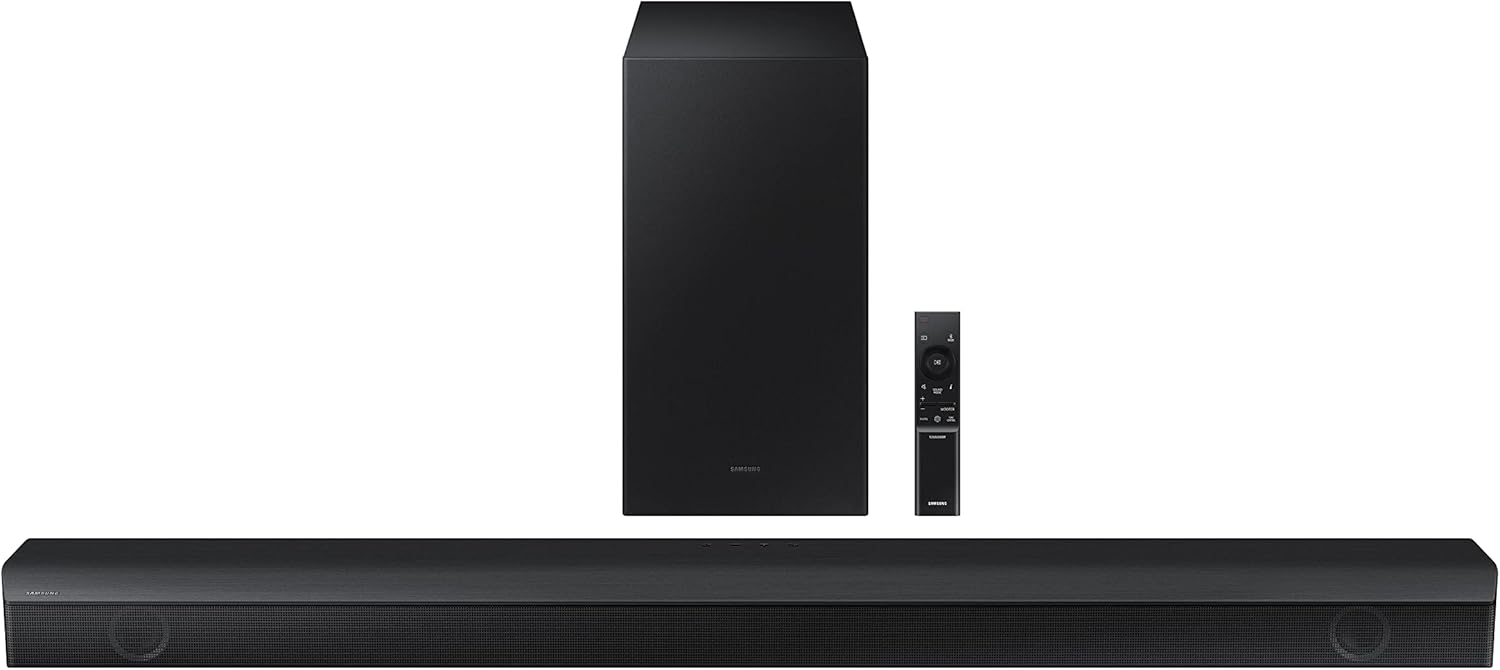
Image: The complete SAMSUNG HW-B650 system, including the soundbar, wireless subwoofer, and remote control, laid out to show all included components.
Ṣeto
1. Ifiweranṣẹ
- Place the soundbar centrally below your TV. Ensure it has clear line of sight for the remote control.
- Position the wireless subwoofer anywhere in the room, preferably near the soundbar, for optimal bass performance. Ensure it is within range of the soundbar for wireless connection.
2. Awọn isopọ
- Okun Ojú: Connect the included optical cable from the DIGITAL AUDIO OUT (OPTICAL) port on your TV to the OPTICAL IN port on the soundbar.
- HDMI (ARC): If your TV supports HDMI ARC, connect an HDMI cable from the HDMI ARC port on your TV to the HDMI OUT (TV-ARC) port on the soundbar. This allows for TV control of the soundbar volume.
- Bluetooth: For wireless audio from mobile devices, enable Bluetooth on your device and select 'Samsung Soundbar HW-B650' from the list of available devices.
3. Agbara
- Connect the power cord to the soundbar and then to a wall outlet.
- Connect the power cord to the wireless subwoofer and then to a wall outlet. The subwoofer will automatically pair with the soundbar.

Image: The soundbar positioned below a television on a media console, with the wireless subwoofer placed to the side, demonstrating a typical home setup.
Ṣiṣẹ
Awọn iṣakoso ipilẹ
- Agbara: Press the Power button on the remote or soundbar to turn the unit on/off.
- Iwọn didun: Use the Volume +/- buttons on the remote to adjust the sound level.
- Orisun igbewọle: Press the Source button on the remote or soundbar to cycle through available input sources (D.IN, HDMI, BT).
Key Awọn ẹya ara ẹrọ
Dolby Digital 5.1 DTS Virtual:X
Experience multi-directional sound that draws you into the action, creating a captivating 3D audio environment.

Image: A living room scene with a soundbar and TV, illustrating sound waves expanding outwards to create a realistic 3D audio experience.
Bass didn
Enhance the low-frequency effects with a dedicated Bass Boost button on the remote, providing deeper and richer bass.

Image: The wireless subwoofer, highlighting its capability to deliver extra bass and a bigger sound experience.
Built-in Center Speaker
The dedicated center channel speaker ensures crisp and clear dialogue, so you won't miss a single word, even during intense action scenes.

Image: The soundbar positioned below a TV, with sound waves indicating clear dialogue projection from the built-in center speaker.
Adaptive Ohun Lite
Enjoy optimized audio with enhanced voice clarity across various content types, from movies and music to games.

Image: The soundbar in front of a TV displaying an orchestra, with icons representing music, movies, and gaming, indicating optimized sound for various content.
Bluetooth Multi-Asopọ
Connect two smart devices simultaneously to the soundbar via Bluetooth, allowing for easy switching between audio sources.

Image: The soundbar on a surface with two mobile phones and a Bluetooth symbol, illustrating the multi-connection capability.
Voice Enhance & Night Mode
Voice Enhance optimizes the equalizer and amplifies dialogue for clearer speech. Night Mode lowers the volume and compresses bass to prevent disturbing others during quiet hours.

Image: The soundbar below a TV showing people conversing, with sound waves indicating enhanced voice clarity, representing Voice Enhance and Night Mode features.
One Remote for Total Control
Control both your Samsung TV and the soundbar, including volume, with just the Samsung OneRemote for streamlined operation.

Image: A hand holding a Samsung OneRemote, with icons for a TV and soundbar, demonstrating unified control over both devices.
Wireless Surround Sound Compatible
Easily connect to optional Samsung wireless rear speakers (sold separately) to expand your audio setup to a full 5.1 channel surround sound system without messy wires.

Image: A person relaxing while watching TV, with sound waves extending from the soundbar to optional wireless rear speakers, illustrating room-filling surround sound.
Itoju
Lati rii daju igbesi aye gigun ati iṣẹ to dara julọ ti ọpa ohun rẹ:
- Ninu: Use a soft, dry cloth to clean the surfaces of the soundbar and subwoofer. Do not use liquid cleaners or aerosol sprays.
- Afẹfẹ: Rí i dájú pé àwọn ihò afẹ́fẹ́ kò dí. Afẹ́fẹ́ tó yẹ kò jẹ́ kí ó gbóná jù.
- Ibi ipamọ: Ti o ba tọju ẹyọ naa fun akoko ti o gbooro sii, ge asopọ kuro ni iṣan agbara ki o tọju rẹ ni itura, aaye gbigbẹ.
Laasigbotitusita
If you encounter issues with your soundbar, refer to the table below for common problems and solutions:
| Isoro | Owun to le Fa | Ojutu |
|---|---|---|
| Ko si agbara | Kò sí okùn agbára tàbí ìṣòro ìjáde. | Check power connections to soundbar, subwoofer, and wall outlet. Try a different outlet. |
| Ko si ohun | Incorrect input source, volume too low, or cable issue. | Select correct input source (D.IN, HDMI, BT). Increase volume. Check optical/HDMI cable connections. Ensure TV audio output is set to external speakers. |
| Subwoofer ko sopọ | Subwoofer not powered on or out of range. | Ensure subwoofer is plugged in and powered on. Move subwoofer closer to the soundbar. Manually pair if necessary (refer to full user manual). |
| Isakoṣo latọna jijin ko ṣiṣẹ | Awọn batiri ti dinku tabi idilọwọ. | Replace remote batteries. Ensure no obstructions between remote and soundbar. Point remote directly at the soundbar's sensor. |
| Ohun ti daru | Volume too high or audio source issue. | Lower the volume. Check the audio source for distortion. Try a different audio source. |
Awọn pato
Key technical specifications for the SAMSUNG HW-B650 Soundbar:
| Ẹya ara ẹrọ | Ẹ̀kúnrẹ́rẹ́ |
|---|---|
| Orukọ awoṣe | HW-B650/ZA |
| Agbọrọsọ Iru | Pẹpẹ ohun |
| Kakiri Ohun ikanni iṣeto ni | 3.1 |
| Asopọmọra Technology | Bluetooth, Optical, HDMI |
| Imọ-ẹrọ Ibaraẹnisọrọ Alailowaya | Bluetooth |
| Subwoofer Asopọmọra | Ailokun |
| Awọn iwọn Ọja (ọpa ohun) | 4.1"D x 40.6"W x 2.3"H |
| Iwọn Nkan | 18.1 Poun (Lapapọ) |
| Awọn irinše to wa | Remote Controller, Optical Cable, Wallmount Kit, Battery for Remote Controller |
| Pataki Awọn ẹya ara ẹrọ | Bass Boost, ENERGY STAR® Certified, Dolby Digital 5.1 / DTS Virtual:X, Built-In Center Speaker |
Atilẹyin ọja & Atilẹyin
Your SAMSUNG HW-B650 Soundbar comes with a Limited Warranty. For detailed warranty terms and conditions, please refer to the documentation included with your product or visit the official Samsung support webojula.
- Iwe afọwọkọ olumulo osise (PDF): For comprehensive instructions and detailed diagrams, you can download the official user manual Nibi.
- Atilẹyin Onibara: For technical assistance, troubleshooting beyond this guide, or warranty claims, please contact Samsung Customer Service.