
1. Ifihan
The HUAWEI Y6 (2018) is a feature-rich smartphone designed for communication, entertainment, and productivity. It operates on Android 8.0 (Oreo) and features a 5.7-inch S-IPS LCD display, a 13 MP main camera, and dual SIM capability. This manual will guide you through the device's functions and features.
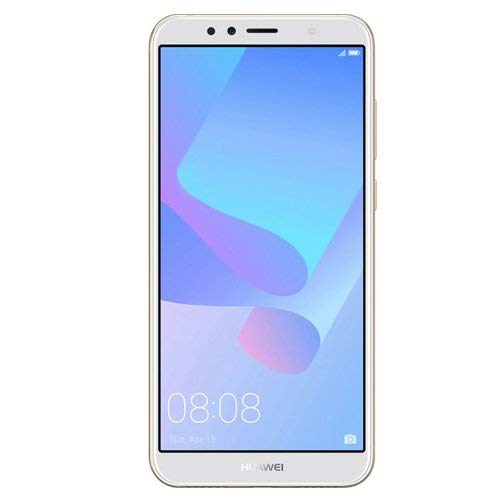
Nọmba 1.1: HUAWEI Y6 (2018) Smartphone. This image shows the front view of the device, highlighting its 5.7-inch display and sleek design.
2. Package Awọn akoonu
Please check the contents of your product box. If any items are missing or damaged, contact your retailer.
- HUAWEI Y6 (2018) Smartphone
- Data Cable / 2-pin Charger
- Itọsọna Ibẹrẹ kiakia (iwe yii)
- Ohun èlò ìyọkúrò SIM (ó lè yàtọ̀ síra láti agbègbè)
3. Eto
3.1. Fi sii SIM ati microSD Awọn kaadi
The HUAWEI Y6 (2018) supports Dual Nano-SIM cards and a dedicated microSD card slot for expandable storage.
- Wa atẹ kaadi SIM ni ẹgbẹ ẹrọ rẹ.
- Fi ohun èlò ìjáde SIM sínú ihò kékeré tó wà lẹ́gbẹ̀ẹ́ atẹ náà kí o sì tì í pẹ̀lẹ́pẹ̀lẹ́ títí atẹ náà yóò fi jáde.
- Place your Nano-SIM card(s) into the designated slots with the gold contacts facing down. If using a microSD card, place it in its dedicated slot.
- Carefully push the tray back into the phone until it is flush with the device's side.
3.2. Agbara akọkọ Lori ati iṣeto ni
Lati fi agbara sori ẹrọ rẹ fun igba akọkọ:
- Press and hold the Power button (located on the right side) until the HUAWEI logo appears.
- Tẹle awọn ilana loju iboju lati yan ede rẹ, sopọ si nẹtiwọki Wi-Fi, ki o si ṣeto akọọlẹ Google rẹ.
- Complete the initial setup process, including setting up screen lock and facial recognition if desired.
4. Ṣiṣẹ ẹrọ rẹ
4.1. Ifihan ati Lilọ kiri
Your device features a 5.7-inch S-IPS LCD touchscreen with a resolution of 720 x 1440 pixels. Navigate the interface using touch gestures:
- Fọwọ ba: Yan ohun kan tabi ṣii ohun elo kan.
- Ra: Yi lọ nipasẹ awọn iboju tabi awọn akojọ.
- Fun pọ: Sun-un sinu tabi jade lori awọn fọto ati web awọn oju-iwe.
4.2. Awọn iṣẹ kamẹra
The HUAWEI Y6 (2018) is equipped with a 13 MP rear camera with phase detection autofocus and LED flash, and a 5 MP front camera with LED flash.
- Ṣii ohun elo Kamẹra lati iboju ile tabi iboju titiipa.
- Fọwọ ba bọtini titiipa lati ya fọto kan.
- Yipada laarin awọn kamẹra iwaju ati ẹhin nipa lilo aami yi pada kamẹra.
- Explore various modes like Panorama, HDR, and video recording (up to 1080p @ 30fps).
4.3. Asopọmọra
Ẹrọ rẹ ṣe atilẹyin fun ọpọlọpọ awọn aṣayan asopọ:
- Wi-Fi: Sopọ si awọn nẹtiwọki alailowaya fun iraye si intanẹẹti. Lọ si Settings > Wireless & networks > Wi-Fi.
- Bluetooth: Papọ pẹlu awọn ẹrọ Bluetooth miiran bi agbekọri tabi agbohunsoke. Lọ si Eto > Awọn ẹrọ ti a ti sopọ > Bluetooth.
- GPS: Lo awọn iṣẹ ipo fun lilọ kiri ati aworan agbaye.
- USB: Connect to a computer using the Micro-USB port for data transfer or charging.
4.4. Iṣakoso batiri
The device is powered by a non-removable 3000 mAh Li-Ion battery. To optimize battery life:
- Ṣatunṣe imọlẹ iboju.
- Mu Wi-Fi, Bluetooth, tabi GPS ṣiṣẹ nigbati ko si ni lilo.
- Pade awọn ohun elo abẹlẹ.
- Lo awọn ipo fifipamọ agbara ti o wa ninu Eto > Batiri.
4.5. Ibi ipamọ
The HUAWEI Y6 (2018) comes with 16 GB of internal storage, expandable up to 256 GB via a microSD card. Manage your storage in Eto > Ibi ipamọ.
4.6. Idanimọ oju
Your device supports facial recognition for unlocking. Set it up in Settings > Security & privacy > Face Unlock.
5. Itọju
Proper care ensures the longevity of your device:
- Ninu: Lo asọ ti ko ni lint lati nu iboju ati ara. Yago fun awọn ohun elo abrasive tabi awọn kemikali lile.
- Iwọn otutu: Operate the device within recommended temperature ranges (typically 0°C to 35°C). Avoid extreme heat or cold.
- Omi Resistance: Ẹrọ yii jẹ ko omi-sooroYẹra fún fífi ara hàn sí omi.
- Awọn imudojuiwọn sọfitiwia: Ṣe àyẹ̀wò déédéé fún àwọn àtúnṣe ètò náà kí o sì fi sori ẹrọ láti rí i dájú pé iṣẹ́ àti ààbò tó dára jùlọ wà. Ètò > Ètò > Àtúnṣe sọ́fítíwè.
6. Laasigbotitusita
Ti o ba pade awọn iṣoro pẹlu ẹrọ rẹ, gbiyanju awọn ojutu wọnyi:
- Ẹrọ ti ko tan: Rii daju pe batiri ti gba agbara. So ṣaja pọ ki o duro fun iṣẹju diẹ ṣaaju igbiyanju lati tan-an lẹẹkansi.
- Iboju ko dahun: Restart the device by pressing and holding the Power button for about 10 seconds.
- Isopọ Wi-Fi ti ko dara: Ensure you are within range of the Wi-Fi router. Restart the router and your phone. Forget the network and reconnect.
- Batiri mimu yarayara: Review batiri lilo ni Eto > Batiri to identify apps consuming excessive power. Reduce screen brightness and disable unnecessary features.
- Awọn ohun elo ikọlu: Ko kaṣe kuro ati data fun ohun elo iṣoro naa (Settings > Apps & notifications > App info > [App Name] > Storage > Clear cache/Clear data). Ti ọrọ naa ba tẹsiwaju, yọ kuro ki o tun fi ohun elo naa sori ẹrọ.
- Forgot screen lock password/pattern: You may need to perform a factory reset, which will erase all data on your device. Refer to online support for specific instructions.
7. Awọn pato
| Ẹya ara ẹrọ | Sipesifikesonu |
|---|---|
| Brand | Huawei |
| Orukọ awoṣe | Y6 (2018) |
| Eto isesise | Android 8.0 (Oreo) |
| Sipiyu Awoṣe | Qualcomm Snapdragon 425 |
| Sipiyu Iyara | 1.4 GHz Quad-Core Cortex-A53 |
| Ramu Memory | 2 GB |
| Ibi ipamọ inu | 16 GB |
| Expandable Ibi ipamọ | microSD, to 256 GB (iho ifiṣootọ) |
| Iwon iboju | 5.7 inches |
| Ipinnu iboju | 720 x 1440 pixels (18:9 ratio) |
| Ẹbun iwuwo | ~282 ppi |
| Ifihan Iru | S-IPS LCD Capacitive Touchscreen, 16M Colors |
| Kamẹra ẹhin | 13 MP, Phase Detection Autofocus, LED Flash |
| Kamẹra iwaju | 5 MP, LED Flash |
| Gbigbasilẹ fidio | 1080p @ 30fps |
| Iho kaadi SIM | SIM meji (Nano-SIM, imurasilẹ meji) |
| Asopọmọra | Wi-Fi 802.11 b/g/n, Bluetooth v4.2, GPS (A-GPS, GLONASS), Micro-USB v2.0 |
| Jack agbekọri | 3.5 mm |
| Agbara Batiri | 3000 mAh Li-Ion (Non-removable) |
| Awọn sensọ | Accelerometer, Proximity, Facial Recognition |
| Awọn iwọn | 152.4 x 73 x 7.8 mm (6.00 x 2.87 x 0.31 in) |
| Iwọn | 150 Giramu (5.29 iwon) |
| Àwọ̀ | Wura |
8. Atilẹyin ọja ati Support
For warranty information and customer support, please refer to the warranty card included in your product package or visit the official HUAWEI website for your region. You can also contact your retailer for assistance.
Fun iranlọwọ siwaju sii, jọwọ ṣabẹwo si Ile itaja HUAWEI lori Amazon.


