
1. פּראָדוקט איבערview
The ATK N9 Tri-Mode Gaming Headset is designed for gamers requiring flexible connectivity, clear audio, and reliable communication across multiple devices. It supports 3.5 mm wired, 2.4G wireless, and Bluetooth connections, allowing seamless switching between gaming consoles, PC, and mobile devices. Stereo-tuned dynamic drivers deliver balanced sound, enhancing in-game audio cues such as footsteps, gunfire, and environmental effects. The detachable noise-canceling microphone improves voice clarity for team communication, online gaming, and voice calls. Its over-ear design, with soft ear cushions and an adjustable headband, ensures a comfortable fit for extended gaming sessions. The headset is compatible with PS5, PS4, PC, Nintendo Switch, and mobile devices. For Xbox Series X|S, audio and microphone functions are supported via the 3.5 mm wired connection.

2. פּעקל אינהאַלט
באַשטעטיקט אַז אַלע זאכן וואָס זענען אויסגערעכנט אונטן זענען אַרייַנגערעכנט אין אייער פּעקל:
- ATK N9 Pro/White Gaming Headset
- אָפּנעמבאַר ראַש-קאַנסאַלינג מיקראָפאָן
- וסב-C טשאַרדזשינג קאַבלע
- 3.5 מם אַודיאָ קאַבלע
- 2.4G וויירלעסס USB אַדאַפּטער
- באַניצער מאַנואַל (דעם דאָקומענט)

3. ערשט סעטאַפּ
3.1. טשאַרדזשינג די העאַדסעט
Before first use, fully charge the headset using the provided USB-C charging cable. Connect the USB-C end to the headset's charging port and the USB-A end to a compatible USB power source (e.g., PC, wall adapter). The LED indicator will show charging status.
3.2. אנשטעלן דעם מיקראָפאָן
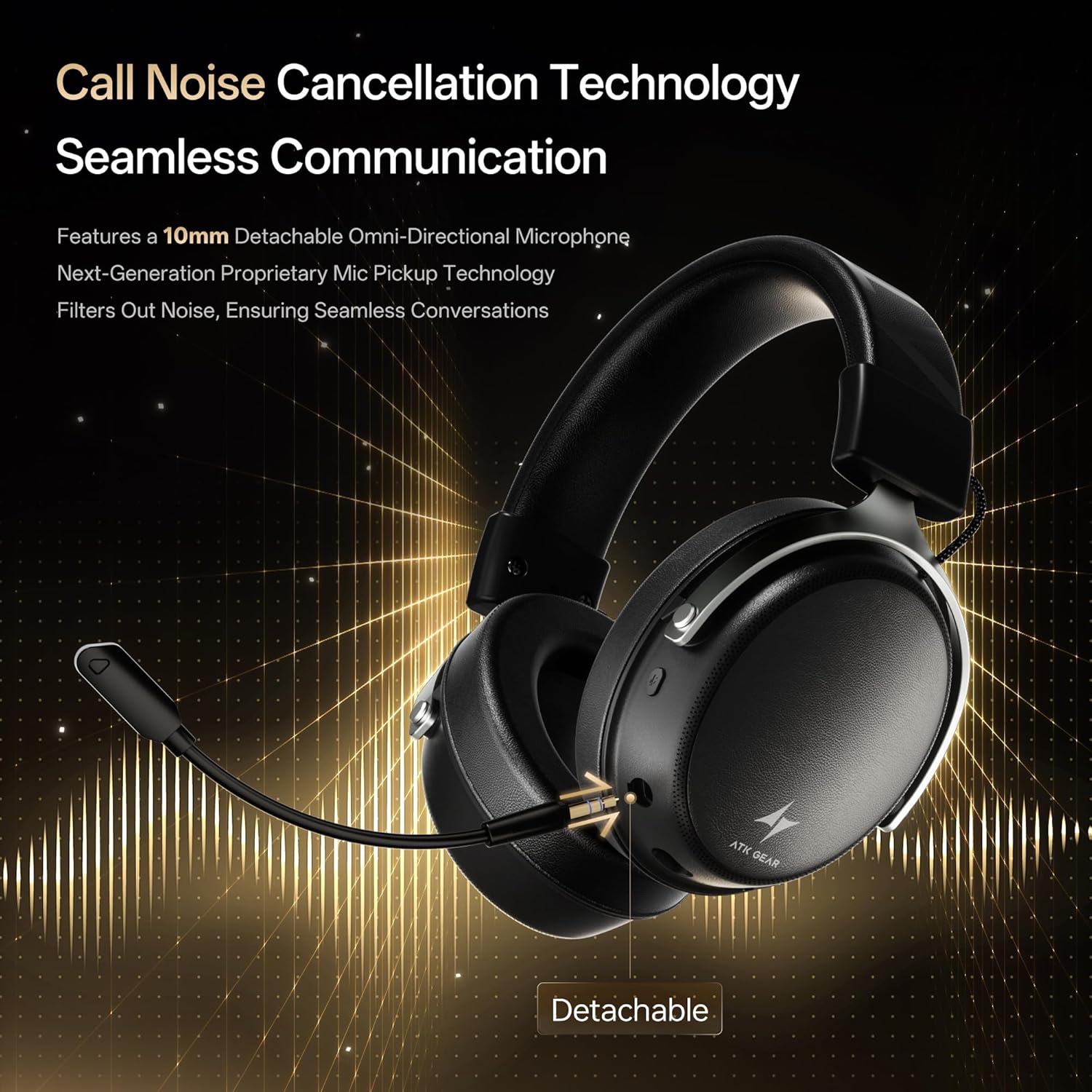
Insert the detachable boom microphone into the microphone port on the left earcup until it clicks into place. Ensure it is securely connected for optimal voice pickup.
3.3. קאַנעקטיוויטי אָפּציעס
The ATK N9 Pro/White headset offers three connectivity modes:
- 2.4G ווירעלעסס מאָדע: For PC, PS4, PS5, and Nintendo Switch (docked mode).
- Plug the 2.4G wireless USB adapter into an available USB port on your device.
- מאַכט די כעדסעט.
- Switch the headset to 2.4G mode using the mode switch. The headset will automatically pair with the adapter.
- Adjust audio output settings on your device if necessary to select the headset.
- בלועטאָאָטה מאָדע: For mobile devices, PC, and Nintendo Switch (handheld mode).
- Power on the headset and switch to Bluetooth mode. The LED indicator will flash, indicating pairing mode.
- On your device, go to Bluetooth settings and select "ATK N9 Pro" from the list of available devices.
- Once connected, the LED indicator will show a steady light.
- 3.5 מם ווייערד מאָדע: For Xbox Series X|S, PS4, PS5, PC, Nintendo Switch, and mobile devices.
- פֿאַרבינדט איין עק פֿון דעם 3.5 מ״מ אַודיאָ קאַבל צום כעדסעט'ס 3.5 מ״מ דזשעק.
- Connect the other end to the 3.5mm audio port on your device (e.g., controller, PC audio jack).
- די כעדסעט וועט ארבעטן אין דראט מאָדע, בייפּאַסינג וויירלעס פאַנגקשאַנז.

4. אַפּערייטינג ינסטרוקטיאָנס
4.1. כעדסעט קאָנטראָלס
The ATK N9 Pro/White headset features intuitive controls located on the earcups:
- מאַכט קנעפּל: Press and hold to power on/off. Short press for play/pause (in 2.4G/Bluetooth mode).
- מאָדע באַשטימען: Toggle between 2.4G wireless, Bluetooth, and wired modes.
- Volume Up/Down Wheel: דרייען צו סטרויערן די אַודיאָ באַנד.
- מיקראָפאָן שטום קנעפּל: דריקן צו שטום / ונמיוט די מיקראָפאָן.
- Spatial Audio Button: Press to activate/deactivate 3D Spatial Audio.
- Mic Monitoring Button: Press to enable/disable microphone monitoring (sidetone).
4.2. מיקראָפאָן באַניץ
The detachable noise-canceling microphone is designed for clear communication. Position the microphone approximately 1-2 inches from your mouth for optimal voice pickup. Use the microphone mute button on the headset to quickly mute your voice when needed.
4.3. אַדזשאַסטירן פּאַסיק
The headset features an adjustable headband and soft ear cushions for comfort. Extend or retract the headband to achieve a snug yet comfortable fit. The earcups are designed to fully enclose your ears for passive noise isolation and comfort during long gaming sessions.
5. טעכניש ספּעסאַפאַקיישאַנז
| שטריך | באַשרייַבונג |
|---|---|
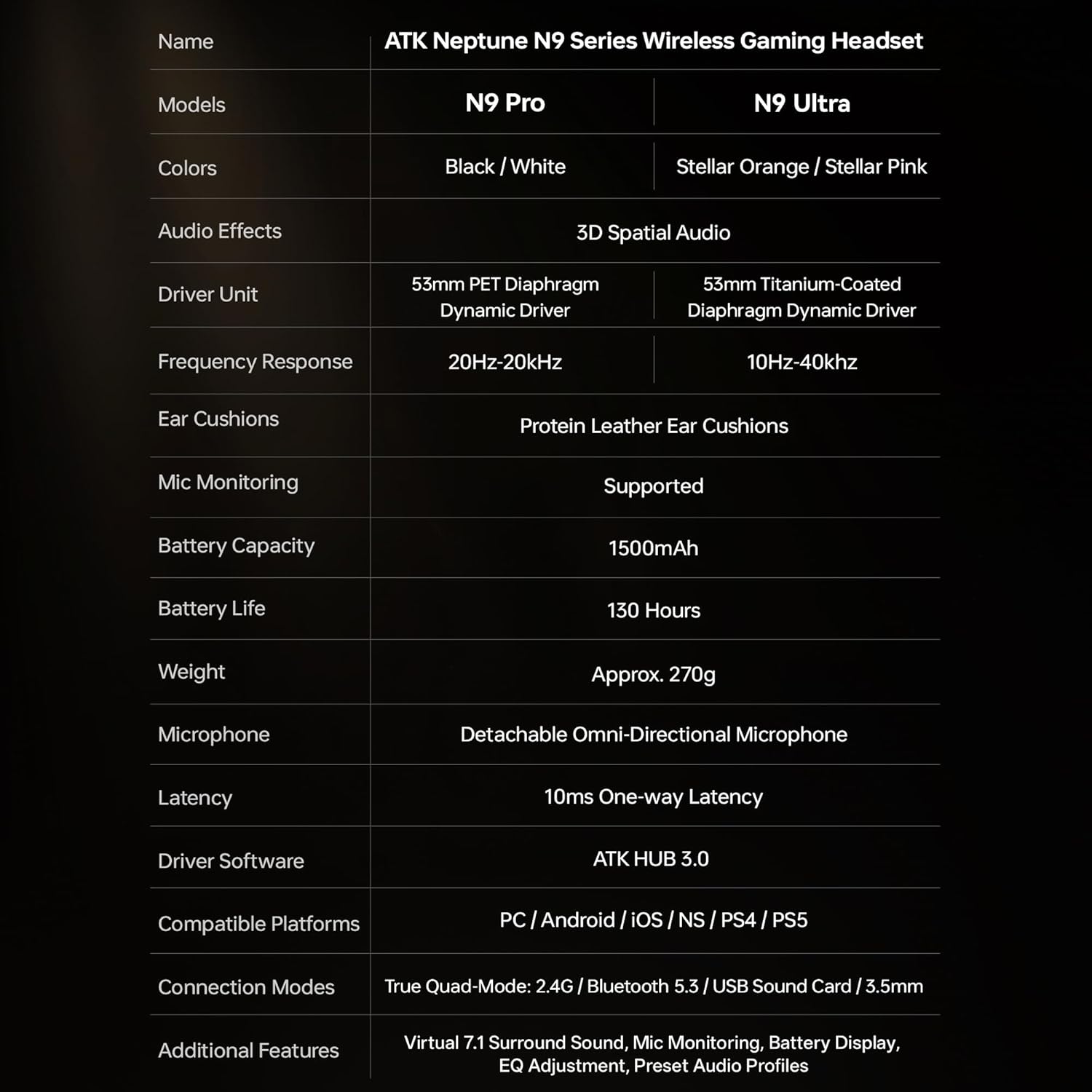
| מאָדעל נאָמען | ATK N9 Pro |
| קאַנעקטיוויטי | 3.5mm Wired, 2.4G Wireless, Bluetooth 5.3 |
| דרייווער טיפּ | דינאַמיש דרייווער |
| דרייווער גרייס | 53 מם |
| אָפטקייַט ראַנגע | 20 הערץ - 20,000 הערץ |
| ימפּידאַנס | 64 אָהמס |
| מיקראָפאָן | Detachable Noise-Canceling Omni-Directional |
| באַטאַרייע קאַפּאַציטעט | 1500 מאַה |
| באַטערי לעבן | אַרויף צו 130 שעה |
| Latency (2.4G) | 10 Milliseconds (one-way) |
| וואָג | 270 גראַמז |
| אויער פּלייסמאַנט | איבער אויער |
| קאַמפּאַטאַבאַל דעוויסעס | PS5, PS4, PC, Nintendo Switch, Mobile Devices, Xbox Series X|S (wired) |
| נאָך פֿעיִקייטן | 3D Spatial Audio, Mic Monitoring, Volume Control |

6. קער און וישאַלט
- רייניקונג: ניצט אַ ווייכע, טרוקענע שטאָף צו רייניקן די כעדסעט. פֿאַרמייַדט ניצן שטרענגע כעמיקאַלן אָדער שרײַבנדיקע מאַטעריאַלן.
- סטאָרידזש: האַלט די כעדסעט אין אַ קיל, טרוקן אָרט אַוועק פון דירעקט זונשייַן און עקסטרעמע טעמפּעראַטורן.
- באַטערי זאָרגן: כדי צו פארלענגערן די לעבן פון די באַטעריע, זאָלט איר נישט אָפט אויסלאָדן דעם כעדסעט. לאָדט עס אָפט אויף, אפילו אויב עס ווערט נישט גענוצט פאר לענגערע צייטן.
- וואַסער קעגנשטעל: די כעדסעט איז נישט וואַסער-קעגנשטעליק. פֿאַרמייַדט קאָנטאַקט מיט פֿליסיקייטן.
7. טראָובלעשאָאָטינג
7.1. קיין אודיאָ / נידעריקע וואָלומען
- Ensure the headset is powered on and connected in the correct mode (2.4G, Bluetooth, or 3.5mm wired).
- קאָנטראָלירט דאָס וואָלומען ראָד אויף דעם כעדסעט און די וואָלומען סעטטינגס פון אייער דעווייס.
- For wireless modes, ensure the headset is paired correctly and selected as the audio output device in your system settings.
- If using 3.5mm wired, ensure the cable is fully inserted into both the headset and the device.
7.2. מיקראָפאָן אַרבעט נישט
- זיכער מאַכן אַז דער מיקראָפאָן איז זיכער אַטאַטשט צום כעדסעט.
- קאָנטראָלירט צי דער מיקראָפאָן מיוט קנעפּל אויף די כעדסעט איז אַקטיוויזירט.
- Verify that the headset microphone is selected as the input device in your device's sound settings.
- For Xbox Series X|S, ensure you are using the 3.5mm wired connection for microphone support.
7.3. קאָנעקטיוויטי פּראָבלעמען
- 2.4G ווירעלעס: Ensure the USB adapter is firmly plugged in. Try a different USB port.
- בלועטאָאָטה: Ensure the headset is in pairing mode. Forget the device on your phone/PC and re-pair. Keep the headset within the 5-meter Bluetooth range.
- אַלגעמיינע: Power cycle both the headset and your connected device.
8. וואָראַנטי און שטיצן
8.1. וואָראַנטי אינפֿאָרמאַציע
The ATK N9 Pro/White Gaming Headset comes with a 6-חודש וואָראַנטי פֿון דעם קויפֿדאַטום. די וואָראַנטי דעקט פֿאַבריקאַציע חסרונות און אַרבעט אונטער נאָרמאַל נוצן. עס דעקט נישט שעדיקן געפֿירט דורך אומרעכט נוצן, אַקסאַדענטן, נישט-אָטעריזירטע מאָדיפֿיקאַציעס, אָדער נאָרמאַל טראָגן און טרער.
8.2. קונה שטיצן
For further assistance, technical support, or warranty claims, please contact ATK customer service through the retailer where the product was purchased or visit the official ATK webפּלאַץ פֿאַר שטיצן קאָנטאַקט אינפֿאָרמאַציע.


