
הקדמה
This manual provides essential information for the installation, operation, and maintenance of your XENO Alexi Pro Digital Door Lock. Please read these instructions carefully before use to ensure proper functionality and security.
The XENO Alexi Pro digital lock is designed for modern living, offering 8 secure unlocking options including face recognition, fingerprint, PIN code, RFID, and mobile app. Ideal for HDB, BTO, condo, and private homes, it combines smart features like auto lock, anti-peeping code, and fire-rated safety for all-around protection. Store up to 100 profiles per access type for family or guest convenience. A powerful 5000mAh battery with a Type-C emergency charging port ensures reliable operation.
שליסל פֿעיִקייטן
- 8 Unlocking Ways: Face Recognition, Fingerprint, PIN Code, RFID, Mobile App, Mechanical Key, Manual Knob, Unlock Button.
- סמאַרט זיכערקייַט פֿעיִקייטן: Offers advanced features like anti-peeping code, auto lock, built-in doorbell, and fire-rated safety.
- לאַנג-דויערנדיקע מאַכט: Equipped with a 5000mAh rechargeable battery, emergency Type-C charging port, and multiple smart alarms.
- Large User Storage: Stores up to 100 faces, fingerprints, PINs, and RFID cards for secure access by your family and guests.
- אוניווערסאַלע טיר קאָמפּאַטאַביליטי: Designed for HDB, BTO, and condos with a sleek look and strong security that fits all types of doors.
פּראָדוקט איבערview און קאַמפּאָונאַנץ
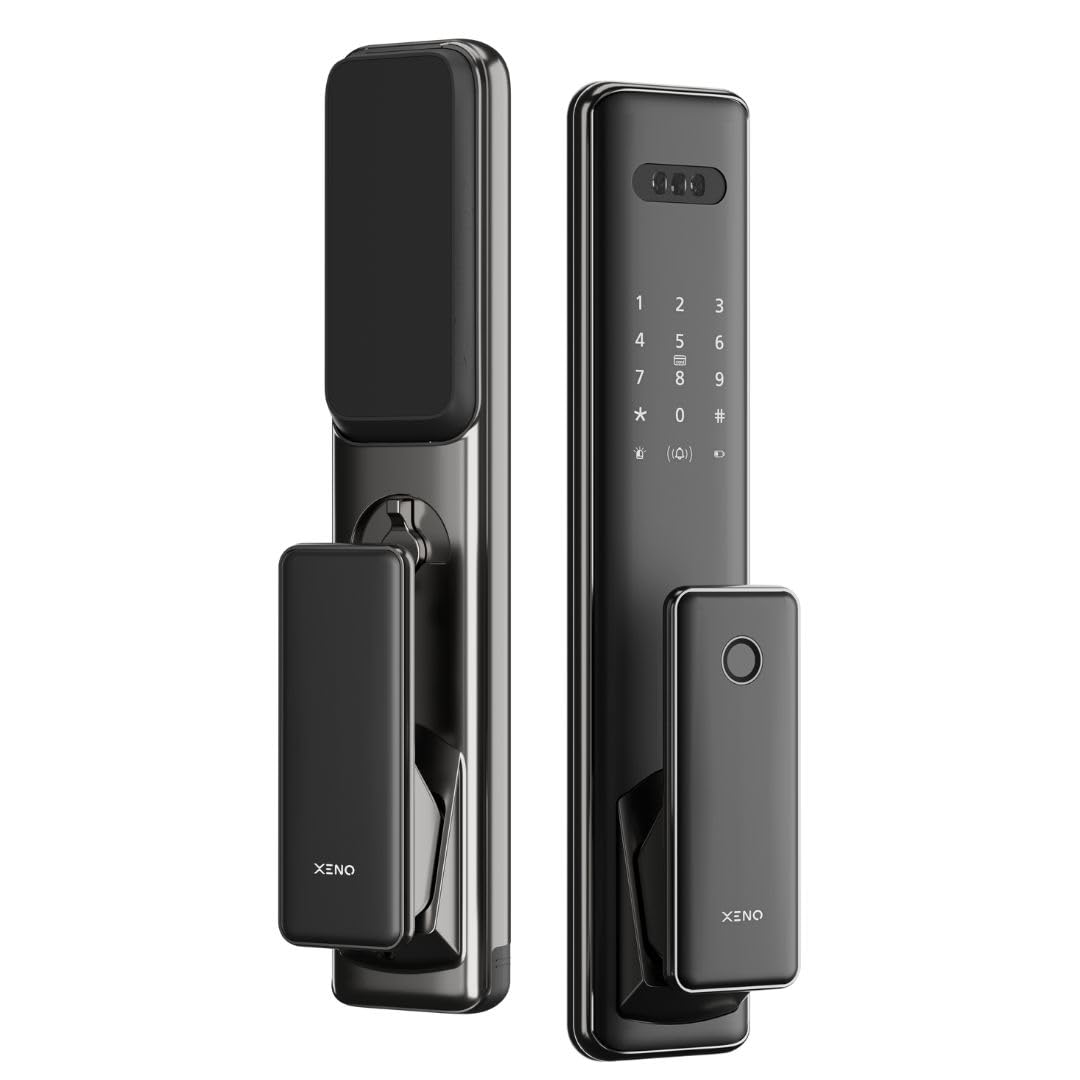
פיגורע 1: פראָנט און זייַט view of the XENO Alexi Pro Digital Door Lock in Nano Black.

Figure 2: Labeled components of the XENO Alexi Pro Door Lock. Outdoor unit features Face Recognition, PIN Code, RFID Card, Door Bell, and Fingerprint sensor. Indoor unit includes Battery Compartment, Manual Knob, Lock/Unlock Button, and Emergency Charging Port.
ינסטאַללאַטיאָן גייד
Professional installation is highly recommended for the XENO Alexi Pro Digital Door Lock to ensure optimal performance and security. Refer to the detailed installation template and instructions provided in the product packaging for specific steps.
אַרייַנגערעכנט קאַמפּאָונאַנץ:
- Digital Lock Unit (Indoor and Outdoor)
- Accessories & Required Fittings (screws, mounting plates, etc.)
- מעטשאַניקאַל קיז
Ensure all components are present before beginning installation. For detailed door preparation and mounting instructions, consult the physical manual.
אַפּערייטינג ינסטראַקשאַנז
אַנלאַקינג מעטהאָדס:
The XENO Alexi Pro offers multiple ways to unlock your door:
- פּנים דערקענונג: Present your registered face to the sensor on the outdoor unit.
- פינגערפּרינט: לייגט אייער רעגיסטרירטן פינגער אויפן פינגער-אפדרוק סענסאר.
- PIN קאָד: Enter your registered PIN on the keypad, followed by the '#' key.
- RFID קאָרט: Tap your registered RFID card on the designated area.
- מאָביל אַפּ: Use the dedicated mobile application to remotely unlock the door.
- מעטשאַניקאַל שליסל: Insert and turn the physical key in the emergency keyhole.
- Manual Knob: Turn the manual knob on the indoor unit to unlock from inside.
- ופשליסן קנעפּל: Press the unlock button on the indoor unit.
סמאַרט פֿעיִקייטן:
- אַוטאָ-שלאָס: The lock will automatically secure the door after a set period once closed.
- אַנטי-קוקן קאָד: Enter random numbers before or after your actual PIN to prevent others from guessing your code.
- Built-in Doorbell: The outdoor unit features an integrated doorbell function.
- Fire-Rated Safety: Designed with fire-resistant materials for enhanced safety.

Figure 3: The standalone smart doorbell feature integrated into the outdoor unit.

Figure 4: The XENO Alexi Pro lock can be synchronized with other XENO locks for unified access control.
Mobile App Features:
Manage your lock settings and access remotely using the dedicated mobile application:

Figure 5: Mobile app features include adding basic functions, remote lock/unlocking, battery level monitoring, smart home compatibility, loitering capture, temporary password generation, and access record viewing.
זיכערהייט אַלאַרמס:
The lock is equipped with several alarms to enhance security:

Figure 6: The XENO Alexi Pro features five essential door lock alarms: Anti-Theft, Low Voltage, Multiple Attempt warnings, Anti-Hijacking, and Failed to Lock alerts.

Figure 7: The XENO Alexi Pro is fire-rated for ultimate safety, providing protection in emergency situations.
וישאַלט
- באַטערי פאַרוואַלטונג: The lock is equipped with a 5000mAh rechargeable battery. Monitor battery levels via the mobile app or the lock's indicator. Recharge using the Type-C emergency charging port when low.
- רייניקונג: Use a soft, dry cloth to clean the lock's surface. Avoid abrasive cleaners, solvents, or harsh chemicals that may damage the finish or electronic components.
- סענסאָר זאָרגן: Keep the fingerprint sensor and face recognition area clean and free from dust or smudges for optimal performance.
- מעטשאַניקאַל שליסל: Store mechanical keys in a safe, accessible location outside the property for emergency access.
טראָובלעשאָאָטינג
- שלאָס ענטפֿערט נישט: Check battery level. If low, connect a Type-C power source to the emergency charging port.
- Fingerprint/Face Recognition Failure: Ensure the sensor/camera is clean and your registered biometric data is correctly positioned. Re-register if issues persist.
- PIN Code Not Working: Verify the correct PIN is entered. Ensure the anti-peeping function is not causing confusion. Try entering the PIN without surrounding random numbers.
- טיר שליסט זיך נישט אויטאמאטיש: Check the auto-lock settings in the mobile app or lock menu. Ensure the door is fully closed and aligned.
- סיסטעם באַשטעטיק: In case of persistent issues, a factory reset may be required. Refer to the full product manual for reset procedures, as this will erase all registered user data.
ספּעסאַפאַקיישאַנז
| שטריך | דעטאַל |
|---|---|
| סאָרט | XENO |
| מאָדעל נומער | XDLAP |
| קאָליר | נאַנאָ שוואַרץ |
| סטייל | ALEXI |
| מאַטעריאַל | אַלומינום |
| פּראָדוקט דימענשאַנז (L x W x H) | 30 X 10 X 15 סענטימעטער |
| פּונקט וואָג | 2 קג |
| ספּעציעלע פֿעיִקייטן | Alarm, Anti-Peeping Password, Auto-Lock, One-Touch Lock, Rechargeable |
| אַרייַנגערעכנט קאַמפּאָונאַנץ | Digital Lock, Accessories & Required Fittings |
| לאַק טיפּ | מאָרטיסע לאַק |
| רעקאָמענדירטע פּראָדוקט ניצט | Suitable for All types of doors. |
| באַטערי | 5000 מאַה קריקאָנלאָדלעך באַטאַרייע |
| באַניצער סטאָרידזש | Up to 100 faces, fingerprints, PINs, and RFID cards |
וואָראַנטי און שטיצן
The XENO Alexi Pro Digital Door Lock comes with a 3 יאָר וואָראַנטי פֿון דעם קויפֿדאַטום, וואָס דעקט פֿאַבריקאַציע־דעפֿעקטן און מאַלפאַנגקשאַנז אונטער נאָרמאַלן באַנוץ.
For technical assistance, troubleshooting, or to make a warranty claim, please contact XENO customer service. Keep your proof of purchase for warranty validation.
פאַבריקאַנט: XENO
פארקויפער : XENO PTE. LTD.