
הקדמה
The HUBBLE CONNECTED Nursery Pal Deluxe is a smart baby monitor system designed to provide comprehensive monitoring of your child. It includes a portable baby unit camera and a 5-inch HD color touchscreen parent unit, offering both local and remote viewing capabilities via the HubbleClub app.
This manual provides detailed instructions for setting up, operating, and maintaining your Nursery Pal Deluxe monitor, along with troubleshooting tips and product specifications.
וואָס איז אין די קעסטל
ביטע טשעקט די אינהאַלט פון די פּאַקעט צו זיכער מאַכן אַז אַלע זאכן זענען דאָרט:
- פאָטער אַפּאַראַט
- בעיבי אַפּאַראַט (אַפּאַראַט)
- מאַכט אַדאַפּטער x2
- שנעל אָנהייב גייד
- HubbleGrip (Flexible mounting accessory)
סעטאַפּ
1. אויפלאָדן די איינהייטן
Before initial use, fully charge both the Parent Unit and the Baby Unit using the provided power adapters. The Parent Unit has a built-in battery for portability, and the Baby Unit also features a built-in rechargeable battery for flexible placement.
2. Positioning the Baby Unit (Camera)
שטעלט די בעיבי יוניט אין א פלאץ וואס גיט א קלארע view of your baby. Ensure it is at least 3 feet (1 meter) away from your baby to avoid potential hazards. The included HubbleGrip allows for versatile mounting options, such as clamping to a crib rail or standing on a flat surface.

Image: Parent unit on a table next to a crib, with the baby unit camera clamped to the crib rail.

Image: Close-up of the baby unit camera clamped securely to a crib rail using the HubbleGrip accessory.

Image: The baby unit camera mounted on a wall above a baby's crib, providing an overhead view.
3. צוזאַמענשטעלן די איינהייטן
The Parent Unit and Baby Unit are typically pre-paired. If they lose connection or you need to re-pair them, refer to the Quick Start Guide or the troubleshooting section for specific instructions.
4. Downloading the HubbleClub App
פֿאַר ווייַט viewing and advanced features, download the free HubbleClub app from the iOS App Store or Google Play Store. Follow the in-app instructions to connect your Baby Unit to your Wi-Fi network and link it to your account.

Image: A smartphone displaying the HubbleClub app interface, showing a live feed from the baby monitor camera and various control options.
אַפּערייטינג ינסטראַקשאַנז
פאָטער אַפּאַראַט Viewer
- לעבן פיטער: View your baby in HD on the 5-inch color touchscreen.
- ווייטער פּאַן, טילט, און זום: צופּאַסן די קאַמעראַ view directly from the Parent Unit.
- צוויי-וועג רעדן: Communicate with your baby or partner through the monitor.
- צימער טעמפּעראַטור מאָניטאָרינג: האַלט אן אויג אויף די טעמפּעראַטור אין קינדערצימער.
- נאַכט זעאונג: אויטאָמאַטיש אַקטיוויזירט אין נידעריק ליכט באדינגונגען פֿאַר קלאָר viewing.
- Preloaded Content: The Parent Unit includes preloaded lullabies, audiobooks, and soothing sounds to comfort your baby.
- Hubble Baby Mode: The Parent Unit doubles as an interactive viewer for children, offering educational videos, picture books, and games.

Image: The 5-inch parent unit displaying a live video feed of a baby in a crib.

Image: The parent unit screen displaying the 'Hubble Baby Mode' interface with options for videos, stories, and games.
Baby Unit (Camera) Features
- פּאָרטאַטיוו פּלאַן: Built-in rechargeable battery allows for flexible placement.
- ווייטער פּאַן, טילט, און זום: Control the camera's perspective from the Parent Unit or HubbleClub app.
- הויך סענסיטיוויטי מיקראָפאָן: Clearly pick up sounds from the nursery.
- פּריוואַטקייט מאָדע: Manually close the camera lens for privacy when not in use.

Image: The baby unit camera with its lens manually covered, indicating privacy mode is active.
HubbleClub App Features
The HubbleClub app enhances your monitoring experience with additional functionalities:
- לייוו סטרימינג: View the camera feed from your smartphone or tablet with private end-to-end encryption.
- Activity Notifications: Receive alerts for motion, sound, and temperature changes.
- Video Recordings & Images: Manually capture precious moments or review motion-activated video footage.
- BabyZone: Access personalized audio recordings, routine management, and more.
- Baby Growth Tracker: Log and track your baby's milestones, growth, feeding patterns, and diaper changes.
- Sleep & Parenting Tips: Access expert advice and articles.
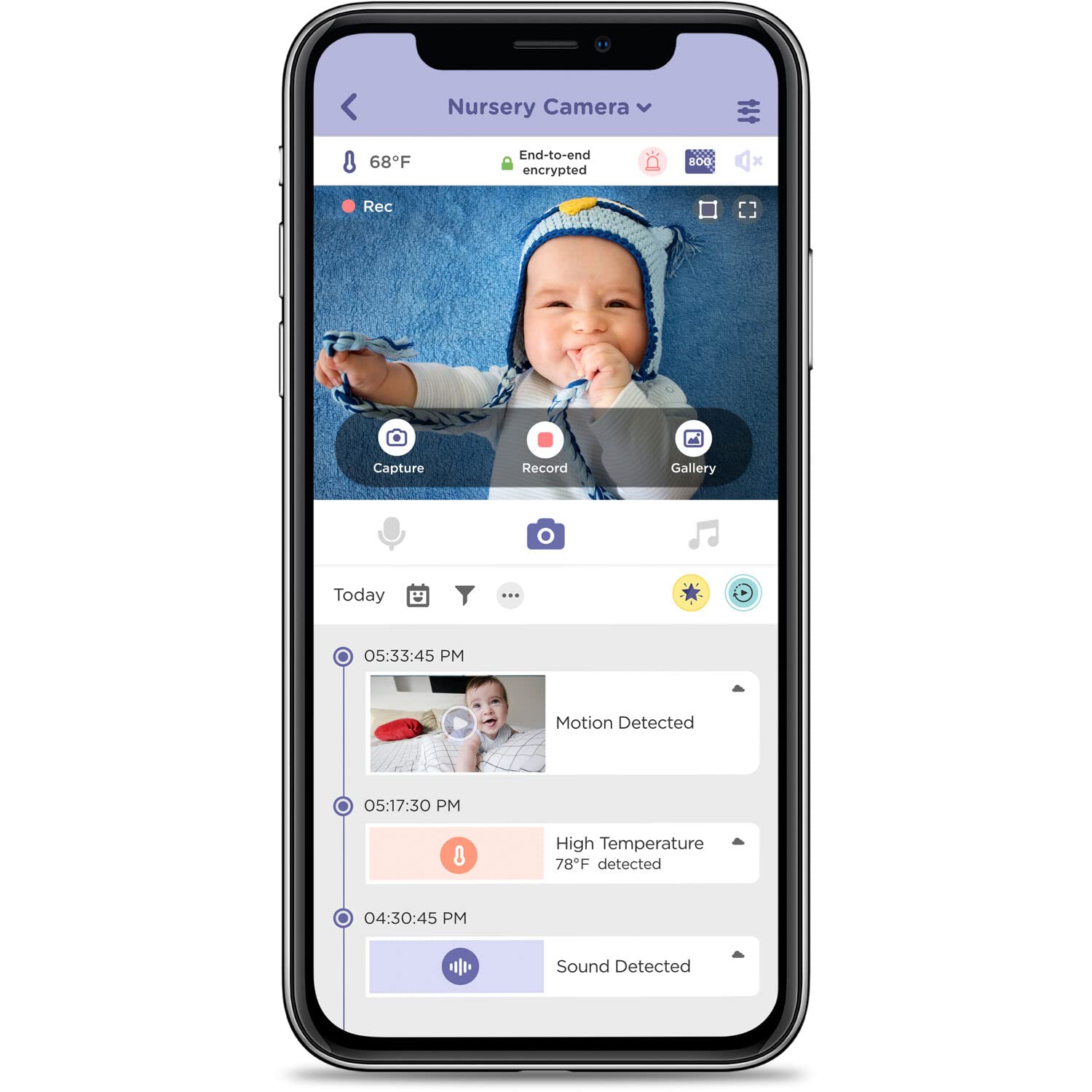
Image: A smartphone screen displaying the HubbleClub app, showing a live video feed of a baby and a timeline of detected events like motion, sound, and temperature alerts.
Video: An official product video demonstrating the features of the Nursery Pal Deluxe Smart Wireless, Wi-Fi Enabled Baby Monitor, including the parent unit, portable camera, and HubbleClub app functionalities.
וישאַלט
רייניקונג
To clean your monitor units, use a soft, dry, lint-free cloth. Do not use cleaning agents or abrasive materials. Avoid getting moisture into any openings.
באַטערי קער
To prolong battery life, avoid exposing the units to extreme temperatures. If storing for an extended period, ensure the batteries are partially charged.
טראָובלעשאָאָטינג
- No Picture/Sound on Parent Unit: Ensure both units are powered on and within range. Re-pair the units if necessary (refer to the Quick Start Guide).
- Poor Connection/Frequent Disconnects: Check your Wi-Fi signal strength if using the app. Ensure the Baby Unit is not too far from the router or the Parent Unit. Obstacles like thick walls can interfere with the signal.
- Parent Unit Screen Too Bright at Night: Adjust the brightness settings on the Parent Unit.
- Touch Screen Not Locking: Ensure the Parent Unit is in the correct mode or setting to prevent accidental touches.
- Audio Too Loud: Adjust the volume settings on both the Parent Unit and within the HubbleClub app.
- Camera Not Responding to Pan/Tilt/Zoom: Check the connection. If using the app, ensure a stable internet connection.
ספּעסאַפאַקיישאַנז
| שטריך | דעטאַל |
|---|---|
| מאָדעל נאָמען | Nursery Pal Deluxe Smart Connected, Wireless, Wi-Fi Enabled Baby Monitor with Parent Unit Viewer |
| מאָדעל נומער | HCTNPDLX |
| דרינענדיק / דרויסנדיק באַניץ | דרינענדיק |
| קאַמפּאַטאַבאַל דעוויסעס | סמאַרטפאָנע, טאַבלעט |
| מאַכט מקור | באַטאַרייע פּאַוערד |
| קאַנעקטיוויטי פּראָטאָקאָל | 2.4 GHz FHSS |
| קאָנטראָללער טיפּ | Android (App compatibility) |
| מאַונטינג טיפּ | וואנט בארג, טאַבלעטאָפּ בארג |
| ווידעא קאַפּטורע רעסאָלוטיאָן | 1280 רענטגענ 720 (HD 720 פּ) |
| קאָליר | ווייַס |
| נומער פון זאכן | 2 (Parent Unit, Baby Unit) |
| נומער פון טשאַנאַלז | 2 |
| ווירעלעסס קאָמוניקאַציע טעכנאָלאָגיע | 2.4 GHz FHSS |
| מאַטעריאַל | אַקרילאָניטרילע בוטאַדיענע סטירענע (אַבס) |
| וואָסtage | 5 וואטס |
| נומער דימענשאַנז (L X W X H) | 6 X 0.8 X 3.5 אינטשעס |
| באַטעריז פארלאנגט? | יאָ (1 ליטהיום יאָן באַטאַרייע אַרייַנגערעכנט) |
| פּונקט וואָג | 1.03 פונט |
| פאָקוס טיפּ | אַוטאָ פאָקוס |
| נידעריק ליכט טעכנאָלאָגיע | נאַכט קאָליר |
| פלינק טיפּ | אַודיאָ און באַוועגונג |
| אָרט טיפּ | קינדער - צימער |
| ווידעא קאַפּטורע פֿאָרמאַט | עמפּעג-4 |
| אינטערנאַציאָנאַלע פּראַטעקשאַן שאַץ | IP54 |
| קאָנטראָל מעטאָד | ריר |
וואָראַנטי אינפֿאָרמאַציע
HUBBLE CONNECTED products typically come with a limited manufacturer's warranty. Please refer to the warranty card included in your product packaging or visit the official HUBBLE CONNECTED website for detailed warranty terms and conditions specific to the Nursery Pal Deluxe model.
שטיצן
For further assistance, technical support, or to access additional resources, please visit the official HUBBLE CONNECTED webפּלאַץ בייַ www.hubbleconnected.comאיר קענט דאָרט אויך געפֿינען אָפֿט געשטעלטע פֿראַגעס און קאָנטאַקט אינפֿאָרמאַציע פֿאַר קונה סערוויס.
For app-related queries, refer to the help section within the HubbleClub app.