
1. הקדמה
Thank you for choosing the Ustellar Remote Control. This remote is specifically designed to operate Ustellar 55W and 100W motion sensor flood lights, allowing for convenient adjustment of various settings. Please read this manual carefully before use to ensure proper operation and to maximize the lifespan of your product.
1.1 זיכערקייַט אינפֿאָרמאַציע
- Keep the remote control away from water and high humidity.
- Do not expose the remote control to direct sunlight or extreme temperatures.
- פרובירט נישט צו צענעמען אדער מאדיפיצירן די ווײַטקאנטראל. דאס וועט בטל מאכן די גאראנטיע.
- אַוועקוואַרפן גענוצטע באַטעריעס לויט די לאָקאַלע רעגולאַציעס. נישט מישן אַלטע און נייע באַטעריעס, אדער פֿאַרשידענע טיפּן באַטעריעס.
2. פּראָדוקט איבערview
2.1 פּעקל אינהאַלט
- Ustellar Remote Control (Model: UT88125)
- באַניצער מאַנואַל
באַמערקונג: באַטעריעס זענען טיפּיש נישט אַרייַנגערעכנט און מוזן זיין געקויפט באַזונדער.
2.2 ווײַטקאָנטראָל אויסלייג
The Ustellar remote control features an ergonomic design with clearly labeled buttons for intuitive operation of your flood light.
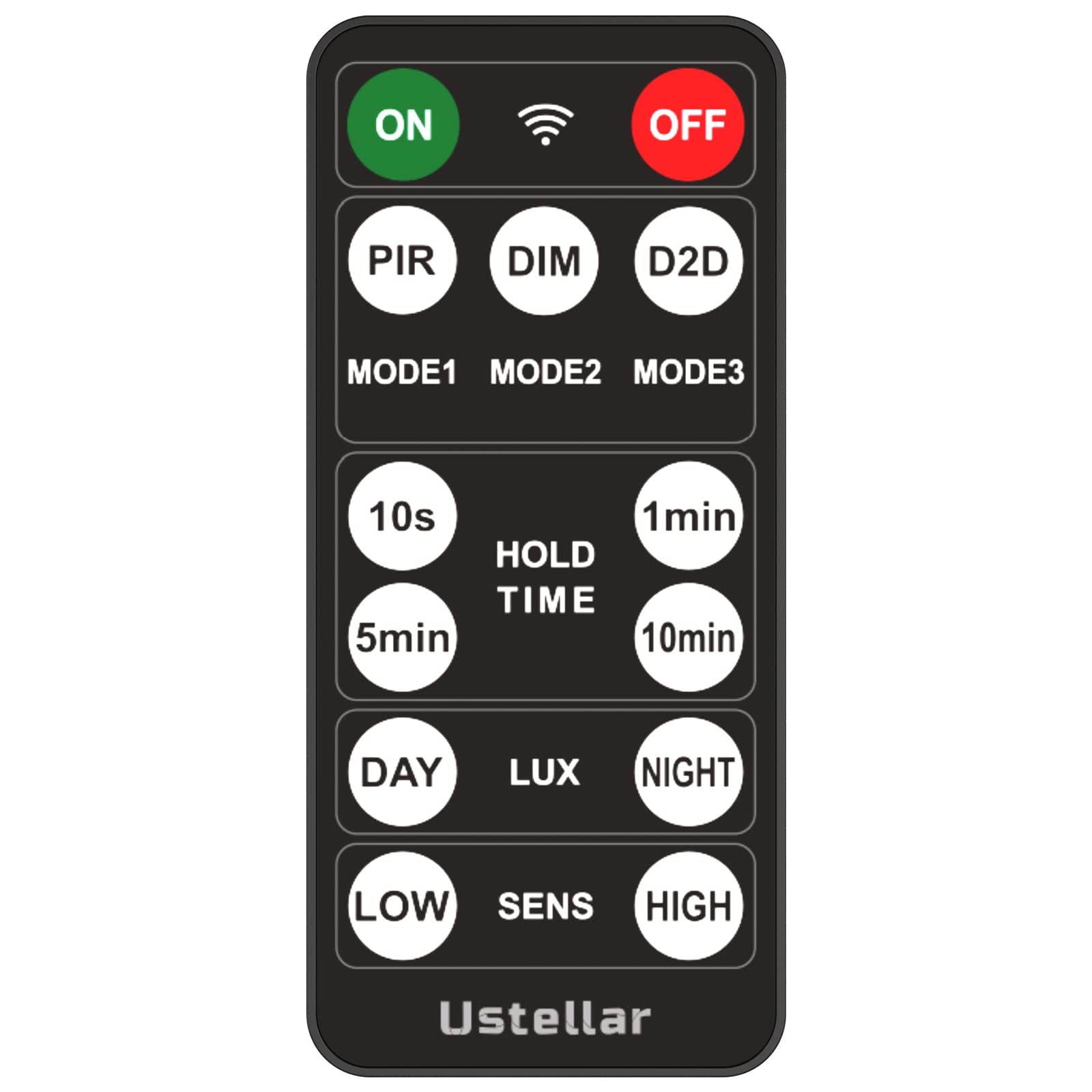
בילד: פראָנט view of the Ustellar remote control, showing various control buttons for power, brightness, mode selection, and timer functions.
Familiarize yourself with the button functions:
- ON/OFF: Powers the flood light on or off.
- ברייטנאַס +/-: אַדזשאַסץ די ליכט ינטענסיטי.
- מאָדע סעלעקציע: Cycles through different lighting modes (e.g., motion sensor, always on, dusk-to-dawn).
- טיימער: Sets a specific duration for the light to remain on.
- סענסיטיוויטי: Adjusts the motion sensor's detection range.
3. סעטאַפּ
3.1 באַטאַרייע ייַנמאָנטירונג
- געפֿינען די באַטאַרייע אָפּטייל אויף די צוריק פון די ווייַט קאָנטראָל.
- רוק עפענען די באַטאַרייע דעקן.
- אַרײַנשטעלן צוויי AAA באַטעריעס (נישט אַרייַנגערעכנט), און זיכער מאַכן אַז די ריכטיקע פּאָלאַריטעט (+ און -) איז אָנגעוויזן אין דעם אָפּטייל.
- פאַרמאַכן די באַטאַרייע דעקן סיקיורלי.
3.2 Pairing with Flood Light
The Ustellar remote control is designed to work seamlessly with compatible Ustellar 55W and 100W motion sensor flood lights. Typically, no manual pairing is required; the remote should function directly with the flood light upon battery installation.
- Ensure the flood light is powered on and within range of the remote control.
- Point the remote control directly at the flood light's sensor or receiver.
- Press any function button (e.g., ON) to test the connection.
If the remote does not respond, refer to the troubleshooting section or the specific manual for your Ustellar flood light model for detailed pairing instructions, if any are required.
4. אַפּערייטינג ינסטרוקטיאָנס
This section outlines the basic and advanced functions of your Ustellar remote control.
4.1 יקערדיק פאַנגקשאַנז
- מאַכט אויף / אַוועק: דרוק די ON/OFF button to toggle the flood light's power state.
- סטרויערן ברייטנאַס: ניצן די ברייטנאַס + or ליכטיקייט - buttons to increase or decrease the light output.
- מאָדע סעלעקציע: דרוק די מאָדע button to cycle through available lighting modes. Common modes include:
- באַוועגונג סענסאָר מאָדע: Light activates only when motion is detected.
- שטענדיק אויף מאָדע: Light remains on continuously.
- זונ-ביז-אויפֿגאַנג מאָדע: Light automatically turns on at dusk and off at dawn.
4.2 אַוואַנסירטע סעטטינגס
- טיימער פֿונקציע: דרוק די TIMER button to set the duration for which the light remains on after activation (e.g., 1 min, 5 min, 10 min).
- Motion Sensor Sensitivity: ניצן די סענסיטיוויטי button (if available) to adjust how easily the motion sensor is triggered. Higher sensitivity detects motion from further away or with less movement.
5. וישאַלט
5.1 רייניקונג
To clean the remote control, gently wipe its surface with a soft, dry cloth. Do not use abrasive cleaners, solvents, or wet cloths, as these can damage the remote's finish or internal components.
5.2 באַטערי פאַרבייַט
When the remote control's range decreases or it becomes unresponsive, it is likely time to replace the batteries. Follow the battery installation steps in Section 3.1. Always replace both batteries at the same time with new ones of the same type (AAA).
5.3 סטאָרידזש
אויב די ווײַטקאָנטראָל וועט נישט ווערן גענוצט פֿאַר אַ לענגערע צײַט, איז רעקאָמענדירט צו אַרויסנעמען די באַטעריעס כּדי צו פֿאַרמײַדן ליקאַדזש און מעגלעכן שאָדן צום אַפּאַראַט.
6. טראָובלעשאָאָטינג
If you encounter issues with your Ustellar remote control, please refer to the following common problems and solutions:
- Remote is unresponsive:
- קאָנטראָלירט צי די באַטעריעס זענען ריכטיק אינסטאַלירט מיט דער ריכטיקער פּאָלאַריטעט.
- פאַרבייַטן די באַטעריז מיט נייַע.
- Ensure there are no obstructions between the remote and the flood light's sensor.
- Confirm the flood light is powered on.
- לימיטירטע אפעראציע ראנגע:
- פאַרבייַטן די באַטעריז.
- Ensure you are within the recommended operating distance and pointing the remote directly at the flood light.
- מינימיזירן אריינמישונג פון אנדערע עלעקטראָנישע דעוויסעס.
- א ספעציפישע פונקציע ארבעט נישט:
- Ensure the flood light supports the specific function you are trying to use.
- Refer to the flood light's manual for compatibility and specific feature activation.
If the problem persists after trying these solutions, please contact Ustellar customer support.
7. ספּעסאַפאַקיישאַנז
7.1 טעכניש דאַטן
| סאָרט | USTELLAR |
| מאָדעל נומער | UT88125 |
| מאָדעל נאָמען | NTSP-RMT-UT88125 |
| קאָליר | שוואַרץ |
| מאַכט מקור | באַטעריע געטריבן (2x AAA, נישט אַרייַנגערעכנט) |
| קאָנטראָל מעטאָד | ווייַט קאָנטראָל |
| ספּעציעלע שטריך | ערגאָנאָמיק |
| פאַבריקאַנט | Shenzhen Ustellar Technology Ltd. |
8. וואָראַנטי און שטיצן
8.1 וואָראַנטי אינפֿאָרמאַציע
Ustellar products are manufactured to high quality standards and are backed by a limited warranty. Please refer to the warranty card included with your original flood light purchase or visit the official Ustellar webזייטל פֿאַר דעטאַלירטע וואָראַנטי טערמינען און באדינגונגען.
8.2 קונה שטיצן
For technical assistance, troubleshooting, or any questions regarding your Ustellar Remote Control, please contact Ustellar customer support through their official website or the contact information provided with your product packaging. When contacting support, please have your product model number (UT88125) and purchase information readily available.